
Data retention for organizations
This feature is currently rolling out to Visionary users and will later become available to organization admins on select Proton Business plans.
Data retention rules in Proton Mail let organization admins control how long to keep emails and when to automatically delete them. Once an admin creates a rule, Proton automatically applies it in the background, so you don’t need to manually check inboxes or remind employees to clean up their messages.
What you can do with data retention rules
Teams can:
- Keep data as long as they need it, whether that’s forever or for a specific period that matches internal policies.
- Automatically clean up old or expired data without relying on manual workflows or reminders.
- Make sure deleted messages are treated consistently and according to the organization’s policies.
- Set different retention timelines for different users or groups, so each team gets the rules that fit their work.
- Easily handle changes in group membership (like onboarding, offboarding, or team moves) and automatically apply the right rule every time.
- Support compliance requirements by enforcing data-handling rules throughout your organization.
How to use data retention in Proton Mail
- In Proton Mail, go to Settings → All settings.
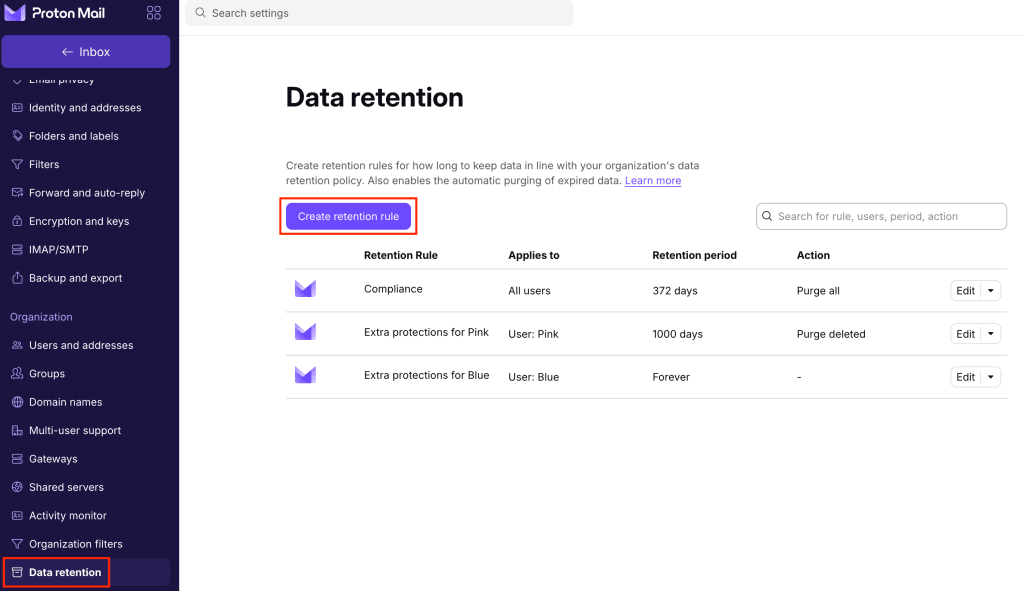
- Under Organization, select Data retention.
- Choose Create retention rule.
- Enter a Rule title. You can make it descriptive, such as “Retain Legal team emails forever.”
- Set the Retention period to:
- Keep messages forever, or
- Keep messages for a specific duration. After setting the duration, choose what should happen when it ends between Purge deleted messages only or Purge all messages (including emails that users did not delete in Inbox, Sent, and all other locations).
- Choose who the rule applies to:
- Everyone in the organization
- Specific users or groups

- When you’re done, select Create rule.
You can search for, edit, or delete rules anytime. If multiple rules apply, Proton always uses the most lenient rule — the one that keeps data longer.
How data retention works
Each rule has a scope, so it may apply to the entire organization, to a specific group (like Legal or Finance), or to individual users. If someone falls under more than one rule, Proton always sets the rule that keeps their data for the longest period.
Once a retention period is in place, the email is guaranteed to remain available for that entire duration. Even if the user tries to delete it sooner, the message is removed from the user’s view but remains available to organization admins.
When someone joins a group, Proton applies that group’s retention rules to all existing emails belonging to the new member. When they leave, Proton removes that group’s rules from their account and sets whichever remaining rules has the highest priority.
Message expiration indicators
If a message is affected by a retention rule, users will see “This message will expire on [date/time]” in the message header after clicking the ⌄ arrow. This replaces the usual ⌛ (hourglass icon) and shows the retention-based expiration date instead of the one set by the user.

The Deleted folder
When at least one retention rule exists, Proton Mail shows a special Deleted folder. Only organization admins can view the retained messages when accessing member accounts. Members cannot see their own Deleted folder or take action on emails sent to this folder, such as replying, forwarding, starring, or labeling.

User-set expiration times
Organization members can still set expiration times on messages, but retention rules may override them. For example, if a team has a retain forever rule and someone sets an email to delete in 30 days, the message disappears from the user’s view after that time, but it remains preserved in their Deleted folder for the admin to access.
Frequently asked questions
Yes. Even after deletion, emails are included when calculating a member’s storage.
Retention rules still apply to private members, and their emails are retained and purged according to the organization’s policies. However, organization admins cannot view private members’ emails, even if those messages are retained.
If multiple rules apply to an organization member, longer retention periods take priority over shorter ones. For example, “forever” overrides 90 days, and 90 days overrides 30 days. If two rules specify the same duration, Proton then prefers the more conservative action: Retain All → Purge Deleted → Purge All.