
Password-protected emails
- Lectură
- 3 min
Password-protected emails are messages that require a password to open them. They allow you to send end-to-end encrypted emails to people who aren’t using Proton Mail.
This feature is available on all Proton Mail plans, including Proton Free.
In this article
- How it works
- Send a password-protected email
- Open a password-protected email
- Reply to a password-protected email
- Are password-protected emails safe?
How it works
When you send a password-protected email, you set a password that the recipient must enter to open and reply to your message.
By default, password-protected emails expire after 28 days (including any days spent in your drafts folder). But you can edit an email’s expiry date if you want it to be available for longer.
Emails sent between Proton Mail users are automatically end-to-end encrypted. But if your recipient isn’t on Proton Mail, password-protected emails are the best way to keep your communications secure and encrypted.
Learn how Proton Mail messages are encrypted
Send a password-protected email
- Compose your email and enter the recipient’s email address.
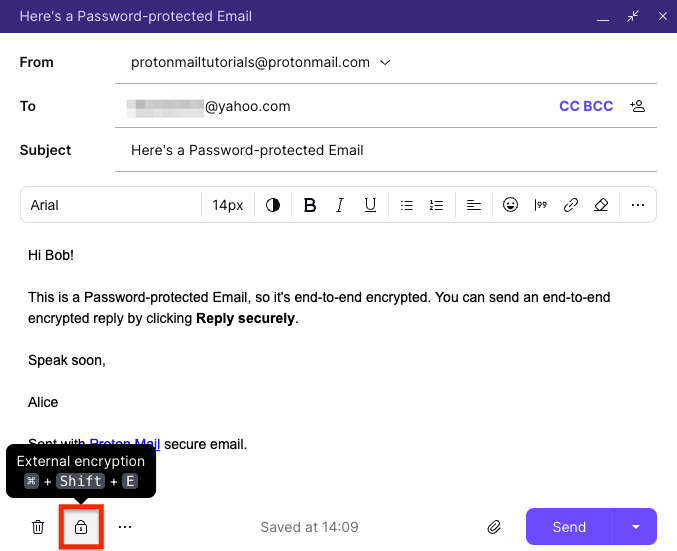
- Click the External encryption button (lock icon) in the toolbar.
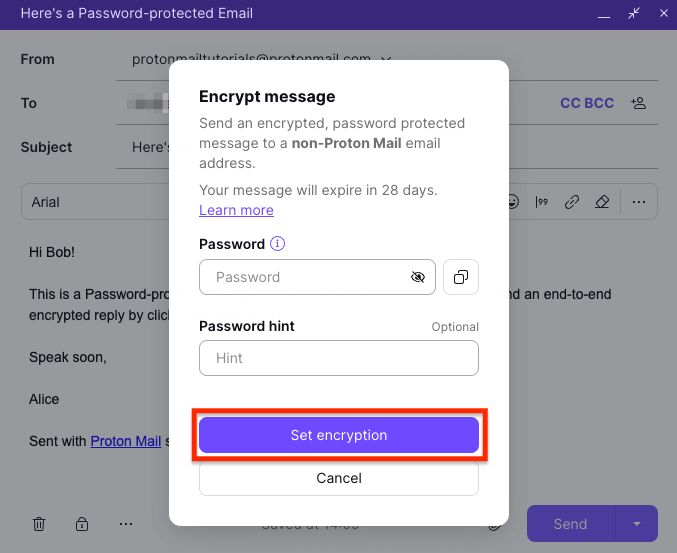
3. Enter a message password and an optional password hint. Click Set encryption (or Save on mobile).
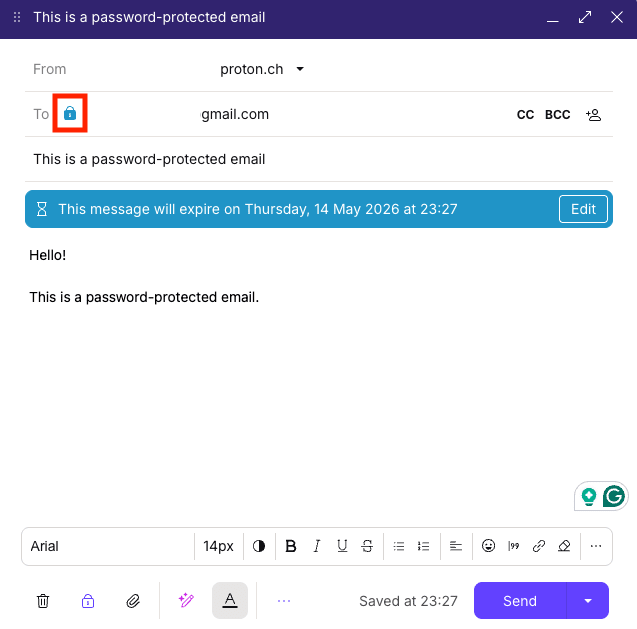
The lock icon next to the recipient’s address should turn blue.
5. Click Send.
Your password-protected email has been sent.
- Remember to share the password with your recipient in a separate, secure format.
- Once your recipient replies to your password-protected email, your reply to that email is not end-to-end encrypted by default. You must re-enable encryption for each reply.
Open a password-protected email
Here’s how to open an encrypted email sent to you by a Proton Mail user:
- Open the notification email and click Unlock message.

2. The sender should have sent you a password. Enter the password and click Read message.

This will unlock your email and open it in your browser. You’ll also see a timer showing the amount of time left before the email expires.
Reply to a password-protected email
Non-Proton Mail recipients can reply to each password-protected email a maximum of five times.
For unlimited encrypted messages, consider creating a free Proton Mail account.
- From your open password-protected email, click Reply securely.

2. Compose your email and click Send.
Are password-protected emails safe?
Yes. Proton Mail uses open-source encryption algorithms to secure these emails, so they can’t be intercepted or accessed by anyone other than you and the sender. It is safe to click the Unlock message button, as long as the website domain is proton.me.
You can also check the email header to make sure our DKIM and SPF records are correct. If you have any doubts, please contact our security team at security@proton.me.