
How to use Projects in Lumo
Projects in Lumo are dedicated spaces where you can store all the information (chats, files, instructions) needed for a specific task. This ensures that Lumo always has all the guidance it needs to assist you better, while saving you from having to re-type the same instructions across sessions.
Projects are end-to-end encrypted and synced across your devices, keeping your data organized and fully private.
Free users can have one Project at a time. Lumo Plus or Lumo Professional users can have unlimited Projects.
- How to create a Project
- How to link Proton Drive files to a Project
- Why use Projects?
- Tips on giving instructions for Projects
How to create a Project
- Sign in at lumo.proton.me(новое окно) or on the Lumo iOS or Android mobile app, then select the folder icon in the left bar.

2. Select the + icon.

3. Enter a name for your Project and add any instructions or files you may need.
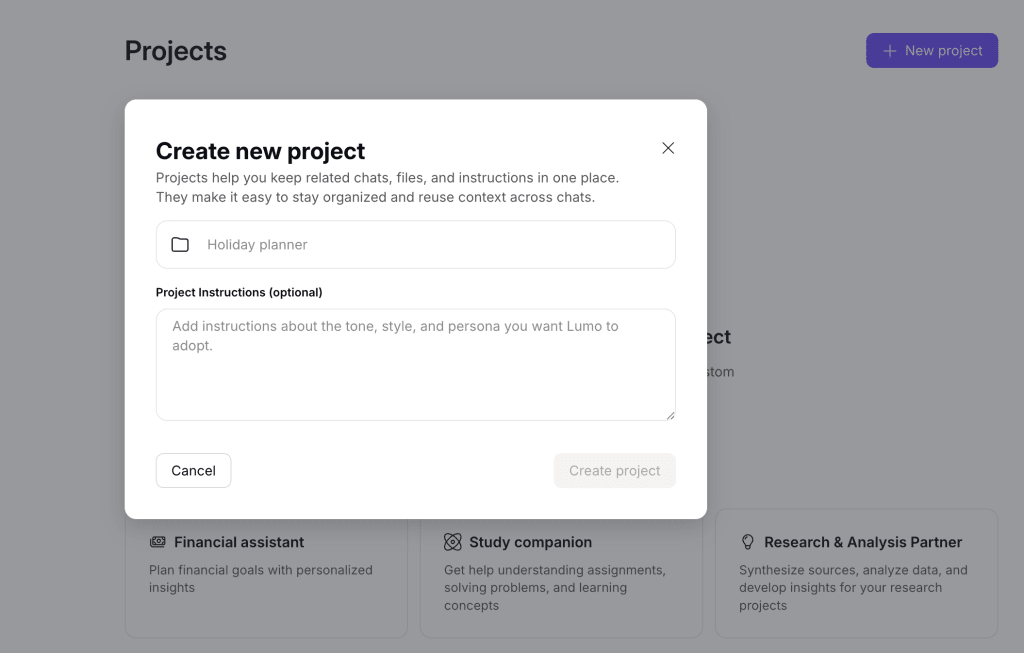
4. Select Create project to confirm.
Your Project is now created. You can edit the instructions and add/remove files. You can also link Proton Drive files to your project.
How to link Proton Drive files to a Project
- Sign in at lumo.proton.me(новое окно), then select the folder icon in the left bar.
2. Under Projects, select the Project you want, or create a new one.
3. Select Connect to Proton Drive on the right.
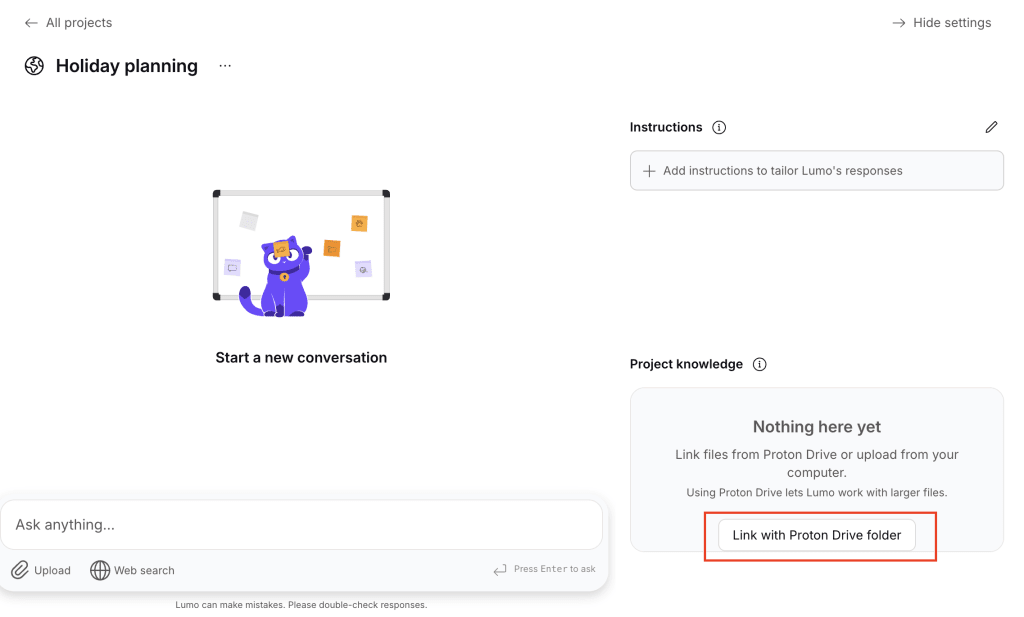
4. Select the appropriate folder from your Proton Drive account.
All done. Your linked files will appear under the Project knowledge section, and whenever new assets are added to the linked Proton Drive folder, Lumo will automatically refer to them when working on this Project. You can link up to a maximum of 200 files per Project.
Why use Projects?
Here are some examples of how you can use Projects to stay productive in both your personal and professional life.
- Track finances: Link financial documents and receipts and have Lumo evaluate your financial health.
- Manage multiple clients: Create a Project for each client so you can keep campaign briefs, reports, and tone instructions separate.
- Review legal documentation: Get Lumo to help summarize or cross-check contracts, wills, and more.
- Ace university coursework: Store reading lists, notes, and drafts together, and have Lumo analyze research papers for you.
- Plan vacations: Indicate destination ideas, schedules, preferences, and budgets to give Lumo a clear picture of what your next holiday should look like.
Tips on giving instructions for Projects
Clear, focused instructions help Lumo better understand your workflow and respond in a way that’s consistent with your goals. Here are some tips for getting the best results with Projects:
- Be specific. Project instructions should clearly explain what you’re trying to achieve and how you want Lumo to help. Include details such as the type of output you want, your preferred style, or key focus areas. You can also get Lumo to adopt a particular personality to shape how it responds, such as that of a personal fitness assistant or a brainstorm partner.
- Define the tone. From formal to friendly, Lumo can adapt its tone of voice to match your Project’s needs. You can specify the intended audience or the general feel you want in responses. For example, “This Project is for social media posts for a new fintech brand, so they should sound knowledgeable but approachable.”
- Provide as much context as possible. Help Lumo see the bigger picture by adding your goals, deadlines, and any relevant background, including files and other attachments.
- Update as you go. As your work evolves and new ideas and references come in, consistently revisit your Project’s instructions and files to refine or expand your guidance. This enables Lumo to keep up with the latest directions.
Here are some examples of how to give instructions for Projects:
| Project theme | Coursework editing and proofreading | Language learning and guidance | Fitness assistant |
| Sample Instructions | Act as my editor for university papers, evaluating them from the perspective of a teacher or lecturer. My major is medicine with a focus on psychology this semester. My professor usually prefers original analyses. Adopt a formal academic tone with precise vocabulary, third‑person voice, and no contractions. Follow American English and use APA style for citations. While editing, help fact-check my references and if they are consistent with published medical journals from 2010 onwards. | I want to learn to speak and write basic Japanese by August this year. I’m starting from scratch and don’t have any formal education with the language, but have watched a lot of Japanese anime and other media. You’re my tutor and language teacher, but in a friendly and conversational way. Each interaction should start with a warm‑up question, followed by a short conversation. Highlight any grammar mistakes and help suggest 2–3 alternative expressions based on that. Set benchmarks and create a lesson plan, and provide me with exercises or any simple tips to improve my grasp of the language daily. | Help me stay on top of my physical wellness progress for the year. My BMI is 26.5 with no medical conditions or prior injuries and I would like to get it down to 24 before the end of 2026. I don’t have any home equipment but have access to a gym with basic facilities such as a treadmill and weights. You’ll act as my personal trainer and help customize workouts, check in and measure my progress, and generally fine-tune other things I can do to meet my fitness goal like adjusting my diet or lifestyle. Help me stay motivated by using encouraging language. |