Software teams are in charge of many secrets that keep their businesses running. Some are obvious, like database passwords and SSH keys. But others are easy to forget, like API tokens created for a quick integration, webhook secrets copied into setup notes, or environment variables added during late deployments.
These credentials often work invisibly. They connect tools, manage data, trigger workflows, and keep applications talking to each other without additional logins. This convenience is exactly why they need tighter control. If one of those secrets leaks, such as an API key, an attacker won’t need to impersonate an employee or get past a multi-factor authentication (MFA) prompt. The system may simply accept a leaked key as valid access.
For many SMBs, API key management only becomes a priority after something has already gone wrong. For example, if a repository is exposed, or a staging key also works in production.
Developer credential management is the process of bringing those secrets out of informal habits and siloed repositories into a controlled system. API keys, database passwords, SSH keys, deployment tokens, and service account credentials should be treated as privileged business access: they need clear ownership, secure storage, limited permissions, and a plan for rotation.
What are developer credentials?
Developer credentials are the secrets that allow systems, applications, and technical users to authenticate and connect. They’re different from ordinary employee passwords because they often belong to services, scripts, applications, databases, and automated workflows rather than individual people.
They can include:
- API keys for SaaS platforms, payment providers, messaging services, cloud tools, and analytics systems
- Database passwords and connection strings
- SSH keys used to access servers or repositories
- Environment variables that store application secrets
- Cloud access keys, tokens, and service account credentials
- Webhook secrets and signing keys
- Deployment credentials used by CI/CD pipelines
- Recovery codes, admin tokens, and integration passwords
Some of these credentials are used by developers directly. Others are used by applications behind the scenes. The thing they all share is that they require highly privileged access. A developer credential tells a system that a request is allowed, even when no human is present to approve it.
This creates a different security problem. A normal login can often be protected with MFA, user behavior checks, device policies, or identity provider rules. An API key may be accepted automatically by the receiving system as long as the key is valid. If the key has broad permissions, the attacker inherits those permissions.
The OWASP API Security Project(yeni pencere) explains that APIs are a critical part of modern web, SaaS, and mobile applications and often expose application logic and sensitive data. When API credentials are poorly protected, the issue is not limited to one secret. The key can become a route into the business function the API supports.
Why developer credentials are uniquely risky
Developer credentials are powerful because they’re built for workflow automation. They allow systems to talk to each other without stopping for a password prompt. This is useful for software teams, but it also means a leaked key may keep working until someone notices unusual activity, increased API usage, missing data, or a failed deployment.
The risk grows when credentials are long-lived, shared across environments, or granted more permissions than the service actually needs. A production database credential used in a test script creates unnecessary exposure. A cloud key with broad admin privileges can turn one mistake into a major incident. An SSH key that remains active after a developer leaves can keep access open long after the person is gone.
The damage also spreads differently from a normal user compromise. A stolen API key may not trigger a suspicious login alert. It may look like ordinary system traffic. If logs are weak or ownership is unclear, the business may not know which service created the key, what it can access, or whether it is still needed.
This is why API key security belongs in the same conversation as access control, data protection, and incident response. These credentials are often the hidden doors between systems.
Common mistakes that expose API keys
API keys usually become exposed by prioritizing speed over security. The most common risks usually come from a few habits:
- Hardcoding keys in source code: A key added to a script, configuration file, test project, or private repository may feel harmless at first. But access changes, forks are created, backups are copied, and private repositories can become public later.
- Sharing keys through chat, email, or documents: A credential pasted into a message may solve an urgent issue, but it also becomes searchable, exportable, and difficult to track. Months later, the team may not know who saw it or where it was copied.
- Leaving old credentials active after offboarding: Removing a developer’s user account is not enough if their API tokens, SSH keys, deployment credentials, or shared secrets still work.
- Reusing the same key across environments: Staging, development, testing, and production should not depend on the same credentials. A less protected environment should never become an easier path into a more sensitive one.
Rotate keys before they become a mystery
A key should never become so old that the team is afraid to change it. Regular rotation reduces the window of exposure if a credential was copied, leaked, or forgotten somewhere. Immediate rotation is especially important when an employee or contractor leaves, when a device is lost, when a repository is exposed, when suspicious activity appears, or when a vendor reports a breach.
Rotation works best when every credential has an owner and a purpose. A key labeled “old API” or “prod backup maybe” will be harder to replace than one tied to a specific service, environment, owner, and date. The business should know why the key exists, where it is used, and what will break when it changes.
In the context of SMB cybersecurity, the process does not need to be so elaborate. Start with the credentials that could cause the most harm: production databases, cloud admin keys, payment APIs, deployment tokens, customer data platforms, and shared developer accounts. Rotate those first, then build a cadence for lower-risk keys.
A credential rotation policy should also cover offboarding. When a developer, contractor, or agency loses access, remove vault access, revoke personal tokens, rotate shared secrets they could access, and confirm that no personal credentials remain tied to production systems.
Apply least privilege to every key
The NCSC’s guidance on identity and access management(yeni pencere) focuses on controlling who can access systems and data. The same principle applies to automated access. A service should only have the permissions it needs to perform its function.
Least privilege means each key should have permissions only for the job it performs and nothing else. A credential created for analytics should not carry permissions over customer records, production deployment, billing settings, or unrelated databases. The more specific the key, the easier it is to revoke, investigate, and replace without disrupting the rest of the environment.
Least privilege is easier to enforce when keys are created for specific services rather than shared across teams. One key per service, environment, or integration gives the business more control. If something goes wrong, the affected credential can be revoked without breaking every workflow.
This also improves incident response. When one key is reused everywhere, the team has to investigate everywhere. When credentials are scoped properly, the investigation has a smaller, clearer boundary.
Access reviews help catch credentials that outlived their purpose. A key created for an old integration, inactive staging system, former vendor, or temporary project should not stay available by default. If no one can explain why a credential still exists, who owns it, and what depends on it, it should be disabled or rotated before it becomes another forgotten access path.
Keep an inventory of developer credentials
An API key inventory should give the team enough context to manage each credential without exposing the secret itself. Instead of storing the actual key, record what it is used for, who owns it, which environment it belongs to, what permissions it has, when it was created, when it was last rotated, and whether its recent activity still makes sense. That way, the business can review and remove access without depending on memory or digging through old code, tickets, and chat threads.
Where secrets are injected at runtime rather than copied into files, rotation gets considerably simpler. When an application resolves a secret reference at execution time, updating the stored value in the vault is enough, the new key propagates to every script, pipeline, and deployment that references it, with no hunt through configuration files to find each place the old one was pasted. Teams don’t postpone rotation because they don’t understand the risk; they just can’t predict what will break.
An inventory can include:
- Credential name or ID
- System or vendor
- Environment: production, staging, development, testing
- Owner or responsible team
- Permissions or scope
- Storage location
- Created date
- Last rotation date
- Last reviewed date
- Offboarding dependency
- Notes on related services or integrations
This inventory becomes especially important when the team grows. A founder, first developer, or agency may know where everything is at the beginning. That knowledge fades as systems change, people leave, and integrations multiply.
Audit access and usage
Storing developer credentials securely is only the first step. The business also needs to know who can access them, which systems still use them, and whether that access still makes sense.
For team access, review vault permissions on a regular schedule. Developers, IT leads, contractors, agencies, and founders should not keep access to sensitive credentials just because they once needed it. Each vault should have a clear owner, and permissions should match current responsibilities.
For system access, use the logs available inside cloud platforms, API dashboards, and SaaS tools. Recent activity can show whether a key is still in use, which services depend on it, and whether requests look unusual. This helps teams retire forgotten credentials before they become hidden access paths.
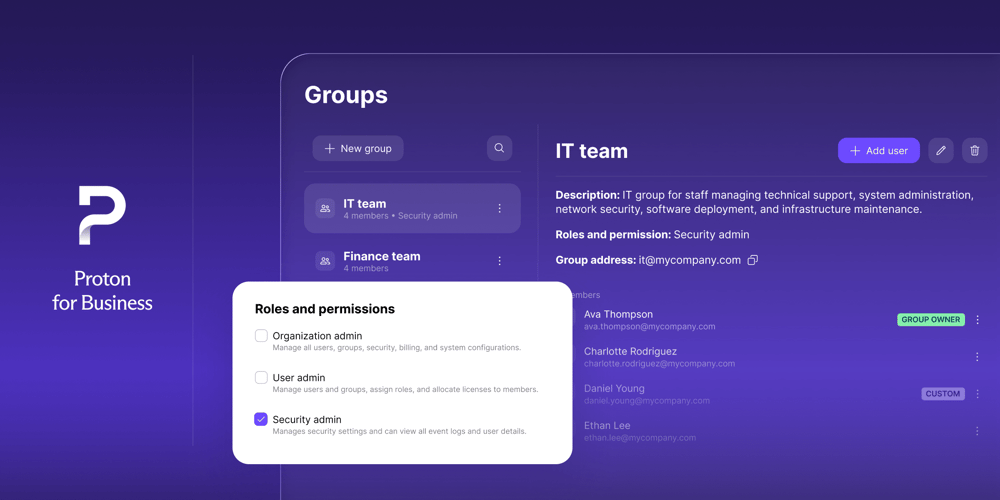
A password manager for IT teams like Proton Pass for Business supports this process with encrypted vaults, group management for permissions, policies, reporting, logs, SCIM provisioning, and SSO integration. Because vault access and secret injection run through the same system, the record of who can reach a credential covers both the people opening it in the app and the pipelines consuming it.
Cloud and API logs still need reviewing where the keys actually operate, since only the receiving platform knows what a key did once it was used.
How Proton Pass supports developer credential management
Proton Pass for Business helps businesses manage both the secrets people open and manage directly, and the secrets applications consume on their own.
On the human side, admin logins, vendor portals, recovery codes, shared developer accounts, SSH details, and sensitive setup notes go into end-to-end encrypted vaults with controlled sharing. Instead of copying those details into chat or documents, teams grant access to the right people, and when someone leaves or changes role, admins remove vault access rather than hunting through message history and shared folders.
On the automation side, the Proton Pass CLI brings the same vault into scripts, terminals, and pipelines. Secret references resolve at runtime into environment variables or template files, commands executed with secrets injected and masked in output, and SSH keys stored in Pass load into an SSH agent. A repository can be committed with references rather than credentials, and a deployment can authenticate without a key ever touching plaintext configuration.
For IT and operations teams, group management gives precise control over who reaches which vault, while SCIM provisioning and SSO integration tie that access to existing identity processes. Logs and reporting show how credential access is being used across the team.
None of this removes the need for repository scanning, cloud key monitoring, or API platform logs; those operate where the credentials are actually used, and Proton Pass has no visibility there. What it does remove is the gap that most SMB incidents actually come from: secrets living in files, chats, and personal notes because the secure option was too heavy to set up.
Keep developer credentials out of the shadows
Developer credentials are easy to create and easy to forget. That is exactly why they need structure.
A business should know which API keys, database passwords, SSH keys, service tokens, and environment secrets exist; where they are stored; who owns them; what they can access; and when they were last rotated. Without that visibility, a single exposed key can remain active long after the team thinks the risk has passed.
The strongest approach combines the right storage with the right habits. Runtime secrets should be injected at execution time rather than hardcoded, whether that runs through the Proton Pass CLI or a dedicated secrets platform in more complex infrastructure. Team-held developer credentials belong in secure vaults with controlled access. Every key should have a clear owner, limited permissions, a rotation plan, and an offboarding process.
Developer speed and credential security do not need to work against each other. Teams move faster when they know where secrets belong, who can access them, and how to replace them safely.
Store and share developer credentials securely with a business password manager such as Proton Pass for Business.