
Så skapar du en organisation
- Lästid
- 1 min
- Kategori
- Proton VPN for Business
Om du har köpt ett Proton VPN for Business-paket måste du skapa en organisation för ditt företag.
När du har gjort detta kan du(nytt fönster) lägga till användare till din organisation(nytt fönster). Alla Proton VPN for Business-paket kommer med minst en användare, och du kan ha lagt till ytterligare användarlicenser när du först köpte ditt Proton VPN for Business-paket. Du kan också lägga till användarlicenser till din organisation(nytt fönster) när som helst.
Så skapar du en organisation
För att skapa en organisation och aktivera stöd för flera användare behöver du ett Proton VPN for Business(nytt fönster)-paket.
1. Logga in på account.proton.me och välj VPN-appen.
2. Gå till Organisation → Organisation och personer → Stöd för flera användare → Stöd för flera användare → Aktivera stöd för flera användare (du måste Autentisera ditt lösenord).

2. Ställ in organisationsnamn. Ange ditt organisationsnamn och klicka på Skicka.
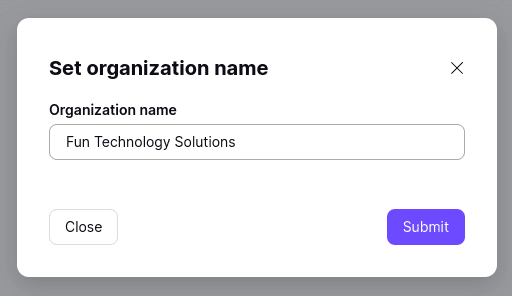
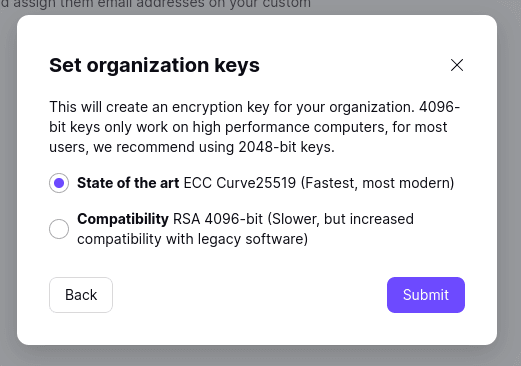
3. Ställ in dina organisationsnycklar. Välj om du vill använda kryptering av typen State of the art eller Kompatibilitet för att skydda din organisations nycklar, och klicka sedan på Skicka.
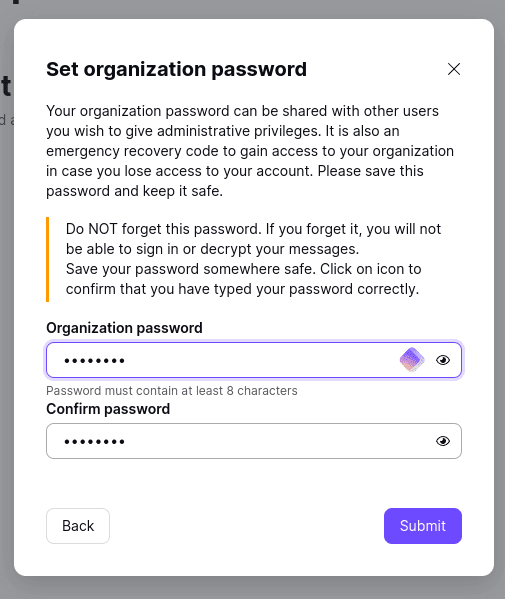
4. Ställ in ett organisationslösenord. Välj ett lösenord för din organisation, bekräfta det och klicka på Skicka.
Du har skapat din organisation!
