
Como criar novas chaves de encriptação no Proton Mail
- Leitura
- 2 min
- Categoria
- Encriptação e chaves
Por predefinição, o Proton Mail utiliza chaves de Criptografia de Curva Elíptica (ECC) definidas na Curve25519 para proteger os seus e-mails. A ECC é altamente segura, rápida e compatível com quase todas as implementações OpenPGP.
Se a sua conta tiver sido criada antes de 2021, poderá ainda ter chaves RSA. Para obter todos os benefícios das chaves ECC (para e-mails futuros enviados e recebidos), pode gerar novas chaves.
Além disso, poderá querer gerar novas chaves se acreditar que as suas chaves existentes foram comprometidas.
Ao interagir com certas versões legadas de implementações OpenPGP, poderá ter de criar uma chave RSA (se ainda não tiver uma), o que pode ser feito localmente, por exemplo, executando gpg --full-generate-key, e depois importar a chave para a sua conta Proton Mail.
Em todos os casos, é extremamente importante que não elimine as suas chaves antigas utilizadas para encriptação e assinatura. Se o fizer, perderá a capacidade de desencriptar todos os seus e-mails existentes. Siga atentamente as instruções abaixo.
Gerar novas chaves de encriptação
Só é possível adicionar novas chaves após ter criado uma conta Proton Mail.
Inicie sessão na aplicação web em mail.proton.me(nova janela), aceda a Definições → Todas as definições → Encriptação e chaves → Chaves de encriptação de e-mail e clique em Gerar chave.

Se estiver a gerar uma nova chave utilizando o mesmo algoritmo de encriptação de uma chave existente, verá o seguinte aviso.

Pode gerar até 20 chaves, mas as chaves adicionais abrandarão ligeiramente o Proton Mail.
Nota: A chave recém-gerada será definida automaticamente como a sua chave primária (predefinida).
Alterar a sua chave primária
Clique na seta de transferências ↓ ao lado de uma chave e selecione Utilizar para encriptação e assinatura.
 (nova janela)
Marcar chaves como obsoletas ou comprometidas
Se estiver a criar uma nova chave porque acredita que a sua chave antiga possa estar comprometida, ou se for obsoleta, clique na seta de transferências ↓ ao lado de uma chave e selecione uma das duas:
- Marcar como obsoleta: Isto desativa a encriptação.
- Marcar como comprometida: Isto desativa a verificação de assinatura além da encriptação.
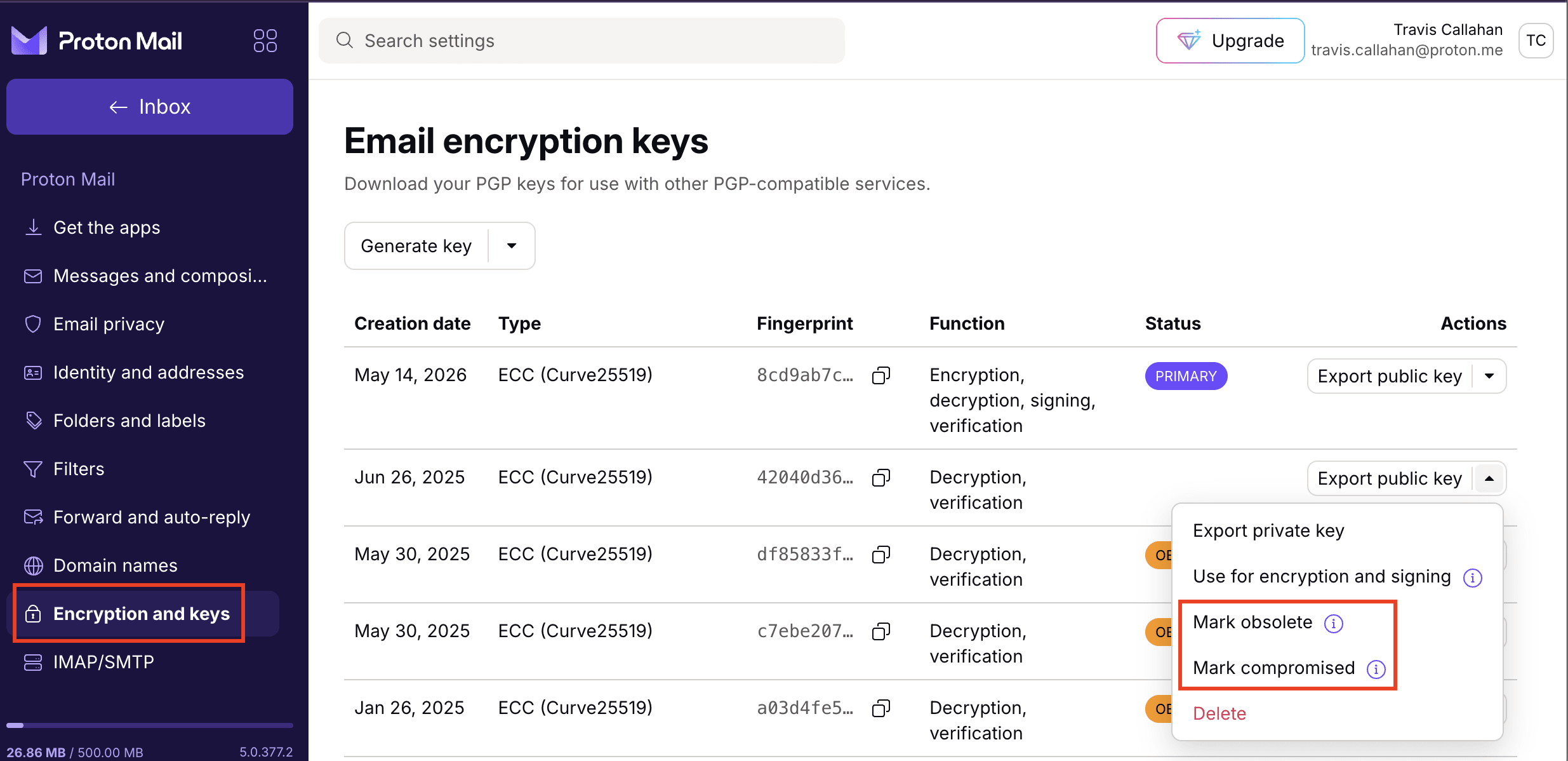
Nota: Mesmo que as suas chaves de encriptação estejam comprometidas, não elimine as suas chaves antigas. Estas ainda são necessárias para abrir e-mails que foram encriptados com as mesmas.