Efter nyheden om, at Google har udrullet funktioner – herunder et AI-overblik, foreslåede svar, en “Hjælp mig med at skrive”-funktion og AI-indbakkefiltre – der som standard giver dets Gemini AI bred adgang til indbakkens indhold, har mange haft travlt med at deaktivere Gemini i Gmail. Sådan gør De.
Sådan slår du Gemini fra i Gmail
- I din Gmail-app, gå til Indstillinger.

- Vælg din Gmail-adresse.
- Ryd afkrydsningsfeltet Smarte funktioner.
- Gå til Smarte funktioner i Google Workspace.

- Ryd afkrydsningsfelterne for:
- Smarte funktioner i Google Workspace
- Smarte funktioner i andre Google-produkter
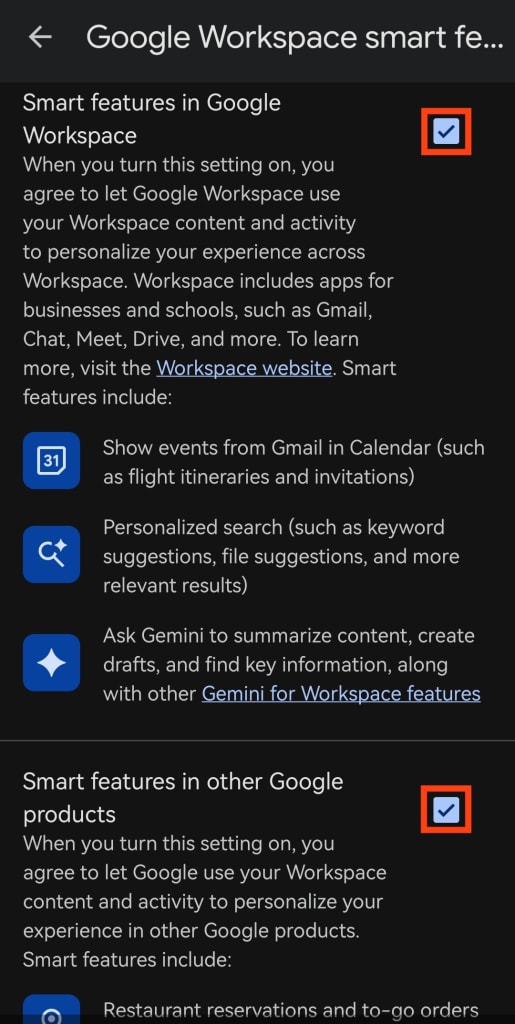
Hvis du har flere Gmail-konti, skal du gentage disse trin for hver enkelt. Workspace-indstillingerne gælder dog globalt på tværs af dit Google Workspace (inklusive Google Drive), så du behøver kun at justere dem én gang.
At slå Gemini fra i Gmail deaktiverer også grundlæggende, mangeårige funktioner som stavekontrol, der er ældre end AI-assistenter. Dette designvalg fraråder fravalg og viser, hvor værdifulde dine AI-behandlede data er for Google.
Hvis du vil være helt sikker på, at Google ikke genaktiverer eller introducerer nye AI-funktioner, der behandler dine data, så overvej at skifte til Proton Mail, vores sikre e-mail.
At flytte alle dine e-mails, kalendere og kontakter er enkelt med Easy Switch.
Hvorfor integrerer Google Gemini i Gmail?
Google lover(nyt vindue), at Gmails 3 milliarder brugere vil drage fordel af en “personlig, proaktiv indbakke-assistent”. Men givet at disse funktioner er gratis, hvad er så hagen? Tag ikke fejl, Google gør ikke dette ud af generøsitet. Indholdet af din indbakke er værdifuldt for virksomheden.
E-mail plejede at være et mere privat rum, hvor din kommunikation potentielt kunne blive opsnappet af ondsindede aktører, men i det store hele var dine data dine egne.
I dag udvider virksomheder som Google AI-adgang til privat kommunikation såsom e-mail, og fremstiller det som produktivitet og bekvemmelighed. Men Gemini opererer under sine egne vilkår, hvilket gør det sværere at skelne, hvilke data der håndteres af Gmail selv, og hvad der behandles af AI-systemer.
Meta har for eksempel taget dette skridt videre ved at bruge chatdata og andre interaktioner med Meta AI til målrettede annoncer, hvilket viser, hvor hurtigt AI-funktioner kan omforme, hvordan personlige data bruges.
Hvorfor bør du slå Gemini AI fra?
Mens du er i stand til at slå smarte funktioner fra, vil Google have, at du slår dem til igen. Under dække af en nemmere arbejdsdag og øget produktivitet giver Gmails nye AI-indbakkefiltre(nyt vindue) en foreslået to-do-liste og indsamler emner, den antager, du har brug for at indhente.
Ved at anerkende, at det er svært at følge med mængden af korrespondance og emneskift, vi alle skal gøre på arbejdet, antager virksomheden, at den kan friste dig til at bytte dit privatliv og sikkerhed for bekvemmelighed. Men der er så mange grunde til at undgå Google og dets AI-assistent.
Du kan ikke garantere, hvad Google vil gøre med dine data
Mens Google hævder, at de ikke vil bruge dine data til at træne deres model, har virksomheden ikke vist sig at være pålidelig tidligere. Flere privacy-washing-kampagner har set Google forsøge at påstå, at du har kontrol over privatlivsindstillinger og kan fravælge funktioner, du ikke er interesseret i; men Google ved også, at 95 % af os ikke ændrer standardindstillingerne(nyt vindue) på vores telefoner og computere. I 2024 fik Googles moderselskab Alphabet en bøde på næsten 2,9 milliarder dollars for skatteunddragelse, monopolistisk praksis, manglende overholdelse af regulatorer og ulovlig favorisering af sine egne digitale annonceringstjenester. Vi kan ikke stole på, at Google gør noget, de lover ikke at gøre, hvilket er grunden til, at vi ikke anbefaler at betro Gemini indholdet af din indbakke.
Google bruger dine data til at vise dig annoncer
Jo flere data Google indsamler om dig, desto mere målrettede annoncer kan den vise dig. Dette kan virke harmløst, da du simpelthen kan vælge ikke at klikke på annoncer, men du bør være bekymret over, at Google ønsker så meget om dig. Annoncører og tredjeparter samarbejder med Google for at målrette annoncer baseret på en detaljeret profil, der opbygges, mens du bruger Google-tjenester. Dette kan omfatte din placering, enheder, søgehistorik, personlige oplysninger som din adresse, alder og køn – og potentielt dine e-mails. Du kan slå personaliserede annoncer fra(nyt vindue), men du kan ikke stoppe Google i at overvåge, hvad du gør, når du bruger deres apps.
Dine data kan blive delt ud over Google
Hvis du bruger Gemini enten i eller uden for Gmail, kan dine data blive delt med tredjepartstjenester. Tilføjelser og udvidelser kan forbinde Gemini til andre tjenester såsom WhatsApp og Spotify, hvilket tillader disse virksomheder at behandle dine data under deres egne privatlivspolitikker. Når du mister kontrollen over dine data, er det meget sværere at forstå, hvad de måske bliver brugt til.
Brug AI, der giver dig kontrol over dine data
Der er en grund til, at brugen af AI-drevne assistenter og chatbots er vokset så eksponentielt: de kan være utroligt hjælpsomme. Kravene i moderne arbejde og liv kan være svære at håndtere, og de rigtige værktøjer gør hele forskellen. Men Big Tech som Google, Microsoft og OpenAI har tendens til at behandle dine data som et forretningsaktiv. Og AI-værktøjer er en særligt effektiv måde at få data om dit privatliv, dit arbejdsliv, dit helbred og dine finansielle optegnelser – den slags information, der kan analyseres, pakkes og tjenes penge på.
Hvis du bruger Googles e-mailtjeneste og bekymrer dig om, hvordan indholdet af dine beskeder kan blive brugt af AI, så start med at slå Gemini fra i Gmail. Og hvis du er klar til at af-Google, så overvej at skifte til Protons end-to-end krypterede pakke af apps designet til at beskytte dine datas privatliv – ikke udnytte det.
Med Proton Mail er e-mails end-to-end krypterede, når du sender beskeder til andre Proton-brugere, og du kan adgangskodebeskytte e-mails, når du skriver til folk uden for Proton, som Gmail-brugere. Uanset hvad kan Proton ikke få adgang til indholdet af dine beskeder.
Hvis du har brug for hjælp til at omskrive eller finjustere en e-mail, tilbyder Proton Scribe (en tilvalgsudvidelse til Proton Mail) AI-drevet skrivehjælp, der aldrig træner på dine data. Til bredere opgaver kan du bruge Lumo, vores private AI-assistent(nyt vindue) designet til at hjælpe dig uden at gemme logs over dine samtaler eller forvandle dine personlige oplysninger til træningsmateriale.
I takt med at Big Tech fortsætter med at forsøge en ny kapring af dine data og dit privatliv ved at tilbyde dig AI-værktøjer, der udnytter dig, har du valget om at afvise dem.