
Reserver barnets brukernavn i Proton Mail
- Lesetid
- 2 min
- Kategorier
- Kom i gang
- Proton Mail
Du kan reservere en Proton-e-postadresse for barnet ditt for å sikre en trygg, privat e-postadresse i sitt navn.
Denne funksjonen er utformet for foreldre, verger eller familiemedlemmer som ønsker å:
- Sikre en privat e-postadresse i barnets navn tidlig
- Forhindre at noen andre gjør krav på adressen
- Forberede seg på fremtidige behov som skole, kommunikasjon eller nettbaserte tjenester
- Introdusere e-post for barnet sitt når de er klare
Hva betyr det å reservere en e-postadresse?
Å reservere en Proton-e-postadresse betyr at du kan velge og sikre et ledig Proton-brukernavn for barnet ditt, selv om de ikke er klare til å bruke e-post ennå.
Vi holder på adressen i opptil 15 år. Kontoen er som standard inaktiv og kan ikke sende eller motta e-poster.
I motsetning til standard e-postkontoer, omgår en reservert adresse retningslinjene for sletting av inaktive kontoer. Dette sikrer at barnets e-postadresse forblir beskyttet til de er klare til å aktivere den. Dette kan gjøres ved hjelp av en aktiveringskode.
Hvordan fungerer e-postreservasjon?
- Gå til account.proton.me/born-private.
- Velg barnets e-postadresse. Du kan angi et ønsket Proton-brukernavn og velge et domene: @proton.me eller @protonmail.com.
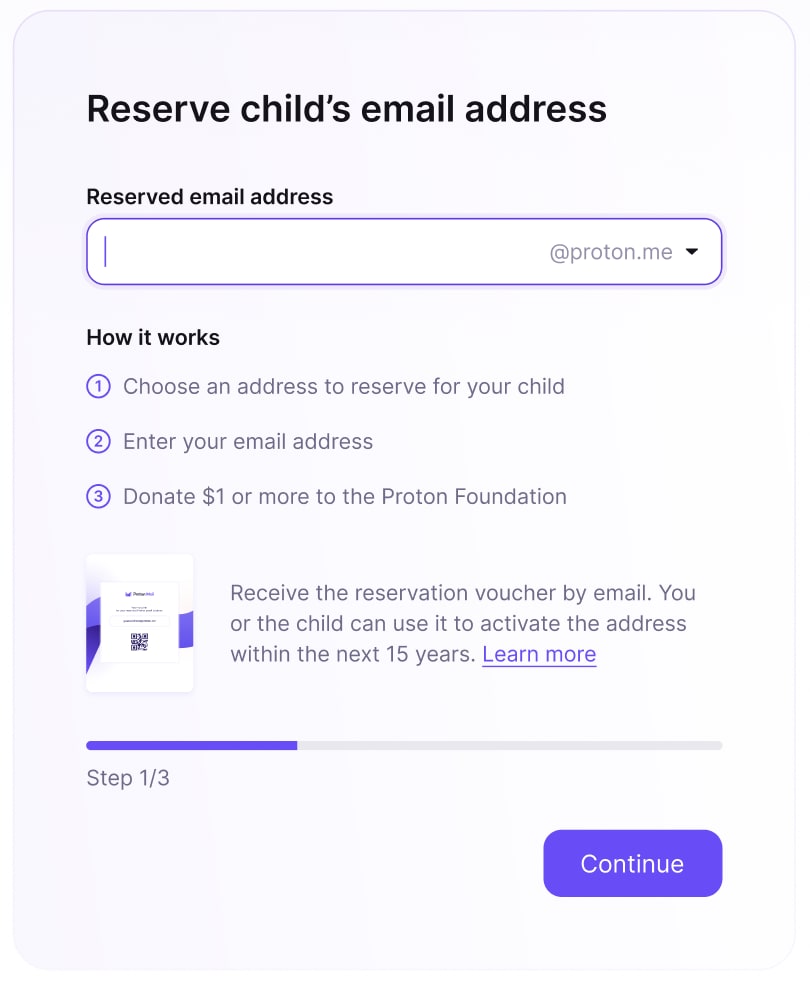
- Angi din egen e-postadresse. Vi bruker den til å sende deg et verdibevis som inneholder aktiveringskoden du trenger for å aktivere barnets e-post senere.
- Gi en donasjon fra 1 USD. Dette bidrar til å forhindre misbruk eller svindel. Alle donasjoner støtter Proton Foundations mål om å beskytte digitale rettigheter og fremme internettfrihet.
- Sjekk e-posten din. Når reservasjonen er fullført, er barnets e-postadresse reservert på en sikker måte, og du vil motta et sikkert verdibevis som inneholder aktiveringskoden.
- Aktiver når barnet ditt er klart. Du kan når som helst innen 15 år aktivere den reserverte e-postadressen med aktiveringskoden.

Hva skjer hvis du mister verdibeviset ditt?
Hvis du mister verdibeviset ditt, kan du be om en ny kopi. Slik gjør du det:
- Gå til account.proton.me/born-private/recovery.
- Angi den overordnede e-postadressen som ble brukt under reservasjonen, og barnets reserverte e-postadresse.
- Fullfør bekreftelsestrinnene.
En kopi av verdibeviset blir sendt til e-postadressen din.