As planilhas estão no centro das decisões de negócios do dia a dia, mantendo dados financeiros, registros de clientes, informações de RH e planos estratégicos. Uma nova pesquisa da Proton mostra que esse papel central torna as planilhas um risco oculto de segurança e privacidade.
Os resultados apontam para uma variedade de riscos que são fáceis de passar despercebidos por funcionários e gerentes ocupados:
- O acesso a planilhas não expira quando as funções mudam e as empresas confessam que não revisam o acesso a documentos antigos, deixando dados confidenciais expostos indefinidamente.
- Gerentes dizem que têm clareza limitada sobre o que provedores de Big Tech como Google e Microsoft podem ver ou reutilizar para treinamento de IA e outros fins. Sem criptografia de ponta a ponta, os dados podem ser indexados, escaneados e vazados.
- Trabalhadores usam contas pessoais para gerenciar arquivos de trabalho, confundindo as linhas digitais e tornando quase impossível manter um firewall de rede e controlar dados de negócios.
Pesquisamos líderes de PMEs nos EUA, Reino Unido, Alemanha e França sobre como eles usam — e protegem — suas planilhas. Todas elas eram pequenas empresas (com menos de 100 funcionários), o que as torna unicamente em risco de ataques de hacking e ransomware.
Os resultados apontam para uma necessidade crítica de planilhas criptografadas e melhores práticas de segurança interna. Apresentamos nossas recomendações no final deste artigo.
De ferramentas temporárias a arquivos permanentes
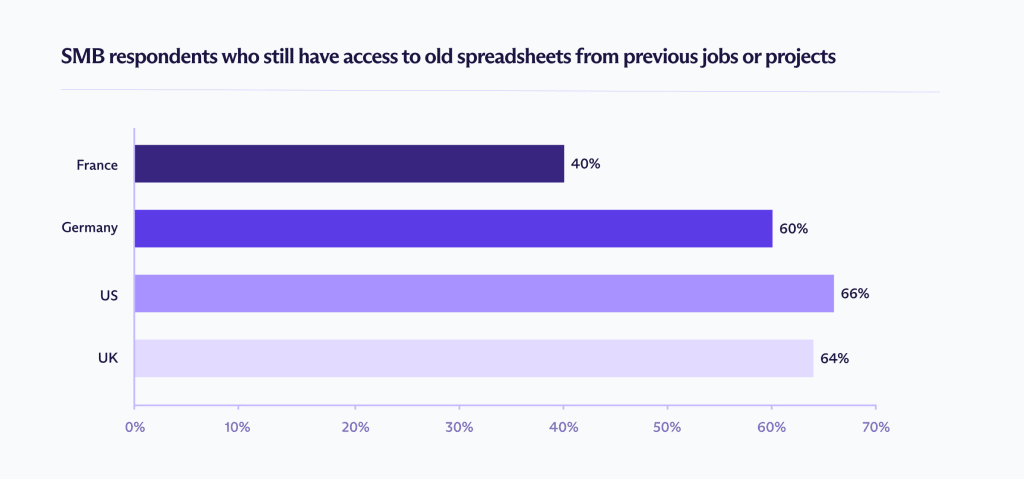
Uma das descobertas mais impressionantes da pesquisa é a frequência com que o acesso a planilhas persiste após o término de funções e projetos. Ex-funcionários continuam a ter visibilidade de arquivos muito tempo depois que deveriam, expondo empresas a falhas de conformidade, violações contratuais e perda de confiança do cliente.
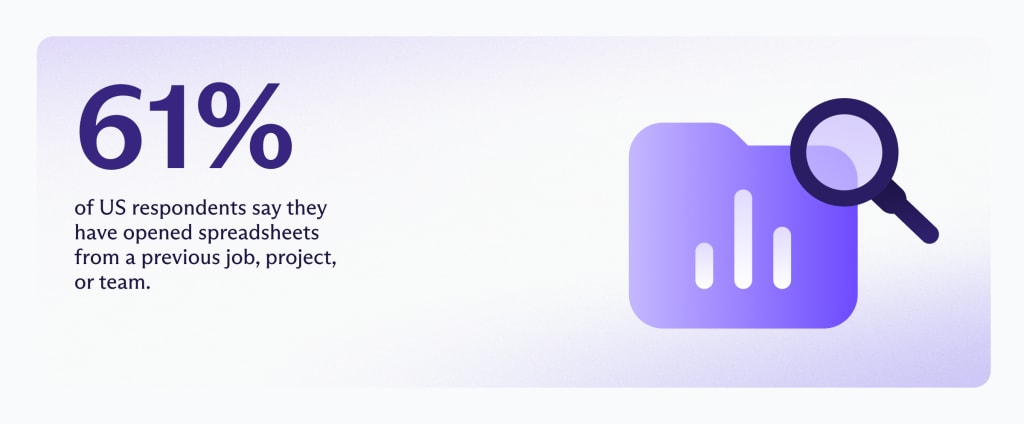
A natureza de quais arquivos permanecem abertos varia por país. O Reino Unido relata os níveis mais altos de dados de RH visíveis, enquanto a França mostra a maior incidência de exposição de dados de clientes.
Esse acesso persistente é conhecido como acesso fantasma: arquivos contendo dados confidenciais de negócios permanecem abertos, links continuam funcionando e permissões abertas permanecem em segundo plano. Os dados expostos não são triviais. Os entrevistados relatam acesso contínuo a informações de salário e folha de pagamento em andamento, orçamentos internos, registros de clientes e documentos de planejamento estratégico.
Quando perguntados sobre quais tipos de dados ainda podiam acessar, os entrevistados relataram o seguinte:
EUA:
- Documentos financeiros ou de folha de pagamento (44%)
- Registros de vendas ou compras (41%)
Esse tipo de acesso expõe dados pessoais de funcionários e transações comercialmente sensíveis, aumentando o risco de violações de privacidade e uso indevido financeiro.
Reino Unido:
- Documentos financeiros ou de folha de pagamento (31%)
- Informações de clientes (31%)
O acesso contínuo a registros de folha de pagamento e de clientes levanta preocupações diretas de conformidade com o GDPR, particularmente em torno do acesso legal e limitação de finalidade.
Alemanha:
- Documentos financeiros ou de folha de pagamento (30%)
- Planos de negócios internos ou arquivos de estratégia (26%)
Além da exposição de dados pessoais, o acesso a planos internos pode afetar a posição competitiva e violar obrigações de confidencialidade.
França:
- Documentos financeiros ou de folha de pagamento (31%)
- Informações de clientes (31%)
A combinação de dados de folha de pagamento e de clientes cria exposição regulatória e risco de reputação se as informações forem compartilhadas além das funções autorizadas.

Por que o acesso fantasma persiste
O acesso fantasma é um subproduto de como as equipes colaboram. Em todos os mercados, 26-28% dos entrevistados disseram que compartilham planilhas usando “qualquer pessoa com o link pode visualizar”. Outros 7-15% usam “qualquer pessoa com o link pode editar”.

Uma vez que um link existe, ele se torna separado da identidade. Se não estiver vinculado ao status de emprego, mudanças de função ou exclusão de conta, ele pode ser encaminhado, copiado, favoritado e reaberto indefinidamente. Uma planilha é tão segura quanto a última pessoa que recebeu o link.
As revisões de acesso raramente compensam isso. Apenas 30% dos entrevistados franceses dizem que sua equipe revisa regularmente o acesso a planilhas, e esse número não é uma exceção entre os países. Uma vez que o acesso a um documento é concedido, as revisões de colaboradores são inconsistentes, mesmo que o compartilhamento aconteça constantemente como parte do trabalho diário.
Com o tempo, essas decisões de compartilhamento pontuais se acumulam. A maneira mais rápida e familiar de colaborar torna-se o padrão, enquanto as revisões de acesso permanecem pouco frequentes e a propriedade muitas vezes não é clara. Como resultado, as planilhas tendem a manter permissões muito tempo depois que projetos, funções ou equipes mudaram.
Reduzir o risco a longo prazo requer controles que operem durante todo o ciclo de vida de uma planilha, não apenas no momento em que ela é compartilhada. O acesso fantasma persiste mesmo em organizações com boas intenções porque a proteção exige revisões manuais regulares e transferências perfeitas.
A lacuna de desligamento
Quando perguntados sobre o que acontece com o acesso a planilhas depois que alguém deixa um emprego ou termina um projeto, apenas 33–44% dos entrevistados disseram acreditar que o acesso foi limpo manualmente por seus empregadores. Entre 12–28% acreditavam que nada acontecia. Outros 14–26% admitiram que simplesmente não sabiam.
Essa incerteza importa. Onde a responsabilidade não é clara, o acesso tende a persistir por padrão. Os arquivos não desaparecem sozinhos; alguém tem que lembrar que eles existem e agir sobre isso. Isso não é necessariamente uma falha de intenção, mas sim uma falha de sistemas que dependem da memória humana.
Também é importante distinguir entre duas falhas relacionadas, mas separadas: desligamento, que é um momento no tempo, e revisão de acesso contínua, que é uma responsabilidade contínua.
Nossos dados mostram que ambos estão falhando.
- 38% das PMEs dos EUA acreditam que o acesso é removido automaticamente
- 44% das PMEs da Alemanha e do Reino Unido acham que o acesso é removido manualmente
Mistura de contas de trabalho e pessoais
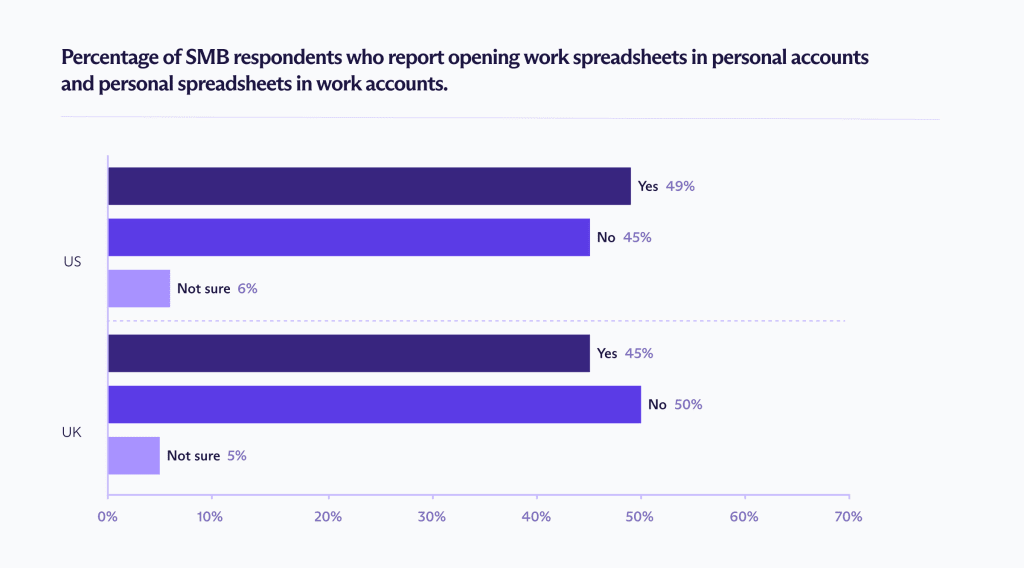
Outra razão significativa para o acesso fantasma é a mistura de contas — usar a mesma conta para atividades pessoais e de trabalho — o que cria um ponto cego de segurança generalizado. Nos EUA e no Reino Unido, mais de 45% dos trabalhadores de PMEs admitem abrir planilhas de trabalho em contas pessoais, ou planilhas pessoais em contas de trabalho.
Quando os limites se confundem dessa forma, as planilhas não são mais restritas pelas estruturas de segurança que uma empresa possui. O acesso torna-se desvinculado de funções, projetos e status de emprego, dificultando o rastreamento, revisão ou revogação.
Acesso de Big Tech, IA e provedores
Mesmo o desligamento perfeito e a revisão de acesso não podem resolver o acesso no nível do provedor ou o uso secundário de dados. Muitas PMEs estão cada vez mais incertas sobre o que acontece com seus dados nos bastidores, especialmente quando esses dados incluem informações financeiras, de clientes e de RH sensíveis.
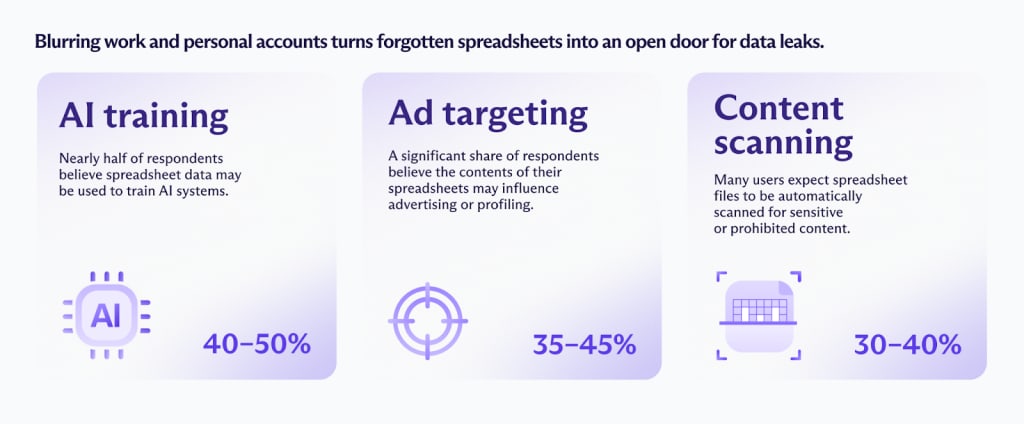
Treinamento de IA (40–50%)
Quase metade dos entrevistados acredita que dados de planilhas podem ser usados para treinar sistemas de IA.
Segmentação de anúncios (35–45%)
Uma parcela significativa dos entrevistados acredita que o conteúdo de suas planilhas pode influenciar a publicidade ou a criação de perfil.
Escaneamento de conteúdo (30–40%)
Muitos usuários esperam que arquivos de planilha sejam automaticamente escaneados em busca de conteúdo sensível ou proibido.
As preocupações refletem como as plataformas de armazenamento em nuvem de Big Tech são projetadas. Embora ferramentas como Google Drive e OneDrive criptografem dados em trânsito e em repouso, elas retêm acesso ao conteúdo dos arquivos para permitir indexação, pesquisa, recursos de colaboração e ferramentas baseadas em IA. Planilhas criptografadas de ponta a ponta são a melhor maneira de evitar esse tipo de acesso.
Apesar disso, as empresas continuam a usar essas plataformas para fluxos de trabalho críticos, colocando dados financeiros, de clientes e operacionais em sistemas controlados por terceiros com um histórico de privacidade ruim.
Quando provedores de Big Tech retêm esse nível de acesso, arquivos podem ser escaneados, indexados e processados automaticamente, sem qualquer interação humana. Nesse modelo, a exposição não se limita apenas a quem tem o link, mas também à segurança da plataforma que hospeda os dados.
Privacidade e segurança duradoura com Proton Sheets
Para muitas PMEs, as planilhas funcionam como sistemas operacionais integrais. Elas contêm dados financeiros, informações de clientes e registros de RH que carregam riscos regulatórios, reputacionais e comerciais.
Para manter os dados seguros, políticas de acesso fortes, desligamento automatizado e limites de conta claros permanecem essenciais. No mínimo, você deve:
- Limitar o acesso por função
- Revisar arquivos compartilhados regularmente
- Remover o acesso imediatamente quando alguém sair
- Evitar usar links públicos para dados sensíveis
Mas a governança sozinha não pode eliminar a visibilidade no nível do provedor ou o uso secundário de dados, desde que as plataformas mantenham as chaves de criptografia.
O Proton Sheets é construído para endereçar esse risco estrutural:
- Criptografia de conhecimento zero: O provedor não pode ler, processar ou reutilizar as informações, mesmo que estejam armazenadas em seus servidores.
- Chaves de criptografia controladas pelo usuário: Apenas colaboradores autorizados podem acessar o conteúdo da planilha.
- Colaboração segura: As equipes podem colaborar em tempo real, mantendo controle claro sobre quem pode visualizar ou editar uma planilha.
- Ferramentas familiares, proteção mais forte: Suporta formatos e recursos comuns de planilhas, incluindo fórmulas, gráficos e importações de arquivos existentes.
Em termos práticos, o Proton Sheets torna as planilhas colaborativas tão seguras quanto podem ser no nível da plataforma, ao mesmo tempo em que suporta o trabalho em equipe em tempo real e fluxos de trabalho familiares. Combinado com práticas de compartilhamento responsáveis, isso reduz a exposição a longo prazo de dados que geralmente duram muito mais do que as equipes esperam.