Fra Google Chrome til Google Workspace har Google aggressivt integreret AI i sine apps og platforme — og Google Søgning er ingen undtagelse. Hvis blot De har søgt efter noget på Google siden 2024, er De allerede bekendt med AI Overviews: det AI-genererede resumé, der vises øverst i Deres resultater før eventuelle faktiske links.
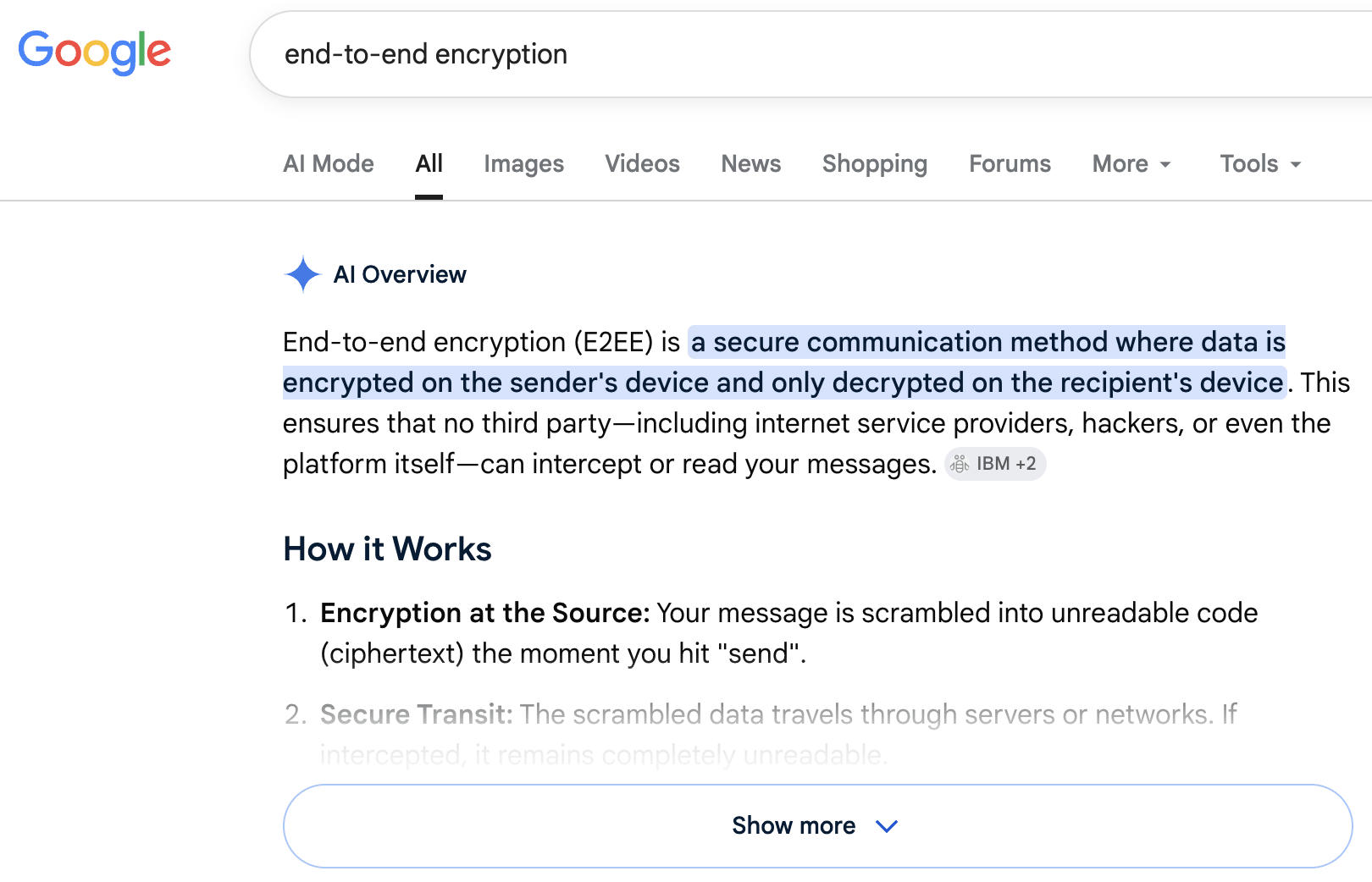
Ideen er at hjælpe Dem med at få svar mere effektivt. Men i praksis er AI Overviews blevet kritiseret for at være unøjagtige eller forvirrende, for at skubbe rigtige resultater længere ned på siden og for at fjerne trafik fra de oprindelige kilder(nyt vindue).
Hvad mere er, hvis De er logget ind på en Google-konto — hvilket de fleste er — bliver Deres søgninger og browseraktivitet, sammen med tilknyttede data som Deres placering og enhedsdetaljer, sporet som standard. Det betyder, at denne såkaldte bekvemmelighed også sker på bekostning af Deres privatliv.
Der findes ikke en simpel indbygget afbryder til at deaktivere AI Overviews på Google. Men den gode nyhed er, at der er et par effektive løsninger, uden at det kræver eksterne plugins eller komplicerede konfigurationer.
Brug webfilteret
Dette er den hurtigste måde at fjerne AI Overview fra Deres resultater på uden at ændre nogen indstillinger, selvom De skal udføre de samme trin nedenfor for hver ny søgning.
- Foretag en Google-søgning som normalt.
- Under søgefeltet skal De kigge efter fanerne: Alle, Produkter, Billeder, Nyheder, Videoer osv. Vælg Web. Hvis De ikke kan se den blandt fanerne, skal De vælge Mere → Web.

Deres resultater genindlæses uden AI Overview.
Tilføj -AI til Deres søgning
Denne metode er afhængig af Googles minus-operator (IKKE) til at udelukke et bestemt ord fra resultaterne. De skal blot tilføje -ai i slutningen af Deres søgning, som f.eks. pris på æg -ai. Deres søgeresultater bør blive vist uden AI Overviews, men det er ikke altid garanteret.

Tilføj &udm=14 til URL’er
Tilføjelse af denne parameter tvinger Google til automatisk at vise udelukkende webresultater. Der er to måder at implementere dette på:
Manuelt (en enkelt gang)
Søg efter noget på Google, og tilføj &udm=14 i slutningen af URL-adressen i Deres browsers adresselinje på resultatsiden, og tryk på Enter.

Den nye side indlæses uden AI Overview, og De kan gemme denne ændrede URL som bogmærke til fremtidige søgninger.
Gem som en brugerdefineret søgemaskine i Chrome
Dette gør det muligt for Dem permanent at tilføje parameteren &udm=14 til enhver søgning i Google Chrome-browseren, så De reelt overspringer AI Overview hver gang uden at skulle gøre det manuelt. Bemærk, at dette kun gælder for stationære enheder.
1. Klik på de tre lodrette prikker ⋮ øverst til højre i Google Chrome, og åbn Indstillinger.

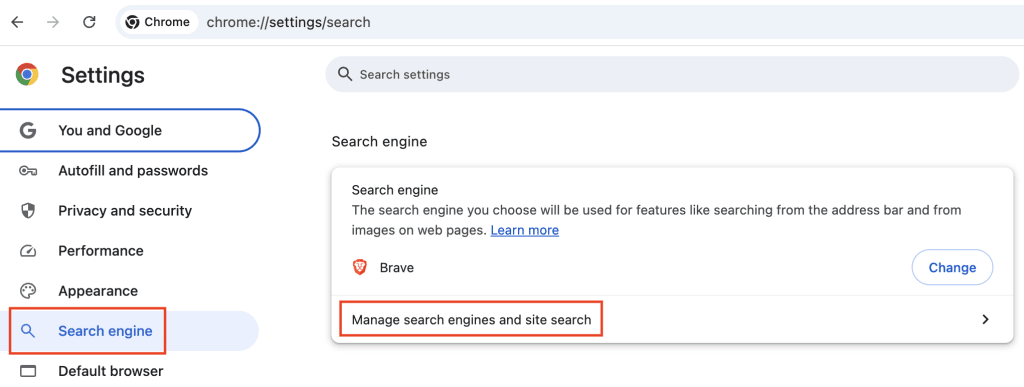
2. Gå til Søgemaskine, og klik på Administrer søgemaskiner og websitesøgning.
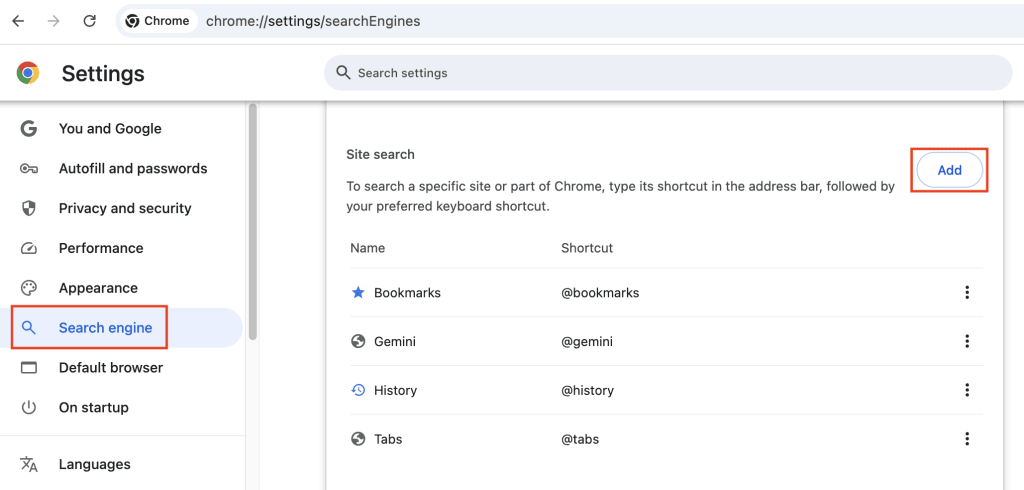
3. Klik på Tilføj under Websitesøgning.
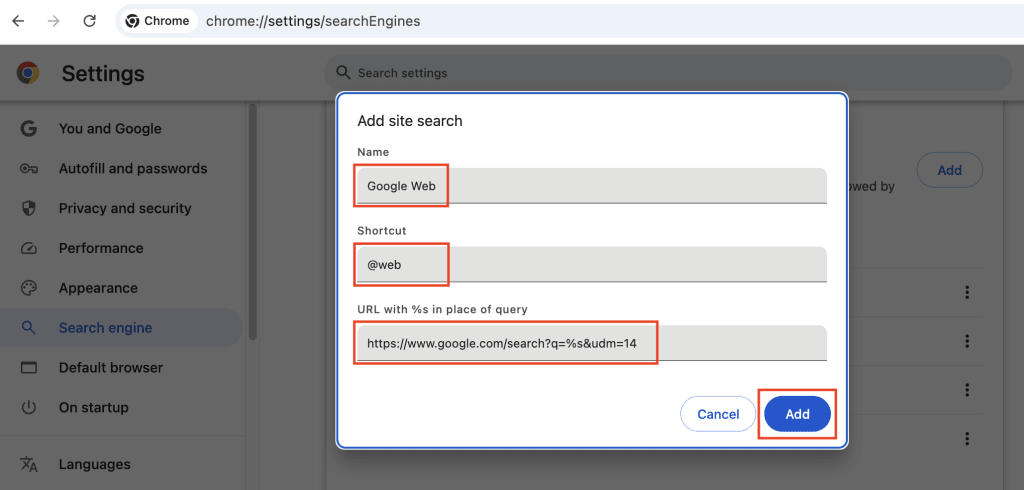
4. Udfyld følgende detaljer:
- Navn: Google Web
- Genvej: @web
- URL med %s i stedet for forespørgsel: https://www.google.com/search?q=%s&udm=14
5. Klik på Tilføj.
6. Klik på de tre lodrette prikker ⋮ ud for Google Web, og vælg Gør til standard.

Enhver standardsøgning, De foretager fra Chromes adresselinje, går nu udenom AI Overview og returnerer rene webresultater.
Deres privatliv fortjener mere end en midlertidig løsning
Gemini, Googles egen AI, er dybt integreret i Googles økosystem, herunder Gmail, Android, Google Docs og Google Drev. Dette giver virksomheden bred adgang til Deres data og vækker mistanke om, hvordan disse data kan bruges til at understøtte Googles forretningsmodel, herunder til målrettede annoncer og AI-træning. For many får manglen på klar gennemsigtighed og meningsfuldt samtykke denne integration til at føles mere som overvågning.
AI Overviews er blot endnu en måde for Google at presse AI ind i Deres liv ved at ændre selve standard-søgeoplevelsen. Det er ikke alle, der støtter denne AI-overtagelse, især ikke når den er indbygget i tjenester, som folk bruger hver dag. Hvis De er enig, er det en start at slå AI Overviews fra.
Men hvis De mener det alvorligt med at holde Deres data ude af Googles AI-systemer, er det mest effektive skridt i første omgang at reducere, hvor meget De forlader Dem på Google.
Dernæst kan De skifte til et krypteret økosystem, der mener, at privatliv bør være standarden på internettet, ikke noget De skal kæmpe for. AI kan være nyttig, men den bør være valgfri, gennemsigtig og bygget på samtykke. Vores egen AI-assistent(nyt vindue) gemmer aldrig logfiler og træner ikke på Deres data. Når det kommer til søgning, kan De vælge en europæisk søgemaskine med tilvalgs-AI-funktioner eller slet ingen AI.
Google is not the only company whose AI tools have implications for your privacy. Whether you’re using AI for work or in your daily life, it’s worth understanding exactly how your data is being handled — because the defaults of Big Tech rarely have your best interests in mind.