
Las herramientas de IA ahora forman parte del trabajo diario, ayudando a resumir notas de reuniones, redactar borradores de correos electrónicos, depurar código, analizar hojas de cálculo y convertir documentos en presentaciones. Sin embargo, cuando se utilizan sin aprobación ni supervisión, pueden plantear graves problemas de privacidad de la IA, exponer información empresarial confidencial y dejar a los equipos de TI sin la posibilidad de ver adónde van los datos de la empresa.
Esta guía explica qué es la Shadow AI, cómo se extiende en las organizaciones y los graves riesgos que genera. Le mostraremos cómo detectar herramientas no aprobadas e implementar medidas de protección prácticas para resguardar los datos de su empresa, sin ralentizar a su equipo.
- ¿Qué es la Shadow AI?
- Shadow AI frente a Shadow IT
- ¿Cómo se produce la Shadow AI?
- ¿Se entrena la IA automáticamente con sus datos?
- Ejemplos de Shadow AI
- ¿Cuáles son los riesgos de la Shadow AI?
- Cómo detectar la Shadow AI
- Cómo reducir los riesgos de la Shadow AI
- Qué hacer si ya se han compartido datos confidenciales
- Un asistente privado de IA para equipos
¿Qué es la Shadow AI?
La Shadow AI es cualquier uso de la inteligencia artificial para el trabajo que quede fuera de los sistemas y políticas aprobados por una empresa. Puede implicar una herramienta no aprobada, una cuenta personal utilizada para trabajos de la empresa o un servicio de IA aprobado utilizado con datos o para tareas que la organización no ha autorizado.
La Shadow AI suele comenzar con las presiones laborales cotidianas: un plazo ajustado, la necesidad de encontrar una forma más rápida o mejor de trabajar, o una herramienta que no cumple del todo su cometido. A veces hay disponible una herramienta de IA aprobada, pero las personas recurren a otra parte porque están más familiarizadas con otra opción.
Shadow AI frente a Shadow IT
El término Shadow IT es una denominación más amplia para referirse a cualquier software o hardware utilizado sin la aprobación o supervisión de una organización. Entre los ejemplos habituales se incluyen el almacenamiento en la nube personal utilizado para el trabajo, las aplicaciones de mensajería no autorizadas y las plataformas de gestión de proyectos no aprobadas.
La Shadow AI es una forma específica de Shadow IT que involucra sistemas de IA y funciones impulsadas por IA. La IA introduce un desafío adicional en la gobernanza de datos porque la información de la empresa puede ser enviada a un sistema externo o procesada de formas poco conocidas fuera del control de la organización.
¿Cómo se produce la Shadow AI?
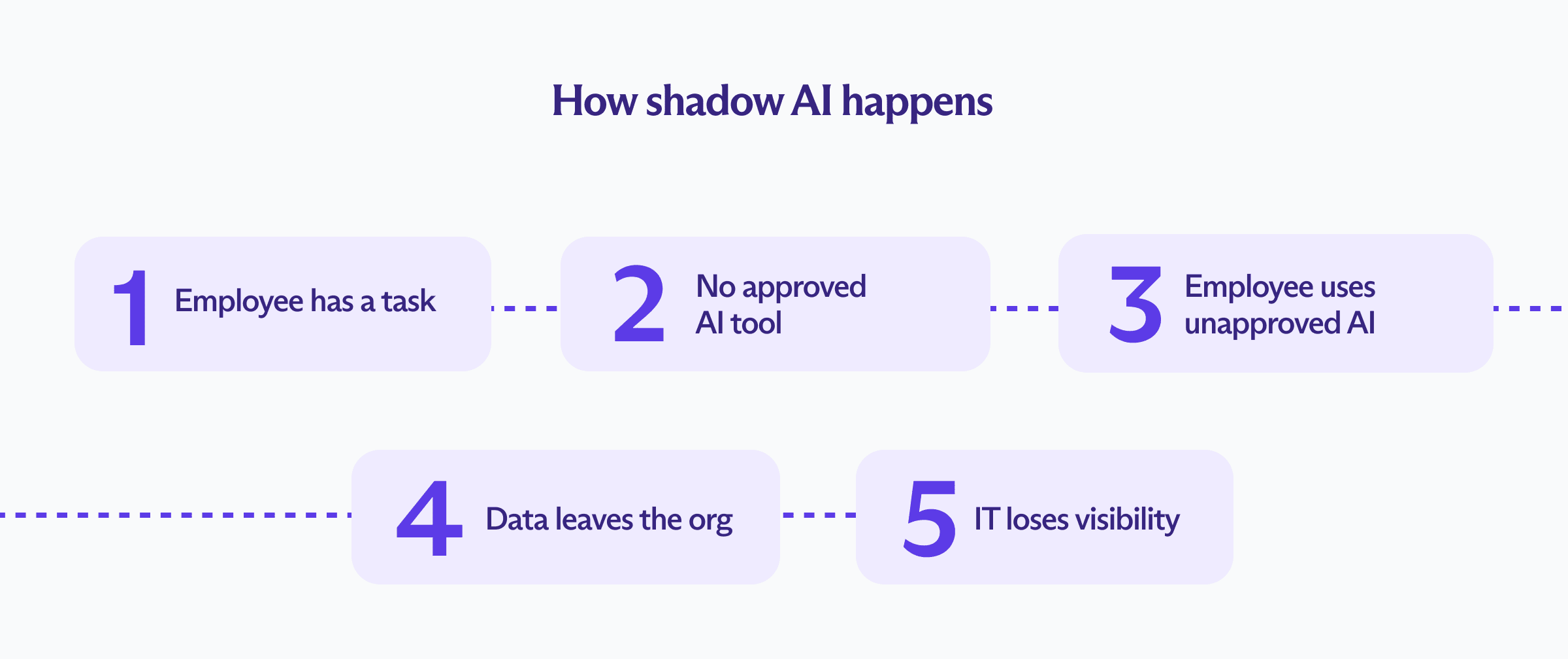
Los empleados pueden ingresar grandes cantidades de información de la empresa en una ventana de chat de IA en cuestión de segundos. Según los ajustes de la IA, la herramienta puede conservar la información ingresada, compartirla con terceros (como corredores de datos o proveedores de analítica, como ocurrió en el caso de la vulneración de OpenAI) o utilizarla para publicidad dirigida o para el desarrollo de modelos.
La Shadow AI suele propagarse debido a algunas deficiencias organizativas comunes.
Falta de una alternativa aprobada
Es más probable que los empleados utilicen herramientas de Shadow AI cuando la empresa no ha proporcionado una opción aprobada. Una encuesta de BlackFog(nueva ventana) realizada a 2,000 trabajadores reveló que el 49% de los empleados adopta herramientas de IA sin la aprobación del empleador, el 63% cree que es aceptable usar la IA cuando no hay una opción aprobada por la empresa y el 51% ha conectado herramientas de IA a los sistemas de trabajo sin el conocimiento de TI.
Políticas poco claras
Es posible que los empleados no estén seguros de qué herramientas, tareas y tipos de información están permitidos. Las directrices de la empresa pueden restringir claramente los datos altamente confidenciales, pero apenas mencionar las notas de reuniones internas, los borradores de correos electrónicos, las hojas de cálculo, el código fuente o las conversaciones con los clientes.
Una encuesta de IT Brew(nueva ventana) realizada a 241 profesionales de TI reveló que el 35 % confía poco o nada en que los empleados conozcan las políticas de seguridad de datos y uso de IA de su empresa, y solo el 12 % se sintió «muy confiado». Otra encuesta de WorkNest(nueva ventana) realizada a 505 empleadores y profesionales de RR. HH. reflejó que el 54 % de las organizaciones no tiene ninguna política sobre IA, el 24 % aún está elaborando una y solo el 13 % cuenta con normas claras y documentadas.
Procesos de aprobación lentos
La presión por cumplir con los plazos puede hacer que una revisión prolongada de seguridad o de compras parezca poco práctica. Cuando los empleados pueden acceder a una herramienta gratuita de inmediato, la lentitud de los procesos internos fomenta las soluciones alternativas no oficiales.
Nuevas funciones de IA en software aprobado
Un proveedor puede agregar funciones de IA generativa a una aplicación que ya superó una revisión de seguridad, y el software permanece en la lista aprobada aunque nadie haya evaluado cómo la nueva función procesa, almacena o comparte los datos de la empresa. El empleado no ha incumplido ninguna política, pero el resultado es el mismo que en los demás casos: los datos de la empresa se transmiten a través de un canal que nadie ha auditado realmente.
Conocimiento limitado sobre el manejo de datos
Es posible que los empleados no sepan cómo los proveedores de IA como ChatGPT y Gemini conservan las instrucciones, procesan los archivos subidos, utilizan las conversaciones para mejorar el servicio o comparten datos con otros proveedores. Pueden asumir que la información ingresada desaparece al cerrar la pestaña del navegador, incluso cuando quedan copias en los historiales de la cuenta, registros, copias de seguridad o sistemas conectados.
El informe de Kolide(nueva ventana) reflejó que, aunque el 89 % de los empleados utiliza la IA de forma mensual, solo el 56 % de las empresas ha explicado a su personal los riesgos de seguridad de la IA.
Ejemplos de Shadow AI
| Equipo | Ejemplo de Shadow AI | Información potencialmente expuesta | Impacto potencial |
|---|---|---|---|
| Desarrollo de software | Pegar código interno en un chatbot público para depurar | Código fuente, credenciales, arquitectura del sistema y funciones no publicadas | El código o los secretos propietarios pueden conservarse fuera de los sistemas de la empresa |
| Producto | Subir una hoja de ruta para su resumen | Fechas de lanzamiento, estrategia de producto, precios e información de socios | Los planes de negocio confidenciales pueden quedar sin gestionar en servidores de terceros |
| Marketing y diseño | Ingresar planes de campaña en una herramienta de redacción o diseño con IA | Productos no lanzados, investigación de clientes, activos de marca y datos de la audiencia | La información confidencial de las campañas puede procesarse sin revisión legal ni de seguridad |
| Análisis de datos | Subir conjuntos de datos de clientes a una herramienta de análisis externa | Datos personales, registros comercialmente confidenciales e información estratégica privada | La información protegida o regulada puede divulgarse a terceros no aprobados |
| Recursos humanos | Utilizar una herramienta de IA para evaluar solicitudes o resumir entrevistas | Datos de candidatos, información laboral y criterios de evaluación | La exposición de datos del personal puede vulnerar el GDPR o la CCPA |
| Ventas | Subir transcripciones de llamadas o notas de la cuenta para su análisis | Identidades de clientes, detalles del contrato, precios y estrategia de ventas | La exposición de datos de clientes puede vulnerar el GDPR o la CCPA |
| Soporte al cliente | Pegar tickets de soporte en un chatbot público | Nombres de clientes, detalles de la cuenta, quejas y correspondencia | Los registros de soporte conservados pueden infringir el GDPR o la CCPA |
| Finanzas | Pedir a un asistente de IA que analice hojas de cálculo internas | Presupuestos, proyecciones, información de nómina y registros de transacciones | Los datos financieros pueden procesarse sin las medidas de protección adecuadas |
| Departamento legal | Subir contratos o archivos de casos para su resumen | Asesoramiento confidencial, términos contractuales e información de clientes | El uso indebido de los datos del cliente puede vulnerar el GDPR o la CCPA y afectar el secreto profesional |
| Dirección | Utilizar un servicio de IA para revisar documentos de la junta directiva o planes estratégicos | Planes de adquisición, objetivos internos y debates ejecutivos | Información corporativa altamente confidencial puede quedar expuesta |
¿Se entrena la IA automáticamente con sus datos?
Los modelos de lenguaje de gran tamaño (LLM) no se vuelven a entrenar automáticamente con cada instrucción en tiempo real, por lo que una conversación no se convertirá inevitablemente en parte del modelo de IA ni aparecerá en la respuesta de otro usuario. Sin embargo, el nivel de riesgo depende del proveedor, el tipo de cuenta, los ajustes de privacidad, el contrato y cómo se haya configurado el servicio.
Un proveedor de IA puede conservar las instrucciones y los archivos subidos, ponerlos a disposición para revisión humana, usarlos para mejorar sus servicios o compartirlos con proveedores de infraestructura y de modelos.
Incluso cuando el entrenamiento del modelo esté desactivado, la información puede aparecer en historiales de cuentas, registros operativos, sistemas de monitoreo de abusos, copias de seguridad, registros del navegador, servicios conectados o integraciones de terceros. Si su contenido ya ha contribuido al entrenamiento del modelo, desactivar esta opción no hará que el modelo olvide sus conversaciones anteriores.
¿Cuáles son los riesgos de la Shadow AI?

La IA puede influir en las decisiones, generar material para los clientes, escribir código o analizar datos personales; todo lo cual crea riesgos que van más allá de la seguridad de la herramienta en sí:
Vulneración de datos
El Informe sobre el costo de una vulneración de datos(nueva ventana) de IBM de 2025 reveló que una de cada cinco organizaciones había sufrido una vulneración vinculada a la Shadow AI; sin embargo, solo el 37 % contaba con políticas diseñadas para gestionarla o detectarla.
Las organizaciones con altos niveles de Shadow AI enfrentaron costos de vulneraciones que superaron en un promedio de $670,000 a los de aquellas con poca o ninguna Shadow AI. Además, los incidentes relacionados con la Shadow AI expusieron información personal y propiedad intelectual con mayor frecuencia que el promedio global.
Exposición de información confidencial
Los empleados pueden compartir documentos internos, código fuente, información financiera, contratos, registros de clientes, planes de productos o secretos comerciales sin darse cuenta de que el proveedor de IA conserva la información ingresada. Incluso cuando la información se excluye del entrenamiento del modelo, puede seguir expuesta a la vulneración de cuentas, filtraciones de seguridad, acceso de proveedores, integraciones no seguras o requerimientos judiciales.
Por ejemplo, Samsung prohibió ChatGPT(nueva ventana) en toda la empresa en mayo de 2023 después de que los empleados pegaran material confidencial en él tres veces en 20 días, incluido código fuente de semiconductores, algoritmos de detección de defectos y la transcripción de una reunión interna.
Pérdida de propiedad intelectual
El conocimiento propietario suele ser el activo más valioso de una empresa. Subir código, investigaciones, diseños de productos, procesos o documentos de estrategia a un servicio de IA externo puede entrar en conflicto con acuerdos de confidencialidad o debilitar la capacidad de la empresa para controlar esa información. Además, un empleado puede utilizar contenido generado por IA sin comprender sus orígenes, restricciones de licencia o similitud con material de terceros.
Violaciones reglamentarias y de privacidad
Los datos personales siguen estando sujetos a las leyes de privacidad de datos cuando se procesan mediante una herramienta de IA. La Shadow AI puede eludir las medidas de protección de la privacidad porque los equipos legales pertinentes nunca llegan a saber que dicho procesamiento se está llevando a cabo. La Oficina del Comisionado de Información del Reino Unido advierte que los sistemas de IA pueden amplificar los riesgos de seguridad existentes(nueva ventana). Las infracciones graves del GDPR pueden acarrear sanciones de hasta 20 millones de euros o el 4 % de la facturación global anual de la organización correspondiente al ejercicio financiero anterior, el monto que sea mayor.
Integraciones no seguras y acceso excesivo
Las herramientas de IA pueden conectarse al correo electrónico, al almacenamiento en la nube, a calendarios, repositorios de código, bases de datos de clientes y plataformas de colaboración. Permisos amplios, API mal aseguradas, tokens de acceso filtrados, extensiones de navegador maliciosas y servicios de terceros comprometidos pueden exponer los sistemas y datos de la empresa más allá de la información ingresada en una sola instrucción.
En la vulneración de Salesloft Drift, los atacantes robaron tokens OAuth de Drift, una integración de asistente de ventas de IA, y los usaron para extraer datos de instancias de Salesforce en más de 700 organizaciones, incluidos contactos comerciales, claves de API y credenciales en la nube incrustadas en casos de soporte.
Ataques de inyección de instrucciones
Esta vulnerabilidad existe en cualquier sistema de IA conectado, esté aprobado o no: los atacantes pueden manipular un sistema de IA mediante instrucciones ocultas en documentos, páginas web, correos electrónicos u otros contenidos que este procese, haciendo que revele información, ignore sus instrucciones originales o realice acciones no deseadas.
La Shadow AI aumenta los riesgos porque una herramienta o un agente de IA no aprobado puede no haber sido evaluado nunca contra la inyección de instrucciones ni limitado a los permisos que realmente necesita. Si un ataque tiene éxito, es posible que los equipos de seguridad tengan muy poca visibilidad de lo sucedido o de cómo contenerlo. Las consecuencias son especialmente graves cuando el agente de IA puede acceder a datos confidenciales o realizar acciones sin revisión humana.
Falta de rendición de cuentas
La actividad de la Shadow AI a menudo no deja un registro de auditoría centralizado. Es posible que los equipos de seguridad no puedan determinar qué información se envió, qué modelo la procesó, qué resultado produjo o cómo influyó ese resultado en una decisión. Investigar un error, una queja, una vulneración de datos o una consulta reglamentaria resulta mucho más difícil sin esos registros.
Costos imprevistos y dependencia de proveedores
Las suscripciones independientes y las cuentas de API pueden generar gastos duplicados en distintos departamentos. Además, las herramientas experimentales pueden quedar incrustadas en flujos de trabajo importantes antes de que los equipos de compras hayan evaluado sus precios, confiabilidad o disponibilidad a largo plazo. Un servicio gratuito puede volverse fundamental para la empresa sin un contrato de servicio, un plan de continuidad o una forma práctica de trasladar el flujo de trabajo a otra parte.
Cómo detectar la Shadow AI
La Shadow AI puede ser difícil de detectar porque los empleados pueden utilizar cuentas personales, extensiones de navegador, funciones de IA incrustadas, navegadores con IA o herramientas que se confunden con el tráfico web normal. Por lo tanto, las organizaciones necesitan visibilidad sobre qué servicios se están utilizando y cómo se desplazan los datos de la empresa a través de ellos.
El monitoreo debe ser proporcionado y respetar la privacidad de los empleados. El objetivo debe ser identificar herramientas y flujos de datos de riesgo sin inspeccionar rutinariamente el contenido de cada instrucción o conversación.

A continuación le presentamos algunos consejos para identificar la Shadow AI en su organización:
Crear un inventario de uso de IA
Pregunte a los equipos qué herramientas de IA utilizan actualmente, para qué tareas las emplean y qué les impide usar alternativas aprobadas. Una breve encuesta, entrevistas con los responsables de departamento y un período de divulgación voluntaria pueden revelar usos que los controles técnicos pasan por alto. Es más probable que los empleados sean honestos cuando el objetivo es comprender sus necesidades en lugar de sancionar la experimentación inicial.
Revisar la actividad de la red y las aplicaciones
Los equipos de seguridad pueden utilizar registros de red, inventarios de software y herramientas de seguridad de acceso a la nube para identificar conexiones con servicios de IA conocidos. El monitoreo puede mostrar a qué servicios se accede y cuántos datos se transfieren sin capturar el contenido de cada conversación.
Auditar extensiones de navegador y complementos
Las extensiones de navegador pueden añadir funciones de IA para redacción, resumen, traducción, reuniones y programación a casi cualquier flujo de trabajo. Revise qué extensiones están instaladas, qué permisos solicitan y si pueden leer el contenido de páginas web, correos electrónicos, documentos o información de inicio de sesión.
Verificar gastos y registros de compras
Las rendiciones de gastos de los empleados, los estados de cuenta de tarjetas corporativas y los registros de compras pueden revelar suscripciones de IA de pago que nunca han superado una revisión de seguridad. Los pagos recurrentes de diferentes equipos también pueden sacar a la luz herramientas duplicadas y cuentas no oficiales.
Buscar claves de API e integraciones no gestionadas
Revise los repositorios de código, gestores de secretos, entornos en la nube, paneles de control de facturación y plataformas de automatización en busca de conexiones con proveedores externos de IA. Las claves de API no gestionadas o los cargos de uso desconocidos pueden indicar la existencia de un prototipo, una integración o una herramienta interna que no ha sido aprobada formalmente.
Utilizar controles de prevención de pérdida de datos
Las herramientas de prevención de pérdida de datos pueden identificar intentos de subir categorías de información confidencial, como registros personales, credenciales, datos financieros y código fuente. Los controles deben ser proporcionados y comunicarse claramente. Los empleados deben entender qué se monitorea, por qué es necesario y cómo realizar su trabajo legítimo mediante sistemas aprobados.
Trabajar con los empleados en lugar de al margen de ellos
El monitoreo técnico por sí solo no revelará cada caso de Shadow AI. Los empleados pueden utilizar cuentas personales, dispositivos móviles o herramientas que aparecen como tráfico web normal. Mantener conversaciones periódicas con los equipos permite identificar en qué puntos los flujos de trabajo actuales generan fricción y por qué los empleados buscan herramientas externas.
Cómo reducir los riesgos de la Shadow AI

Reducir la Shadow AI exige ofrecer alternativas prácticas, establecer políticas claras, controles de acceso adecuados, capacitación para los empleados y una revisión continua. Las medidas de protección eficaces deben respaldar el uso legítimo de la IA manteniendo los datos de la empresa dentro de los sistemas aprobados:
Proporcionar a los empleados una herramienta de IA aprobada
Es menos probable que los empleados busquen alternativas cuando usted les proporciona un asistente de IA para empresas que satisface sus necesidades prácticas. Cualquier herramienta aprobada debe ofrecer sólidas protecciones de privacidad, términos claros en el tratamiento de datos, controles empresariales adecuados y capacidad suficiente para respaldar las tareas habituales.
Evitar las prohibiciones absolutas
Una prohibición total puede hacer que el uso de la IA sea aún más clandestino, en especial si los empleados ya dependen de estas herramientas. Algunos pueden migrar a cuentas personales, dispositivos móviles, extensiones de navegador o servicios de IA menos confiables que resultan más difíciles de identificar para la organización.
Crear una política de uso aceptable de la IA
Utilice ejemplos basados en flujos de trabajo reales. La frase «No comparta información confidencial» deja demasiado margen a la interpretación. Una política más clara podría indicar a los empleados que nunca suban exportaciones de soporte al cliente, código fuente, contratos, credenciales, resultados financieros no publicados o registros identificables de empleados a un servicio no aprobado.
Clasificar los datos antes de establecer normas sobre la IA
Identifique qué categorías de información son públicas, internas, confidenciales, reguladas o altamente restringidas. Conecte cada categoría con los usos permitidos de la IA. El texto de marketing público puede ser adecuado para una gama más amplia de herramientas, mientras que los datos personales, las credenciales, los secretos comerciales y el material legal confidencial pueden requerir un sistema estrictamente controlado o excluirse por completo.
Revisar periódicamente el software aprobado en busca de nuevas funciones de IA
Una aplicación puede procesar los datos de manera diferente tras incorporar un asistente de IA, transcripción automática, generación de contenido o análisis predictivo. Las revisiones periódicas de los proveedores permiten identificar estos cambios y confirmar que las herramientas aprobadas anteriormente siguen cumpliendo con los requisitos de seguridad, privacidad y cumplimiento de la organización.
Limitar los permisos
Otorgue a las herramientas de IA acceso únicamente a los datos y sistemas necesarios para una tarea aprobada. Utilice cuentas gestionadas por la empresa, inicio de sesión único (SSO), autenticación de dos factores (2FA), permisos basados en roles y la eliminación centralizada de cuentas donde esté disponible. Evite conectar un asistente de IA para empresas a toda una unidad de almacenamiento, bandeja de entrada o base de datos de clientes cuando una fuente más acotada sea suficiente.
Establecer normas según el rol y el caso de uso
Los distintos equipos tienen necesidades y niveles de riesgo diferentes. Los desarrolladores pueden necesitar acceso a API para pruebas o creación de prototipos. Los equipos de marketing pueden requerir la generación de texto e imágenes. Los equipos legales o de RR. HH. pueden trabajar con información que exige restricciones mucho más estrictas. Las normas basadas en roles permiten mantener una política realista al tiempo que limitan el acceso a datos confidenciales y funciones de alto riesgo.
Capacitar a los empleados
Los empleados necesitan la capacitación suficiente en IA para comprender tanto los beneficios como las limitaciones de los sistemas que utilizan. La formación debe abarcar la privacidad de la IA, la confidencialidad, las alucinaciones, los sesgos, la propiedad intelectual, la inyección de instrucciones, la revisión humana y el reporte de incidentes. El nivel de capacitación adecuado depende de los conocimientos del personal, su experiencia y el contexto en el que se utiliza la IA.
Crear un proceso de aprobación sencillo
Un proceso práctico podría recopilar el nombre de la herramienta, la tarea prevista, los datos involucrados, las integraciones necesarias y el beneficio empresarial esperado. A continuación, los equipos legal y de seguridad pueden aprobarla, restringirla, probarla, aislarla en un entorno de pruebas o rechazarla en función del riesgo real. Un proceso de compras prolongado puede incitar a los empleados a buscar su propia solución alternativa. Establezca un plazo razonable de revisión y explique qué información se requiere para tomar una decisión.
Mantener a las personas responsables del resultado
El trabajo asistido por IA debe tener un responsable humano. Exija una revisión antes de que los resultados afecten a clientes, empleados, finanzas, decisiones legales, código de producción, información publicada u otras áreas de gran impacto. Cualquier persona que utilice una herramienta de IA sigue siendo responsable de verificar su precisión, idoneidad, confidencialidad y el cumplimiento de la política de la empresa.
Documentar las decisiones importantes asistidas por IA
Mantenga un registro claro cuando la IA contribuya a tomar decisiones que afecten a clientes, empleados, finanzas, asuntos legales u otras áreas de gran impacto. Un registro de auditoría confiable respalda la rendición de cuentas y ayuda a las organizaciones a investigar errores, explicar resultados y responder a quejas o consultas reglamentarias.
Qué hacer si ya se han compartido datos confidenciales
Trate la divulgación accidental de información en una herramienta de IA como cualquier otro posible incidente de datos. Actúe con rapidez siguiendo estos pasos.
Identifique qué se compartió: Confirme qué información se ingresó o subió, qué herramienta y cuenta se utilizaron, cuándo se produjo la divulgación y quiénes pudieron haber tenido acceso a los datos.
Elimine la información siempre que sea posible: Elimine la conversación y cualquier archivo subido de la herramienta. Revise los términos y las opciones de soporte del proveedor para ver si puede presentar una solicitud formal de eliminación.
Verifique qué puede conservar el proveedor: Borrar un chat de la vista no siempre elimina todas las copias. Revise y documente lo que indica el proveedor sobre los registros operativos, las copias de seguridad, la revisión humana, el entrenamiento de modelos y los plazos de eliminación para ayudar a determinar si puede haber quedado algún dato.
Asegure los sistemas afectados: Revoque los permisos otorgados a la herramienta de IA o a los complementos conectados. Modifique las contraseñas, claves de API, tokens de acceso u otras credenciales que hayan aparecido en las instrucciones o en los archivos adjuntos.
Notifique a los equipos pertinentes: Reporte el incidente al equipo de seguridad, privacidad, legal o de protección de datos de la organización. Ellos podrán evaluar las obligaciones contractuales, los requisitos reglamentarios y si es necesario informar a los clientes o socios afectados.
Aprenda del incidente: Documente lo sucedido y utilícelo para mejorar la capacitación, los controles y las alternativas aprobadas. Evite sancionar a los empleados que reporten errores legítimos, ya que una respuesta punitiva puede desanimar a otros a informar de futuros incidentes.
Un asistente privado de IA para equipos
Lumo for Business ofrece a su equipo un asistente de IA confiable para resumir documentos, analizar datos, revisar código, redactar borradores de contenido y explorar ideas, al tiempo que ayuda a su empresa a mantener el control de la información confidencial.
Nuestro asistente de IA para empresas no guarda registros de las conversaciones ni las utiliza para entrenar modelos de IA, y cualquier historial de chat que decida guardar está protegido con encriptación de acceso cero, lo que significa que nunca tenemos acceso a sus datos
Lumo es totalmente de código abierto, desarrollado en Europa y diseñado para respaldar el cumplimiento del GDPR y de la norma HIPAA mediante la certificación ISO 27001 y la atestación SOC 2 Tipo II de Proton.
Proporcionar a su equipo un asistente de IA eficiente y centrado en la privacidad reduce la dependencia de herramientas no aprobadas y le ayuda a mantener el uso de la IA dentro de los sistemas que supervisa.





