
게이트웨이 서버 편집 방법
- 읽기
- 0분
- 카테고리
- Proton VPN for Business
게이트웨이에 할당된 서버를 편집하려면:
1. account.protonvpn.com에 로그인합니다.
2. VPN → 게이트웨이 → 편집하려는 게이트웨이 → ⋮ → 서버 편집으로 이동합니다.
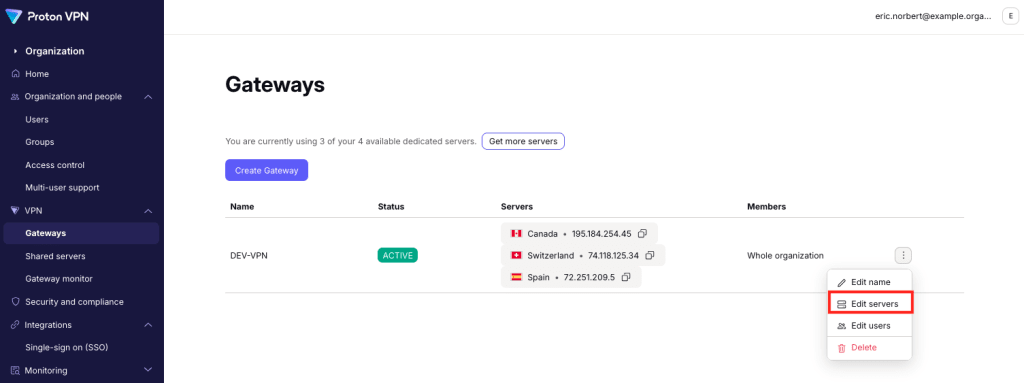
귀하의 게이트웨이에서 서버를 삭제하려면 해당 서버 옆의 휴지통 아이콘을 클릭하세요. 완료되면 저장을 선택하세요.

귀하의 게이트웨이에 서버를 추가하려면 서버 추가를 클릭하세요. 사용할 수 있는 서버가 없는 경우, 더 구매하실 수 있습니다(새 창).

이제 귀하의 게이트웨이에 VPN 서버를 할당할 수 있습니다(새 창).

완료되면 계속을 클릭하세요. 해당 게이트웨이에 사용할 수 있는 서버에 귀하의 편집 사항이 반영된 것을 확인하실 수 있습니다.