
Cách chỉnh sửa máy chủ Cổng kết nối
- Đọc
- 1 phút
- Danh mục
- Proton VPN for Business
Để chỉnh sửa các máy chủ được gán cho một Cổng kết nối:
1. Đăng nhập vào account.protonvpn.com.
2. Đi tới VPN → Cổng kết nối → Cổng kết nối muốn chỉnh sửa → ⋮ → Chỉnh sửa máy chủ.
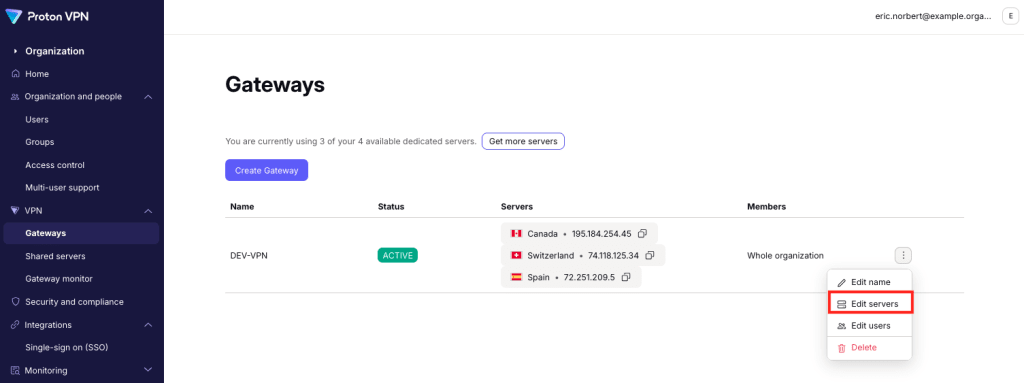
Để xóa máy chủ khỏi Cổng kết nối, hãy nhấp vào biểu tượng thùng rác bên cạnh máy chủ đó. Chọn Lưu khi hoàn tất.

Để thêm máy chủ vào Cổng kết nối, hãy nhấp vào Thêm máy chủ. Nếu không có sẵn máy chủ nào, có thể mua thêm(cửa sổ mới).

Bây giờ có thể gán máy chủ VPN cho Cổng kết nối(cửa sổ mới).

Nhấp vào Tiếp tục khi hoàn tất. Các chỉnh sửa sẽ được hiển thị trong các máy chủ hiện có của Cổng kết nối đó.