
Cum să activați protecția post-cuantică în Proton Mail
- Lectură
- 2 min
- Categorii
- Criptarea e-mailurilor
- Proton Mail
Notă: Protecția post-cuantică este implementată treptat în Proton Mail. Dacă nu vedeți încă această opțiune în contul dvs., nu trebuie să faceți nimic. Va deveni disponibilă în curând.
Puteți activa protecția post-cuantică în Proton Mail pentru a genera noi chei de criptare rezistente la calculul cuantic pentru contul dvs.
Cum funcționează
- Când activați protecția post-cuantică, contul dvs. începe să utilizeze noi chei de criptare concepute pentru a proteja viitoarele e-mailuri criptate împotriva atacurilor cu potențial cuantic.
- Protecția post-cuantică se aplică e-mailurilor criptate noi trimise de acum înainte. Momentan, aceasta nu recriptează retroactiv e-mailurile care se află deja în căsuța dvs. poștală.
- Dacă aveți activată redirecționarea criptată de la un capăt la altul, aceasta nu este compatibilă momentan cu protecția post-cuantică. Activarea protecției post-cuantice va suspenda redirecționarea criptată de la un capăt la altul.
- Este posibil să observați un mic impact asupra performanței după activarea acesteia, însă pe hardware-ul modern funcționarea Proton Mail ar trebui să rămână, în general, neschimbată.
Cerințe minime ale aplicației
Protecția post-cuantică necesită ca toate aplicațiile Proton pe care le utilizați să fie actualizate la o versiune recentă. Dacă nu vedeți opțiunea de a activa protecția post-cuantică, asigurați-vă că fiecare dintre aplicațiile dvs. Proton a fost actualizată cel puțin la versiunea minimă listată mai jos.
| Produs | Platformă | Versiune minimă |
| Android | 7.0.0 | |
| iOS | 7.0.0 | |
| Calendar | Android | 2.24.1 |
| iOS | 2.20.0 | |
| Authenticator | iOS | 1.4.2 |
| macOS | 1.4.2 | |
| Meet | Android | 1.0.3 |
| iOS | 1.0.3 | |
| Drive | Windows | 1.13.4 |
| macOS | 2.9.0 | |
| iOS | 1.54.0 | |
| Android | 2.23.0 | |
| Instrument de exportare | Toate platformele | 1.0.5 |
| Bridge | Toate platformele | 3.22.0 |
| Pass | Android | 1.32.0 |
| iOS | 1.19.2 | |
| macOS | 1.19.2 | |
| VPN | macOS | 5.1.0 |
| iOS | 6.3.0 | |
| AppleTV | 1.3.0 | |
| Android | 5.12.25 | |
| AndroidTV | 5.12.25 | |
| Portofel | Android | 1.2.7 |
| iOS | 1.2.7 |
Activare protecție post-cuantică
- Autentificați-vă pe account.proton.me și deschideți setările contului dvs..
- Selectați Criptare și chei din bara laterală.
- La secțiunea Protecție post-cuantică, faceți clic pe Activare protecție post-cuantică.

- Citiți mesajul de confirmare. Dacă doriți să continuați, bifați caseta și faceți clic pe Activare și generare chei. Vi se va solicita să introduceți parola pentru a confirma.
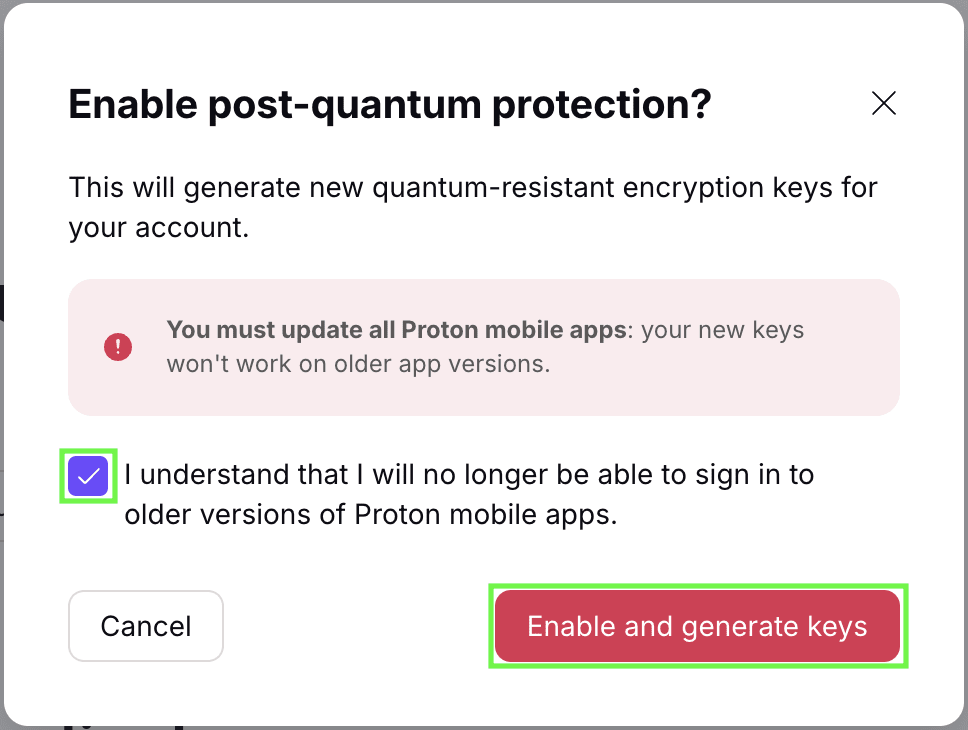
Protecția post-cuantică este acum activată pentru contul dvs.
Gestionați-vă cheile de criptare
După activarea protecției post-cuantice, puteți continua să vă gestionați cheile de criptare e-mail și cheile de cont în același mod ca înainte. Aceasta include crearea și gestionarea cheilor, descărcarea cheilor dvs. PGP și utilizarea acestora cu alte servicii compatibile cu PGP.
