
Cum să creați noi chei de criptare în Proton Mail
- Lectură
- 2 min
- Categorie
- Criptare și chei
În mod implicit, Proton Mail folosește chei de criptare pe curbe eliptice (ECC) definite pe Curve25519 pentru a vă securiza mesajele. ECC este extrem de sigur, rapid și compatibil cu aproape toate implementările OpenPGP.
Dacă contul dvs. a fost creat înainte de 2021, este posibil să aveți în continuare chei RSA. Pentru a beneficia din plin de avantajele cheilor ECC (pentru viitoarele mesaje trimise și primite), puteți genera chei noi.
În plus, s-ar putea să doriți să generați chei noi dacă credeți că cheile dvs. existente au fost compromise.
Atunci când interacționați cu anumite versiuni originale ale implementărilor OpenPGP, este posibil să fie necesar să creați o cheie RSA (dacă nu aveți deja una), lucru care poate fi făcut local, de exemplu prin rularea gpg --full-generate-key, iar apoi prin importarea cheii în contul dvs. Proton Mail.
În toate cazurile, este extrem de important să nu vă ștergeți cheile vechi utilizate pentru criptare și semnare. Dacă o faceți, vă veți pierde capacitatea de a decripta toate mesajele dvs. existente. Vă rugăm să urmați cu atenție instrucțiunile de mai jos.
Generați noi chei de criptare
Adăugarea de noi chei este posibilă numai după ce v-ați creat un cont Proton Mail.
Conectați-vă la aplicația web la mail.proton.me(fereastră nouă), accesați Setări → Toate setările → Criptare și chei → Chei de criptare e-mail și faceți clic pe Generare cheie.

Dacă generați o cheie nouă utilizând același algoritm de criptare ca o cheie existentă, veți vedea următoarea avertizare.

Puteți genera până la 20 de chei, însă cheile suplimentare vor încetini ușor Proton Mail.
Notă: Cheia nou generată va fi setată automat ca fiind cheia dvs. primară (implicită).
Schimbați cheia dvs. primară
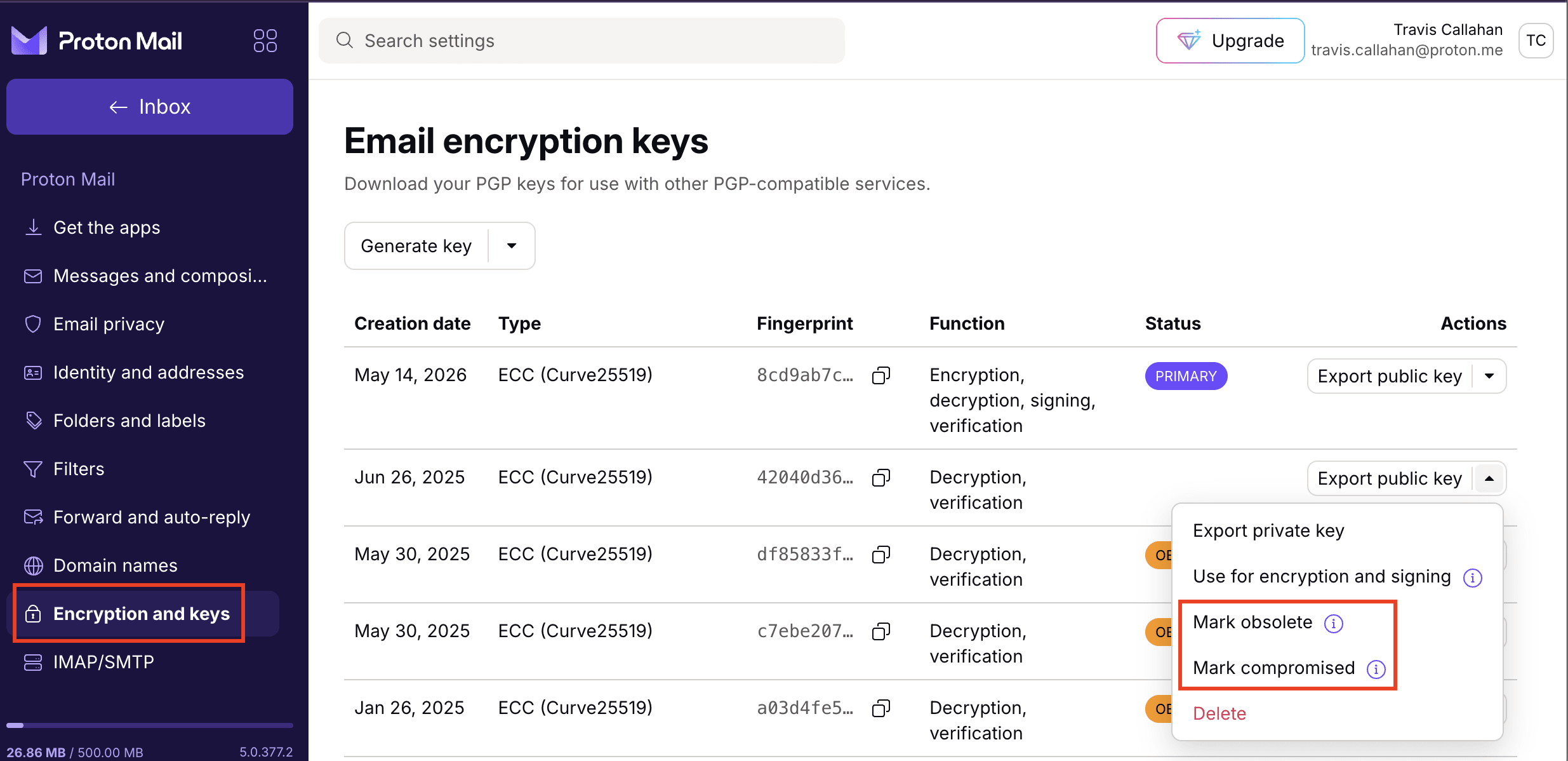
Faceți clic pe săgeata de descărcare ↓ din dreptul unei chei și selectați Utilizare pentru criptare și semnare.
 (fereastră nouă)
Marcați cheile ca nevalabile sau compromise
Dacă creați o cheie nouă deoarece credeți că vechea cheie ar putea fi compromisă sau este nevalabilă, faceți clic pe săgeata de descărcare ↓ din dreptul unei chei și selectați una dintre cele două opțiuni:
- Marcare ca nevalabilă: Aceasta dezactivează criptarea.
- Marcare ca și compromisă: Aceasta dezactivează verificarea semnăturii, pe lângă criptare.
Notă: Chiar dacă cheile dvs. de criptare sunt compromise, nu vă ștergeți cheile vechi. Acestea sunt necesare în continuare pentru a deschide mesajele care au fost criptate cu ajutorul lor.