
Comment ajouter ou retirer des utilisateurs dans votre abonnement Proton for Business
- Lecture
- 1 minute
- Catégorie
- Gérer les utilisateurs
Tous les abonnements professionnels Proton sont flexibles pour vous permettre d’ajouter autant d’utilisateurs que votre entreprise en a besoin. Après avoir sélectionné le nombre d’utilisateurs dont vous avez besoin lors de votre inscription, vous pouvez à tout moment ajouter et retirer des utilisateurs de votre abonnement depuis votre compte Proton.
Vous pouvez voir combien d’utilisateurs sont disponibles dans votre abonnement en consultant le Tableau de bord de votre compte.
Ajouter et retirer des utilisateurs de votre abonnement
Pour augmenter ou diminuer le nombre d’utilisateurs dans votre abonnement Proton for Business :
1. Connectez-vous à votre compte Proton à l’adresse account.proton.me et sélectionnez Paramètres → Tous les paramètres → Tableau de bord → Votre abonnement.
2. Sélectionnez Personnaliser l’abonnement.

3. Sélectionnez les boutons + / – à côté de Nombre d’utilisateurs pour ajouter ou retirer des utilisateurs.
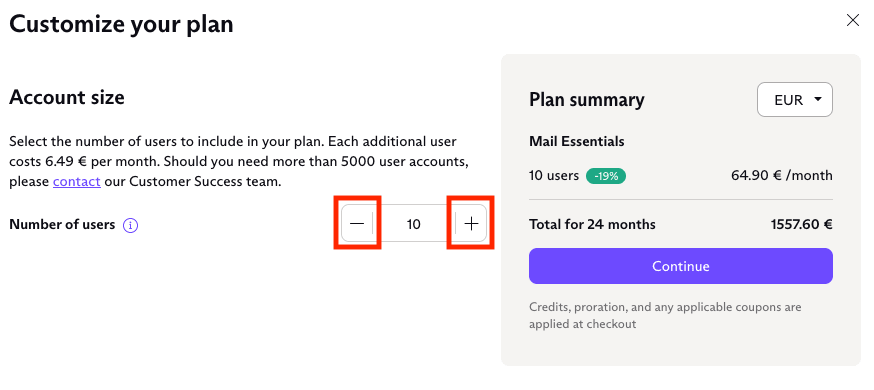
4. Cliquez sur Continuer pour accéder au paiement et payer si vous avez ajouté des utilisateurs. Si vous avez retiré des utilisateurs, nous ajouterons un crédit au prorata sur votre compte en fonction de la durée restante de votre contrat initial et du nombre d’utilisateurs que vous avez retirés.
Remarque : Pour bénéficier d’un tarif au prorata lorsque vous modifiez votre abonnement, effectuez la modification depuis votre compte Admin principal. Si vous effectuez la modification depuis un autre compte admin, le prorata ne sera pas appliqué et le plein tarif vous sera facturé à la place.
En savoir plus sur le crédit de compte
En savoir plus sur l’ajout d’utilisateurs à votre organisation