
Cara menambah atau menghapus pengguna di paket Proton for Business
- Membaca
- 1 mnt
- Kategori
- Kelola pengguna
Semua paket bisnis Proton bersifat fleksibel untuk memudahkan penambahan pengguna sebanyak yang dibutuhkan bisnis. Setelah memilih jumlah pengguna yang dibutuhkan saat mendaftar, pengguna dapat ditambahkan atau dihapus dari paket kapan saja di masa mendatang melalui Akun Proton.
Jumlah pengguna yang tersedia dalam paket dapat dilihat dengan memeriksa Dasbor akun.
Menambah dan menghapus pengguna dalam paket
Untuk menambah atau mengurangi jumlah pengguna dalam paket Proton for Business:
1. Masuk ke Akun Proton di account.proton.me dan pilih Pengaturan → Semua pengaturan → Dasbor → Paket Anda.
2. Pilih Atur paket.

3. Pilih tombol + / – di samping Jumlah pengguna untuk menambah atau menghapus pengguna.
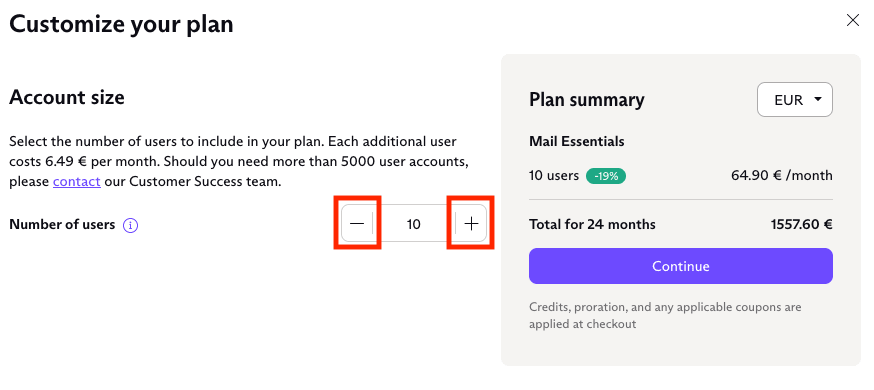
4. Klik Lanjut untuk beralih ke halaman pembayaran dan melakukan pembayaran jika telah menambahkan pengguna. Jika telah menghapus pengguna, kredit prorata akan diberikan ke akun berdasarkan sisa durasi kontrak asli dan jumlah pengguna yang telah dihapus.
Catatan: Untuk mendapatkan harga prorata saat mengubah paket, lakukan perubahan dari akun Admin Utama. Jika melakukan perubahan dari akun admin yang berbeda, prorasi tidak akan diterapkan dan biaya penuh akan dikenakan sebagai gantinya.
Pelajari lebih lanjut tentang kredit akun
Pelajari lebih lanjut tentang menambahkan pengguna ke organisasi