
วิธีจัดการผู้ใช้งานและกลุ่มเกตเวย์
- เวลาอ่าน
- 0 นาที
- หมวดหมู่
- Proton VPN for Business
เมื่อสร้างเกตเวย์(หน้าต่างใหม่)สำหรับองค์กรแล้ว ให้เพิ่มผู้ใช้งาน(หน้าต่างใหม่)และกลุ่ม(หน้าต่างใหม่)เพื่อเปิดสิทธิ์การเข้าถึงเซิร์ฟเวอร์เฉพาะของเกตเวย์
วิธีเพิ่มผู้ใช้งานและกลุ่มไปยังเกตเวย์
1. เข้าสู่ระบบที่ account.protonvpn.com.
2. ไปที่ VPN → เกตเวย์ ถัดจากเกตเวย์ที่ต้องการแก้ไข คลิกสัญลักษณ์สามจุดแนวตั้ง (⋮) → แก้ไขผู้ใช้งาน
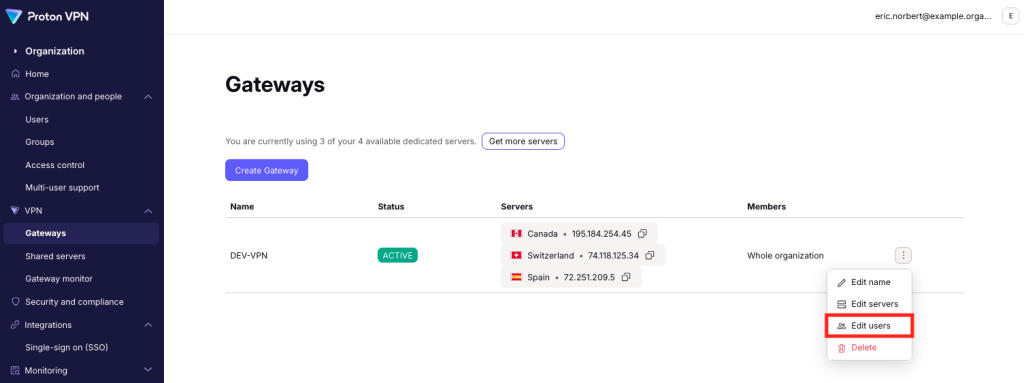
หากต้องการเปิดให้ทุกคนเข้าถึงเกตเวย์ ให้เลือก ทั้งองค์กร จากเมนูดรอปดาวน์ จากนั้นคลิก บันทึก เพื่อยืนยัน

หากต้องการจำกัดการเข้าถึงเฉพาะบุคคล ให้เลือก เลือกผู้ที่สามารถเข้าถึงได้ จากเมนูดรอปดาวน์
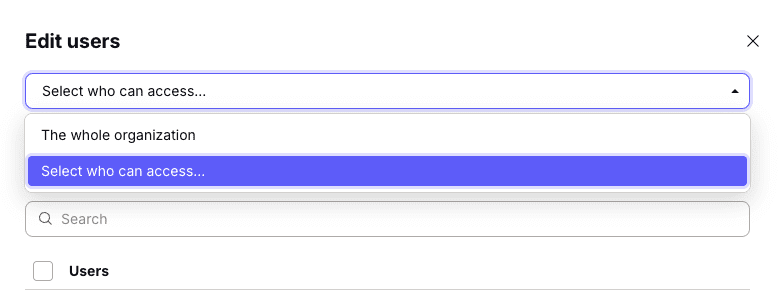
ตอนนี้สามารถเพิ่ม ผู้ใช้งาน, กลุ่ม(หน้าต่างใหม่) หรือทั้งสองอย่างได้แล้ว
วิธีเพิ่มผู้ใช้งาน: เลือกแท็บ ผู้ใช้งาน เลือกผู้ใช้งานจากรายการ หรือ ค้นหา ด้วยชื่อผู้ใช้งานหรือที่อยู่อีเมล
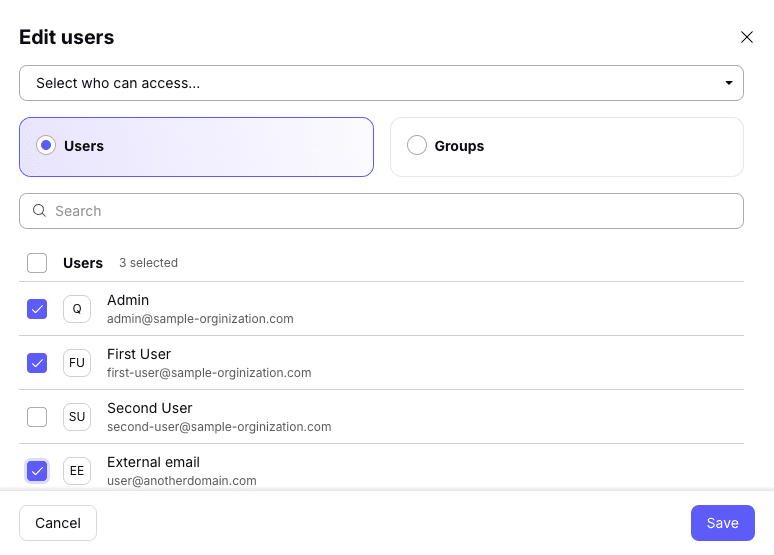
วิธีเพิ่มกลุ่ม: เลือกแท็บ กลุ่ม เลือกกลุ่มจากรายการ หรือ ค้นหา ด้วยชื่อกลุ่ม

คลิก บันทึก เมื่อเสร็จสมบูรณ์
วิธีลบผู้ใช้งานหรือกลุ่มออกจากเกตเวย์
หากต้องการลบผู้ใช้งานหรือกลุ่ม ให้ยกเลิกการเลือก โปรดทราบว่าผู้ดูแลระบบหลักขององค์กรจะต้องสามารถเข้าถึงเกตเวย์ขององค์กรได้เสมอและไม่สามารถยกเลิกการเลือกได้