
Cách quản lý người dùng và nhóm trên Cổng kết nối
- Đọc
- 2 phút
- Danh mục
- Proton VPN for Business
Sau khi tạo Cổng kết nối(cửa sổ mới) cho tổ chức, hãy thêm người dùng(cửa sổ mới) và nhóm(cửa sổ mới) để cấp quyền truy cập vào máy chủ chuyên dụng của Cổng kết nối.
Cách thêm người dùng và nhóm vào Cổng kết nối
1. Đăng nhập vào account.protonvpn.com.
2. Đi tới VPN → Cổng kết nối. Bên cạnh Cổng kết nối muốn chỉnh sửa, muốn. Nhấp vào dấu ba chấm dọc (⋮) → Chỉnh sửa người dùng.
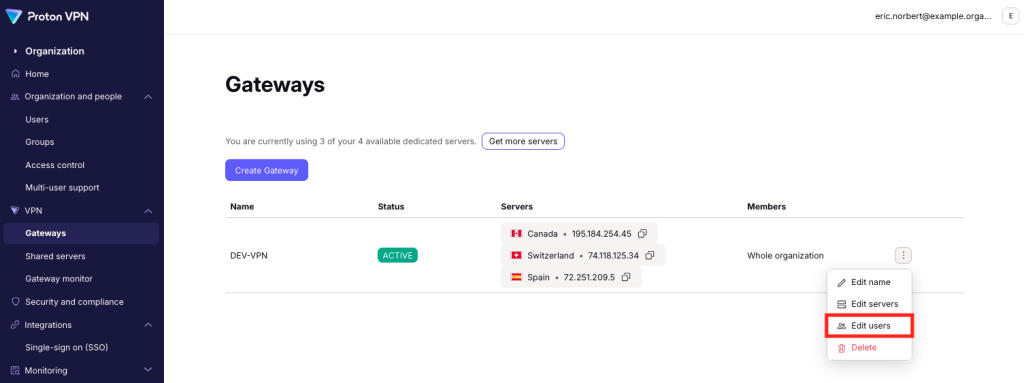
Để cấp quyền truy cập Cổng kết nối cho tất cả mọi người, hãy chọn Toàn bộ tổ chức từ menu thả xuống, sau đó nhấp vào Lưu để xác nhận.

Để giới hạn quyền truy cập cho những người cụ thể, hãy chọn Chọn người có thể truy cập từ menu thả xuống.
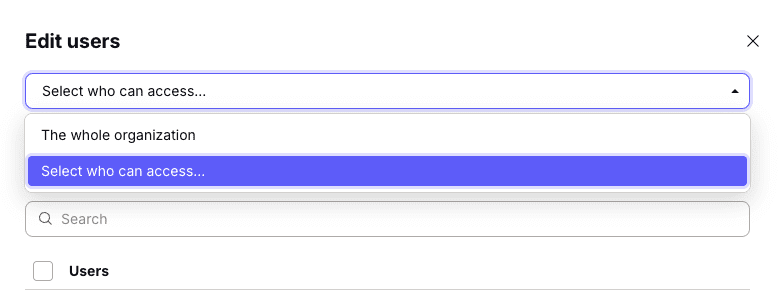
Bây giờ có thể thêm người dùng, nhóm(cửa sổ mới) hoặc cả hai
Để thêm người dùng: Chọn tab Người dùng. Chọn người dùng từ danh sách hoặc Tìm kiếm tên đăng nhập hoặc địa chỉ email.
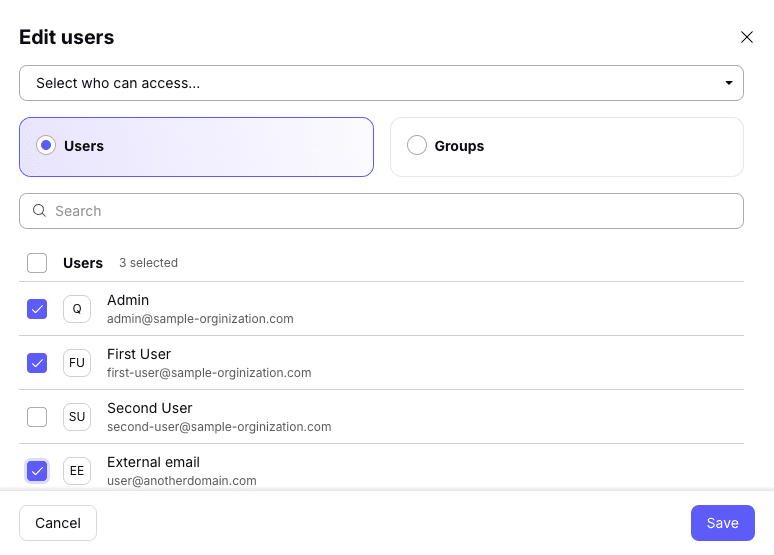
Để thêm nhóm: Chọn tab Nhóm. Chọn nhóm từ danh sách hoặc Tìm kiếm tên nhóm.

Nhấp vào Lưu sau khi hoàn tất.
Cách xóa người dùng hoặc nhóm khỏi Cổng kết nối
Để xóa người dùng hoặc nhóm, chỉ cần bỏ chọn. Lưu ý rằng quản trị viên chính của tổ chức phải luôn có quyền truy cập vào các Cổng kết nối của tổ chức và không thể bỏ chọn.