
Как управлять пользователями и группами шлюза
- Чтение
- 0 мин.
- Категория
- Proton VPN for Business
После того как вы создали шлюз(новое окно) для своей организации, добавьте пользователей(новое окно) и группы(новое окно), чтобы предоставить им доступ к выделенным серверам вашего шлюза.
Как добавить пользователей и группы в шлюз
1. Войдите на account.protonvpn.com.
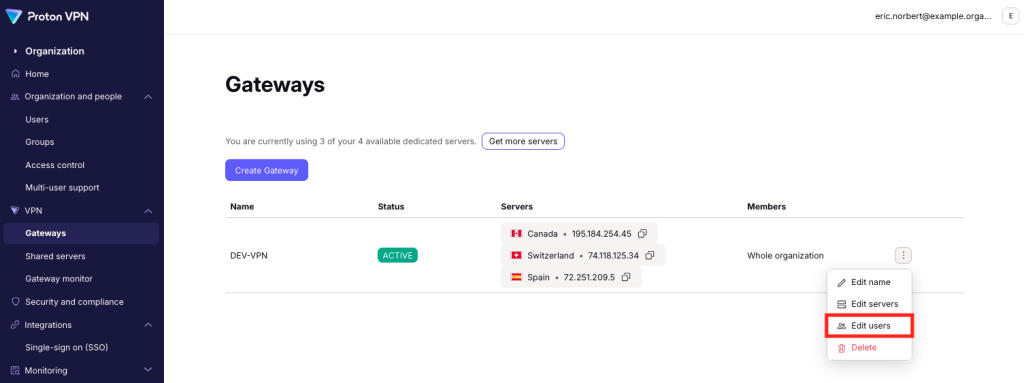
2. Перейдите в раздел VPN → Шлюзы. Рядом со шлюзом, который вы хотите изменить, вы хотите. Нажмите на три вертикальные точки (⋮) → Изменить пользователей.
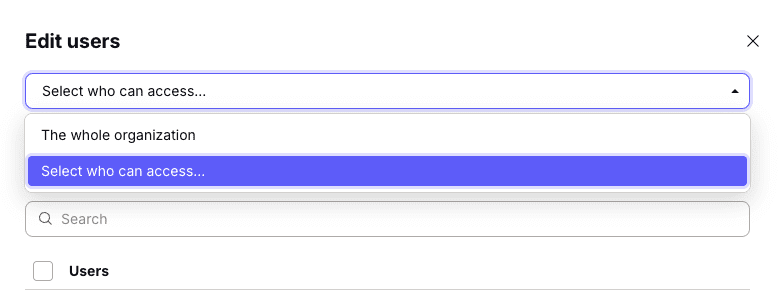
Чтобы предоставить всем доступ к вашему шлюзу, выберите Вся организация в раскрывающемся меню, затем нажмите Сохранить , чтобы подтвердить.

Чтобы ограничить доступ для определенных людей, выберите Выбрать, кто может получить доступ в раскрывающемся меню.
Теперь вы можете добавить пользователей, группы(новое окно) или и тех, и других
Чтобы добавить пользователей: выберите вкладку Пользователи. Выберите пользователей из списка или выполните Поиск по имени пользователя или адресу электронной почты.
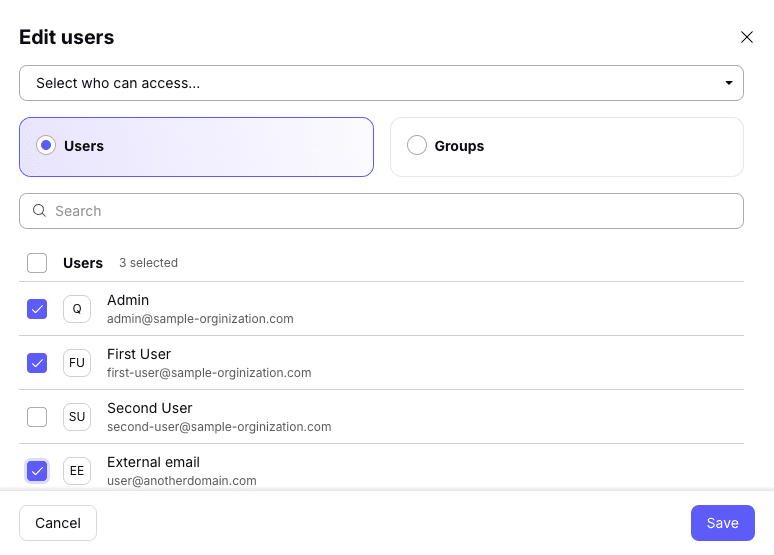
Чтобы добавить группы: выберите вкладку Группы. Выберите группы из списка или выполните Поиск по названию группы.

Когда закончите, нажмите Сохранить.
Как удалить пользователей или группы из шлюза
Чтобы удалить пользователей или группы, просто снимите с них флажки. Обратите внимание, что главный администратор вашей организации всегда должен иметь доступ к шлюзам вашей организации, и с него нельзя снять флажок.