
วิธีลบสิทธิ์การเข้าถึงห้องนิรภัยที่แชร์ออก
- เวลาอ่าน
- 0 นาที
- หมวดหมู่
- แผน Pass Family
- การใช้งาน Proton Pass
หากต้องการลบสิทธิ์การเข้าถึงห้องนิรภัยที่แบ่งปันร่วมกันของสมาชิกในครอบครัว ให้ทำตามขั้นตอนต่อไปนี้:
- เข้าสู่ระบบที่ pass.proton.me(หน้าต่างใหม่) จากนั้นเลือกห้องนิรภัยที่ต้องการยกเลิกการเข้าถึง → เลือก จัดการสิทธิ์

- เลือกไอคอนจุดสามจุดถัดจากผู้ใช้ที่ต้องการลบออกจากห้องนิรภัย → เลือก Remove access
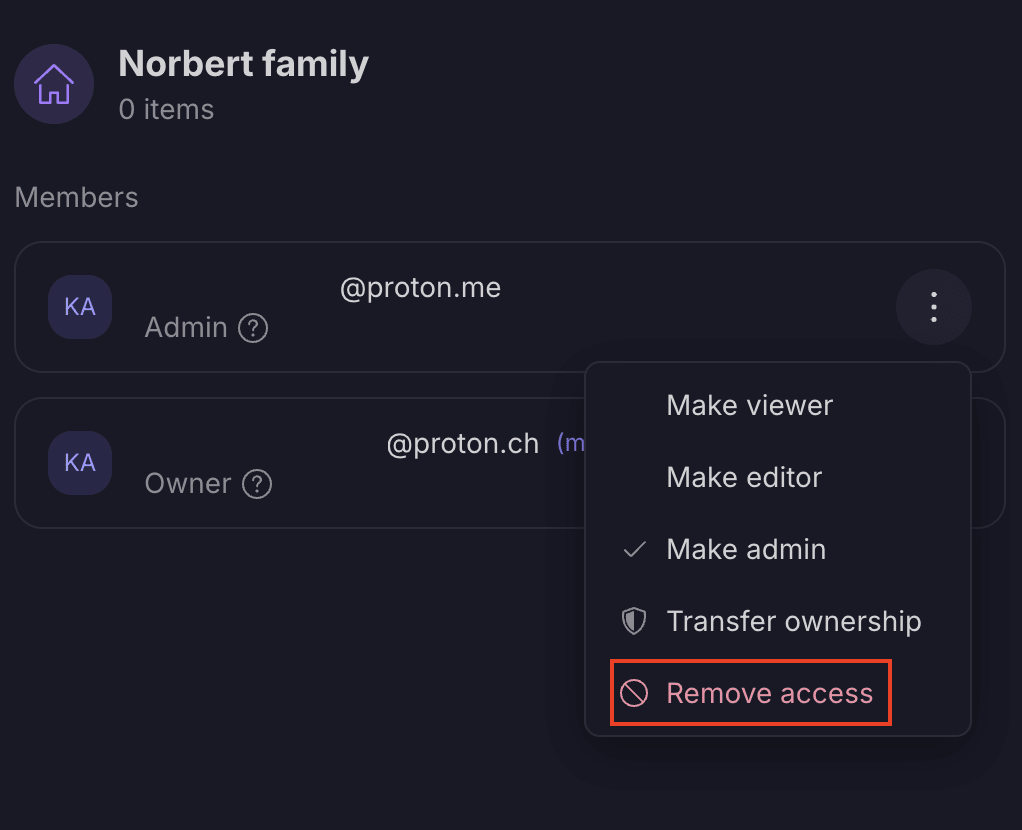
- ผู้ใช้จะไม่สามารถเข้าถึงห้องนิรภัยนี้ได้อีกต่อไป