Gmail kanske är gratis, men du betalar för det med dina data. Även om Google säger att de inte skannar eller läser Gmail-meddelanden för att anpassa annonser, existerar Gmail inom ett enormt, annonsdrivet ekosystem där aktivitet från sökningar, platssignaler, köp, appanvändning och interaktioner med AI-verktyg som Gemini kan hjälpa Google att förstå, anpassa och förbättra sina tjänster.
Anslutningen till dina Gmail-meddelanden kan vara indirekt, men den är fortfarande betydelsefull. Att be Gemini sammanfatta innehållet i ett konfidentiellt e-postmeddelande flyttar den känsliga informationen till en separat databehandlingspipeline för AI som styrs av omfattande datapolicyer för AI (inklusive träning på dina data), vilket skapar en praktisk lösning som kringgår andan i Gmails regel om “inga annonser baserade på dina meddelanden”. Oron gäller det oförutsägbara flödet av personuppgifter genom ett kommersiellt datanätverk där integritetskontroller kan upplevas som fragmenterade, svåra att utvärdera fullt ut och uppbyggda kring opt-out snarare än opt-in.
Oavsett om du byter till en mer privat e-postleverantör, stänger ett konto du inte längre använder eller minskar din exponering för Googles ekosystem, får du här veta hur du tar bort ditt Gmail-konto, varför du bör göra det, vad du bör göra innan du tar bort det och hur du gör övergången så smidig som möjligt.
- Så här tar du bort ett Gmail-konto i din webbläsare
- Så här tar du bort ett Gmail-konto från en Android-telefon
- Varför ta bort ditt Gmail-konto?
- Innan du tar bort ditt Gmail-konto
- Hur lång tid tar det att ta bort ett Gmail-konto helt?
- Vad händer när du tar bort ditt Gmail-konto?
- Kan du återställa ett borttaget Gmail-konto?
- Så här tar du bort ditt Google-konto
- Ett bättre sätt att skydda din e-post
Så här tar du bort ett Gmail-konto i din webbläsare
När du tar bort din Gmail-adress behöver du lägga till en annan e-postadress för att fortsätta få åtkomst till resten av ditt Google-konto, inklusive tjänster som YouTube och Google Maps. Om du vill lämna alla Google-tjänster helt och hållet måste du ta bort ditt Google-konto i stället.
Så här tar du bort ditt Gmail-konto i din webbläsare:
- Gå till myaccount.google.com(nytt fönster) och logga in.
- Öppna Data och integritet i det vänstra sidofältet.
- Under Verktyg väljer du Ta bort data från tjänster du inte längre använder. Du kan bli ombedd att verifiera din identitet.

- Klicka på papperskorgsikonen 🗑️ bredvid Gmail.
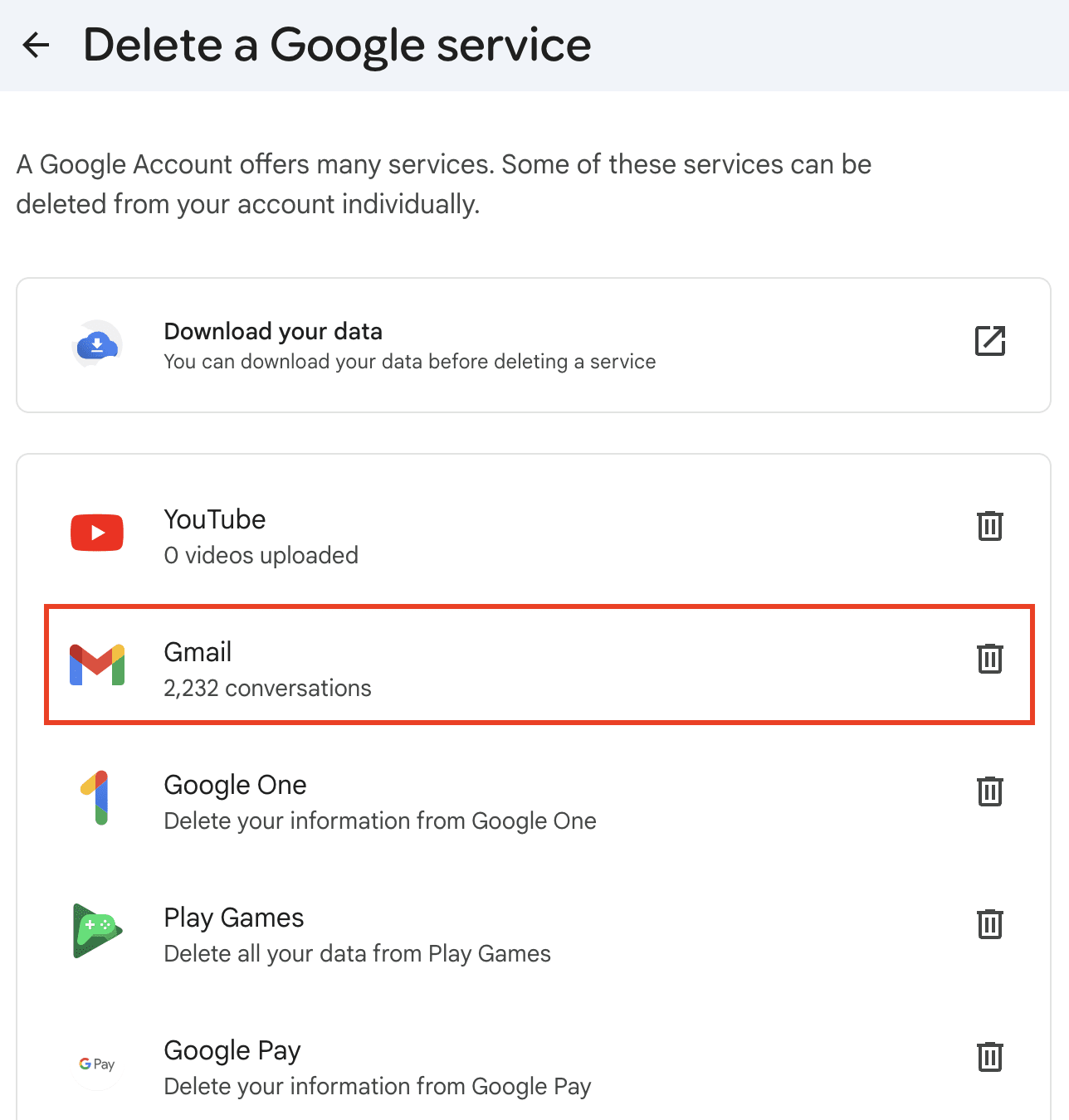
- Ange en annan e-postadress som ska användas för att logga in på ditt nya Google-konto och klicka på Skicka verifieringsmeddelande.

- Öppna verifieringsmeddelandet och klicka på bekräftelselänken.
När den har verifierats kommer din Gmail-adress att läggas i kö för borttagning.
Om du inte har en alternativ e-postadress ännu kan du överväga att skapa ett Proton Mail-konto först – använd sedan det som ersättningsadress innan du slutför borttagningen av Gmail. Till skillnad från Google kan Proton inte få åtkomst till dina data.
Så här tar du bort ett Gmail-konto från en Android-telefon
- Gå till Inställningar → Google → Hantera ditt Google-konto.
- Välj din Gmail-adress och tryck på Google-konto.
- Öppna Data och integritet.

- Under Verktyg väljer du Ta bort data från tjänster du inte längre använder. Du kan bli ombedd att verifiera din identitet.

- Klicka på papperskorgsikonen 🗑️ bredvid Gmail.

- Ange en annan e-postadress som ska användas för att logga in på ditt nya Google-konto och klicka på Skicka verifieringsmeddelande.

- Öppna verifieringsmeddelandet och klicka på bekräftelselänken.
När den har verifierats kommer din Gmail-adress att läggas i kö för borttagning.
Använder du Gemini på Android? Ta reda på hur du stänger av Gemini på Android, återkallar dess åtkomst till dina appar och förhindrar kvarvarande datainsamling under tidsfönstret för borttagning av Gmail.
Varför ta bort ditt Gmail-konto?
Det finns gott om giltiga skäl att ta bort ett Gmail-konto:
- Din Gmail är överbelastad med skräppost, reklammeddelanden och prenumerationer som du inte längre är intresserad av. Att börja om på nytt kan kännas enklare än att rensa bort år av oreda i inkorgen.
- Du öppnade kontot tillfälligt, behöver det inte längre och vill minska den digitala oredan genom att stänga oanvända konton. Om du inte längre bevakar kontot kan du missa misstänkta inloggningsförsök eller e-postmeddelanden om återställning av lösenord.
- Ett gammalt konto med svaga återställningsinställningar kan bli en säkerhetsrisk, särskilt om det upprepade gånger har exponerats i dataintrång, som till exempel Gmail-dataintrånget. Återanvända lösenord, föråldrad tvåfaktorsautentisering (2FA) eller okänd appåtkomst från tredje part kan göra ditt Gmail-konto till en belastning.
- Du har bestämt dig för att deGoogle och byta till en annan e-postleverantör, särskilt om du känner dig obekväm med de integritetsmässiga kompromisserna med att använda Gmail och Googles bredare ekosystem.
Integritetsbekymmer gällande Gmail
Integritet är en av de största anledningarna till att människor väljer att ta bort Gmail. Din Gmail används för att logga in på ditt Google-konto som ansluter all din aktivitet i alla appar i Googles ekosystem, inklusive Google Chrome, YouTube och Google Maps.
Detta gör att Google kan samla in en enorm mängd personuppgifter om dig, inklusive din privata e-post, dina onlinesökningar, din geografiska plats och tidslinjehistorik, din köphistorik och dina köppreferenser samt all din Android-aktivitet. Google kan sedan använda denna information för att rikta annonser till dig och träna AI-system som Gemini, vilket är djupt inbäddat i Googles ekosystem och hjälper till att driva företagets annonsdrivna affärsmodell.
Dessa metoder sker ofta utan din fulla förståelse eller ditt samtycke, vilket ger dig liten kontroll över hur dina data kombineras och används.
Tillsynsmyndigheter förväntas skydda konsumenter, men Googles historia av böter visar att verkställighet inte alltid förhindrar skadligt beteende. För techjättar som Google är sanktioner bara en vanlig affärskostnad. Bara under 2025 skulle Google kunna betala sina böter på nästan 4,24 miljarder dollar med det fria kassaflöde som genererades under cirka tre veckor.
Innan du tar bort ditt Gmail-konto
Att byta e-postleverantör kräver lite förberedelser. Innan du tar bort ditt Gmail-konto bör du:
- Uppdatera dina onlinekonton. Gå igenom dina konton för sociala medier, banktjänster, shopping och prenumerationer och ersätt din Gmail-adress med din nya, så att du inte blir utestängd efter borttagningen.
- Konfigurera vidarebefordran av e-post och autosvar. Vidarebefordra inkommande Gmail-meddelanden till din nya inkorg så att inget faller mellan stolarna under övergången, och ställ in ett autosvar för att låta dina kontakter veta var de kan nå dig i fortsättningen.
- Exportera dina Gmail-data. På ditt Google-konto går du till Data och integritet → Ladda ned dina data för att spara en kopia av din e-post, dina kontakter och din kalender via Google Takeout.
Easy Switch: det enklare sättet att gå över
Om allt detta låter för krångligt kan Easy Switch hantera övergångsperioden åt dig. Du kan ansluta ditt Gmail-konto till Proton Mail och använda båda sida vid sida:
- Skicka och ta emot e-post från din Gmail-adress direkt i Proton Mail, så att du inte missar något under tiden du uppdaterar dina tjänster.
- Importera dina befintliga e-postmeddelanden, kontakter och kalenderhändelser till Proton Mail med några få klick.
- Bjud in dina kontakter att börja använda Proton Mail och göra detsamma. När de använder Proton Mail och ansluter sin Gmail via Easy Switch blir era e-postmeddelanden end-to-end-krypterade, vilket innebär att endast du och din mottagare kan läsa dem.
Ta reda på hur du byter från Gmail till Proton Mail.
När du är redo kan du ta bort din Gmail-adress, behålla alla dina importerade data i Proton Mail, koppla från Gmail och börja använda enbart Proton Mail.
Hur lång tid tar det att ta bort ett Gmail-konto helt?
Enligt Googles datalagringspolicy(nytt fönster) kan det ta upp till två månader för ett Gmail-konto att tas bort helt från deras servrar. Detta inkluderar en återställningsperiod på ungefär en månad om du har tagit bort kontot av misstag. När den perioden har passerat är borttagningen permanent och oåterkallelig.
Vad händer när du tar bort ditt Gmail-konto?
När borttagningen är klar:
- Din Gmail-adress och dina e-postmeddelanden tas bort, och du kan inte längre använda den adressen för att skicka eller ta emot e-post.
- Alla som skickar e-post till din gamla Gmail-adress kommer att få ett leveransfelmeddelande.
- För att fortsätta använda Google-kontot efter att du har tagit bort Gmail måste du lägga till en annan e-postadress för att logga in.
- Google tilldelar inte borttagna Gmail-adresser till nya användare, så ingen annan kan göra anspråk på den i framtiden.
- Själva ditt Google-konto tas inte bort. Om du bara tar bort Gmail kan du fortfarande använda andra Google-tjänster som är anslutna till det kontot, till exempel YouTube, Google Play och Google Maps.
Om du vill av-googla måste du ta bort ditt Google-konto, inte bara ditt Gmail-konto. Detta gör att du inte längre kan få åtkomst till alla Google-tjänster som är kopplade till det kontot. Tänk dock på att om du tar bort ditt Google-konto kanske inte alla insikter som Google redan har fått från din tidigare aktivitet raderas.
Kan du återställa ett borttaget Gmail-konto?
Om det har gått mindre än två månader sedan du tog bort ditt Gmail-konto kan det vara möjligt att återställa det:
- Gå till Googles sida för kontoåterställning(nytt fönster).
- Ange den Gmail-adress du vill återställa och följ anvisningarna.
- Svara på så många av Googles säkerhetsfrågor du kan. Ju mer du kan verifiera, desto större är dina chanser.
- Om möjligt bör du använda en enhet och nätverksplats som du tidigare har använt för att få åtkomst till kontot, eftersom Google använder detta som en tillförlitlighetssignal.
Efter två månader är återställning inte längre möjlig, eftersom Gmail-adressen tas bort permanent.
Så här tar du bort ditt Google-konto
Om du är redo att lämna Googles ekosystem helt och hållet kan du ta bort ditt Google-konto:
- Gå till myaccount.google.com(nytt fönster) och logga in.
- Öppna Data och integritet i det vänstra sidofältet.
- Välj Ta bort ditt Google-konto längst ner på sidan. Du kan bli ombedd att verifiera din identitet.

- Granska vad som kommer att tas bort, markera båda bekräftelserutorna och klicka på Ta bort konto.

Om du tar bort hela ditt Google-konto tas alla data bort från alla Google-tjänster – e-post, filer i Google Drive, foton, YouTube-historik med mera. Säkerhetskopiera alltid allt du vill behålla innan du fortsätter.
Ett bättre sätt att skydda din e-post
Det finns många goda skäl att ta bort ett Gmail-konto, och de flesta av dem är kopplade till hur Google behandlar konsumenternas integritet som en efterhandskonstruktion. Om detta oroar dig också är Proton Mail det Gmail-alternativ som är uppbyggt kring en i grunden helt annorlunda modell.
Till skillnad från Google tjänar vi inte pengar på annonsering eller datainsamling: Våra intäkter kommer uteslutande från betalande prenumeranter som tror på vårt uppdrag att skapa ett internet där integritet är standard. Vi ägs i huvudsak av en ideell stiftelse som säkerställer att vi förblir fokuserade på det uppdraget, så vi har inga affärsmässiga incitament att läsa, analysera eller tjäna pengar på din e-post.
Proton Mail skyddar din e-post med end-to-end-kryptering(nytt fönster) och nollåtkomstkryptering(nytt fönster), vilket innebär att vi inte kan få åtkomst till några av dina data. Vi är helt transparenta: Våra appar är oberoende granskade och har öppen källkod, så att vem som helst kan kontrollera vår säkerhetskodbas. Inga annonser, ingen AI-träning på dina data och ingen delning av din information med någon.