Si guardas contraseñas en Microsoft Edge, hay un riesgo de seguridad que deberías conocer. Según una nueva revelación, cada vez que abres Edge, el navegador carga inmediatamente todas las contraseñas guardadas en la memoria en un formato legible, no solo la contraseña del sitio web en el que estás iniciando sesión. Esto significa que las credenciales de cada cuenta guardada en Edge podrían quedar expuestas si un malware, una cuenta de administrador comprometida u otro atacante obtiene acceso a tu dispositivo o sesión de usuario.
El hallazgo fue revelado por el investigador de seguridad Tom Jøran Sønstebyseter Rønning(ventana nueva), quien afirma que la respuesta de Microsoft fue que este comportamiento es «por diseño».
La propia documentación de Microsoft indica que Edge cifra las contraseñas guardadas en el disco mediante AES (Advanced Encryption Standard) y reconoce que las contraseñas pueden quedar expuestas si la sesión de usuario o el dispositivo se ven comprometidos. El nuevo descubrimiento no rebate esto, sino que plantea una preocupación distinta: Edge carga todas las contraseñas guardadas en la memoria de lectura en cuanto se inicia el navegador, lo que hace que el raspado de memoria (memory scraping) sea mucho más valioso si un atacante obtiene el acceso suficiente.
Esto ocurre un año después de que Microsoft limitara la administración de contraseñas a Edge al eliminar gradualmente el almacenamiento de contraseñas y el relleno automático en Microsoft Authenticator, empujando a los usuarios que querían seguir usando las funciones de contraseña de Microsoft hacia su propio navegador.
Cómo gestiona Microsoft Edge las contraseñas guardadas
Se supone que las contraseñas deben estar protegidas por el cifrado cuando se almacenan: el cifrado convierte una contraseña legible (texto plano) en datos ilegibles (texto cifrado). Para usar esa contraseña en el relleno automático, un navegador finalmente tiene que descifrarla para que vuelva a ser legible. La pregunta importante es: ¿cuántos datos de contraseñas pasan a ser legibles a la vez?
El investigador de seguridad Tom Jøran Sønstebyseter Rønning afirma que Microsoft Edge carga todas las contraseñas guardadas en la memoria del navegador en texto plano en cuanto se inicia, en lugar de descifrar únicamente una contraseña específica cuando se necesita. Esto incluye todas las contraseñas guardadas en el gestor de contraseñas de Edge, incluso las de sitios web que no visitas ni rellenas automáticamente durante la sesión de navegación actual.
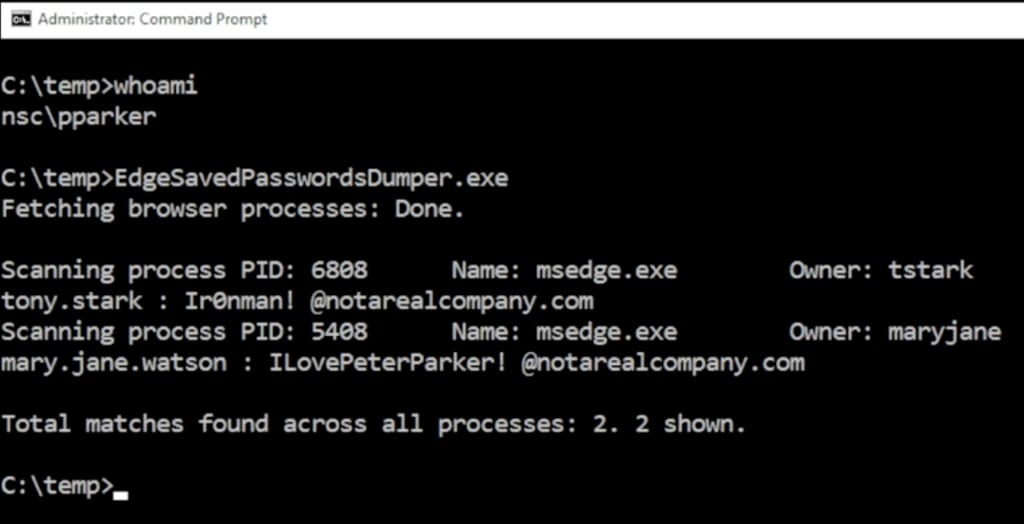
Esto hace que el aviso de reautenticación de Edge parezca engañoso: la interfaz te pide que demuestres tu identidad antes de revelar una contraseña, a pesar de que el proceso del navegador ya tiene todas las contraseñas guardadas disponibles en formato legible.
El investigador probó este comportamiento en varios navegadores basados en Chromium, incluidos Google Chrome, Brave, Vivaldi, Opera y Microsoft Edge. Solo Edge mostró este comportamiento.
Basta con dejar Microsoft Edge abierto
El investigador de seguridad Rob VandenBrink, escribiendo para el SANS Internet Storm Center(ventana nueva), reprodujo el problema dejando Microsoft Edge abierto y analizando un volcado de memoria de la sesión del navegador en ejecución. Demostró cómo un usuario de Windows con la sesión iniciada puede realizar un volcado de sus credenciales guardadas en Edge sin derechos adicionales, lo que también significa que un malware que se ejecute como ese usuario también podría acceder a esas credenciales.
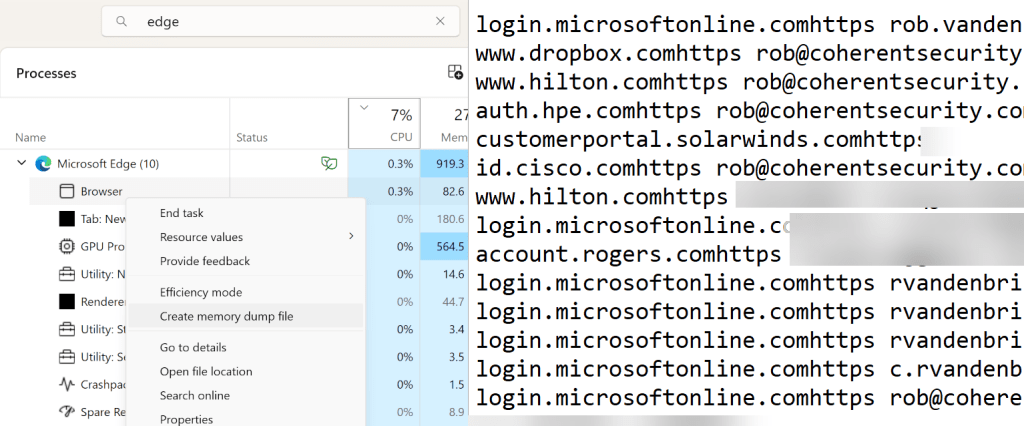
Una sola sesión comprometida puede exponer todas tus contraseñas
Si un atacante obtiene el acceso suficiente al dispositivo o a la sesión de usuario, podría inspeccionar la memoria del navegador. Si solo se descifrara una contraseña cuando fuese necesario, el atacante tendría una ventana de oportunidad más pequeña y menos datos que capturar. Pero si todas las contraseñas guardadas ya están en la memoria sin la protección del cifrado, el raspado de memoria se vuelve mucho más valioso.
El riesgo es especialmente grave en entornos compartidos, como servidores de terminales, escritorios remotos, infraestructura de escritorio virtual o sistemas donde varios usuarios tienen la sesión iniciada al mismo tiempo. Una cuenta de administrador comprometida podría extraer las credenciales guardadas de otros usuarios conectados, incluso de sesiones desconectadas donde Edge todavía se estuviera ejecutando.
Qué hacer si has guardado contraseñas en Microsoft Edge
Esto no significa que todos los usuarios de Microsoft Edge hayan sido hackeados, pero tanto particulares como organizaciones deberían reconsiderar si Edge es el lugar adecuado para almacenar credenciales. Esto es lo que puedes hacer para mantenerte a salvo:
- Deja de guardar contraseñas nuevas en el navegador de Microsoft y desactiva el gestor de contraseñas de Edge.
- Mueve tus credenciales guardadas a un gestor de contraseñas seguro. Puedes importar fácilmente las contraseñas de Edge a Proton Pass.
- Elimina las contraseñas guardadas en Edge después de la migración.
- Cambia las contraseñas de alto riesgo y haz que sean únicas, empezando por el correo electrónico, las cuentas financieras, las herramientas de administrador, las bandejas de entrada para restablecer contraseñas y las cuentas del trabajo. Nuestro gestor de contraseñas tiene una herramienta integrada para este fin, pero también puedes usar nuestro generador de contraseñas.
- Activa la autenticación de dos factores (2FA) o las llaves de acceso siempre que sea posible; esto ayuda a reducir los daños si una contraseña queda expuesta. Proton Pass admite llaves de acceso y 2FA para todas tus cuentas guardadas. También puedes usar nuestra aplicación de autenticación para administrar el acceso a tu cuenta de Proton de forma segura.
- Para equipos de TI: revisad las políticas de contraseñas de Edge y desactivad el almacenamiento de contraseñas del navegador para reducir el riesgo organizativo. Un gestor de contraseñas para empresas controlado de forma centralizada es mejor a que los empleados guarden sus contraseñas en navegadores individuales.
Tus contraseñas se merecen algo mejor que Microsoft Edge
La filtración de Microsoft Edge es un recordatorio de que tus credenciales más confidenciales no deberían estar almacenadas en un gestor de contraseñas que pertenece a una empresa que trata este tipo de exposición como un comportamiento esperado, a pesar de que plantea preocupaciones de seguridad obvias para particulares y organizaciones.
Con Proton Pass, tus contraseñas, alias, llaves de acceso y códigos 2FA están protegidos por un cifrado de extremo a extremo, y tú mantienes el control sobre dónde y cómo los usas.