
Lås opp mer gratis lagring for din nye Proton Drive-konto
- Lesetid
- 3 min
- Kategori
- Kom i gang
Når du oppretter en gratis Proton-konto, kan du låse opp 3 GB ekstra Drive-lagring ved å fullføre sjekklisten med velkomsthandlinger i løpet av de første 30 dagene.
Sjekklisten består av tre enkle oppgaver som hjelper deg med å oppdage din nye skylagring og personvernfunksjonene.
Når du har fullført sjekklisten, oppgraderer vi lagringen din fra 2 GB til 5 GB.
I denne artikkelen
Hvem er kvalifisert?
Alle gratis Proton Drive-kontoer er kvalifisert for oppgraderingen på 3 GB, så lenge du fullfører sjekklisten innen 30 dager etter at du opprettet kontoen din.
Betalte Proton Drive-abonnementer er ikke kvalifisert for dette tilbudet, men vi har et eget lagringsbonusprogram for betalende abonnenter.
Slik får du velkomstbonusen
1. Legg til en fil eller mappe
Disse instruksjonene gjelder for Proton Drive på nettet, men du kan legge til en fil eller mappe i en hvilken som helst Proton Drive-app for å fullføre denne oppgaven .
- Logg inn på account.proton.me/drive.
- På siden Mine filer kan du enten:
- klikke på + Ny og deretter velge Last opp fil eller Last opp mappe. Velg elementene dine og klikk på Åpne.

- Dra og slipp elementene dine direkte inn i Mine filer.

Lær hvordan du administrerer filer og mapper i Proton Drive
2. Opprett en delbar kobling
Disse instruksjonene gjelder for Proton Drive på nettet, men du kan opprette en delbar kobling i en hvilken som helst Proton Drive-app for å fullføre denne oppgaven .
- Logg inn på account.proton.me/drive.
- På siden Mine filer markerer du filen du vil dele, og klikker på Del (👤)-ikonet.
- Slå på bryteren for Offentlig kobling.
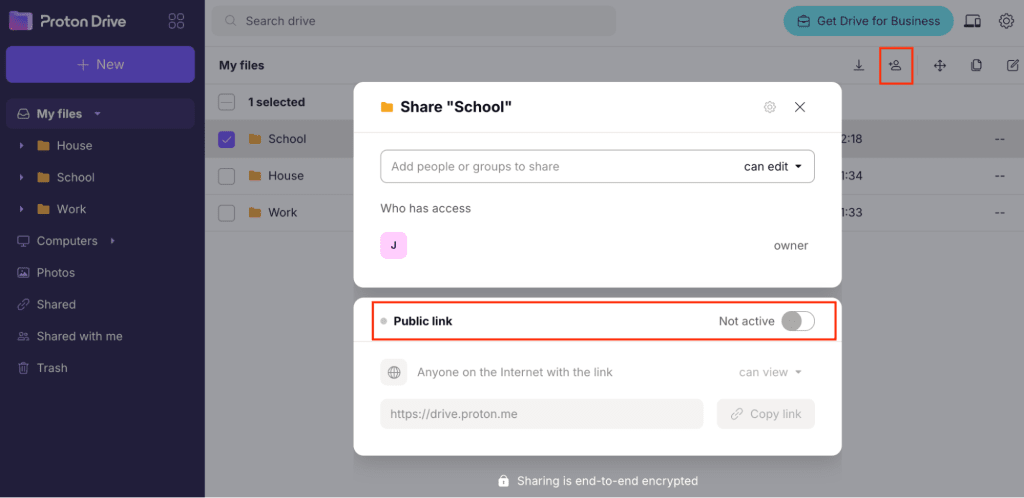
Det er alt. Du kan sende koblingen til noen hvis du vil, men det er ikke et krav for denne oppgaven.
Lær mer om deling av Proton Drive-filer
3. Beskytt kontoen din med en gjenopprettingsmetode
For å sikre kontoen din mot tap av passord er det viktig å konfigurere flere alternativer for kontogjenoppretting når du oppretter kontoen din. Lær hvordan kontogjenoppretting fungerer
- Logg inn på account.proton.me/drive og åpne kontoinnstillingene dine.
- Velg Gjenoppretting fra sidepanelet.
- Rull til Kontogjenoppretting og legg til minst én metode for kontogjenoppretting og én metode for datagjenoppretting. Lær mer om Protons gjenopprettingsalternativer

Når du har fullført disse trinnene, vil du motta en e-post som bekrefter den økte lagringen din.
Feilsøking
Kan ikke se velkomstsjekklisten
Først bør du dobbeltsjekke at du:
- Opprettet kontoen din for mindre enn 30 dager siden: dette er et eksklusivt tilbud for nye kontoer.
- Har en gratis konto: dette tilbudet er bare tilgjengelig med Proton Free.
- Ikke allerede har fullført sjekklisten: hvis du har det, vil lagringsgrensen din allerede være 5 GB.
Hvis du nettopp har opprettet kontoen din, kan det hende du ikke ser sjekklisten umiddelbart. Dette kan skyldes at et annet tilbud vises først.
Du kan imidlertid fortsatt komme i gang med oppgavene — tilbudet er aktivt.
Få enda mer lagring med Proton Drive Plus
Lås opp 200 GB med skylagring og andre premiumfunksjoner som 10 års filgjenoppretting. Oppdag Drive Plus