Berichten die u met de meeste e-mailproviders verzendt, zijn niet veilig, maar er zijn manieren om gevoelige informatie per e-mail te verzenden.
De meeste e-mailservices zijn gebouwd voor gemak, niet voor vertrouwelijkheid. Toch blijft het een belangrijk communicatiemiddel in het bedrijfsleven.
Maar als u in een gereguleerde sector werkt of persoonlijke, financiële of juridische gegevens verwerkt, is het delen van gevoelige informatie — zoals bankgegevens van klanten, socialezekerheidsnummers (BSN’s) en vertrouwelijke factureringsinformatie van klanten — via e-mail inherent riskant.
Onderschepping, ongeautoriseerde toegang en onbedoelde blootstelling zijn waarschijnlijke bedreigingen. Maar wanneer vertrouwen deel uitmaakt van uw bedrijfsmodel, is hoe u met gevoelige informatie omgaat net zo belangrijk als wat u levert.
We zijn hier om te helpen. Blijf lezen als u een bedrijfsleider bent die wil begrijpen:
- Wat geldt als gevoelige informatie
- Welke soorten gegevens extra bescherming vereisen wanneer ze via e-mail worden gedeeld
- Waarom standaard e-mail geen veilig kanaal is voor gevoelige informatie
- 4 manieren om gevoelige informatie per e-mail te verzenden
- Hoe versleutelde e-mail kan worden gebruikt om gevoelige gegevens veilig te verzenden

Wat is gevoelige informatie?
Gevoelige informatie is alle gegevens die een individu of bedrijf kwetsbaar kunnen maken voor fraude, identiteitsdiefstal, financieel verlies of juridische blootstelling.
Deze gegevens worden als gevoelig beschouwd omdat ze, indien blootgesteld, kunnen worden misbruikt om zich als personen voor te doen, toegang te krijgen tot accounts of financiële fraude te plegen.
In de praktijk delen bedrijven routinematig gevoelig materiaal. Dit kunnen financiële rapporten, contracten, personeelsdossiers of klantgegevens zijn.
Het verzenden van deze informatie via standaard e-mail stelt organisaties bloot aan nalevingsfouten, boetes en reputatieschade.
Welke soorten gegevens vereisen extra bescherming wanneer ze via e-mail worden gedeeld?
De meeste individuen en bedrijven verwerken dagelijks persoonlijke en vertrouwelijke bedrijfsinformatie — vaak zonder te beseffen hoe blootgesteld deze kan zijn in standaard e-mailworkflows. Gegevens die om privacy- of veiligheidsredenen moeten worden beschermd, worden doorgaans gegroepeerd in drie categorieën, op basis van aan wie de gegevens toebehoren en de impact van de blootstelling ervan:
Persoonlijke informatie
Wat het omvat:
• BSN’s, bankafschriften, sollicitaties, cv’s, contactgegevens, reisdocumenten.
• Zeer gevoelige gegevens zoals medische geschiedenis, seksuele geaardheid, religie of politieke voorkeuren.
Waarom het belangrijk is:
• Identificeert een individu en kan worden gebruikt voor identiteitsdiefstal.
• Sommige kenmerken kunnen leiden tot discriminatie of intimidatie.
Vertrouwelijke bedrijfsinformatie
Wat het omvat:
• Bedrijfsgeheimen, financiële gegevens, productplannen.
• Klant- en cliëntgegevens, personeelsdossiers.
Waarom het belangrijk is:
• Schendingen kunnen leiden tot rechtszaken, boetes en reputatieschade.
• Vereist om te worden beschermd onder wetten zoals de AVG.
Geclassificeerde overheidsinformatie
Wat het omvat:
• Gegevens beschermd voor nationale veiligheid of buitenlandse betrekkingen.
• Omvat classificatieniveaus (Vertrouwelijk, Geheim, Zeer Geheim) en SCI.
Waarom het belangrijk is:
• Verkeerde behandeling kan levens in gevaar brengen en diplomatieke betrekkingen schaden.
• Er gelden zware strafrechtelijke sancties.
Waarom is standaard e-mail geen veilig kanaal voor gevoelige informatie?
Standaard e-mail is geen veilig kanaal voor gevoelige informatie omdat het nooit is ontworpen om informatie te beschermen, maar alleen om het te bezorgen.
Hoe zit het met e-mailproviders die adverteren met versleuteling? De meeste providers vertrouwen op basis transportversleuteling, zoals TLS, dat berichten alleen beschermt terwijl ze onderweg zijn.
Zodra een e-mail de servers van de provider bereikt, wordt deze doorgaans opgeslagen in een vorm waartoe de provider toegang heeft, waardoor uw gevoelige informatie leesbaar is buiten de controle van de afzender en ontvanger.
De onderliggende toegangscontroles passen vaak niet bij de gevoeligheid van de informatie die wordt gedeeld.
Zelfs wanneer meer geavanceerde beveiligingsopties beschikbaar zijn, kunnen deze complex zijn om te configureren en te beheren. Bedrijven moeten mogelijk handmatig sleutelbeheer, aangepaste beleidsregels of technische expertise op zich nemen waarvoor ze niet de capaciteit hebben.
Deze kloof — tussen de gevoeligheid van de gegevens en de beveiliging die de meeste e-mailsystemen daadwerkelijk afdwingen — introduceert vaak nalevingsrisico’s voor bedrijven die regelmatig gevoelige informatie verwerken.
Dus, is het mogelijk om informatie veilig te delen via e-mail? Ja, maar alleen met de juiste waarborgen.
1. Gebruik end-to-end versleutelde e-mail
De meest private en veilige manier om gevoelige informatie per e-mail te verzenden, is door gebruik te maken van end-to-end versleuteling.
End-to-end versleutelde e-mail zorgt ervoor dat berichten worden versleuteld op het apparaat van de afzender en alleen kunnen worden ontsleuteld door de beoogde ontvanger. Dit betekent dat de inhoud van de e-mail onleesbaar blijft voor alle anderen — inclusief de e-mailserviceprovider, tussenpersonen, adverteerders of derden.
In tegenstelling tot basis transportversleuteling beschermt end-to-end versleuteling berichten zowel tijdens verzending als in rust, waardoor het risico op onderschepping, ongeautoriseerde toegang of blootstelling in het geval van een inbreuk aanzienlijk wordt verminderd.
Veilig persoonlijk gebruik
Met versleutelde e-mail kunnen individuen veilig zeer gevoelige persoonlijke informatie delen — zoals burgerservicenummers (BSN’s), bankgegevens of identiteitsdocumenten — zonder die gegevens bloot te stellen aan onnodig risico.
Veilig zakelijk gebruik
Voor bedrijven biedt versleutelde e-mail een manier om vertrouwelijke informatie te verzenden — inclusief financiële rapporten, personeelsdossiers, contracten en klantgegevens — terwijl privacy- en gegevensbeschermingsvereisten worden ondersteund. Door de toegang tot berichtinhoud te beperken, helpt versleuteling organisaties het nalevingsrisico te verminderen wanneer gevoelige gegevens elektronisch moeten worden gedeeld.
Meer informatie over end-to-end versleuteling
2. Beveilig uw zakelijke e-mails met een wachtwoord
Gebruik een e-mail met wachtwoordbeveiliging om gevoelige informatie te verzenden naar iemand die geen versleutelde e-mailservice gebruikt.
In plaats van de berichtinhoud rechtstreeks in de inbox van de ontvanger af te leveren, vereisen e-mails met wachtwoordbeveiliging dat de ontvanger een wachtwoord invoert voordat hij het bericht kan lezen.
Dit voegt een beschermingslaag toe als een e-mail wordt onderschept, verkeerd wordt bezorgd of wordt geopend via een gecompromitteerd account.
Hoe e-mails met wachtwoordbeveiliging werken
Hoewel de exacte stappen per provider verschillen, ziet het algemene proces er als volgt uit:
- Stel uw e-mail op zoals gewoonlijk.
- Schakel wachtwoordbeveiliging of veilig delen van berichten in voordat u verzendt.
- Deel het wachtwoord met de ontvanger via een apart, veilig kanaal (zoals een telefoongesprek of versleutelde berichtenapp).
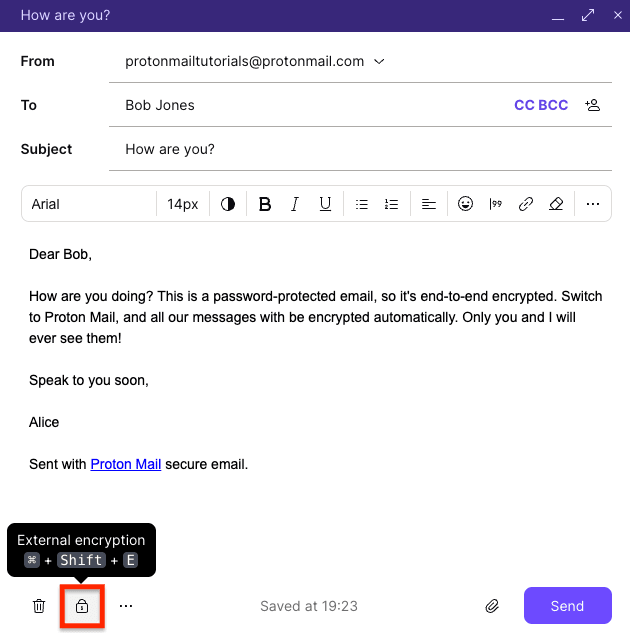
Gebruik wachtwoordbeveiliging alleen wanneer sterkere versleuteling niet beschikbaar is. Deel het wachtwoord altijd via een apart, veilig kanaal. Stuur het wachtwoord nooit in dezelfde e-mail als het bericht — als u dat doet, wordt de extra beveiliging tenietgedaan.
Meer informatie over e-mails met wachtwoordbeveiliging
3. Beveilig uw bijlagen met een wachtwoord
Het beveiligen van bijlagen met een wachtwoord is vaak voldoende wanneer de e-mailtekst zelf geen gevoelige informatie bevat en het risico voornamelijk in het bestand ligt — zoals een opzichzelfstaand rapport, formulier of document.
Het beschermen van het bestand zelf voegt een belangrijke beveiligingslaag toe. Pas bij het verzenden van een gevoelig document wachtwoordbeveiliging toe voordat u het aan uw e-mail toevoegt. De meeste gangbare bestandstypen — waaronder Microsoft Word, Excel, PowerPoint en PDF’s — ondersteunen ingebouwde wachtwoordbeveiliging.
Maak uw bestand, stel een sterk wachtwoord of wachtwoordzin in en voeg het vervolgens toe aan uw e-mail.
Opmerking: Versleutelingssterkte varieert per bestandstype en ontvangers moeten compatibele software hebben om beveiligde bestanden te openen. Als het e-mailbericht zelf gevoelige gegevens of contextuele informatie bevat, is het beschermen van alleen de bijlage mogelijk niet voldoende — in die gevallen is het beveiligen van het hele bericht de veiligere optie.
Leer hoe u documenten veilig via e-mail verzendt
4. Gebruik versleutelde cloudopslag
E-maildiensten beperken vaak de grootte van bijlagen, waardoor het moeilijk is om grote bestanden of meerdere documenten tegelijk te verzenden.
In deze gevallen is het gebruik van een veilige cloudopslagdienst met versleutelde deelkoppelingen een veiliger en praktischer alternatief. In plaats van bestanden rechtstreeks aan een e-mail toe te voegen, uploadt u ze naar een veilige opslagruimte en deelt u een koppeling met de ontvanger.
Deze aanpak werkt goed voor het delen van persoonlijke bestanden, grote projectmappen, deliverables voor klanten of technische documenten — zonder de bestanden zelf bloot te stellen in een inbox.
Hoe het delen van beveiligde koppelingen werkt
Hoewel de exacte stappen per provider verschillen, is het algemene proces:
- Upload uw bestanden naar een veilige cloudopslagdienst.
- Genereer een privé of versleutelde deelkoppeling voor de geselecteerde bestanden of mappen.
- Voeg de koppeling toe aan uw e-mail en verzend deze naar de ontvanger.
- De ontvanger gebruikt de koppeling om de bestanden veilig te downloaden of te openen.
Het delen van beveiligde koppelingen is het meest effectief in combinatie met aanvullende toegangscontroles, zoals wachtwoordbeveiliging, verloopdatums of downloadbeperkingen. Deze controles helpen beperken wie toegang heeft tot de bestanden — en voor hoe lang — waardoor het risico op ongeautoriseerde toegang wordt verkleind als de koppeling wordt doorgestuurd of onthuld.
Gecombineerd met sterke versleuteling, stellen beveiligde koppelingen voor het delen van bestanden teams in staat om samen te werken en gevoelige informatie uit te wisselen zonder volledig afhankelijk te zijn van e-mailbijlagen.
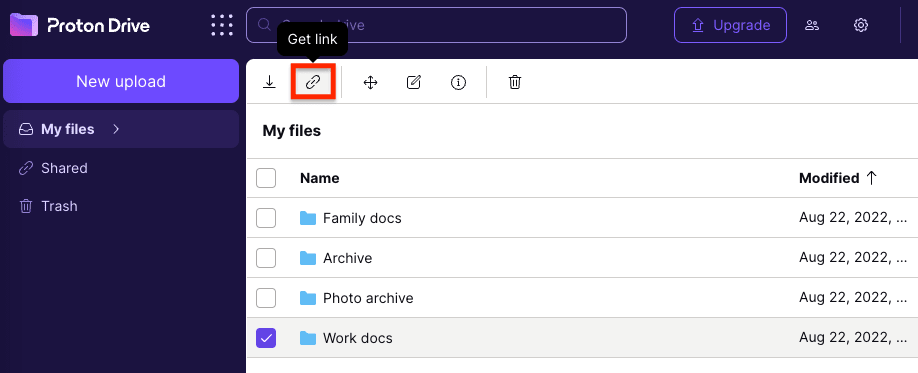
U kunt uw koppeling voor het delen van bestanden beveiligen met een wachtwoord of een verloopdatum instellen waarna de koppeling wordt uitgeschakeld.
Meer informatie over veilig bestanden delen
Gemakkelijkste manier om gevoelige gegevens veilig te e-mailen
Zelfs met Slack, veilige tools voor het delen van bestanden en klantportalen, blijft e-mail een onvermijdelijk onderdeel van het dagelijkse werk. Als u persoonlijke, financiële of vertrouwelijke informatie behandelt, is het risico niet dat u e-mail gebruikt — het is hoe u het gebruikt.
Met de juiste waarborgen kunt u e-mail blijven gebruiken zonder in te boeten aan vertrouwelijkheid of vertrouwen. Maar deze maatregelen zijn acceptabele noodoplossingen, geen systeem dat standaard veilig is.
In plaats van te vertrouwen op workarounds, handmatige beslissingen of perfect gebruikersgedrag, beschermt end-to-end versleutelde e-mail berichten automatisch, elke keer dat ze worden verzonden.
Proton Mail is ontworpen rond dit principe. Berichten zijn standaard versleuteld, toegang tot inhoud is strikt beperkt tot de afzender en ontvanger, en beveiliging is niet afhankelijk van het delen van wachtwoorden, het wisselen van tools of het toevoegen van wrijving aan dagelijkse workflows.
Meer informatie over Proton Mail
Als u onze visie wilt steunen, schrijf u dan in voor een betaald abonnement. Samen kunnen we een beter internet bouwen waar privacy de standaard is.