De krantenkoppen in de media richten zich vaak op de ongelooflijk realistische resultaten die door AI-hulpmiddelen voor het genereren van afbeeldingen worden geproduceerd, maar ze benadrukken zelden hoe die deepfakes daadwerkelijk worden gecreëerd en tegen welke prijs.
Veel deepfakes worden opgebouwd uit gewone foto’s, video’s en spraakopnamen — de alledaagse inhoud die we gewillig uploaden en publiekelijk beschikbaar maken op sociale media zoals Instagram of Facebook, en in cloud Opslag zoals Google Drive of OneDrive.
Wat we zelden overwegen is dat die digitale sporen kunnen worden hergebruikt op manieren die we nooit hadden bedoeld, inclusief voor het creëren van deepfakes zonder onze medeweten of toestemming. Dit betekent meestal het verliezen van privacy en controle over hoe we online verschijnen, wat kan leiden tot oplichting, diefstal van identiteit, intimidatie, cyberpesten, reputatieschade en emotionele nood — vaak onomkeerbaar(nieuw venster).
Niet-consensuele deepfake-afbeeldingen zoals de Sweet Anita-zaak zijn een ernstige vorm van misbruik geworden. In de VS streeft de DEFIANCE Act(nieuw venster) ernaar de juridische mogelijkheden voor slachtoffers te versterken, en de Take It Down Act(nieuw venster) richt zich op de snellere verwijdering van schadelijke inhoud online.
In de EU hebben meldingen dat Grok op X werd gebruikt om geseksualiseerde deepfake-afbeeldingen te genereren (waaronder van vrouwen en minderjarigen) ertoe geleid dat privacy toezichthouders zijn gaan onderzoeken(nieuw venster) of dit de GDPR-gegevensbeschermingswetten zou kunnen schenden. Tegelijkertijd maken landen zoals Spanje(nieuw venster) werk van nationale wetgeving om niet-consensuele deepfakes strafbaar te stellen.
Totdat wetten de snelheid waarmee deepfake-technologie zich ontwikkelt (vaak tot het punt waarop het moeilijk is om echt van nep te onderscheiden) inhalen, is het belangrijk om proactief te zijn over de bescherming van uw foto’s, video’s en spraakopnamen. Het voorkomen van misbruik is veel eenvoudiger dan later met de gevolgen om te gaan.
- Hoe deepfakes te voorkomen
- Tips voor deepfake-preventie voor families
- Houd de controle over uw digitale identiteit
Hoe deepfakes te voorkomen
Deepfakes zijn afhankelijk van drie dingen: de kwaliteit van de data, hoeveel data er beschikbaar is, en hoe gemakkelijk deze toegang is. Hier is hoe u uzelf kunt beschermen tegen deepfakes:
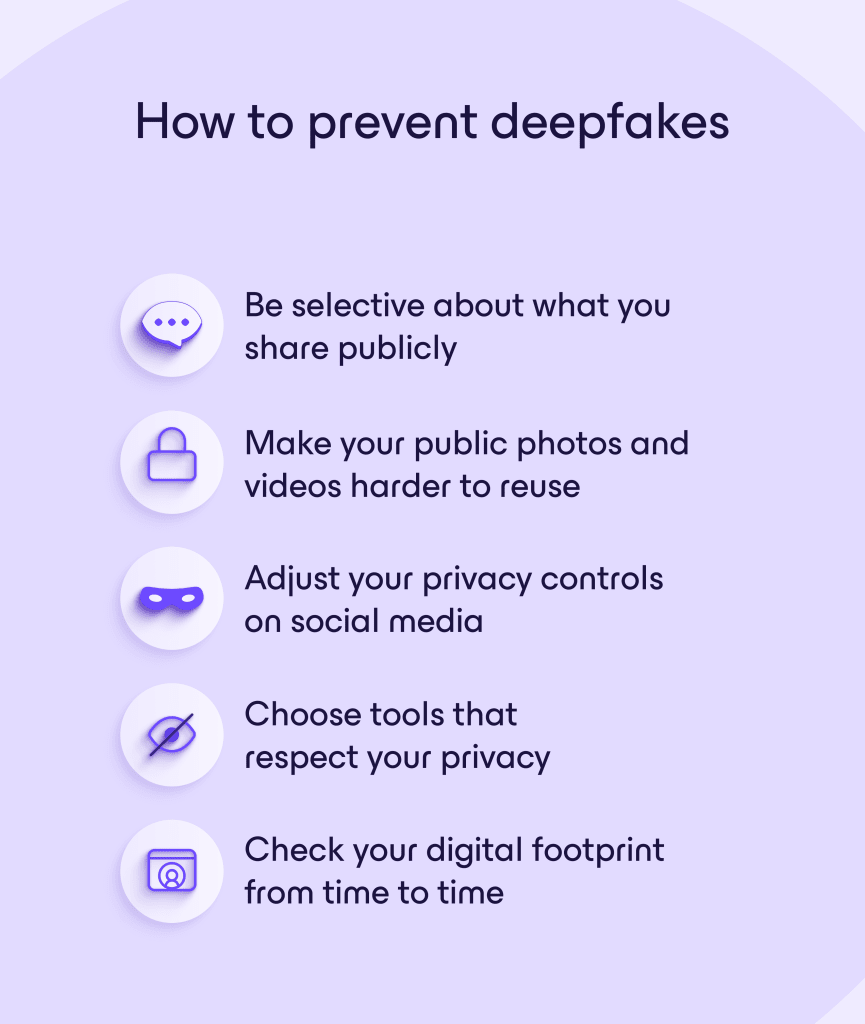
Wees selectief in wat u publiekelijk delen
Hoe meer inhoud met hoge resolutie er beschikbaar is, hoe gemakkelijker realistisch klonen wordt. Hier is hoe u kunt verminderen hoeveel media van hoge kwaliteit van u publiekelijk beschikbaar is:
- Vermijd het posten van HD close-ups van uw gezicht of lange wissen video’s, vooral die met consistente hoeken en belichting.
- Verwijder oude openbare media die u niet meer online nodig heeft.
- Scheid openbare en privé account zoveel mogelijk.
- Vraag anderen om geen media van u te taggen of uploaden zonder toestemming.
- Controleer app machtigingen en verwijder ongebruikte derden app die toegang kunnen hebben tot uw cameraprol.
Maak uw openbare foto’s en video’s moeilijker te hergebruiken
Bij het publiekelijk delen van foto’s of video’s, zijn er manieren om het voor AI-systemen moeilijker te maken om ze te kopiëren, analyseren en hergebruiken. Deze methoden voorkomen deepfakes of AI-training niet volledig, maar ze kunnen misbruik ontmoedigen:
- Vervaag of verbergen gezichten in foto’s wanneer het niet nodig is om iemands identiteit te toon.
- Plaats een watermerk op afbeeldingen of video’s.
- Gebruik tools voor cloaking en datavergiftiging zoals Glaze en Nightshade, die geschraapte afbeeldingen minder nuttig maken voor AI-training. Ze helpen ook te voorkomen dat AI traint op uw kunstwerk zonder toestemming, hoewel onderzoek toon dat ze verzwakt kunnen worden naarmate AI-systemen zich ontwikkelen.
- Website zoals Have I Been Trained(nieuw venster) helpen u verifiëren of uw foto’s voorkomen in bekende datasets die worden gebruikt om AI-modellen te trainen.
- Gegevensbeschermingswetten zoals de GDPR(nieuw venster) in de EU kunnen u helpen bedrijven te verzoeken uw inhoud niet te gebruiken voor AI-training. U kunt er bijvoorbeeld voor kiezen om af te zien van Meta AI die uw data gebruikt op Facebook, Instagram en WhatsApp.
Pas uw privacy instellingen aan op sociale media
Veel van deze instellingen zijn gemakkelijk over het hoofd te zien, maar kunnen een wezenlijk verschil maken om te beperken hoeveel van uw content zichtbaar is voor vreemden en datascrapers:
- Stel uw accounts waar mogelijk in als privé.
- Beperk wie eerdere en toekomstige berichten kan zien (alleen vrienden in plaats van openbaar).
- Beperk wie uw content kan downloaden, delen of opnieuw kan plaatsen.
- Schakel functies voor gezichtsherkenning uit als het platform deze aanbiedt.
- Beheer de instellingen voor taggen, zodat u berichten waarin u bent getagd moet goedkeuren.
- Beperk wie u kan vinden via uw e-mail of telefoonnummer.
Houd er rekening mee dat het platform zelf mogelijk nog steeds toegang heeft tot uw gegevens en deze onder zijn eigen voorwaarden verwerkt. Daarom is het de moeite waard om het privacy- en AI-gebruiksbeleid af en toe door te nemen. Als u zich er niet prettig bij voelt hoeveel van uw gegevens mogelijk worden gebruikt, overweeg dan te beperken wat u uploadt, of u dat platform überhaupt wilt gebruiken.
Meta kan bijvoorbeeld alle Meta AI-interacties gebruiken om gerichte advertenties te maken en de eigen AI-systemen te verbeteren. Dus content die u deelt in wat voelt als een privégesprek met een vriend — zoals het toevoegen van een afbeelding van uzelf en Meta AI vragen er een grappige versie van te genereren — kan eindigen in een AI-dataset waar u geen controle heeft over wat er met uw afbeelding gebeurt.
Kies tools die uw privacy respecteren
Sommige apps zijn ontworpen om zo min mogelijk persoonlijke gegevens te verzamelen en u controle te geven over hoe uw content wordt opgeslagen en gedeeld — een belangrijk onderdeel van digitale soevereiniteit. Geen enkele tool kan deepfakes volledig stoppen, aangezien dit grotendeels afhangt van wat u kiest om over uzelf te delen. Maar privacygerichte diensten, zoals die in het Proton-ecosysteem, kunnen helpen beperken hoeveel van uw foto’s, video’s en spraakopnamen openbaar toegankelijk worden of beschikbaar komen voor AI-training.
Proton Drive is een gratis, veilige dienst voor cloudopslag en betanden delen die gebruikmaakt van end-to-end versleuteling. Dit betekent dat alleen u en de mensen met wie u expliciet bestanden deelt toegang hebben tot uw gegevens, zelfs Proton niet. U kunt bestanden, foto’s of albums delen via beperkte e-mailuitnodigingen voor kleinere groepen, of via veilige openbare koppelingen die met een wachtwoord kunnen worden beveiligd en zo kunnen worden ingesteld dat ze automatisch verlopen. Met Proton Drive kunt u eenvoudig het downloaden volgen en de toegang op elk moment intrekken.
Controleer van tijd tot tijd uw digitale voetafdruk
Uw digitale voetafdruk groeit passief na verloop van tijd. Zelfs als u nu voorzichtig bent, kunnen oudere berichten, opnamen, getagde foto’s of media uit het Archief weer opduiken en openbaar toegankelijk blijven zonder dat u het merkt. Bovendien kunnen platforms de standaard privacyinstellingen wijzigen.
Om de paar maanden moet u controleren wat er online van uzelf beschikbaar is dat gebruikt zou kunnen worden om deepfakes te maken. Dit doet u als volgt:
- Zoek periodiek naar uw naam en afbeeldingen in zoekmachines.
- Controleer de zichtbaarheid van uw berichten.
- Controleer de lijsten met volgers of contactpersonen op onbekende of verdachte accounts.
- Verwijder verouderde content of beperk deze tot een kleiner publiek.
- Sluit ongebruikte accounts.
- Controleer de privacystandaarden en instellingen voor AI-training opnieuw na platformupdates.
Preventietips voor deepfakes voor gezinnen
Er zijn slechts 20 foto’s of een video van 30 seconden nodig om een realistisch digitaal profiel van iemand te maken. Dat betekent dat alledaagse familiefoto’s, schoolvideo’s, spraakberichten of berichten op sociale media onbedoeld trainingsmateriaal kunnen worden voor deepfake-tools.
Voor gezinnen gaat deepfake-preventie minder over strikte controle of angst, en meer over bewustzijn, communicatie en doordachte deelgewoonten — vooral voor kinderen die de langetermijn online risico’s nog niet volledig kunnen begrijpen.
Kinderen helpen om al vroeg goede digitale instincten te ontwikkelen, zoals vragen voordat ze een bericht plaatsen, nadenken over het publiek en begrijpen hoe biometrische gegevens kunnen worden hergebruikt, kan een blijvend verschil maken. En voor volwassenen helpt het bewust omgaan met wat openbaar versus privé wordt gedeeld om onnodige blootstelling te verminderen, terwijl herinneringen toch behouden blijven.
Hier zijn enkele technieken om deepfakes te voorkomen die gezinnen in gedachten moeten houden:
Voor ouders
- Vermijd sharenting, vooral openbare albums, berichten over mijlpalen of identificeerbare school- en locatiegegevens.
- Gezichten van kinderen veranderen naarmate ze groeien, maar oude afbeeldingen kunnen nog steeds worden gebruikt om AI-modellen te trainen, dus het helpt om openbare fotoarchieven te verkleinen.
- Gebruik privé deelkanalen, zoals familiechats op Signal of privéalbums op Proton Drive, in plaats van openbare sociale media.
- Controleer regelmatig de privacyinstellingen en tagrechten op uw eigen accounts.
- Praat openlijk met familieleden, vrienden en opvoeders over het niet openbaar plaatsen of opnieuw plaatsen van een bericht over uw kind zonder toestemming.
- Houd in de gaten waar anderen mogelijk foto’s delen — zoals scholen, clubs, sportteams of fotografen — en meld u af wanneer u kunt.
Voor kinderen en tieners
- Denk na voordat u iets plaatst: zou u het goed vinden als deze foto of video zich buiten uw vriendenkring verspreidt?
- Wees voorzichtig met virale uitdagingen, apps met gezichtsfilters of AI-avatar-apps.
- Deel geen persoonlijke gegevens (inclusief school, adres, routines) samen met foto’s en video’s.
- Vraag vrienden om toestemming voordat u een bericht over hen plaatst, en verwacht hetzelfde respect.
- Begrijp dat het verwijderen van iets niet altijd de kopieën verwijdert. Het is veiliger om in de eerste plaats te voorkomen dat u een bericht plaatst.
- Als iets online ongemakkelijk voelt, vertrouw dan op dat instinct. Vertel het een ouder of vertrouwde volwassene als iemand om foto’s, spraakfragmenten of ongebruikelijke inhoud vraagt.
Houd de controle over uw digitale identiteit
Deepfakes veranderen hoe identiteit, privacy en vertrouwen in mensen en bedrijven online werken. Hoewel wetten en platformbeleid evolueren, bewegen ze vaak langzamer dan de technologie zelf, wat bewustzijn en proactieve digitale gewoonten belangrijker dan ooit maakt, zowel voor u als voor de mensen om u heen.
Bewust nadenken over wat u deelt, waar u het opslaat en wie er toegang toe heeft, zal het risico niet volledig wegnemen, maar het maakt wel een verschil. Die focus op controle en privacy vormt de kern van de missie van Proton: tools bouwen die mensen helpen om online de baas te blijven over hun gegevens.