

Een firewall is een beveiligingssysteem dat is ontworpen om inkomend en uitgaand netwerkverkeer te monitoren en te controleren op basis van vooraf bepaalde beveiligingsregels. Het fungeert als een barrière tussen een vertrouwd intern netwerk en onvertrouwde externe netwerken, zoals het internet, en beschermt zo tegen ongeautoriseerde toegang en andere cyberbedreigingen(nieuw venster).
Of u nu een thuisnetwerk, een kantoor(nieuw venster)-setup aan huis of een bedrijfsnetwerk met duizenden endpoints beveiligt, hetzelfde basisprincipe is van toepassing:
Een firewall bepaalt wat er binnenkomt, wat er uitgaat en wat er wordt geblokkeerd.
In deze gids bekijken we:
- Hoe werkt een firewall?
- Wat doet een firewall?
- Firewall vs. antivirus: wat is het verschil?
- Waarom is een netwerkfirewall belangrijk?
- Een korte geschiedenis van firewalls
- Soorten firewalls
- Hoe werken VPN’s en firewalls samen?
- Hoe kiest en implementeert u een firewall voor uw bedrijf
- Wat een firewall niet kan doen
- Veelgestelde vragen
Hoe werkt een firewall?
Stel dat uw huis een lokaal privénetwerk (LAN) is — dat wil zeggen, alle apparaten in uw huis die verbinding maken met uw modem/router, die weer verbinding maakt met het internet. Een firewall werkt als een beveiligingsbeambte aan de deur van uw huis. Deze laat vertrouwde bezoekers (veilige gegevens) binnen, blokkeert vreemden (gevaarlijke gegevens) en houdt iedereen binnen in de gaten om ervoor te zorgen dat ze zich correct gedragen.
De beveiligingsbeambte heeft een gastenlijst (een set regels) waarop staat wie het huis mag betreden. Vrienden en familie staan bijvoorbeeld op de lijst, maar vreemden en verdachte personen niet.
Wanneer iemand de deur nadert, vraagt de beveiligingsbeambte om een identiteitsbewijs (controleert het datapakket — een eenheid van gegevens die over een netwerk wordt verzonden). De beambte kijkt naar belangrijke gegevens zoals de naam (IP-adres(nieuw venster)) en de reden voor het bezoek (protocol/poortnummer). Als de persoon (het datapakket) overeenkomt met de gastenlijst, laat de beveiligingsbeambte deze binnen. Als de persoon niet op de lijst staat of er verdacht uitziet, stuurt de beambte deze weg.
Eenmaal binnen houdt de beveiligingsbeambte uw bezoekers in de gaten om ervoor te zorgen dat ze geen verboden kamers binnengaan (gevoelige delen van uw netwerk). Als iemand zonder toestemming toegang probeert te krijgen tot deze kamers, wordt deze naar buiten begeleid.
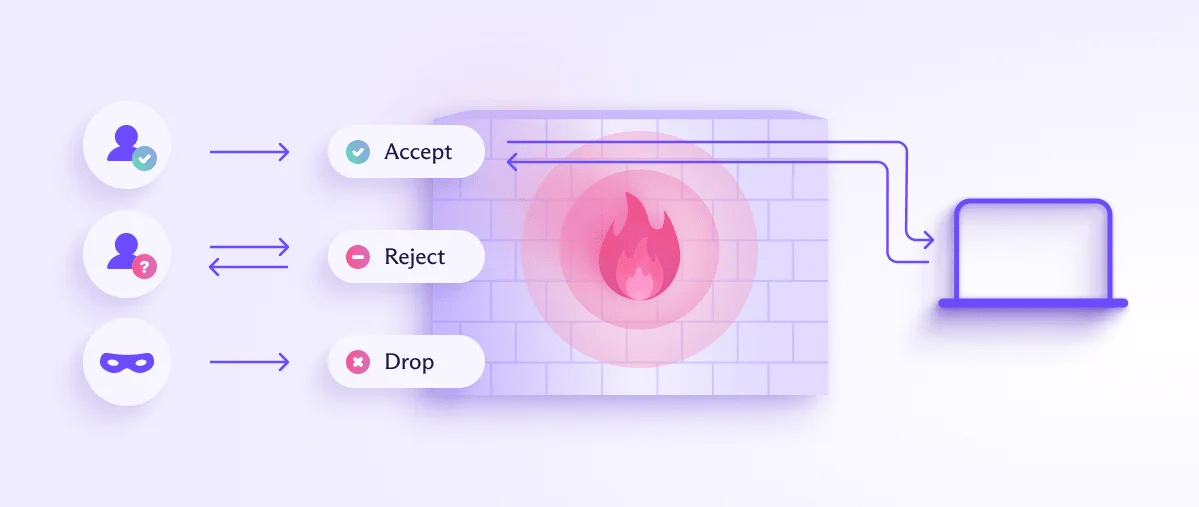
Firewalls werken vaak in beide richtingen. Dat wil zeggen dat ze zowel inkomend als uitgaand verkeer filteren, waardoor niet alleen wordt voorkomen dat personen op het internet verbinding maken met beperkte lokale bronnen, maar ook dat lokale gebruikers verbinding maken met gespecificeerde bronnen op het internet. Sommige firewalls zijn alleen voor uitgaand verkeer.
Een uitgaande firewall kan voorkomen dat een lokaal apparaat verbinding maakt met een IP-adres dat is gekoppeld aan malware, of kan worden gebruikt om inhoud te censureren. Een school kan een firewall gebruiken om te voorkomen dat leerlingen toegang krijgen tot inhoud op sociale media, of een beperkende overheid kan firewalls gebruiken om inhoud te blokkeren die zij op sociale, religieuze, culturele of politieke gronden verwerpelijk vindt (zoals de Grote Firewall van China(nieuw venster)).
Dezelfde logica van de ‘beveiligingsbeambte’ is ook van toepassing in een zakelijke omgeving, zij het vaak op veel grotere schaal. In plaats van één huis, stelt u zich een kantoorgebouw, een datacentrum en een aantal externe medewerkers voor die allemaal vanuit huis verbinding maken. Een zakelijke firewall (of vaker nog, meerdere firewalls die samenwerken) moet consequent dezelfde gastenlijst toepassen op al deze partijen.
Wat doet een firewall?
Een firewall voert drie hoofdfuncties uit:
1. Verkeersfiltering
Firewalls analyseren datapakketten om te bepalen of ze moeten worden toegestaan of geblokkeerd op basis van specifieke criteria, zoals IP-adressen, poortnummers, protocollen en inhoud.
2. Regelsets afdwingen
Beheerders configureren firewalls met regelsets die bepalen welk verkeer is toegestaan of wordt geweigerd. Deze regels zijn gebaseerd op een beveiligingsbeleid dat toegestane en niet-toegestane activiteiten specificeert.
3. Monitoren en loggen
Firewalls kunnen netwerkverkeer continu monitoren en belangrijke gebeurtenissen loggen, waardoor netwerkbeheerders waardevol inzicht krijgen in netwerkactiviteiten en potentiële beveiligingsrisico’s.
Firewall vs. antivirus: wat is het verschil?
Voor kleinere organisaties die al over antivirussoftware beschikken, is de beslissing of een firewall ook het beveiligingsbudget waard is een veelvoorkomend dilemma. In de meeste gevallen is het antwoord ja, omdat deze hulpprogramma’s verschillende dingen beschermen.
Scope
- Een firewall beschermt het netwerk en bepaalt in de eerste plaats welk verkeer mag binnenkomen of vertrekken.
- Antivirussoftware beschermt het individuele apparaat door bestanden en processen die er al zijn te scannen op bekende malwarehandtekeningen of verdacht gedrag.
Wat ze onderscheppen
- Een firewall kan een verbindingspoging blokkeren nog voordat deze een apparaat bereikt.
- Antivirussoftware pakt bedreigingen aan die het apparaat al hebben bereikt. Bijvoorbeeld een schadelijk bestand dat is gedownload via een reeds toegestane verbinding.
Wanneer ze in actie komen
- Firewalls treden in realtime op aan de perimeter, op het verkeer.
- Antivirustools treden over het algemeen achteraf op en scannen bestanden of actieve processen op tekenen van inbreuk.
Hoewel beide hulpprogramma’s dus helpen beschermen tegen kwaadaardige bedreigingen, bestrijken ze verschillende stadia van een aanval. Een firewall vermindert in de eerste plaats hoeveel uw apparaten bereikt, terwijl antivirussoftware opvangt wat erdoorheen slipt.
Waarom is een netwerkfirewall belangrijk?
Het gebruik van een firewall heeft verschillende voordelen:
- Verkeersfiltering door potentiële bedreigingen te identificeren en te blokkeren voordat ze het netwerk binnenkomen
- Beschermt gevoelige informatie
- Helpt te voldoen aan wettelijke vereisten en compliance-eisen
- Helpt het netwerkverkeer te controleren en te optimaliseren
Firewalls kunnen worden geïmplementeerd als een grens tussen het interne netwerk en het internet (wat bekendstaat als een perimeterfirewall), of binnen het netwerk om specifieke segmenten en/of bronnen binnen dat netwerk te beschermen (bekend als een interne firewall).
Cloud-firewalls, ook wel bekend als firewall-as-a-service(nieuw venster) (FWaaS), worden gehost in the cloud en bieden firewallbeveiliging voor op cloud gebaseerde infrastructuur. Dergelijke firewalls worden beheerd door cloudserviceproviders.
Met name voor bedrijven zijn firewalls vaak een basisvereiste in plaats van een optionele aanvulling. Veel nalevingskaders en cyberverzekeringspolissen vereisen dat er een vorm van netwerkfirewall aanwezig is voordat zij een organisatie als adequaat beschermd beschouwen.
Een korte geschiedenis van firewalls
Firewalls als concept verschenen voor het eerst eind jaren 80 en hebben sindsdien vier brede generaties doorgemaakt:
Pakketfilterende (stateless) firewalls: de vroegste vorm.
Stateful firewalls: voegden de mogelijkheid toe om de status van actieve verbindingen te volgen, in plaats van elk pakket afzonderlijk te beoordelen.
Proxy-firewalls (op toepassingsniveau): voegden volledige inspectie van de inhoud van het verkeer toe, niet alleen van de headers.
Next-generation firewalls (NGFW’s): combineren het bovenstaande met mogelijkheden zoals deep packet inspection (DPI)(nieuw venster), inbraakpreventie en toepassingsbewustzijn, wat resulteert in het merendeel van wat tegenwoordig in een zakelijke context als een “firewall” wordt verkocht.
Typen firewalls
Firewalls zijn er in verschillende typen, elk ontworpen om aan verschillende beveiligingsbehoeften te voldoen en verschillende niveaus van bescherming te bieden.
Wat is een pakketfilterende firewall?
Pakketfilterende firewalls onderzoeken de headers van datapakketten (IP), die bron- en doel-IP-adressen, poortnummers en protocolinformatie bevatten. Vervolgens passen zij regels toe op basis van deze headers om de pakketten toe te staan of te blokkeren.
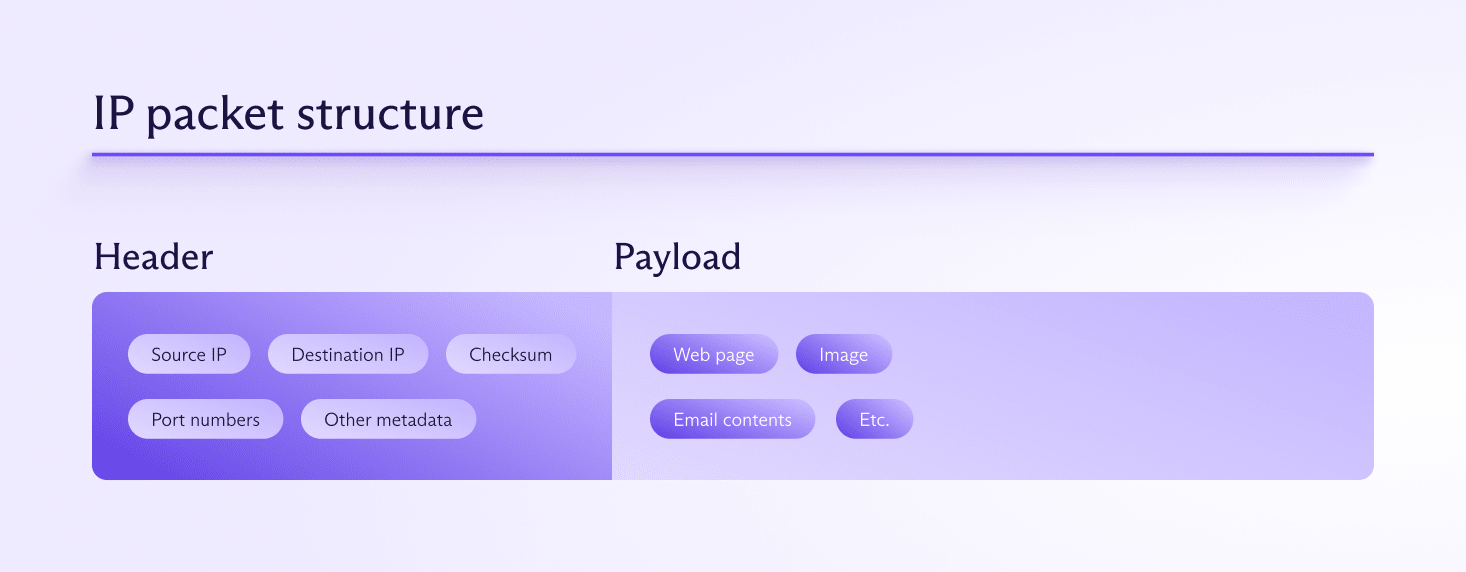
Hoewel zelfstandige pakketfilterende firewalls in theorie bestaan, is de realiteit dat alle firewalls pakketten filteren — het is de meest elementaire functie van een firewall.
Wat is een stateful firewall?
Deze firewalls, ook wel bekend als dynamische pakketfiltering, volgen de status van actieve verbindingen en nemen beslissingen op basis van de status en context van het verkeer. Ze inspecteren pakketheaders en houden een statustabel bij waarin informatie over actieve verbindingen wordt opgeslagen.
In tegenstelling tot stateless firewalls, die pakketten uitsluitend filteren op basis van vooraf gedefinieerde regels en de informatie in de pakketheaders (zoals IP-adressen en poortnummers), volgen stateful firewalls de status van actieve sessies en gebruiken zij deze informatie om beter geïnformeerde beslissingen te nemen over het toestaan of blokkeren van verkeer.
De statustabel bevat informatie zoals de bron- en doel-IP-adressen, poortnummers en de huidige status van de verbinding. Door de context van de verbinding te begrijpen, kunnen stateful firewalls complexere beslissingen nemen. Zij kunnen bijvoorbeeld herkennen of een pakket deel uitmaakt van een bestaande, legitieme verbinding of dat het een ongevraagd pakket is dat deel uitmaakt van een aanval.
Bijna alle firewalls in de praktijk zijn stateful firewalls. Ze bieden mogelijk extra functionaliteit, zoals u hieronder zult lezen, maar deze zijn bijna altijd een verfijning van de stateful firewall.
Wat is een proxyfirewall?
Proxyfirewalls fungeren als tussenpersoon tussen u en het internet. Ze doen namens u verzoeken, inspecteren het gehele datapakket (header and payload) en sturen de gegevens, indien deze als veilig worden beschouwd, door naar de bestemming.
Proxyfirewalls zijn het meest geschikt voor omgevingen waar een diepgaande inspectie van toepassingsgegevens cruciaal is, zoals bedrijfsnetwerken die gevoelige informatie verwerken.
In principe verbeteren proxyfirewalls de prestaties en verminderen ze het bandbreedtegebruik. Dit wordt echter vaak tenietgedaan door het feit dat ze complex en resource-intensief kunnen zijn, waardoor ze een knelpunt worden dat de netwerkprestaties vertraagt.
Wat is een next-generation firewall (NGFW)?
NGFW’s combineren traditionele firewallfuncties met extra functionaliteiten, zoals deep packet inspection, intrusion prevention systems (IPS) en inspectie van versleuteld verkeer. Ze kunnen toepassingen identificeren en beheren, geavanceerde bedreigingen detecteren en voorkomen, en beveiligingsbeleid afdwingen.
Next-generation firewalls zijn zeer effectief in het identificeren en stoppen van geavanceerde bedreigingen en bieden uitgebreide beveiliging door meerdere beveiligingsfuncties te integreren. Ze zijn echter duurder en complexer om te beheren, waardoor ze het meest geschikt zijn voor organisaties die geavanceerde beveiligingsmogelijkheden nodig hebben om zich te beschermen tegen geavanceerde cyberbedreigingen.
Wat is een unified threat management (UTM)-firewall?
UTM-firewalls integreren een mix van beveiligingsdiensten — bijvoorbeeld verschillende typen firewalls, antivirussoftware en inbraakdetectie — om een holistische benadering van netwerkbeveiliging te bieden.
Hoewel ze de geavanceerde functies en flexibiliteit missen van gespecialiseerde beveiligingsoplossingen zoals NGFW-firewalls, worden UTM-firewalls vaak beschouwd als een kosteneffectieve oplossing voor het midden- en kleinbedrijf, omdat ze het beveiligingsbeheer vereenvoudigen door meerdere beveiligingsfuncties te consolideren.
Wat is een network address translation (NAT)-firewall?
NAT-firewalls wijzigen netwerkadresgegevens in IP-pakketheaders tijdens de overdracht, zodat meerdere apparaten op een lokaal netwerk één openbaar IP-adres kunnen delen. Ze worden vaak gebruikt door thuisrouters en LAN-gatewayservers op kantoor, waarmee lokale apparaten verbinding maken met het internet.
NAT-firewalls voegen een beveiligingslaag toe door interne IP-adressen te verbergen, maar worden meestal gebruikt in combinatie met andere typen firewalls om een uitgebreidere beveiliging te bieden.
Wat is een webtoepassingsfirewall (WAF)?
Een webtoepassingsfirewall (WAF) is een gespecialiseerde firewall die is ontworpen om webtoepassingen te beschermen door het HTTP/HTTPS-verkeer tussen een webtoepassing en het internet te filteren en te monitoren. WAF’s helpen webtoepassingen te bescherming tegen verschillende aanvallen, zoals SQL-injectie, cross-site scripting (XSS) en andere veelvoorkomende webexploits, door binnenkomend verkeer te inspecteren en te filteren.
Wat is een menselijke firewall?
A “human firewall” is een analogie die verwijst naar de gezamenlijke inspanning van werknemers binnen een organisatie om te fungeren als verdedigingslinie tegen cyberbeveiligingsdreigingen. Dit concept benadrukt de rol van menselijk bewustzijn en gedrag bij het verbeteren van de organisatorische beveiliging, als aanvulling op technologische verdedigingswerken zoals firewalls, antivirussoftware en inbraakdetectiesystemen.
Hoe beïnvloeden VPN’s en firewalls elkaar?
Een VPN(nieuw venster) maakt een versleutelde tunnel tussen uw apparaat en de VPN-server.
Dit voorkomt dat een firewall tussen de VPN-server(nieuw venster) and uw apparaat interactie heeft met uw gegevens, zodat gegevens binnen de VPN-tunnel de firewall simpelweg omzeilen. Dit omvat firewalls op modems/routers thuis en bedrijfsservers op kantoor.
Lees meer over hoe VPN’s werken(nieuw venster)
Om dit probleem aan te pakken, implementeren de meeste VPN-providers (waaronder Proton VPN) firewalls op hun servers om hun klanten te beschermen. De servers van Proton VPN gebruiken bijvoorbeeld stateful firewalls om alle inkomende verkeersverbindingen te weigeren die niet door u zijn geïnitieerd.
Als u ongevraagde inkomende verbindingen wilt (bijvoorbeeld als u aan het torrenten(nieuw venster) bent), bieden wij een port forwarding(nieuw venster)-functie die een gat in de firewall slaat. Dit brengt enkele beveiligingsrisico’s(nieuw venster) met zich mee, maar port forwarding is alleen actief als u ervoor kiest om het in te schakelen.
VPN-apps gebruiken ook firewallregels (en soortgelijke platformspecifieke bewerkingen) om DNS- en IPv6-lekken(nieuw venster) te voorkomen.
Lees hoe u kunt controleren of uw VPN werkt(nieuw venster)
VPN’s en firewalls die worden gebruikt om inhoud te censureren
Omdat een versleutelde VPN-verbinding voorkomt dat firewalls VPN-verkeer onderzoeken en filteren, zijn diensten zoals Proton VPN zeer effectief in het omzeilen van firewalls(nieuw venster) die tot doel hebben inhoud op het web te blokkeren.
Hoe u een firewall kiest en implementeert voor uw bedrijf
Voor een huishouden of klein kantoor is één firewall (meestal ingebouwd in een router of een besturingssysteem) over het algemeen voldoende om aan uw beveiligingsbehoeften te voldoen. Bedrijven moeten echter vaak nadenken over firewalls in verschillende omgevingen tegelijk. De juiste setup hiervoor hangt af van wat er wordt beschermd:
Hoofdkantoor / campus: een perimeterfirewall die het netwerk van het hoofdkantoor beschermt, vaak naast interne firewalls die gevoelige gebieden (zoals financiën, HR, techniek) scheiden van de rest van het netwerk.
Bijkantoren: kleinere, externe locaties hebben vaak een eigen firewall nodig, in plaats van volledig te vertrouwen op het hoofdkantoor. Dit geldt met name als ze rechtstreeks verbinding maken met het internet, in plaats van via een centrale hub.
Datacenters: Firewalls in datacenters moeten doorgaans grote hoeveelheden verkeer verwerken en worden vaak samen met netwerksegmentatie geïmplementeerd om een eventuele schending te beperken tot een klein deel van de infrastructuur.
Cloud- en multi-cloudomgevingen: Traditionele hardware-firewalls sluiten niet goed aan op cloudinfrastructuur, en dat is waar firewall-as-a-service-firewalls (FWaaS) nuttig zijn. Deze schalen mee met de cloudprovider, in plaats van dat er fysieke apparatuur voor nodig is.
Hybride teams en werknemers op afstand: Werknemers die verbinding maken vanaf thuisnetwerken of openbare wifi vallen volledig buiten de traditionele firewall-perimeter van het kantoor. Dit wordt doorgaans aangepakt met een combinatie van endpoint-firewalls, VPN’s (ofwel traditionele setups waarbij het bedrijf zijn eigen VPN-servers bezit, of moderne oplossingen van derden die gebruikmaken van dedicated servers) en benaderingen voor netwerktoegang op basis van zero-trust-beveiliging (voor grotere organisaties).
Enkele praktische vragen die u kunt stellen bij het evalueren van firewall-opties voor uw bedrijf zijn:
Moet het versleuteld verkeer inspecteren? Een groeiend aandeel van het schadelijke verkeer is versleuteld. Dus als de firewall geen TLS/SSL-inspectie kan uitvoeren door HTTPS-verkeer te ontsleutelen, te controleren en opnieuw te versleutelen met zijn eigen vertrouwde certificaat, is deze in feite blind voor een grote categorie bedreigingen.
Hoe wordt het beheerd? Het beheren van een handvol afzonderlijke firewall-dashboards voor verschillende kantoren, cloudaccounts en externe endpoints schaalt niet goed. Gecentraliseerd beheer wordt belangrijker naarmate een organisatie groeit.
Wat zijn de prestatiekosten? Diepere inspectie (zoals DPI) vereist meer rekenkracht. Het is de moeite waard om te begrijpen hoe een firewall presteert als alle beveiligingsfuncties zijn ingeschakeld.
Is het onafhankelijk getest? De prestatie- en beveiligingsclaims van leveranciers zijn het waard om te worden getoetst aan onafhankelijke tests, in plaats van dat ze zomaar worden aangenomen. Dit is hetzelfde principe dat moet worden toegepast bij het evalueren van elk beveiligings- of privacyproduct.
Wat een firewall niet kan doen
Firewalls zijn een essentieel onderdeel van netwerkbeveiliging, maar ze zijn nooit bedoeld om alleen te werken. Eén manier om te begrijpen wat ze kunnen doen, is door duidelijk te zijn over wat ze niet kunnen:
Bedreigingen neutraliseren die zich al in uw netwerk bevinden
Als malware binnenkomt via een toegestaan kanaal, zoals een e-mailbijlage, een gecompromitteerde update of het eigen apparaat van een gebruiker, kan een perimeter-firewall daar weinig tegen doen. Dit is waar antivirus, endpoint-detectie en interne segmentatie van belang zijn.
Rekening houden met menselijke fouten
Een firewall kan een slecht menselijk oordeel niet herstellen. Iemand die door social engineering of phishing is misleid om zijn of haar wachtwoord af te geven, is geen probleem op het gebied van verkeersfiltering.
Versleuteld verkeer filteren waarvoor de firewall niet is geconfigureerd om te inspecteren
Verkeer dat bijvoorbeeld via een VPN wordt verzonden, kan bewust niet door een firewall worden geïnspecteerd. Dit is precies de reden waarom VPN’s effectief zijn voor zowel privacy als het omzeilen van censuurfirewalls (zie hierboven).
Effectief zijn bij verkeerd geconfigureerde regels
Een firewall is slechts zo goed als de regels die deze krijgt. Een te soepele regelset (of een regelset die niet is bijgewerkt naarmate het netwerk verandert) kan kritieke gaten in uw verdediging achterlaten, ondanks dat de firewall technisch gezien ‘actief’ is.
Dit betekent geenszins dat firewalls niet essentieel zijn. Het betekent alleen dat u ze moet zien en implementeren als één laag van de vele, zoals een firewall, antivirus, VPN en training van werknemers, in plaats van als een enkel verdedigingspunt.
Tot slot: Firewalls en VPN’s vullen elkaar aan
Firewalls zijn een essentieel onderdeel van netwerkbeveiliging. Bijna alle firewalls zijn stateful firewalls, met variaties die specifieke functies en voordelen bieden die zijn afgestemd op specifieke beveiligingsbehoeften en -omgevingen.
VPN-diensten maken uitgebreid gebruik van firewalls om zowel hun eigen systemen als die van de apparaten van klanten veilig te houden, terwijl ze tegelijkertijd een effectief middel zijn om firewalls te omzeilen die erop gericht zijn online inhoud te censureren.
Vooral voor bedrijven kan een firewall het beste worden beschouwd als één laag van een bredere beveiligingssetup, die naast tools zoals VPN’s, antivirussoftware en bewustmakingstraining voor werknemers moet worden gebruikt, in plaats van als vervanging voor een daarvan.
Veelgestelde vragen
In een computernetwerk is een firewall een beveiligingssysteem bestaande uit hardware, software of beide, dat zich tussen een vertrouwd en een onvertrouwd netwerk (meestal het internet) bevindt. Het controleert welk verkeer daartussen mag passeren, op basis van een gedefinieerde set regels.
Een firewall filtert inkomend en uitgaand netwerkverkeer en blokkeert alles wat niet aan de beveiligingsregels voldoet, terwijl legitiem verkeer wordt doorgelaten. Het kan ook netwerkactiviteit monitoren en loggen om mogelijke bedreigingen te helpen identificeren.
Het doel van een firewall is om ongeautoriseerde toegang tot (of vanaf) een netwerk te voorkomen, gevoelige systemen en gegevens te beschermen tegen externe bedreigingen, en beheerders controle en inzicht te geven in welk verkeer zich over het netwerk mag verplaatsen.





