For years, Google promised it wouldn’t use your emails, files, and photos to profile you for ad targeting. This month they gave themselves a way out of that promise.
On October 16, Google changed a sentence in its privacy policy that said your Gmail, Drive, and Photos content would not shape the ads you see. The sentence now has an exception spotted by Android Authority(nytt fönster): If you connect those apps to Google’s Personal Intelligence features, that data can inform ads in Search.

If you’ve never connected your Google apps to Personal Intelligence, then nothing changes for you. But if you turn it on, then Google will turn your most private information into fodder for ads. For better privacy, you can disconnect the ad machine from Gmail or disconnect personalization entirely — or switch to privacy-first services. We show you how below.
Stop Google from scanning your files for Search ads
To stop connected Gmail and Google Photos data from reaching Search, disconnect those apps in your Google Account settings:
- Open your Google Account and go to Data & privacy.
- Under Personalization & activity, select Personalization settings.
- Choose Manage Personalized Recommendations in Search Services.
- Under Additional Personal Intelligence, find Connected Content apps.
- Disconnect Google Workspace and Google Photos.
You can also turn off personalized recommendations entirely from the same Search Services personalization page. The easiest route is the Gemini settings for Personal Intelligence, where you can disable the connected apps. If you use Gemini, check both places. If you use Gmail’s built-in Gemini features, our guide to turning off Gemini in Gmail covers those separately.
Disconnecting does not erase what Google has already saved. Google’s help page says that disconnecting an app, or deleting the original email or photo, doesn’t remove data from your Search Services History, and that data can still be used for product improvement, including training generative AI models. To clear it, delete your Search Services History from your Google Account’s activity controls. You can also review your ad settings separately in My Ad Center.
If you’re in Europe: connecting apps has reportedly not been made available in the EU, the UK, or Switzerland. The privacy policy is a single global document, though, so the new wording covers you even where the feature isn’t live yet.
What the new policy wording allows
Google’s policy used to say it doesn’t show personalized ads based on your content from Drive, Gmail, or Photos. Since October 16, that sentence carries an exception for data you choose to make available to other Google services that support personalized ads. Google’s own example is Search processing the data you allow it to access to personalize content, including ads.
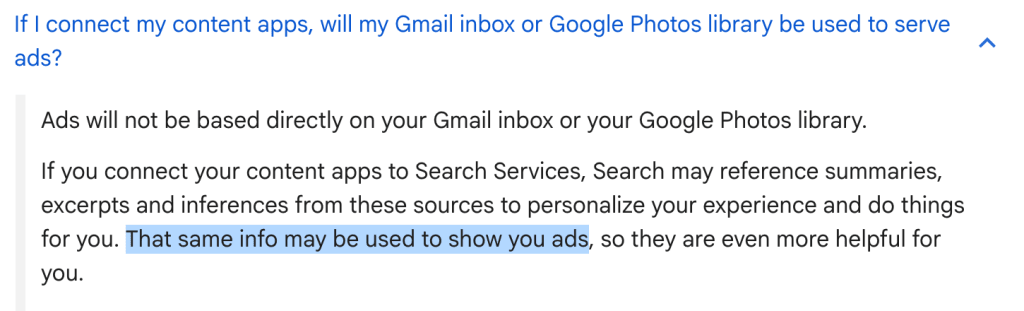
In a statement to Ars Technica(nytt fönster), Google said “connecting your apps is entirely opt-in”. Google’s help page for Personal Intelligence uses tricky wording to explain how your Gmail will feed the ad machine: “Ads will not be based directly on your Gmail inbox or your Google Photos library.” If you connect your apps, Search may use summaries, excerpts, and inferences from them, and Google says that same information may be used to show you ads.
Ads are not the only use. The same help page says connected data may be used to improve Google services, including by training generative AI models, and that a subset of data processed by AI Mode is reviewed by human reviewers, including trained service providers. Google advises against connecting apps that hold confidential information you wouldn’t want a reviewer to see. Google has confirmed it is testing ads in AI Mode(nytt fönster) for people who connect their apps.
Google’s no-ads promise now has conditions
Google has said since 2017 that it won’t show ads based on Gmail messages. The sentence in its privacy policy about Drive, Gmail, and Photos was added in July 2021 and stayed the same through 17 versions of the policy, until October 1, 2026, according to PPC Land’s review of the policy archive(nytt fönster).
Google launched Personal Intelligence on January 14, 2026. In March, the company said there were no ads for people who connect their apps with AI Mode, adding that this was not changing “right now.” The policy changed on October 16, about nine months after launch.
Store your data where the provider can’t read it
Personal Intelligence works because Google can read your email and photos. If Google instead used end-to-end encryption and zero-access encryption, they couldn’t. A policy change alone wouldn’t give them access to the content.
That is how we built Proton Mail and Proton Drive. Your messages and files are encrypted so that we can’t read them. Our revenue comes from paid plans rather than ads, and we can’t scan your inbox or use your photos to train AI models.
If you want AI help without handing over your data, Lumo is our private AI assistant(nytt fönster). It keeps no logs of your conversations, stores saved chats with zero-access encryption, and doesn’t use your chats to train its models.
Moving off Google is manageable in two steps:
- Email and calendar: Easy Switch imports your Gmail messages and can forward future mail to your Proton inbox. Google Calendar events can be imported as well, as a one-time import.
- Photos and files: Export them from Google with Google Takeout, then upload them to Proton Drive. Here’s how to switch from Google Photos to Proton Drive.