Wie du Face ID, Touch ID und die PIN-Code-Sperre in der Proton Mail iOS-App einrichtest
- Lesen
- 2 Min.
- Kategorie
- Mobile Sicherheit
Wenn du dich zum ersten Mal bei den Proton Mail-Apps für iPhone und iPad(neues Fenster) anmeldest, wird dein Anmeldepasswort sicher auf deinem Gerät gespeichert, damit du ganz einfach auf verschlüsselte E-Mails zugreifen und diese senden kannst.
Um eine zusätzliche Schutzebene hinzuzufügen, kann die Proton Mail-App auf deinem iPhone oder iPad automatisch mit Face ID (sofern dein Gerät dies unterstützt), Touch ID oder einem PIN-Code gesperrt werden. Diese können so eingestellt werden, dass dein Konto nach einer bestimmten Zeit oder beim Öffnen der App gesperrt wird.
Du musst eine Option (Face ID/Touch ID/PIN-Code) auswählen, wenn du das automatische Sperren einrichtest. Du kannst nicht gleichzeitig einen PIN-Code und Face ID/Touch ID verwenden.
Wenn du deine PIN vergisst oder die Face ID-/Touch ID-Abfrage fehlschlägt, fordert dich die App auf, die PIN deines Geräts einzugeben.
- So richtest du Face ID oder Touch ID ein
- So richtest du einen PIN-Code ein
- So legst du die Zeit für das automatische Sperren fest
So richtest du Face ID oder Touch ID ein
- Stelle sicher, dass du einen Passcode festgelegt hast(neues Fenster), und zwar in den System-Einstellungen deines iPhones oder iPads.
- Öffne die Proton Mail-App und melde dich mit deinem Proton-Konto an.
- Tippe auf ☰ und öffne die Einstellungen.

- Gehe zu App-Anpassungen.

- Wähle App-Sperre aus.

- Tippe je nach Gerät auf Mit Face ID sichern oder Mit Touch ID sichern.

Du kannst jetzt auswählen:
- Automatisches Sperren, um den Zeitraum für das automatische Sperren festzulegen
- Nicht sperren, um Face ID oder Touch ID zu deaktivieren
So richtest du einen PIN-Code ein
- Öffne die Proton Mail-App und melde dich mit deinem Proton-Konto an.
- Tippe auf ☰ und öffne die Einstellungen.
- Gehe zu App-Anpassungen.
- Wähle Mit PIN sichern aus.

- Gib einen PIN-Code ein, tippe dann auf Weiter und bestätige ihn.

Du kannst jetzt auswählen:
- Automatisches Sperren, um den Zeitraum für das automatische Sperren festzulegen
- PIN ändern, um einen neuen PIN-Code einzugeben
- Nicht sperren, um den PIN-Code zu deaktivieren
So legst du die Zeit für das automatische Sperren fest
Die Zeit für das automatische Sperren ist der Zeitraum, nach dem dein Konto automatisch gesperrt wird und Face ID/Touch ID oder dein PIN-Code zum Entsperren erforderlich ist.
- Öffne die Proton Mail-App und melde dich mit deinem Proton-Konto an.
- Tippe auf ☰ und öffne die Einstellungen.
- Gehe zu App-Anpassungen.
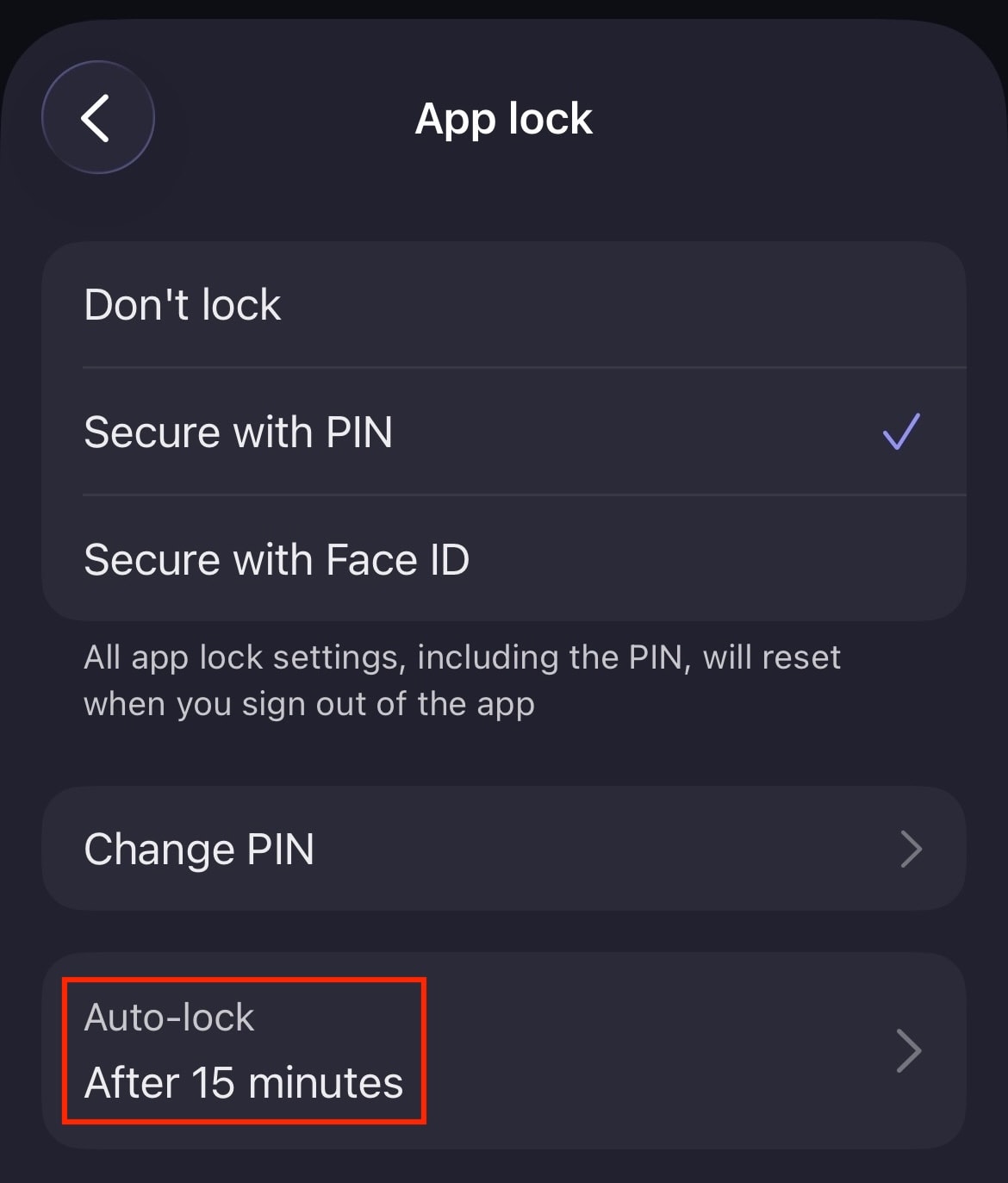
- Wähle App-Sperre und dann Automatisches Sperren aus.
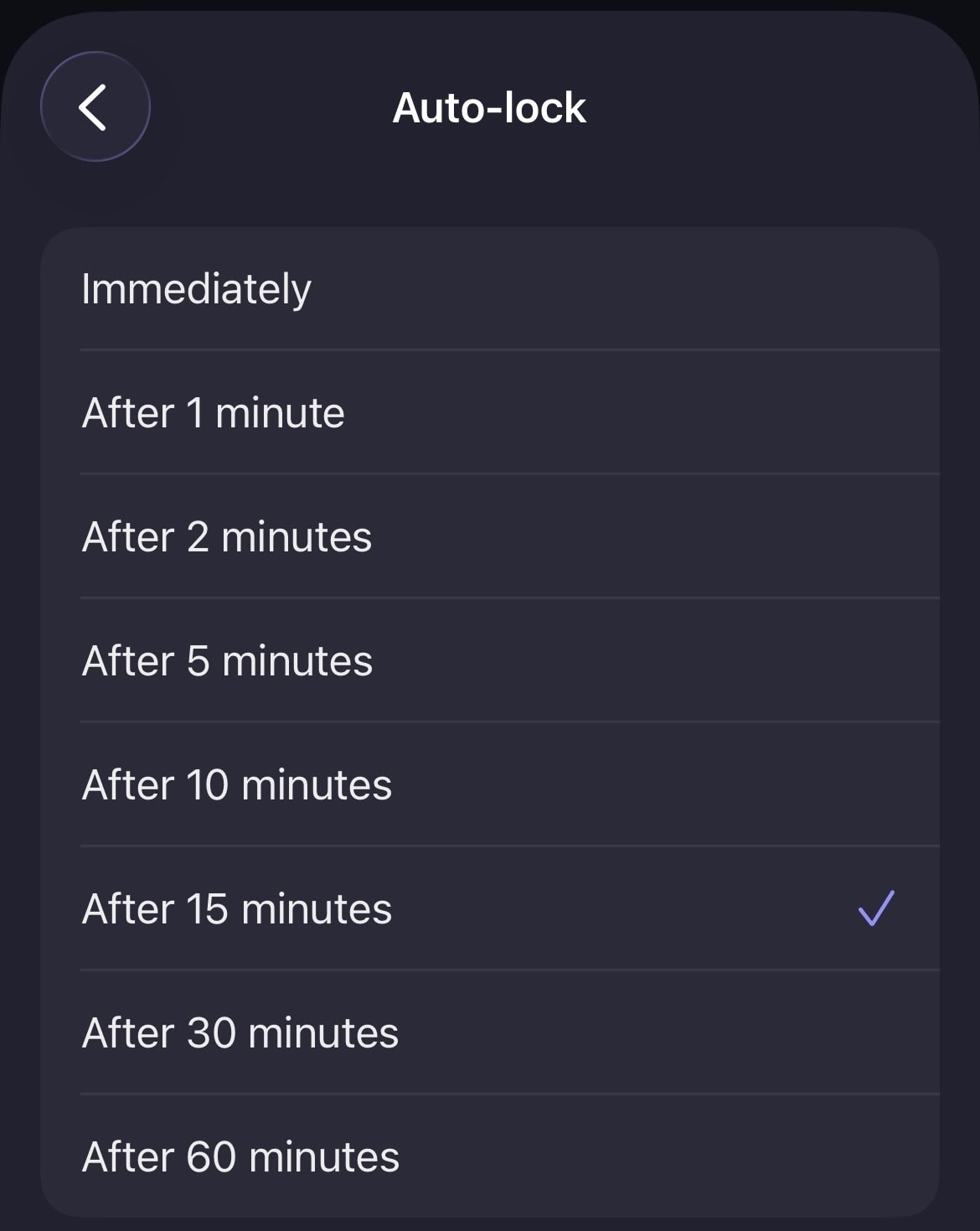
- Lege die gewünschte Zeit für das automatische Sperren fest, von Sofort bis zu Nach 60 Minuten.