
외부 캘린더 구독하기
- 읽기
- 0분
- 카테고리
- 캘린더 공유 및 구독
Proton Calendar를 사용하면 상대방이 Proton을 사용하지 않더라도 해당 사용자의 캘린더를 구독하고 이벤트를 볼 수 있습니다.
캘린더를 구독하려면 캘린더 소유자로부터 공유 링크를 받아 Proton Calendar 웹 앱에 추가하십시오. 구독이 완료되면 모바일 및 데스크톱 앱에서도 이벤트를 볼 수 있습니다.
구독한 캘린더는 귀하의 요금제에서 사용할 수 있는 전체 캘린더 수에 포함됩니다.
다른 사람의 캘린더를 구독하는 방법
- 캘린더 URL 가져오기
먼저 캘린더 소유자에게 해당 캘린더의 iCal(.ics) 링크를 공유해 달라고 요청하십시오. 링크를 생성하기 전에 캘린더를 공개(게시)해야 할 수도 있습니다.
다음 가이드에서는 가장 널리 사용되는 일부 캘린더 앱에서 링크를 공유하는 방법을 설명합니다.
- Proton Calendar에서 캘린더 링크를 공유하는 방법
- Google Calendar에서 캘린더 링크를 공유하는 방법
- Outlook Calendar에서 캘린더 링크를 공유하는 방법(새 창)
- Nextcloud에서 캘린더 링크를 공유하는 방법(새 창)
캘린더 소유자는 바쁨 상태는 표시하고 이벤트 세부사항은 숨기는 등 보기 권한 수준을 다르게 설정할 수 있습니다. 소유자가 귀하의 권한 수준을 변경하는 경우, 귀하에게 새로운 링크를 공유해야 합니다.
- calendar.proton.me(새 창)에 로그인하고 계정 설정(설정 ⚙️ → 전체 설정)을 엽니다.
- 사이드바에서 캘린더를 선택합니다. 다른 달력으로 이동하여 URL로 캘린더 추가를 클릭합니다.
- 캘린더 URL 아래에 링크를 붙여넣은 다음, 캘린더 추가를 클릭합니다.
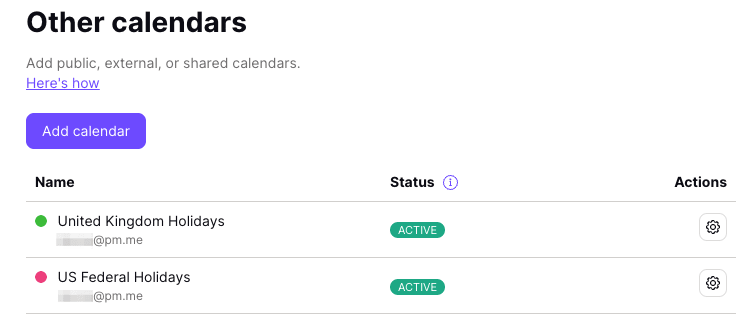
모든 이벤트가 동기화되는 데 몇 분 정도 걸릴 수 있습니다. 동기화가 완료되면 구독한 캘린더가 다른 달력 아래에 표시됩니다. 이는 귀하의 요금제에서 사용할 수 있는 전체 캘린더 수에 포함됩니다.
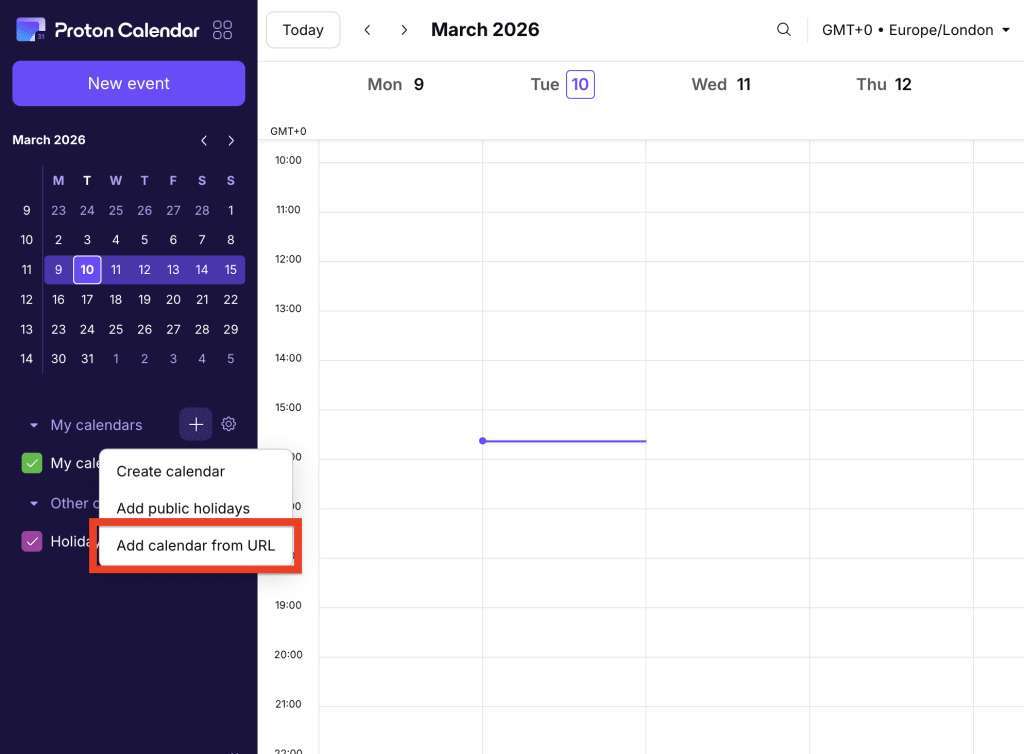
Proton Calendar 홈 페이지에서 캘린더를 빠르게 구독할 수도 있습니다. 내 캘린더 옆에 있는 + 버튼을 클릭한 다음 드롭다운 메뉴에서 URL로 캘린더 추가 를 선택하십시오.
구독한 캘린더는 보기 전용입니다
즉, 다음과 같은 작업을 수행할 수 없습니다.
- 이벤트 편집 또는 삭제
- 기본 캘린더로 설정
- 공유 또는 내보내기
- 이벤트 불러오기
구독한 캘린더 관리
캘린더의 이름 또는 설명을 변경하려면:
- calendar.proton.me(새 창)에 로그인하고 계정 설정(설정 ⚙️ → 전체 설정)을 엽니다.
- 사이드바에서 캘린더를 선택하고 다른 달력으로 이동합니다. 편집하려는 캘린더를 찾아 설정 열기(⚙️)를 클릭합니다.
캘린더 구독 해지
- calendar.proton.me(새 창)에 로그인하고 계정 설정(설정 ⚙️ → 전체 설정)을 엽니다.
- 사이드바에서 캘린더를 선택하고 다른 달력으로 이동합니다. 편집하려는 캘린더를 찾아 설정 열기(⚙️)를 클릭합니다.
- 캘린더 삭제로 스크롤하여 구독 해지를 클릭합니다.
이렇게 하면 캘린더와 모든 이벤트가 삭제됩니다.
문제 해결
타사 캘린더는 제공업체에 따라 4-16시간마다 동기화됩니다.
16시간이 지났는데도 이벤트가 업데이트되지 않는 경우, 구독한 캘린더(설정 ⚙️ → 전체 설정 → 캘린더 → 다른 달력)를 확인하십시오.
캘린더 옆에 동기화되지 않음 경고가 표시되면 해당 항목에 마우스를 올려 자세한 정보를 확인하십시오.
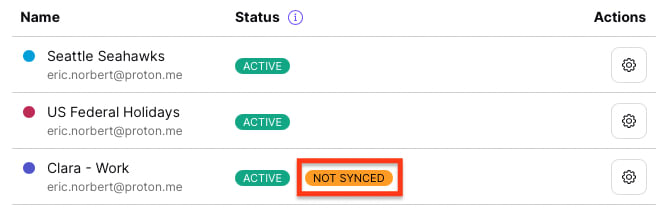
다음 메시지 중 하나가 표시됩니다.
마지막 업데이트 이후 12시간 이상 경과
지난 12시간 동안 캘린더를 업데이트할 수 없었습니다. 동기화에는 최대 16시간이 걸릴 수 있으므로 문의하시기 전에 잠시만 기다려 주십시오.
지원되지 않는 캘린더 형식
당사가 따르는 iCalendar(새 창) 표준과 다른 형식을 사용하므로 캘린더를 동기화할 수 없습니다. 링크가 올바른지 확인하십시오.
캘린더 링크에 액세스할 수 없음
외부 구독자를 허용하지 않는 캘린더입니다.
캘린더 링크에 일시적으로 액세스할 수 없음
캘린더 소유자가 링크를 삭제했거나 편집했을 수 있습니다.
캘린더 용량이 너무 큼
캘린더 파일 크기가 너무 커서 불러올 수 없습니다.
Google Calendar
지정된 날짜와 시간 이후의 이벤트만 동기화하여 캘린더 크기를 줄일 수 있습니다. 이렇게 하려면 URL 끝에 다음을 추가하여 캘린더 링크를 편집하십시오.
?start-min=YYYY-MM-DDT00:00:00Z
예를 들어:
위의 예에서는 2022년 1월 1일 이전의 모든 이벤트가 Proton Calendar로 동기화되지 않으므로 파일 크기가 작아집니다.
다른 달력
현재로서는 다른 달력 제공업체를 위한 명확한 우회 방법이 없습니다.
하지만 캘린더 플랫폼에서 허용하는 경우, 더 늦은 날짜부터 시작하는 공유 가능한 링크를 생성해 볼 수 있습니다.