
Přihlásit odběr externího kalendáře
- Čtení
- 5 minut
- Kategorie
- Sdílení kalendáře a předplatné
S Proton Calendar můžete přihlásit odběr kalendáře někoho jiného a zobrazit jeho události, i když nepoužívá Proton.
Chcete-li přihlásit odběr kalendáře, získejte odkaz pro sdílení od vlastníka kalendáře a přidejte jej do své webové aplikace Proton Calendar. Po přihlášení odběru můžete události zobrazovat také v našich mobilních a desktopových aplikacích.
Kalendáře s přihlášeným odběrem se započítávají do celkového počtu kalendářů dostupných ve Vašem tarifu.
- Přihlásit odběr kalendáře někoho jiného
- Spravovat kalendáře s přihlášeným odběrem
- Odhlásit odběr kalendáře
- Řešení problémů
Jak přihlásit odběr kalendáře někoho jiného
- Získat URL kalendáře
Nejprve požádejte vlastníka kalendáře, aby sdílel iCal (.ics) odkaz na svůj kalendář. Je možné, že před vytvořením odkazu bude muset svůj kalendář zveřejnit (publikovat).
Tyto návody vysvětlují, jak sdílet odkaz v některých z nejběžnějších kalendářových aplikací:
- Jak sdílet odkaz na kalendář v Proton Calendar
- Jak sdílet odkaz na kalendář v Google Calendar
- Jak sdílet odkaz na kalendář v Outlook Calendar(nové okno)
- Jak sdílet odkaz na kalendář v Nextcloud(nové okno)
Vlastník kalendáře může mít možnost nastavit různé úrovně oprávnění k zobrazení, například Vám zobrazovat, kdy má plno, ale skrýt podrobnosti o událostech. Pokud změní úroveň Vašeho oprávnění, bude s Vámi muset sdílet nový odkaz.
- Přihlaste se k calendar.proton.me(nové okno) a otevřete nastavení účtu (Nastavení ⚙️ → Všechna nastavení).
- V postranním panelu vyberte Kalendáře. Přejděte na Ostatní kalendáře a klikněte na Přidat kalendář z URL.
- Vložte odkaz do pole URL kalendáře a klikněte na Přidat kalendář.
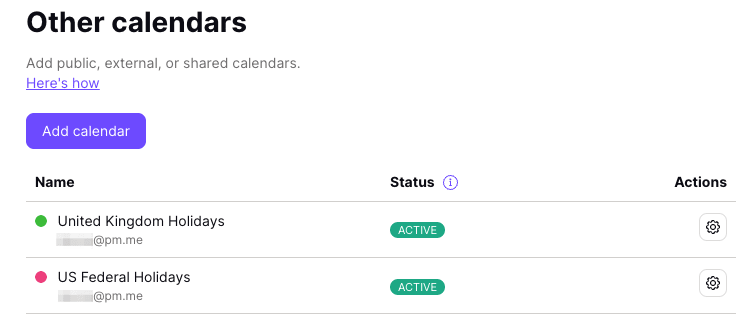
Synchronizace všech událostí může trvat několik minut. Po synchronizaci se kalendář s přihlášeným odběrem zobrazí v sekci Ostatní kalendáře. Bude se započítávat do celkového počtu kalendářů dostupných ve Vašem tarifu.
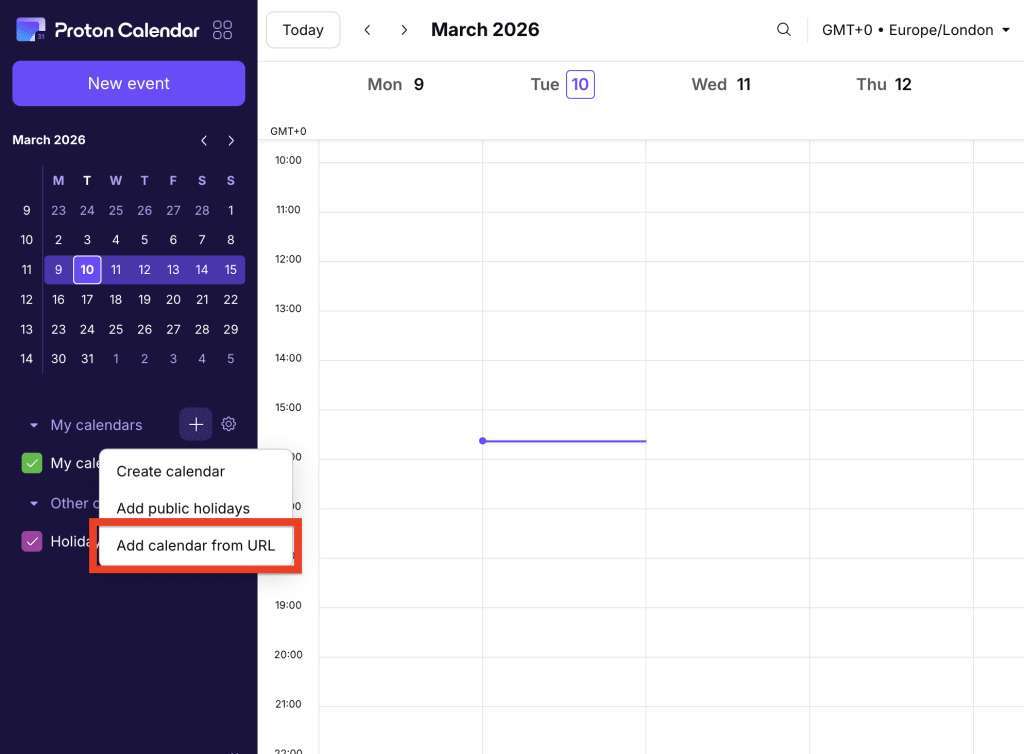
K odběru kalendáře se můžete také rychle přihlásit z domovské stránky Proton Calendar. Stačí kliknout na tlačítko + vedle položky Mé kalendáře, a pak vybrat možnost Přidat kalendář z URL z rozbalovací nabídky.
Kalendáře s přihlášeným odběrem jsou pouze pro zobrazení
To znamená, že nemůžete:
- Upravovat ani mazat události
- Nastavit je jako svůj výchozí kalendář
- Sdílet je ani exportovat
- Importovat do nich události
Spravovat kalendáře s přihlášeným odběrem
Chcete-li změnit název nebo popis kalendáře:
- Přihlaste se k calendar.proton.me(nové okno) a otevřete nastavení účtu (Nastavení ⚙️ → Všechna nastavení).
- V postranním panelu vyberte Kalendáře a přejděte na Ostatní kalendáře. Najděte kalendář, který chcete upravit, a klikněte na Otevřít nastavení (⚙️).
Odhlásit odběr kalendáře
- Přihlaste se k calendar.proton.me(nové okno) a otevřete nastavení účtu (Nastavení ⚙️ → Všechna nastavení).
- V postranním panelu vyberte Kalendáře a přejděte na Ostatní kalendáře. Najděte kalendář, který chcete upravit, a klikněte na Otevřít nastavení (⚙️).
- Přejděte na Odebrat kalendář a klikněte na Odhlásit odběr.
Tím se odstraní kalendář i se všemi jeho událostmi.
Řešení problémů
Kalendáře od třetích stran se synchronizují každých 4-16 hodin v závislosti na poskytovateli.
Pokud uplynulo více než 16 hodin and Vaše události se neaktualizovaly, zkontrolujte své kalendáře s přihlášeným odběrem (Nastavení ⚙️ → Všechna nastavení → Kalendáře → Ostatní kalendáře).
Pokud vedle kalendáře uvidíte varování nesynchronizováno, najeďte na něj myší a zobrazí se další informace.
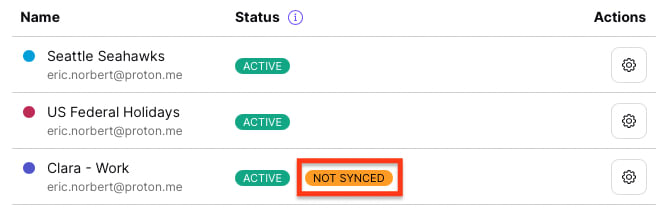
Uvidíte jednu z následujících zpráv:
Od poslední aktualizace uplynulo více než 12 hodin
V posledních 12 hodinách se nám nepodařilo kalendář aktualizovat. Synchronizace může trvat až 16 hodin, proto prosím před kontaktováním podpory chvíli počkejte.
Nepodporovaný formát kalendáře
Kalendář nelze synchronizovat, protože používá jiný formát než standard iCalendar(nové okno), který používáme. Zkontrolujte, zda je váš odkaz správný.
Odkaz na kalendář není přístupný
Kalendář nepovoluje externí odběratele.
Odkaz na kalendář je dočasně nedostupný
Vlastník kalendáře mohl odkaz smazat nebo upravit.
Kalendář je příliš velký
Soubor kalendáře je příliš velký na to, aby mohl být importován.
Google Calendar
Velikost kalendáře můžete zmenšit tak, že budete synchronizovat pouze události po určitém datu a času. Chcete-li to provést, upravte odkaz kalendáře tak, že na konec URL přidáte následující:
?start-min=YYYY-MM-DDT00:00:00Z
Například:
Ve výše uvedeném příkladu se všechny události před 1. lednem 2022 nebudou synchronizovat do Proton Calendar, čímž se soubor zmenší.
Ostatní kalendáře
V současné době neexistuje žádné jasné řešení pro ostatní poskytovatele kalendářů.
Pokud to však platforma kalendáře umožňuje, můžete zkusit vygenerovat odkaz ke sdílení s pozdějším datem začátku.