Eine E-Mail-Adresse ist eine eindeutige Kennung, mit der du digitale Nachrichten senden und empfangen kannst. Sie ist im Grunde deine Postadresse für das Internet. Alle E-Mail-Adressen folgen derselben Grundstruktur: Benutzername@Domain.
Wir nutzen unsere E-Mail jeden Tag, ohne groß darüber nachzudenken – um uns für Konten zu registrieren, uns anzumelden, unsere Identitäten zu verifizieren und Passwörter wiederherzustellen. In vielerlei Hinsicht hat sich die E-Mail-Adresse zu dem Faden entwickelt, der einen Großteil unserer Online-Identität zusammenhält.
Wie viel weißt du eigentlich über deine E-Mail-Adresse? Lass uns erkunden, woraus sie besteht, einige häufige Verwendungszwecke und Ratschläge, wie du deine privat hältst.
- Die Entwicklung der E-Mail-Adresse
- Elemente einer E-Mail-Adresse
- Gültige und ungültige E-Mail-Adressen
- Wie Menschen E-Mail-Adressen nutzen
- Warum der Schutz deiner E-Mail-Adresse wichtig ist
- Halte deine E-Mail-Adresse privat
Die Entwicklung der E-Mail-Adresse
Als die E-Mail 1971 erfunden wurde, erfüllte sie einen rein funktionalen Zweck. Sie war eine Möglichkeit für Menschen im selben Netzwerk, digital über einfache Nachrichten im ARPANET, dem Vorläufer des Internets, zu kommunizieren. Mit dem Wachstum des Internets wurden E-Mail-Adressen zentral für unser digitales Leben.
Heute ist deine E-Mail-Adresse für fast alles unerlässlich. Über sie kommunizierst du, meldest dich an und greifst auf sensible Informationen wie deine Steuerdetails zu. Was als Online-Mailsystem begann, hält heute die Schlüssel zu deinem gesamten Online-Leben.
Die Elemente einer E-Mail-Adresse
E-Mail-Adressen bestehen aus drei Teilen: dem Benutzernamen (auch „Lokalteil“ genannt), dem @-Symbol und dem E-Mail-Domain-Namen.
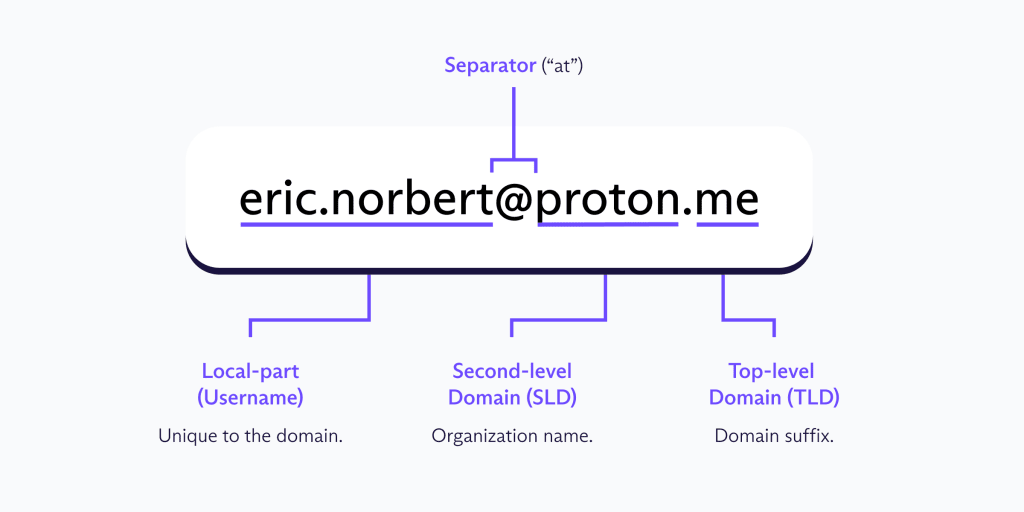
Der Benutzername
Dein E-Mail-Benutzername ist der Teil einer E-Mail-Adresse, der dich innerhalb des E-Mail-Dienstes identifiziert.
Bei der Erstellung deines Benutzernamens kannst du deinen echten Namen oder ein Pseudonym verwenden. Beides hat seine eigenen Vorteile; die Verwendung deines echten Namens funktioniert beispielsweise gut in beruflichen Kontexten, da er wiedererkennbar ist. Pseudonyme bieten mehr Privatsphäre, wirken aber in formellen Kommunikationen, etwa wenn du dich für einen Job bewirbst, weniger glaubwürdig.
Die meisten E-Mail-Dienste zwingen dich dazu, zwischen Privatsphäre und Professionalität zu wählen, aber E-Mail-Aliasse ermöglichen es dir, das Beste aus beiden Welten zu haben. Anstatt überall deine echte E-Mail-Adresse anzugeben und unerwünschte Nachrichten zu riskieren, kannst du eindeutige Aliasse für verschiedene Websites und Dienste erstellen. Alle Nachrichten kommen weiterhin im selben Posteingang an, aber das Alias hält deine primäre E-Mail-Adresse privat. Wenn ein Alias anfängt, Spam zu empfangen, kannst du es einfach deaktivieren. Finde heraus, wie E-Mail-Aliasse funktionieren.
Das @-Trennzeichen
Das @-Symbol trennt deinen Benutzernamen vom Domainnamen und teilt dem E-Mail-System mit, wohin deine Nachricht weitergeleitet werden soll. Ohne dieses würde das System nicht wissen, an welchen Server es liefern soll, und du würdest stattdessen einen Zustellungsfehler erhalten.
Bei der Entwicklung des ersten Netzwerk-E-Mail-Systems im Jahr 1971 suchte Ray Tomlinson nach einem Zeichen auf der Tastatur, das den Benutzer vom Host-Computer trennen könnte. Er wählte das @-Symbol, das bereits „bei“ (at) bedeutete, wodurch Adressen wie user@host ganz natürlich als „user at host“ gelesen werden.
Der Domainname
Was ist eine E-Mail-Domain? Es ist der Teil einer E-Mail-Adresse, der signalisiert, welcher E-Mail-Anbieter deine Nachrichten handhabt. Er steht nach dem @-Symbol, wie z. B. „proton.me“ oder „gmail.com“. Eine E-Mail-Domain besteht typischerweise aus zwei Teilen:
Second-Level-Domain (SLD): Der Name des E-Mail-Dienstes (z. B. „proton“)
Top-Level-Domain (TLD): Das Suffix am Ende (z. B. „.com“)
Einige Domains können auch zusätzliche Teile enthalten, wie etwa Subdomains. Beispielsweise enthalten Adressen wie „user@mail.example.com“ oder „user@department.university.ac.uk“ zusätzliche Ebenen, die helfen, E-Mails innerhalb größerer Organisationen oder Netzwerke weiterzuleiten.
Du bist wahrscheinlich schon auf verschiedene TLDs gestoßen und hast dich gefragt, was sie alle bedeuten. TLDs weisen auf die Herkunft der Domain hin, und einige gängige umfassen:
.com: Für kommerzielle Zwecke und die am weitesten verbreitete TLD
.org: Für Organisationen wie gemeinnützige Organisationen
.net: Ursprünglich für Netzwerke, wird aber jetzt allgemein verwendet
.edu: Für Bildungseinrichtungen
.gov: Für Regierungsbehörden
Bei der Erstellung einer E-Mail-Adresse verwenden die meisten von uns standardmäßig die vom E-Mail-Dienst bereitgestellte Domain. Unternehmen und Fachleute verwenden jedoch oft eine benutzerdefinierte E-Mail-Domain, die zu ihrer Marke passt; anstelle von „help.yourbusiness@proton.com“ würde die Adresse beispielsweise „help@yourbusiness.com“ lauten. Wenn du ein Unternehmen oder eine persönliche Marke führst, hilft das Einrichten einer benutzerdefinierten E-Mail-Domain dabei, Kunden und Partnern Glaubwürdigkeit zu signalisieren.
Gültige und ungültige E-Mail-Adressen
E-Mail-Adressen folgen bestimmten Regeln, und wenn eine Adresse diese bricht, kannst du kein Konto erstellen oder eine E-Mail zustellen. Hier sind die grundlegenden Regeln:
E-Mail-Benutzernamen:
- Können Groß- und Kleinbuchstaben enthalten
- Können Zahlen enthalten
- Können bestimmte Sonderzeichen enthalten, wie Punkte, Bindestriche, Unterstriche, Dollarzeichen, Ausrufezeichen und andere
- Dürfen nicht mit einem Punkt beginnen oder enden
- Dürfen nicht zwei aufeinanderfolgende Punkte haben
- Dürfen keine Leerzeichen enthalten
E-Mail-Domains:
- Müssen sowohl SLD als auch TLD enthalten
- Können Buchstaben, Zahlen und Bindestriche enthalten
- Dürfen nicht mit einem Bindestrich beginnen oder enden
| Beispiele für gültige E-Mail-Adressen | Beispiele für ungültige E-Mail-Adressen |
|---|---|
| eric.norbert@proton.me | eric..norbert@proton.me |
| er1c_n0rbert@proton.me | .ericn0rbert@proton.me |
| ericnorbert+newsletter@proton.me | ericnorbert.proton.me |
| eric~n0rbert@proton.me | eric norbert@proton.me |
| hello@ericnorbert.com | ericnorbert@proton |
| contact@ericnorbert.co.uk | ericnorbert@-proton.me |
Wie Menschen E-Mail-Adressen nutzen
Heute hat eine E-Mail-Adresse viele Funktionen und wir nutzen sie in unserem digitalen und Offline-Leben.
Persönliche Nutzung
Trotz der Beliebtheit von sozialen Medien und Instant-Messaging-Apps bleibt E-Mail eine der einfachsten Möglichkeiten, mit Freunden und Familie in Kontakt zu bleiben. Sie dient auch als durchsuchbare Aufzeichnung deiner Transaktionen, da dort deine Online-Bestätigungen, Reise- und Terminbestätigungen sowie Abonnementverlängerungen landen.
Berufliche Nutzung
In Arbeitsumgebungen ist E-Mail das Rückgrat der Kommunikation. So koordinieren viele Teams Projekte, erreichen Kunden, schließen Geschäfte ab und erhalten Jobbewerbungen. E-Mails schaffen auch eine Aufzeichnung von Entscheidungen, Vereinbarungen und Unterhaltungen, auf die später verwiesen werden kann – was besonders wichtig für sensible Informationen sein kann.
Offizielle Nutzung
Viele Organisationen setzen zunehmend auf E-Mails als umweltfreundliche Alternative zu herkömmlicher Post. In vielen Industrieländern stellen Regierungen, Banken und öffentliche Institutionen offizielle Mitteilungen mittlerweile digital zu, als Teil breiterer Bemühungen zur Modernisierung von Diensten. Infolgedessen werden sensible Informationen wie Kontoauszüge, Steuerformulare und behördliche Bescheide oft direkt in deinen Posteingang gesendet. Das macht die Sicherung deines Posteingangs noch wichtiger.
Warum der Schutz deiner E-Mail-Adresse wichtig ist
Da so viel von deiner E-Mail-Adresse abhängt, war es noch nie so wichtig, sie privat zu halten. Heute versuchen Unternehmen bei fast jeder Gelegenheit, an deine E-Mail-Adresse zu gelangen, wie zum Beispiel bei der Essensbestellung in einem Restaurant. Manchmal wird dir ein Promo-Code im Austausch für deine E-Mail angeboten – das entspricht dem Verkauf deines digitalen Identifikators für ein paar Cent.
Sobald deine E-Mail-Adresse geteilt ist, verlierst du die Kontrolle darüber, wer sie kennt und wie dieses Wissen genutzt wird. Sie könnte an Datenbroker verkauft oder in einem Datenleck aufgedeckt werden. Diese Risiken lassen sich leicht übersehen, aber ihre Konsequenzen können von bloßem Ärgernis bis hin zu schwerwiegenden Problemen reichen:
Spam: Das sind unerwünschte E-Mails, die deinen Posteingang verstopfen. Unser Spam Watch-Bericht 2025 zeigt, dass die meisten Marketing-E-Mails unsichtbare Pixel-Tracker enthalten und während der Feiertage stark ansteigen, was zur Überlastung des Posteingangs führt.
Tracking: Unternehmen können deine E-Mail mit deinen Online-Aktivitäten verknüpfen, um ein detailliertes Verhaltensprofil zu erstellen. Beispielsweise kann Google deine Aktivitäten über verschiedene Dienste hinweg verbinden, wie Suchanfragen in der Google-Suche, angesehene Videos auf YouTube und besuchte Orte in Google Maps – alles nur, weil du einfach in deinem Gmail-Konto angemeldet warst.
Phishing: Betrüger können dir betrügerische E-Mails senden, die darauf ausgelegt sind, dich zur Preisgabe persönlicher Informationen zu verleiten, was zu Identitätsdiebstahl, finanziellem Verlust oder unbefugtem Zugriff auf deine Konten führen kann.
Datenlecks: Wenn Unternehmen, die deine E-Mail, Passwörter oder Zahlungsdetails speichern, gehackt werden oder Daten verlieren, können deine persönlichen Informationen Cyberkriminellen preisgegeben werden, was zu Kontoübernahmen, Identitätsdiebstahl oder Finanzbetrug führt.
Halte deine E-Mail-Adresse privat
Der einfachste Weg, deine E-Mail-Adresse zu schützen, ist, sie nur zu teilen, wenn es nötig ist, wie zum Beispiel, wenn du sie als Wiederherstellungs-E-Mail-Adresse für ein Konto festlegst.
Wann immer du gebeten wirst, deine E-Mail-Adresse anzugeben – sei es, um dich für einen Newsletter zu registrieren, ein Konto zu erstellen, Inhalte herunterzuladen oder einen Rabatt freizuschalten – denke daran, dass du das nicht immer tun musst. Wenn es eine Option gibt, ohne sie fortzufahren, wie beispielsweise als Gast zur Kasse zu gehen, wähle stattdessen diese Option.
Wenn das nicht möglich ist, erstelle E-Mail-Aliasse für verschiedene Zwecke und verwalte sie mit Proton Pass. Jedes Alias leitet E-Mails an deinen Proton Mail-Posteingang weiter, und du kannst davon aus antworten, genau wie von deiner regulären Adresse. Die Verwendung eines eindeutigen Alias für jeden Dienst macht es auch einfach zu erkennen, wenn ein Unternehmen deine Informationen teilt – zum Beispiel, wenn ein für eine Website verwendetes Alias plötzlich Werbung von einer anderen empfängt.
Proton Mail fungiert als sicherer Posteingang hinter deinen Aliasen. Es bietet integrierte Schutzmaßnahmen zum Blockieren von E-Mail-Trackern und Phishing, zur einfachen Verwaltung von Abonnements und erweiterte Spamfilter, damit du die Kontrolle behältst. Es enthält zudem eine Dark Web-Überwachung, um dich zu alarmieren, falls deine Daten in Datenlecks auftauchen, sowie Proton Sentinel für erweiterten Kontoschutz gegen gezielte Angriffe.
Da alle Proton-Apps dasselbe Konto teilen, kannst du die Posteingangsschutzfunktionen von Proton Mail, Proton Pass-Aliasse und andere Proton-Datenschutztools gemeinsam nutzen, sogar in einem Free plan.
Proton Mail bietet eine europäische Alternative zu den E-Mail-Diensten von Big Tech wie Gmail und Outlook: Wir zeigen niemals Werbung an, tracken deine Aktivitäten, nutzen deine E-Mails, um KI-Modelle zu trainieren, oder teilen deine Daten mit irgendjemandem. Wir verwenden Ende-zu-Ende- und Zero-Access-Verschlüsselung, um deine Daten sicher zu halten, was bedeutet, dass nicht einmal Proton auf die Inhalte deines Posteingangs zugreifen kann. Und da Proton Mail Open Source ist, kann jeder verifizieren, wie es funktioniert, sodass du uns mit deinen Daten nicht einfach vertrauen musst.