Most of us use a mobile device to access the internet and handle various computing activities. For an increasing number of us, our phone is our primary device. And for many, especially in developing countries, it’s the only device.
We use our phones for online banking and shopping, interacting with government services, and a host of other personal and highly sensitive online tasks. They also store and organize our contacts, calendar events, intimate photos, messages, notes, and so much more. The security of our mobile devices (especially our phones) is therefore of critical importance.
Two mobile operating systems dominate the market:
- Android: An open (but not fully open-source) operating system with a global market share(新視窗) of 69%. Although developed by Google, it runs on hardware from many different manufacturers.
- iOS (including iPadOS for the purposes of this article): A closed (“walled garden”) operating system developed by Apple and used exclusively on its own hardware (iPhones and iPads). While it accounts for only 29.3% of the global mobile OS market, iOS enjoys a 61% share in the United States.
In this article, we take an in-depth look at whether Android or iOS is more secure. It’s a complex question with nuances on both sides, but the recurring theme is the contrast between Android’s open approach and iOS’s walled garden.
- Security and design philosophy
- Root of trust and secure boot
- Hardware security modules
- Kernel
- Sandboxing and permissions
- Memory
- Baseband
- Security updates
- Malware
- Enterprise security
- Cloud backup
- Operating system flexibility
- Final verdict
- FAQ
Android vs. iOS: Security and design philosophy
Android
Android is an open operating system designed to run on a wide range of hardware from different manufacturers. This means it runs on everything from cheap no-name phones to high-end flagship devices from the likes of Samsung, Huawei, Motorola, and Google itself.
Android is built on an open-source core known as the Android Open Source Project (AOSP), but most devices run Google’s proprietary version. This uses closed-source components such as Google Mobile Services, the Google Play Store, and its associated Google Play Services development platform. On top of this, most manufactures add their own proprietary code to their devices.
This fragmentation means security patches and features roll out inconsistently across the ecosystem. However, Android’s open nature also allows for more transparency, as independent security researchers can audit much of the code.
iOS
iOS, on the other hand, is a tightly controlled ecosystem. Apple controls the hardware, operating system, and app distribution chain. This creates a smaller attack surface because every component is designed to work together under strict specifications. The walled garden approach means Apple can enforce security policies consistently across all devices.
Verdict
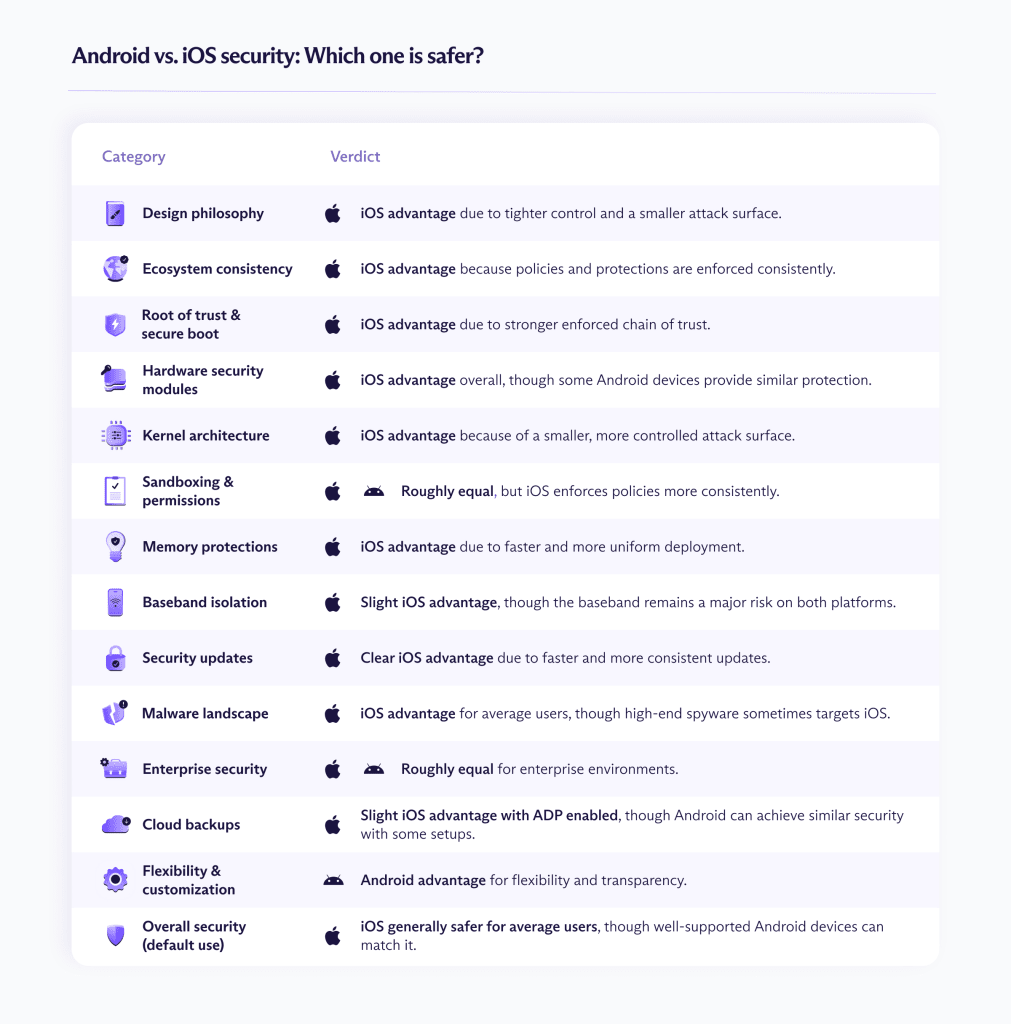
On paper, this is an easy win for iOS’s walled garden over Android’s fractured ecosystem. However, with the AOSP, it’s possible to build versions of Android that are at least as secure as iOS.
Another important point is that this assessment only considers the Android system as a whole. Individual manufacturers such as Samsung (which makes almost a third(新視窗) of all Android devices on the market), are much better at pushing regular security updates and supporting older devices than the Android ecosystem as a whole, sometimes matching or even exceeding Apple’s support(新視窗) for its flagship devices.
iOS vs Android: Technical security
Root of trust and secure boot
The root of trust is the first trusted piece of hardware or firmware in a system that cannot be altered and is used to verify everything else. Secure boot is the process of using the root of trust to verify each stage of the boot process. Together, they form the backbone of modern smartphone and PC security.
Android
Android uses Android Verified Boot (AVB) to ensure system partitions are cryptographically verified at startup. However, Android bootloaders are typically unlockable (for development and to allow custom ROMs), which breaks the chain of trust.
Google requires AVB for devices that ship with Google Mobile Services, and mainstream manufacturers generally implement it. However, enforcement varies in practice. Many vendors allow users to unlock bootloaders or use permissive configurations that reduce the practical security guarantees of the boot chain.
Devices without Google certification (such as open-source forks and low-cost OEM builds) are not subject to AVB requirements and may not even implement Verified Boot at all.
iOS
iOS strictly enforces a fully locked secure boot chain rooted in an immutable hardware Boot ROM. Every stage of the boot process must be signed by Apple, and unsigned firmware cannot run without exploiting vulnerabilities.
Verdict
Another win for Apple, as iOS enforces a stronger root of trust. Android’s solution is comparably secure on paper, but while its greater flexibility over unlocking the bootloader has practical benefits, it fundamentally weakens the chain of trust and therefore comes at a security cost. Again, though, the severity of this problem depends greatly on who makes your phone.
Hardware security modules
A hardware security module (HSM) is a dedicated tamper-resistant piece of hardware that securely generates, stores, and uses cryptographic keys so that sensitive secrets never leave the hardware in plaintext.
Android
Android devices use vendor-specific HSM solutions, such as trusted execution environments(新視窗) (hardware-isolated secure areas inside the main processor) and hardware security chips (such as the Pixel’s Titan M and Samsung Knox). The strength of these security solutions can vary widely, and some low-cost devices even rely on software-based key storage.
iOS
Apple devices use the Secure Enclave Processor, a dedicated chip that stores encryption keys and biometric data, isolated from the main CPU and hardened against brute-force attacks.
Verdict
Apple devices provide consistently strong hardware key protection. Some Androids offer similar levels of security, but as is becoming a theme of this article, it very much depends on the vendor.
Kernel
The kernel is the bridge between a device’s hardware and the software it runs.
Android
Android runs a Linux kernel, but most vendors add drivers to ensure compatibility with their hardware, such as proprietary drivers from Qualcomm and MediaTek. These massively increase the kernel’s attack surface (ways to attack it) and have historically enabled privilege escalation(新視窗) exploits.
iOS
iOS uses Apple’s XNU kernel with mandatory code signing and a tightly controlled driver ecosystem, resulting in a smaller and more consistent attack surface.
Verdict
Thanks to Apple’s complete control over the entire production process, iOS has a smaller and more tightly controlled kernel attack surface. Android, by contrast, must contend with a complex vendor ecosystem that affects even premium devices. For example, Samsung often uses Qualcomm Snapdragon processors in its flagship devices. Supporting this third-party hardware requires additional kernel drivers, which increases the attack surface.
Sandboxing and permissions
Both operating systems use sandboxing. This means each app runs in isolation with limited access to system resources and other apps’ data. However, the implementation and permission models they use differ.
Android
Modern Android versions offer robust sandboxing with runtime permissions, one-time grants, granular controls, and privacy indicators similar to iOS. However, because manufacturers can modify the OS, permission handling varies between devices.
iOS
iOS enforces strict sandboxing and entitlement-based permissions controlled by Apple, with limited inter-app communication and strong file system isolation.
Verdict
By default, both iOS and Android offer strong sandboxing. But Android vendors often don’t stick to the default settings.
Memory
Modern operating systems are built to defend against hacking techniques that exploit bugs in how software uses memory. These vulnerabilities can let attackers take control of a device without you even noticing.
Android
Android uses several built-in protections to make software bugs harder to exploit. These include randomizing where programs and data live in memory, separating apps from each other, and adding extra checks to prevent attackers from hijacking the normal program flow. Newer Android versions also use hardened memory allocators(新視窗) and control-flow protections(新視窗), but how widely these are deployed depends on the device manufacturer and chipset.
iOS
iOS uses similar defenses, including memory randomization and strict code signing. To this, Apple adds hardware-assisted protections such as pointer authentication(新視窗) on its newer chips. It also typically enables these memory exploit mitigations across all supported devices at the same time, which reduces the number of vulnerable configurations in the wild.
Verdict
Both platforms implement modern protections against memory exploits, but iOS tends to deploy advanced memory-safety features faster and more uniformly. Android can offer comparable protections, but implementation varies by device and vendor.
Baseband
The baseband(新視窗) is a separate modem processor running its own firmware and OS to handle cellular and other communications protocols. It is not the main CPU and, often runs proprietary code with elevated privileges, and can be accessed externally.
If compromised, the baseband can act as a hidden entry point beneath the main OS, circumventing app sandboxing and many of the kernel’s built-in security protections. The baseband is therefore one of the largest remaining issues in mobile security, and even a perfectly hardened kernel can be bypassed if the modem stack (the software running on the baseband) is exploited.
Android
Android devices use proprietary modem firmware (for example, from Qualcomm), with each manufacturer using its own architecture to isolate the baseband from the rest of the system. Needless to say, these solutions vary considerably in quality and security.
iOS
Most iPhones use a Qualcomm baseband chip, although starting in 2025 with the iPhone 16e, Apple has introduced its own chip (at the time of writing, only on certain mid‑range models). Apple isolates the baseband more aggressively than most Android vendors, using hardware separation, strict IPC(新視窗), and memory protections. However, even these measures and Apple’s own modem hardware cannot guarantee that the baseband will remain secure.
Verdict
The baseband is the soft underbelly of both operating systems. Apple is better at isolating it than most Android manufacturers (especially on low to mid-range devices), but it’s still a worrying attack surface.

Security updates on iOS and Android
How security updates are rolled out is arguably the most significant practical security difference between the two platforms.
Android
Google releases patches monthly, but because of Android’s complex supply chain, it can take months for them to reach consumer devices. OEM vendors often customize these patches to provide more device-specific updates, which must then be certified by mobile network carriers.
Plus, most Androids stop receiving updates after just two to three years, depending on the device and vendor, which creates a massive population of vulnerable devices.
iOS
Security updates come directly from Apple and are available to supported devices simultaneously. And because adoption rates are high, most iPhones run the latest iOS version within months. This means security patches reach users quickly.
Verdict
Android’s haphazard update ecosystem is the number-one reason that iOS is considered safer for non-technical users. Google has attempted to address this with Project Mainline(新視窗), which uses modular system security components so they can be updated via the Play Store, along with requirements for longer support. But the ecosystem’s fragmentation remains a problem.
Google’s own Pixel devices, in particular, always receives the latest updates — and some other vendors (such as Samsung) are good at delivering regular, timely updates. But in general, the broader Android ecosystem is something of a mess in this area.
Malware
Android
According to a report by Check Point Research(新視窗) in 2022, 97% of mobile malware targeted Android devices, while only 3% targeted iOS. This is largely because more people use Android, which makes it a more attractive target.
However, other factors also contribute to this problem, including the ability to sideload apps outside the Play Store, Android’s fragmented security update ecosystem, open access to system files, and the huge number of cheap devices running outdated software.
That said, downloading apps only from the Play Store and keeping your device updated with the latest security patches greatly reduces the risk. And unlike on iOS, you can install anti-malware apps to further minimize the danger.
iOS
iOS malware exists but is rare. Barriers such as code signing, App Store review, and the lack of sideloading make large-scale attacks difficult, and the risk for average users is therefore substantially lower. However, Apple’s refusal to allow anti-malware apps on the App Store smacks more of hubris than genuine concern for its users.
Most iOS malware that does exist targets jailbroken(新視窗) devices or is deployed by sophisticated, state-sponsored actors using zero-day exploits(新視窗) like the Graphite and Pegasus spyware(新視窗). In part, this is because iPhone users are often considered “higher-value” targets.
Verdict
Android users are much more vulnerable to mass-targeted malware of the kind that has long plagued Windows users, and for many of the same reasons. However, iOS users are a particular target for high-end espionage malware.
Enterprise security
For business users, security is less about theoretical design and more about manageability, update consistency, compliance, and reducing risk at scale.
Android
Android Enterprise(新視窗) from Google is a mature corporate management framework built around work profiles, fully managed device modes, zero-touch enrollment, and hardware-backed key storage.
On properly supported devices (especially those in the Android Enterprise Recommended program), organizations can enforce encryption, block bootloader unlocking, require Play Integrity attestation(新視窗), and use profiles to cryptographically separate corporate data from staffs’ personal apps.
iOS
iOS benefits from tight vertical integration. Hardware, firmware, and operating system updates are delivered directly by the same vendor, resulting in uniform patch distribution and predictable support timelines. Supervised mode, hardware-backed keys via Secure Enclave, managed Apple IDs, and strong MDM integration allow for consistent policy enforcement across devices.
Verdict
At the enterprise level, the security gap between iOS and Android has narrowed considerably. For most organizations, platform choice now depends less on security fundamentals and more on which platform aligns better with their existing infrastructure, user preferences, and specific requirements.
Android vs iOS: Cloud backup
An often overlooked yet important part of mobile security is where and how your data is backed up. A device might be perfectly hardened locally, but your backed up data can be easily accessed by third parties with access to the cloud.
Android
By default, Android backs up all your data to Google Drive. This doesn’t use end-to-end encryption (E2EE), meaning that Google and potentially other third parties can access your files. However, starting around Android 9, Google introduced client-side encryption tied to your device lock-screen method(新視窗) (for example, PIN, password, or pattern). The following things may be protected with E2EE, even when uploaded to Google’s severs:
- App data
- SMS messages
- Call history
- Device settings
The reality is much patchier. Some metadata may remain exposed to Google, and implementation varies across devices. A weak phone unlock method also means weak E2EE protections in the cloud.
Even when implemented well, backed up documents and photos are not end-to-end encrypted, but there are plenty of third-party cloud storage solutions available for these, such as Proton Drive. Advanced Android users can perform full device backups via ADB or custom ROM recovery tools, which is not possible on standard iOS.
Individual Android vendors may also implement their own E2EE backup solutions, such as Samsung’s Enhanced Data Protection(新視窗) function.
iOS
By default, iOS backs up all your data to iCloud. And by default, your iCloud account is not end-to-end encrypted. As with Google Drive, this means Apple and potentially other third parties can access your data.
However, since iOS 16.2, Apple has offered Advanced Data Protection (ADP), an optional feature that enables end-to-end encryption for iCloud backups and other data categories. This covers all backups, including documents and photos, but may still leave some metadata exposed.
Passwords and passkeys stored in iCloud Keychain (Apple’s built-in password manager) are protected using ADP, and are automatically available for autofill across all Apple devices. This is convenient, but unlike third-party password managers such as Proton Pass, it only works within Apple’s closed ecosystem.
Verdict
With ADP enabled, iCloud backups are among the strongest mainstream cloud backup implementations available. But it’s not enabled by default and it’s not available everywhere.
Meanwhile, many Android devices now offer similar levels of security, with end-to-end encrypted backups often enabled by default. Android devices can also be combined with a secure third-party E2EE backup or password management solution such as Proton Drive and Proton Pass, which are available on both Android and iOS and can be especially useful if you use devices from both ecosystems.
Operating system flexibility
Outside of security considerations, one of Android’s most compelling draws is its flexibility. It runs on devices designed to meet almost any budget, allows access to the file system for extensive tinkering, and lets you install apps from outside the Play Store.
This flexibility is at the heart of many of Android’s security issues. However, it also has some security upsides.
Android
As already mentioned, Android’s open source core (AOSP) means that it can be publicly and independently audited to ensure that it’s doing what it’s supposed to. Major components like the Linux kernel, SELinux policies, and key system libraries have undergone decades of scrutiny from the broader security community.
This advantage is somewhat undercut by the fact that most devices also run proprietary closed-source code, including those running “stock” Android. But advanced users can replace the entire OS with hardened, fully open-source custom ROMs such as LineageOS(新視窗) and GrapheneOS, over which they have complete control. This flexibility makes it possible to tailor devices to a specific threat model rather than relying on a fixed, one-size-fits-all configuration.
An additional consideration is that the sheer diversity of Android hardware reduces “monoculture risk”. Because Android runs on devices from many manufacturers, a single design flaw doesn’t automatically affect all devices in the ecosystem.
iOS
Apple’s strict control and vertical integration have many benefits. Regular, consistent security updates across the ecosystem, a strictly enforced chain of trust, simplified risk management, and more ensure robust security at default settings across all devices.
The trade-off is reduced flexibility and transparency. Users and researchers have almost no visibility into what’s going on under the hood, and customization is limited.
Verdict
It may come at a cost, but Android’s flexibility is what draws many people to the platform. While iOS’s tightly controlled and integrated approach provides a more secure experience for most casual users, there are advantages to Android’s more open model.
Flexibility creates more room for misconfiguration, but it’s not inherently insecure. In the right hands, it enables transparency, customization, and resilience — all of which can be genuine security strengths.
Final verdict: Android vs. iOS — which OS is more secure?
For the average non-technical user buying a mainstream device and leaving it on default settings, iOS has the clear edge. Apple’s tight hardware–software integration, uniformly enforced secure boot chain, consistent update delivery, and controlled app ecosystem reduce fragmentation and minimize user-driven risk. The result is a smaller attack surface and faster patch adoption across the entire ecosystem.
However, Android is not inherently insecure. Where it falls down is in the lack of consistency across its hugely diverse ecosystem, which results in a significant variability over update timelines, hardware security implementations, and long-term support. iOS avoids much of this through strict vertical control, creating a consistently secure experience across all its products.
But on well-supported devices (particularly flagship models from major vendors and Google’s own Pixel devices), Android’s core security architecture is highly robust, providing protections that can match those of iOS. And for technically sophisticated users with specific threat models, Android can be configured in ways that exceed those of iOS.
Whichever platform you use, you can improve your online privacy with a good VPN(新視窗). And for those who use more than one device, third-party solutions such as Proton Pass and Proton Drive can secure your sensitive data across multiple platforms.
Frequently asked questions
Is iOS more secure than Android?
Not inherently, but you can be be sure all iOS devices are very secure. Android devices may also be very secure, but this depends a great deal on who makes them and whether they are still supported with security updates.
Are iPhones harder to hack than Android?
Android phones are much more vulnerable to hacking through malware, largely because most malware targets the more popular platform. iPhones are a particular target for sophisticated hackers looking for high-value targets.
Which phone is the safest against hackers?
This depends on your threat model. For most people, iPhones are safer. But if you stick to downloading Android apps from only the Play Store, you’re also unlikely to be hacked.