
如何打开您的 Proton 帐户设置
- 阅读
- 0 分钟
- 类别
- 管理帐户
- Proton 账户
在 Proton 帐户设置中,管理您的用户名和密码、帐户和 数据恢复、订阅和 付款等。
本文介绍如何从 Proton 的每个网页应用访问您的帐户设置。
您的 Proton 帐户在所有 Proton 服务之间共享。对帐户设置所做的更改将应用于您使用的所有 Proton 产品。
- Proton Mail、Proton Calendar、Proton Drive
- Proton VPN
- Proton Pass
- Proton Docs、Proton Sheets、Proton Meet
- Lumo AI
- Proton Wallet
Proton Mail、Proton Calendar、Proton Drive
- 登录 account.proton.me/mail、account.proton.me/calendar 或 account.proton.me/drive。
- 选择设置 (⚙) →所有设置。

Proton VPN
只需登录 account.protonvpn.com,系统即会自动将您带至帐户设置。
Proton Pass
- 登录 account.proton.me/pass。
- 从侧边栏选择您的用户名,然后从菜单中选择帐户。

Proton Docs、Proton Sheets、Proton Meet
- 登录 account.proton.me/docs、account.proton.me/sheets 或 account.proton.me/meet。
- 点击您的用户名,然后从菜单中选择设置。

Lumo AI
- 前往 lumo.proton.me(新窗口) 并点击设置 (⚙)。
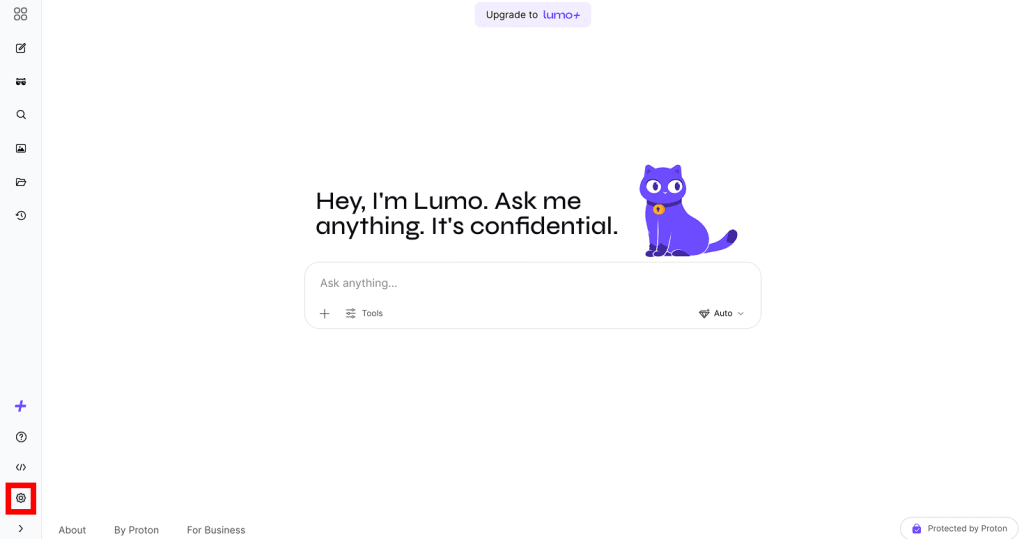
- 在设置面板中:
- 如果已登录,请点击您的用户名(位于帐户下方)。

- 如果尚未登录,请点击登录。

登录后,再次点击设置 (⚙) ,然后点击您的用户名(位于帐户下方)。
Proton Wallet
- 登录 account.proton.me/wallet。
- 从侧边栏选择用户设置。
