
How to open your Proton Account settings
- Reading
- 1 min
- Categories
- Manage account
- Proton Account
Manage your username and password, account and data recovery, subscription and payments, and more in your Proton Account settings.
This article explains how to access your account settings from each of Proton’s web apps.
Your Proton Account is shared across all Proton services. When you make changes to your account settings, they’ll apply to every Proton product you use.
- Proton Mail, Proton Calendar, Proton Drive
- Proton VPN
- Proton Pass
- Proton Docs, Proton Sheets, Proton Meet
- Lumo AI
- Proton Wallet
Proton Mail, Proton Calendar, Proton Drive
- Sign in to account.proton.me/mail, account.proton.me/calendar, or account.proton.me/drive.
- Select Settings (⚙) → All settings.

Proton VPN
Simply sign in to account.protonvpn.com. This will automatically bring you to your account settings.
Proton Pass
- Sign in to account.proton.me/pass.
- Select your username from the sidebar, then select Account from the menu.

Proton Docs, Proton Sheets, Proton Meet
- Sign in to account.proton.me/docs, account.proton.me/sheets, or account.proton.me/meet.
- Click on your Username, then select Settings from the menu.

Lumo AI
- Go to lumo.proton.me(new window) and click Settings (⚙).
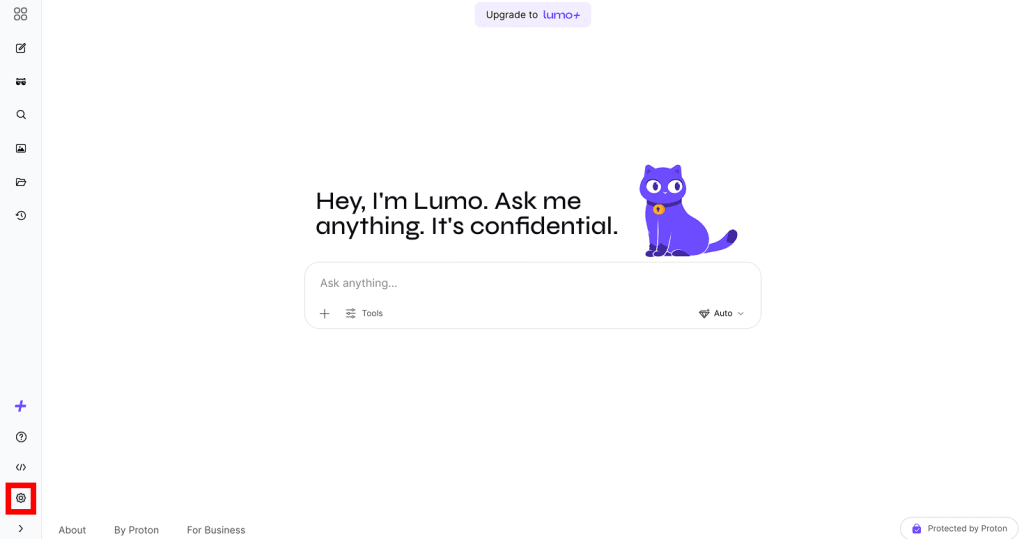
- In the settings panel:
- If you’re already signed in, click on your username (under Account).

- If not, click Sign in.

Once signed in, click Settings (⚙) again, then click on your username (under Account).
Proton Wallet
- Sign in to account.proton.me/wallet.
- Select User settings from the sidebar.
