E-Mail-Betrug mit Cloud-Speicher kommt immer häufiger vor. Diese Nachrichten sollen dir vorgaukeln, dass deine Dateien in Gefahr sind – und dich dazu verleiten, auf einen Link zu klicken oder Zahlungsdetails einzugeben, bevor du Zeit hast, darüber nachzudenken.
Als eine Form des Phishing nutzen diese Betrugsmaschen mit dem Vorwand „Cloud-Speicher voll“ eine einfache Angst aus: dass deine Fotos, Dokumente oder Sicherungen kurz davor sind, gelöscht zu werden. Gefälschte Verlängerungsseiten sollen deine Zahlungsdetails erfassen, Phishing-Websites ahmen echte Cloud-Dienste nach, um deine Anmeldedaten zu stehlen, und Links leiten zu Produkten weiter, um Affiliate-Einnahmen zu erzielen. In einigen Fällen versuchen schädliche Websites, unerwünschte Software auf deinem Gerät zu installieren.
Einige Betrugs-E-Mails geben sich als bekannte Anbieter wie Apple, Google oder Microsoft aus, um glaubwürdiger zu wirken. Andere verwenden generische Namen wie „Cloud+“ oder „Cloud-Speicher“, sind aber so überzeugend gestaltet, dass sie Zweifel säen. Hier erfährst du, wie du den Unterschied erkennst, dein Speicherkonto sicher überprüfst und verhinderst, dass du darauf hereinfällst.
- Wie du Betrug mit Cloud-Speicher erkennst
- Beispiele für Betrug mit Cloud-Speicher im Vergleich zu legitimen „Speicher voll“-E-Mails
- Was zu tun ist, wenn du eine Betrugs-E-Mail zum Cloud-Speicher erhältst
- Warum du immer wieder Betrugs-E-Mails zum Cloud-Speicher erhältst und wie du sie stoppst
- Bleibe Betrügern mit Proton immer einen Schritt voraus
Wie du Betrug mit Cloud-Speicher erkennst

Betrüger verlassen sich auf immer dieselben Taktiken. Bevor du auf Links in einer E-Mail reagierst oder darauf klickst, solltest du auf diese Warnzeichen für einen Betrug achten:
Ungewöhnliche Absenderadresse: Nachrichten stammen oft von zufälligen Domains oder langen, unleserlichen E-Mail-Adressen, die nicht mit dem Unternehmen übereinstimmen, für das sie sich ausgeben.
Generisches Branding: Namen wie „Cloud“, „Cloud+“ oder „Cloud-Speicher“ werden häufig anstelle von echten Produktnamen verwendet.
Dringliche oder angstschürende Sprache: Warnungen, dass dein Cloud-Speicher voll ist oder Dateien an einem bestimmten Datum dauerhaft gelöscht werden, sind ein typisches Merkmal von Phishing-Angriffen, mit denen du zu schnellem Handeln gedrängt werden sollst.
Verdächtige Links: Links können über unbeteiligte Domains weiterleiten oder zu gefälschten Anmeldeseiten führen, die echte Dienste imitieren.
Gefälschte Kontodetails oder Scans: Einige Nachrichten enthalten erfundene Konto-IDs oder Links zu gefälschten Seiten, die einen „Speicher-Scan“ durchführen und immer melden, dass dein Kontospeicher voll ist.
Generische Anreden: Nachrichten beginnen oft mit „Hallo“ ohne deinen Namen oder sprechen dich mit deiner E-Mail-Adresse an.
Unrealistische Angebote: Enorme Rabatte, die zu schön klingen, um wahr zu sein, wie „80 % Rabatt auf Upgrades“ oder „zeitlich begrenzte Wiederherstellungsangebote“, sind ein starkes Indiz für einen Betrug.
Beispiele für Betrug mit Cloud-Speicher im Vergleich zu legitimen „Speicher voll“-E-Mails
Betrugsmaschen rund um den Cloud-Speicher können besonders überzeugend sein, da sie oft zusammen mit echten Speicherwarnungen von Diensten wie iCloud, Google Drive, OneDrive oder Dropbox auftauchen.
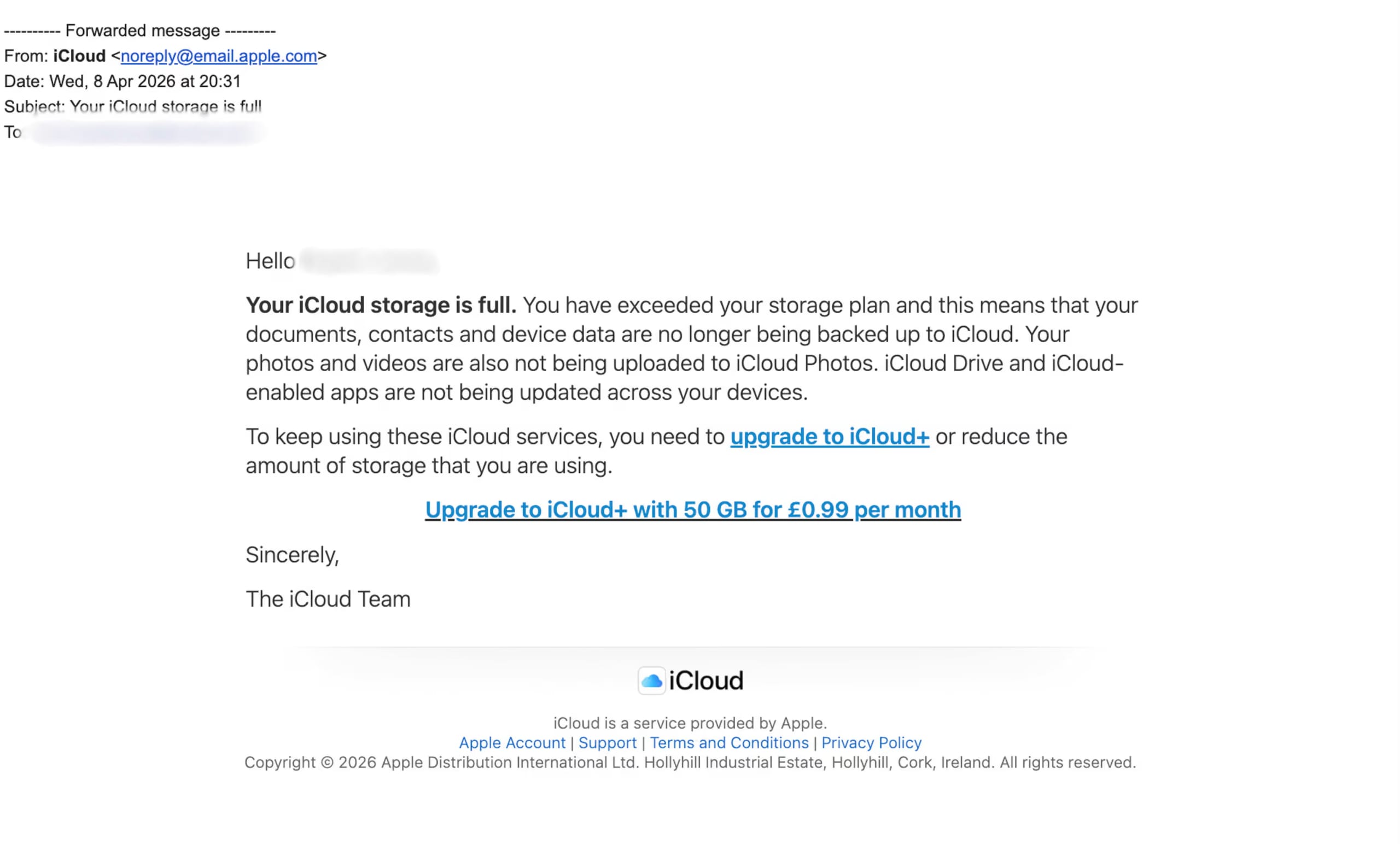
Für Apple-Benutzer kann ein iCloud-Betrug behaupten, dass dein iCloud-Konto gesperrt wurde, deine Fotos und Videos gelöscht werden, deine Zahlungsmethode abgelaufen ist oder dein Cloud-Dienst deaktiviert wurde. Das Ziel ist es, dich dazu zu bringen, auf einen schädlichen Link zu klicken, der zu einer gefälschten Anmelde- oder Zahlungsseite führt, um deine Apple-ID oder Bankdaten zu stehlen. The Guardian(neues Fenster) liefert ein gutes Beispiel:

Eine legitime „Speicher voll“-E-Mail ist weniger bedrohlich und leitet dich an, deinen Speicher über die offizielle App oder die Kontoeinstellungen zu verwalten. Gehe zu Einstellungen → [dein Name] → iCloud, um dies zu überprüfen. Wenn der Speicher tatsächlich voll ist, zeigt die offizielle Kontoseite das Problem an und bietet sichere Optionen zur Verwaltung oder zum Upgrade des Speichers.
Was zu tun ist, wenn du eine Betrugs-E-Mail zum Cloud-Speicher erhältst
Wenn du eine verdächtige Speicherwarnung erhältst, befolge diese Schritte:
Klicke in der E-Mail auf nichts
Betrugs-E-Mails zum Cloud-Speicher enthalten oft gefälschte Schaltflächen oder Links wie „Speicher upgraden“, „Konto verlängern“, „kostenlosen Speicherplatz anfordern“ oder „Zahlung korrigieren“. Diese Links können zu Phishing-Seiten führen, die darauf abzielen, dein Passwort, deine Zahlungsdetails oder deine persönlichen Daten zu stehlen.
Klicke nicht auf Links, Schaltflächen oder Anhänge in der E-Mail.
Überprüfe dein echtes Cloud-Speicherkonto direkt
Melde dich direkt in deinem echten Konto an, z. B. bei Proton Drive, iCloud, Google Drive, OneDrive oder Dropbox, und überprüfe dort deinen Speicher sowie die Rechnungs- und Sicherheitseinstellungen. Wenn ein echtes Problem vorliegt, wird es normalerweise in deinem offiziellen Konto angezeigt.
Markiere die E-Mail als Spam oder Phishing
Das einfache Löschen der E-Mail entfernt sie zwar aus deinem Posteingang, hilft deinem E-Mail-Anbieter jedoch nicht, ähnliche Betrugsversuche in Zukunft zu erkennen.
Nutze die Option deines E-Mail-Anbieters wie „Phishing melden“, „Spam melden“ oder „Blockieren und melden“. Dies hilft beim Trainieren von Spamfiltern und kann ähnliche Betrugs-E-Mails mit der Zeit reduzieren.
Antworte dem Absender nicht
Eine Antwort kann bestätigen, dass deine E-Mail-Adresse aktiv ist. Betrüger senden dann möglicherweise noch mehr Betrugsversuche oder verkaufen deine Adresse an andere Spam-Verteiler.
Antworte nicht, selbst wenn du nur „Stopp“ sagen oder das „Abonnement kündigen“ willst. Verwende stattdessen nur Abmelde-Links von Unternehmen, die du kennst und denen du vertraust. Proton Mail bietet eine Option zum automatischen Abbestellen, um dir dies zu erleichtern.
Lösche die Betrugs-E-Mail, nachdem du sie gemeldet hast
Wenn du Betrugs-E-Mails in deinem Posteingang behältst, erhöht sich die Wahrscheinlichkeit, dass du später versehentlich darauf klickst.
Nachdem du die Nachricht als Spam oder Phishing gemeldet hast, lösche sie aus deinem Posteingang. Du kannst später auch deinen Papierkorb leeren, um sie vollständig zu entfernen.
Ändere dein Passwort und aktiviere die 2FA, wenn du auf einen Link geklickt hast
Wenn du auf einen Link geklickt und dein Passwort eingegeben hast, haben Betrüger jetzt möglicherweise Zugriff auf dein Cloud-Speicherkonto oder andere Konten, bei denen du dasselbe Passwort verwendest.
Ändere das Passwort deines Cloud-Kontos sofort und verwende ein starkes, einzigartiges Passwort, das du sonst nirgendwo verwendest.
Und falls du die Zwei-Faktor-Authentifizierung (2FA) noch nicht aktiviert hast, solltest du sie für zusätzliche Sicherheit unbedingt einschalten. Wenn ein Betrüger dein Passwort hat und versucht, in dein Konto einzudringen, kann dich die 2FA warnen, indem sie einen zweiten Schritt wie einen Code oder eine Genehmigungsanfrage anfordert. Wenn du eine Aufforderung erhältst, die du nicht angefordert hast, lehne sie ab und ändere dein Passwort sofort.
Überprüfe deine Kontoaktivitäten und Zahlungsdetails
Wenn du Anmelde- oder Zahlungsinformationen auf einer gefälschten Seite eingegeben hast, versuchen Betrüger möglicherweise, auf dein Konto zuzugreifen, Einstellungen zu ändern oder deine Kartendetails zu verwenden.
Überprüfe die letzten Kontoaktivitäten, verbundenen Geräte, Wiederherstellungs-E-Mail-Adressen und Zahlungsmethoden, um alles Unbekannte zu entfernen. Wenn du ein kostenpflichtiges Proton-Konto hast, kannst du Proton Sentinel aktivieren, um dich vor einer Kontoübernahme zu schützen.
Wenn du Kartendetails eingegeben hast, wende dich an deine Bank oder deinen Kartenanbieter, um deine Karte oder dein Konto sperren zu lassen.
Betrug melden
Cloud-Speicher-Betrugsmaschen sind Teil größerer Phishing-Kampagnen, und ihre Meldung hilft Anti-Phishing-Organisationen, diese Angriffe zu verfolgen und zu bekämpfen.
Leite verdächtige E-Mails an die APWG (Anti-Phishing Working Group)(neues Fenster) weiter, eine internationale gemeinnützige Organisation, die sich auf die Bekämpfung von Phishing, Online-Betrug, E-Mail-Spoofing, Malware und verwandter Cyberkriminalität konzentriert. Du kannst sie auch deinem E-Mail-Anbieter und dem imitierten Unternehmen melden.
Warum du immer wieder Betrugs-E-Mails zum Thema Cloud-Speicher erhältst und wie du sie stoppst
Selbst nach dem Melden und Blockieren erhältst du möglicherweise weiterhin Betrugs-E-Mails. Dafür gibt es einige Gründe:
Deine E-Mail-Adresse steht auf Spam-Listen
Deine E-Mail-Adresse ist möglicherweise in einem Datenleck(neues Fenster), auf einer öffentlichen Website, in einer Verteilerliste oder in einer Marketing-Datenbank aufgetaucht, die von einem Datenhändler verkauft wurde. Sobald Betrüger deine Adresse haben, nehmen sie dich möglicherweise immer wieder mit Cloud-Speicher-Betrugsversuchen ins Visier.
Die Dark Web-Überwachung ist eine Funktion von Proton Pass, die prüft, ob deine E-Mail-Adresse in bekannten Datenlecks aufgetaucht ist. Du kannst auch, wo immer möglich, deine E-Mail-Adresse von öffentlichen Seiten entfernen und bei der Registrierung für Online-Dienste oder Apps E-Mail-Aliase verwenden, um deine echte E-Mail-Adresse auszublenden.
Du hast zuvor eine Betrugs-E-Mail geöffnet, angeklickt oder darauf geantwortet
Das Öffnen einer verdächtigen E-Mail kann manchmal bestätigen, dass deine Adresse aktiv ist, insbesondere wenn die Nachricht Tracking-Bilder lädt. Das Anklicken von Links oder Antworten gibt Betrügern ein noch stärkeres Signal, dass dein Posteingang überwacht wird.
Klicke nicht auf Links, öffne keine Anhänge und antworte nicht auf verdächtige Nachrichten. Greife auf dein Cloud-Speicherkonto nur zu, indem du die offizielle Website-Adresse eingibst oder die offizielle App öffnest, und deaktiviere das automatische Laden von Bildern in deinen E-Mail-Einstellungen. Proton Mail entfernt unsichtbare Tracker aus jeder E-Mail, die du erhältst, um deine E-Mail-Aktivitäten vor Absendern auszublenden.
Betrüger wechseln Absender und Domains
Das Blockieren eines einzelnen Absenders stoppt die Betrugsversuche möglicherweise nicht, da Betrüger häufig E-Mail-Adressen, Domains und Anzeigenamen ändern. Die nächste Nachricht sieht vielleicht ähnlich aus, stammt aber von einem völlig anderen Absender.
Melde diese Nachrichten als Phishing, anstatt nur den Absender zu blockieren. Dies hilft deinem E-Mail-Anbieter, ähnliche Betrugsversuche zu erkennen und die Filterung für zukünftige Nachrichten zu verbessern.
Dein Spamfilter lernt noch
Einige Betrugs-E-Mails sind so konzipiert, dass sie Spamfilter umgehen, indem sie Bilder anstelle von Text, ungewöhnliche Abstände, Rechtschreibfehler, gekürzte Links oder kompromittierte E-Mail-Konten verwenden, die vertrauenswürdiger erscheinen.
Melde Betrugs-E-Mails weiterhin als Phishing und erstelle benutzerdefinierte Posteingangsfilter für wiederkehrende Formulierungen wie „Speicher voll“, „Cloud-Verlängerung“, „Zahlung fehlgeschlagen“ oder „Konto gesperrt“. Überprüfe außerdem gelegentlich deinen Spam-Ordner, um sicherzustellen, dass legitime E-Mails nicht fälschlicherweise gefiltert werden.
Bleibe Betrügern mit Proton einen Schritt voraus
Cloud-Speicher-Betrugsmaschen funktionieren, weil sie auf zwei Dinge abzielen, die den Menschen wichtig sind: den Zugriff auf ihren Posteingang und den Zugriff auf ihre Dateien. Der Schutz von beidem macht es Betrügern viel schwerer, dich auszutricksen, deine Informationen zu stehlen oder dich zur Preisgabe von Zahlungsdaten zu drängen.
Proton Mail hilft dabei, deine E-Mails vor Phishing-Versuchen zu schützen – mit Spam-Filterung, Phishing-Schutz, benutzerdefinierten Filtern, Tracker-Schutz und einfachen Tools zum Melden von Vorfällen. Zudem schützt es deine E-Mails mit Ende-zu-Ende-Verschlüsselung und Zero-Access-Verschlüsselung, sodass dein Posteingang standardmäßig privat bleibt.
Proton Drive bietet dir einen sichereren Ort zum Speichern und Sichern deiner wichtigen Dateien, Fotos und Dokumente. Mit dem Ende-zu-Ende-verschlüsselten Cloud-Speicher werden deine Dateien auf deinem Gerät verschlüsselt, bevor sie hochgeladen werden. Das bedeutet, dass niemand – nicht einmal Proton – ohne deine Erlaubnis darauf zugreifen kann.
Wenn diese Betrugsversuche dich dazu gebracht haben, darüber nachzudenken, wo du deine E-Mails und Dateien aufbewahrst, ist Proton ganz einfach auszuprobieren. Mit einem kostenlosen Proton-Konto erhältst du sowohl Proton Mail als auch Proton Drive, was dir von Anfang an einen privateren Posteingang und sicheren Cloud-Speicher bietet.