ChatGPT to jeden z najpopularniejszych asystentów AI, ale rosnące obawy o prywatność w AI, bezpieczeństwo danych i firmę OpenAI sprawiły, że ludzie zaczęli szukać informacji o tym, jak usunąć ChatGPT.
Jeśli uznasz, że czas pożegnać się z ChatGPT — czy to ze względów moralnych lub związanych z prywatnością, w celu zmniejszenia swojego cyfrowego śladu, czy po prostu dlatego, że udało Ci się znaleźć lepszą alternatywę dla ChatGPT — ten przewodnik pokaże Ci krok po kroku, jak dokładnie usunąć konto ChatGPT, anulować subskrypcję i wyeksportować swoje dane przed odejściem.
- Jak usunąć konto ChatGPT
- Co zrobić przed usunięciem konta ChatGPT
- Co się dzieje po usunięciu konta ChatGPT?
- Dlaczego warto usunąć konto ChatGPT?
- Wybierz AI, które szanuje Twoją prywatność
Jak usunąć swoje konto ChatGPT
Usunięcie konta ChatGPT jest trwałe i nie można go cofnąć. Zanim przejdziesz dalej, upewnij się, że chcesz usunąć swoje konto ChatGPT.
ChatGPT oferuje kilka metod usuwania konta:
Usuń swoje konto bezpośrednio w ChatGPT w przeglądarce
1. Wejdź na stronę chatgpt.com i zaloguj się.
2. Kliknij ikonę profilu w lewym dolnym rogu.
3. Wybierz Ustawienia → Konto → Usuń konto → Usuń. Jeśli nie zalogowano się w ciągu ostatnich dziesięciu minut, pojawi się prośba o ponowne zalogowanie.
4. Na ekranie potwierdzenia wpisz adres e-mail swojego konta oraz słowo DELETE w pola wejściowe.

5. Kliknij Trwale usuń moje konto, aby dokończyć usuwanie.
Usuń swoje konto przez portal prywatności OpenAI
1. Wejdź na stronę privacy.openai.com.
2. Kliknij Zgłoś żądanie dotyczące prywatności w prawym górnym rogu.
3. Select I have a consumer ChatGPT account.
4. Kliknij Usuń moje konto ChatGPT i postępuj zgodnie z instrukcjami, aby zgłosić prośbę o usunięcie konta.

Usuń konto w systemie iOS
1. Otwórz aplikację ChatGPT na swoim urządzeniu z systemem iOS.
2. Kliknij dwie poziome linie w lewym górnym rogu, aby otworzyć menu.

3. Kliknij ikonę użytkownika w prawym górnym rogu.

4. Przewiń w dół i wybierz Zarządzanie danymi.
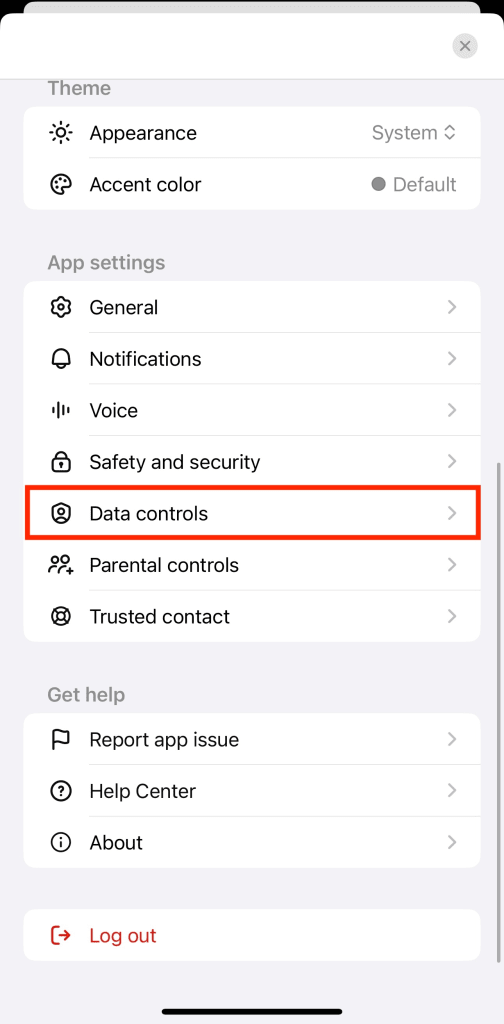
5. Wybierz Usuń konto.

6. W oknie potwierdzenia, które się pojawi, kliknij Usuń konto.

Usuń konto w systemie Android
1. Otwórz aplikację ChatGPT na swoim urządzeniu z systemem Android.
2. Kliknij dwie poziome linie w lewym górnym rogu, aby otworzyć menu.

3. Kliknij ikonę użytkownika w prawym górnym rogu.

4. Przewiń w dół i wybierz Zarządzanie danymi.

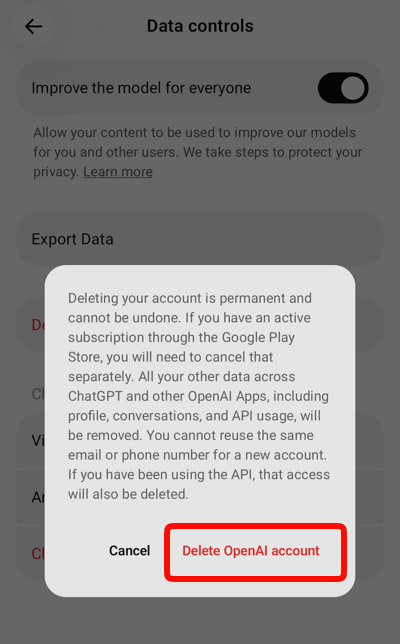
5. Wybierz Usuń konto OpenAI.

6. W oknie potwierdzenia, które się pojawi, kliknij Usuń konto OpenAI.
OpenAI usunie Twoje dane w ciągu 30 dni, z pewnymi wyjątkami. Zgodnie z polityką prywatności OpenAI, nawet jeśli Twoje konto zostanie usunięte, firma może zachować niektóre informacje w celu zachowania zgodności z przepisami prawnymi, zapobiegania oszustwom lub ze względów bezpieczeństwa. Dokładny okres przechowywania danych oraz to, jakie dokładnie informacje są zachowywane, nie zawsze jest jasne, co jest jednym z powodów, dla których wielu użytkowników dbających o prywatność decyduje się na przejście na alternatywne rozwiązania.
Co zrobić przed usunięciem konta ChatGPT
Przed usunięciem konta warto najpierw wyeksportować wszelkie wątki lub informacje, które chcesz zachować. Jeśli masz płatną subskrypcję ChatGPT, najlepiej anulować ją przed usunięciem konta, aby uniknąć naliczania opłat w przyszłości.
Wyeksportuj swoje dane z ChatGPT
Możesz wyeksportować swoje dane z ChatGPT za pomocą przeglądarki internetowej. Dotyczy to nawet aplikacji ChatGPT w systemach iOS i Android, która przekierowuje Cię do przeglądarki, aby wyeksportować dane. Oto jak to zrobić:
1. Wejdź na stronę chatgpt.com i zaloguj się.
2. Kliknij ikonę profilu w lewym dolnym rogu.
3. Wybierz Ustawienia → Kontrola danych.
4. Znajdź sekcję Eksport danych, a następnie kliknij Eksportuj.
5. Kliknij Potwierdź eksport w wyskakującym oknie.

Otrzymasz wiadomość e-mail z powiadomieniem, gdy eksport zostanie zakończony i będzie gotowy do pobrania. Ten proces może potrwać od kilku godzin do kilku dni, w zależności od tego, ile masz danych.
Uwaga: Twoje dane zostaną wyeksportowane jako plik ZIP zawierający pliki JSON oraz plik HTML z Twoimi wątkami, informacjami o koncie, przesłanymi lub utworzonymi obrazami oraz innymi danymi powiązanymi z Twoim kontem. Link do pobrania w tej wiadomości wygaśnie po 24 godzinach. Jeśli do tego czasu nie wyeksportujesz danych, musisz powtórzyć cały proces.
Anuluj subskrypcję ChatGPT
Jeśli masz subskrypcję ChatGPT, anuluj ją przed usunięciem konta. W przeciwnym razie opłaty mogą być nadal naliczane, nawet po usunięciu konta.
Jeśli subskrybujesz przez stronę internetową ChatGPT:
1. Wejdź na stronę chatgpt.com i zaloguj się.
2. Kliknij ikonę profilu w lewym dolnym rogu.
3. Wybierz Ustawienia → Rozliczenia → Anuluj subskrypcję.
4. Kliknij Anuluj subskrypcję w wyskakującym oknie.

Otrzymasz wiadomość e-mail z potwierdzeniem anulowania. Twoja subskrypcja pozostanie aktywna do końca bieżącego okresu rozliczeniowego, ale kolejne opłaty nie będą już naliczane.
Jeśli subskrybujesz przez iOS App Store:
- Otwórz aplikację Ustawienia na swoim urządzeniu z systemem iOS (nie aplikację ChatGPT).
- Kliknij swoje imię i nazwisko na górze ekranu.
- Wybierz Subskrypcje, a następnie znajdź i kliknij ChatGPT na liście aktywnych subskrypcji.
- Kliknij Anuluj subskrypcję i postępuj zgodnie z instrukcjami, aby potwierdzić anulowanie.
Jeśli subskrybujesz przez Google Play:
- Otwórz aplikację Google Play.
- Kliknij ikonę swojego profilu w prawym górnym rogu.
- Wybierz Płatności i subskrypcje → Subskrypcje, a następnie znajdź i kliknij ChatGPT na liście subskrypcji.
- Kliknij Anuluj subskrypcję i postępuj zgodnie z instrukcjami, aby potwierdzić anulowanie.
Po anulowaniu subskrypcji możesz bezpiecznie przejść do usuwania konta ChatGPT.
Co się stanie po usunięciu konta ChatGPT?
Po usunięciu konta:
- Stracisz dostęp do całej historii wątków, chyba że została już wyeksportowana.
- Twoja subskrypcja ChatGPT zostanie anulowana (jeśli nie zostało to już zrobione przez stronę internetową).
- Przez 30 dni nie zalogujesz się ani nie skorzystasz z ChatGPT przy użyciu tego adresu e-mail.
- Wszystkie klucze API powiązane z Twoim kontem zostaną dezaktywowane.
- Niestandardowe instrukcje i ustawienia zostaną trwale usunięte.
- Twoje dane zostaną usunięte w ciągu 30 dni, chyba że OpenAI zdecyduje się zachować informacje ze względów prawnych, zapobiegania oszustwom lub bezpieczeństwa.
Dlaczego warto usunąć konto ChatGPT?
Istnieje kilka powodów, dla których warto przestać korzystać z ChatGPT, w tym jego wpływ na prywatność i kontrowersyjna przeszłość OpenAI.
Obawy dotyczące prywatności i gromadzenie danych
OpenAI gromadzi Twoje wątki, informacje o koncie i wzorce korzystania z usługi za każdym razem, gdy wchodzisz w interakcję z ich platformami. Ponieważ ChatGPT nie oferuje szyfrowania zero-access, Twoje dane osobowe mogą być narażone na naruszenia bezpieczeństwa danych. To już się wydarzyło: w 2023 roku błąd ChatGPT(nowe okno) na krótko umożliwił niektórym użytkownikom wyświetlenie tytułów z historii czatów innych osób, a w 2025 roku napastnicy włamali się do dostawcy OpenAI i uzyskali dostęp do wrażliwych danych użytkowników biznesowych ChatGPT.
Trenowanie modeli AI
Domyślnie Twoje wątki są wykorzystywane do trenowania i ulepszania modeli OpenAI. Nawet jeśli zrezygnujesz z wykorzystywania Twoich danych do trenowania lub korzystasz z ChatGPT w trybie tymczasowym, Twoje wątki są nadal przechowywane na serwerach OpenAI — przynajmniej tymczasowo. Tworzy to stały zapis potencjalnie wrażliwych informacji, od poufnych dyskusji w pracy po osobiste pytania, które mogą być narażone na wyciek.
Dostęp stron trzecich i zgodność z przepisami prawa
Jako firma z siedzibą w USA, OpenAI podlega rządowym żądaniom udostępnienia danych oraz przepisom dotyczącym inwigilacji, które mogą być sprzeczne z międzynarodowymi standardami prywatności. Władze USA mogą uzyskać dostęp do Twoich wątków w ChatGPT bez Twojej wiedzy, niezależnie od tego, gdzie mieszkasz. OpenAI udostępnia również dane dostawcom usług będącym stronami trzecimi na potrzeby operacji biznesowych. Dla osób w regionach dbających o prywatność, takich jak UE, rodzi to obawy dotyczące jurysdykcji, ponieważ Twoje dane przekraczają granice, trafiając do systemów prawnych, które mogą oferować mniejszą ochronę niż w Twoim kraju rodzimym.
Kontrowersje wokół OpenAI
OpenAI boryka się z rosnącą krytyką, która wykracza poza techniczne problemy z prywatnością. Współpraca firmy z Pentagonem(nowe okno) w zakresie wykorzystywania AI do zastosowań wojskowych, w tym autonomicznych systemów bojowych, budzi poważne obawy etyczne i bezpośrednio przeczy jej deklarowanej misji zapewnienia, że AI przyniesie korzyści całej ludzkości. OpenAI krytykowano również za chaotyczne zarządzanie wewnętrzne(nowe okno), konflikt między deklarowaną misją non-profit a praktykami nastawionymi na zysk(nowe okno), brak przejrzystości(nowe okno) w kwestii protokołów bezpieczeństwa oraz umożliwianie tworzenia wprowadzających w błąd treści(nowe okno).
Wybierz AI, w którym prywatność i wartości nie są zagrożone
Jeśli obawy dotyczące prywatności i kwestii etycznych skłaniają Cię do rezygnacji z ChatGPT, nie musisz całkowicie rezygnować ze wsparcia sztucznej inteligencji. Istnieją alternatywy zbudowane wokół Twoich praw, a nie zysków korporacyjnych czy inwigilacji.
Lumo od Protona stworzono z zachowaniem tych samych zasad prywatności, co resztę ekosystemu Proton. Twoje wątki są zaszyfrowane, Twoje dane nigdy nie są przechowywane ani używane do szkolenia modeli, a Ty zachowujesz pełną kontrolę. Stworzone i hostowane w Europie, z dala od jurysdykcji USA i pod ochroną jednych z najsurowszych przepisów dotyczących prywatności na świecie, Twoje prywatne dane pozostają w najbezpieczniejszych możliwych rękach: Twoich.
Chcesz odkryć AI, które szanuje Twoją prywatność? Wypróbuj Lumo, asystenta AI od Protona, bezpłatnie już dziś.