
วิธีตรวจสอบสถานะการเข้ารหัสลับโดยใช้ไอคอนแม่กุญแจ
- เวลาอ่าน
- 2 นาที
- หมวดหมู่
- เขียนและส่งอีเมล
- รับและอ่านอีเมล
ข้อความทั้งหมดใน Proton Mail จะติดป้ายกำกับด้วยไอคอนแม่กุญแจซึ่งระบุสถานะการเข้ารหัสลับ บทความนี้จะอธิบายความหมายของไอคอนเหล่านี้
ไอคอนแม่กุญแจจะแสดงอยู่ถัดจากทุกอีเมลในกล่องขาเข้าและโฟลเดอร์ที่กำหนดเอง
สถานะการเข้ารหัสลับของอีเมลที่ส่งและรับจะแสดงวิธีเข้ารหัสข้อความเมื่อตอนที่ส่งและไม่สามารถเปลี่ยนแปลงได้

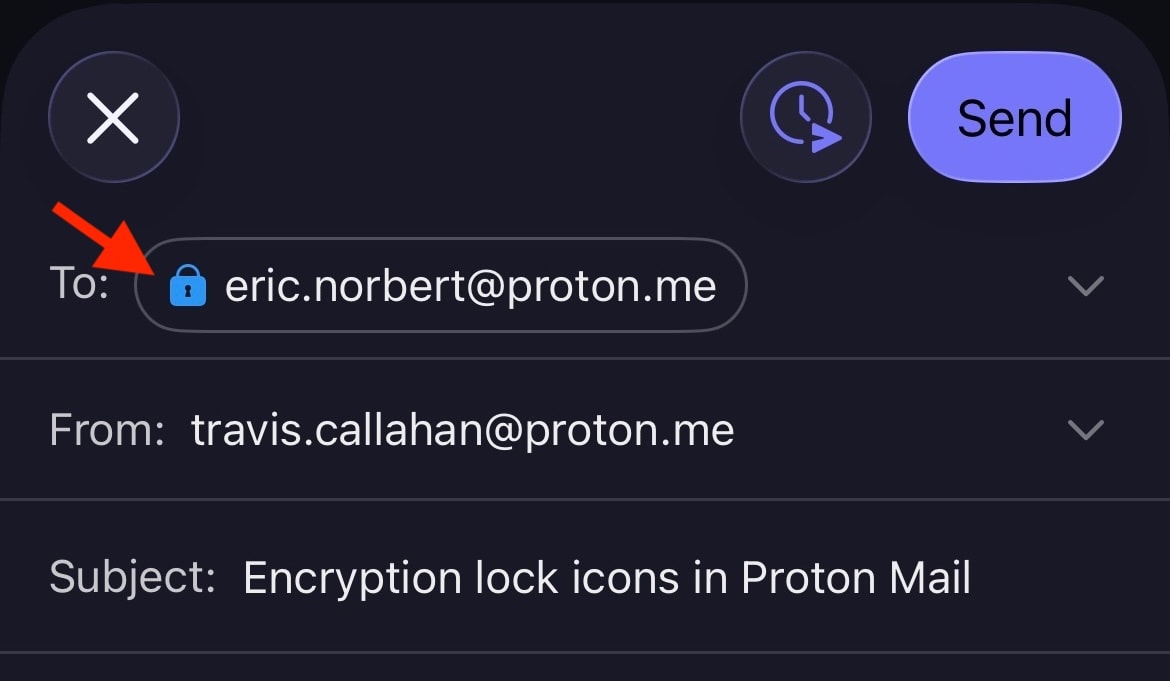
ไอคอนแม่กุญแจจะแสดงในหน้าต่างสำหรับเขียนด้วยเช่นกัน และอาจเปลี่ยนแปลงได้โดยขึ้นอยู่กับวิธีการส่งอีเมล ตัวอย่างเช่น หากปกป้องอีเมลด้วยรหัสผ่านที่ส่งไปยังภายนอก Proton แม่กุญแจจะเปลี่ยนจากสีดำ (หรือสีเขียว (เปิด) หากมีการแนบลายเซ็น PGP) เป็นสีน้ำเงิน

ไอคอนแม่กุญแจการเข้ารหัสลับยังแสดงในแอปมือถือ Proton Mail สำหรับ Android และ iOS อีกด้วย
ความหมายของไอคอนแม่กุญแจ
ตัวบ่งชี้หลักของสถานะการเข้ารหัสลับของข้อความคือสีของไอคอนแม่กุญแจ ข้อมูลเพิ่มเติมจะแสดงด้วยสัญลักษณ์ขนาดเล็กภายในแม่กุญแจ โปรดทราบว่าการเข้ารหัสลับจะมีผลกับเนื้อหาข้อความและไฟล์แนบเท่านั้น ส่วนหัวของข้อความและข้อมูลเมตาจะไม่ได้รับการเข้ารหัสลับ เพื่อให้ Proton Mail สามารถทำงานร่วมกับ PGP ได้
แม่กุญแจสีดำ
แม่กุญแจสีดำหมายถึงข้อความนั้นถูกจัดเก็บด้วยการเข้ารหัสลับแบบเข้าถึงเป็นศูนย์ ซึ่งหมายความว่าไม่มีใครอื่นที่สามารถอ่านอีเมลนี้ในกล่องจดหมายได้ แม้แต่ Proton Mail ก็ไม่สามารถถอดรหัสข้อความนี้ได้ อย่างไรก็ตาม สำเนาของอีเมลนี้อาจถูกจัดเก็บอย่างไม่ปลอดภัยบนเซิร์ฟเวอร์เมลของผู้ส่งหรือผู้รับ
 (หน้าต่างใหม่) (หน้าต่างใหม่) | Standard — The email is safely stored on Proton Mail’s servers using zero-access encryption. We never have access to your message contents. |
แม่กุญแจสีน้ำเงิน
จะเห็นแม่กุญแจสีน้ำเงิน บนอีเมลที่ส่งระหว่างที่อยู่อีเมล Proton Mail ข้อความเหล่านี้จะได้รับการจัดเก็บด้วยการเข้ารหัสลับแบบเข้าถึงเป็นศูนย์ แต่ก็มีคุณสมบัติระบบอัตโนมัติ ของ การเข้ารหัสลับจากต้นทางถึงปลายทาง (E2EE) เพื่อความปลอดภัยที่เพิ่มขึ้นอีกขั้น
ซึ่งหมายความว่าข้อความได้รับการเข้ารหัสลับโดยผู้ส่งบนอุปกรณ์ และสามารถถอดรหัสได้โดยผู้รับปลายทางบนอุปกรณ์เท่านั้น ไม่มีผู้อื่น รวมถึง Proton Mail ที่จะสามารถเข้าถึงข้อความ E2EE ได้
 | Standard — End-to-end encrypted message |
 | Checkmark — End-to-end encrypted message with verified recipient/sender. This lock is used for the contacts for whom you enabled the optional Address Verification feature. Address verification and end-to-end encryption allow for a much higher level of security than just E2EE alone. |
 | Warning — This lock can appear if you enabled the optional Address Verification feature. It means the message could not be verified using the sender’s trusted key. Contact the sender to confirm the authenticity of the message. It can also mean that the contact’s key or signature is insecure. In this case, please ask them to update their key or software. |
ต่อไปนี้คือตัวอย่างบางส่วนของสิ่งที่จะทำให้ระบบแสดงคำเตือน:
- การใช้คีย์ที่ไม่ปลอดภัย (เช่น คีย์ RSA-1024 หรือคีย์ที่ได้รับการยืนยันตัวตนโดยใช้ SHA1)
- ผู้ส่งเปลี่ยนคีย์และลงลายเซ็นในอีเมลด้วยคีย์ใหม่ที่ยังไม่ได้รับการยอมรับว่าเชื่อถือได้
- มีการรีเซ็ตรหัสผ่าน และไม่สามารถยืนยันลายเซ็นของรายชื่อผู้ติดต่อ (ซึ่งมีคีย์ที่เชื่อถือได้อยู่) ได้
แม่กุญแจสีเขียว (ปิด)
Proton Mail สามารถทำงานร่วมกับ PGP ได้ ซึ่งช่วยให้สามารถส่งและรับอีเมล E2EE กับผู้ที่ไม่ได้ใช้ Proton Mail ได้ ข้อความที่ส่งถึงผู้ที่ตั้งค่า PGP อย่างถูกต้องจะได้รับการเข้ารหัสลับจากต้นทางถึงปลายทาง และจะแสดงไอคอนแม่กุญแจสีเขียว ที่ปิดอยู่ ซึ่งรวมถึงผู้ที่ใช้คีย์ WKD ด้วยเช่นกัน
 | Standard – PGP end-to-end encrypted message |
 | Pencil — PGP end-to-end encrypted and signed message. A PGP signature guarantees that the sender is genuine and that the message hasn’t been tampered with. |
 | Checkmark — PGP end-to-end encrypted message with verified recipient/sender. This is the most secure way to email someone who doesn’t use Proton Mail. |
 |
Warning — PGP end-to-end encrypted message, but the sender’s email or key couldn’t be verified. If you see this warning, you may wish to contact the sender to confirm the authenticity of the message. It can also mean that the contact’s key or signature is insecure. In this case, please ask them to update their key or software. |
แม่กุญแจสีเขียว (เปิด)
แม่กุญแจสีเขียว ที่เปิดอยู่แสดงว่าข้อความไม่ได้รับการเข้ารหัสลับจากต้นทางถึงปลายทางโดยใช้ PGP แต่ได้รับการลงลายเซ็นดิจิทัลด้วยลายเซ็น PGP อีเมลเหล่านี้ เช่นเดียวกับอีเมลทั้งหมด จะได้รับการจัดเก็บไว้บนเซิร์ฟเวอร์โดยใช้การเข้ารหัสลับแบบเข้าถึงเป็นศูนย์
 | Pencil — PGP-signed message. A PGP signature guarantees that the sender is genuine and that the message hasn’t been tampered with. |
 | Checkmark — PGP-signed message from a verified sender |
 | Warning — PGP-signed message, but the message could not be verified using the sender’s trusted key. If you see this warning, you may wish to contact the sender to confirm the authenticity of the message. It can also mean that the contact’s key or signature is insecure. In this case, please ask them to update their key or software. |