
लॉक आइकन की मदद से एन्क्रिप्शन स्थिति कैसे चेक करें
- पढ़ने का समय
- 2 मिनट
- श्रेणियां
- ईमेल लिखें और भेजें
- ईमेल प्राप्त करें और पढ़ें
Proton Mail में सभी संदेशों पे एक लॉक आइकन लगा होता है, जो उनकी एन्क्रिप्शन स्थिति बताता है। इस लेख में हम समझाते हैं कि इनका मतलब क्या है।
आपके इनबॉक्स और कस्टम फोल्डर में हर ईमेल के आगे एक लॉक आइकन दिखाया जाता है।
भेजे गए और प्राप्त किए गए ईमेल की एन्क्रिप्शन स्थिति बताती है कि संदेश भेजे जाने के वक्त किस तरह एन्क्रिप्ट किया गया था और इसे बदला नहीं जा सकता।

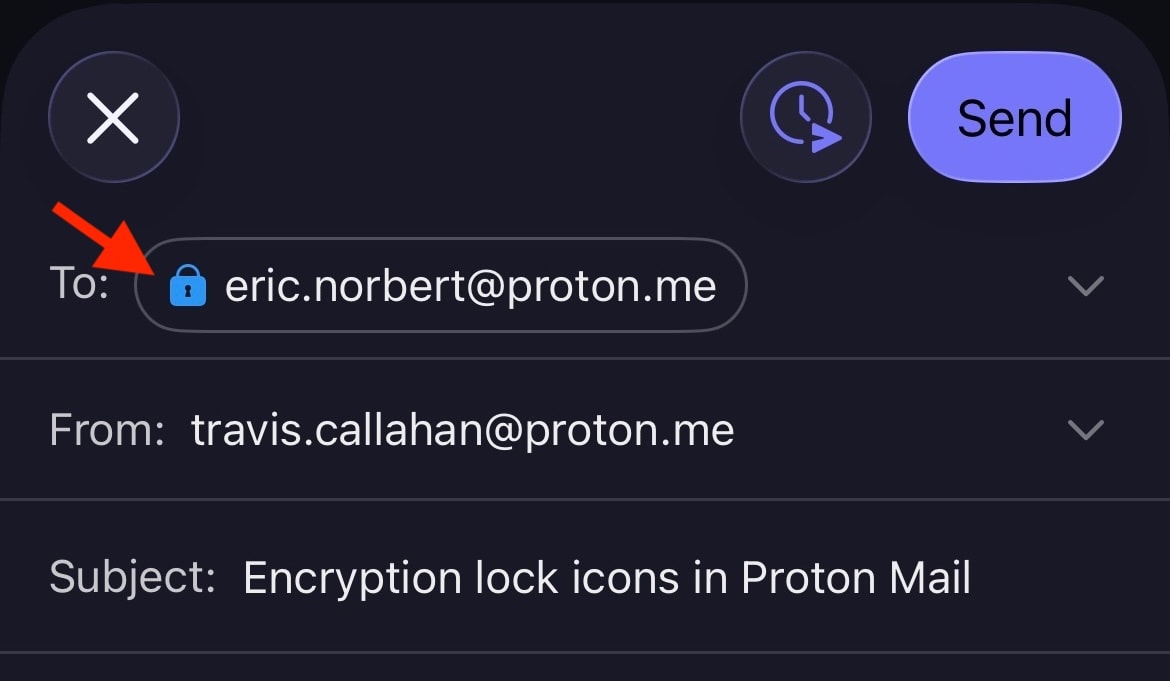
लॉक आइकन रचना जगह विंडो में भी दिखाए जाते हैं और ईमेल भेजने के तरीके के हिसाब से बदल सकते हैं। उदाहरण के लिए, अगर आप Proton के बाहर भेजे गए ईमेल को पासवर्ड से सुरक्षित करें, तो लॉक काला (या हरा (खुला) अगर PGP हस्ताक्षर जुड़ा हो) से बदलकर नीला हो जाएगा।

एन्क्रिप्शन लॉक आइकन Android और iOS के लिए Proton Mail मोबाइल ऐप में भी दिखाया जाता है।
लॉक आइकन का क्या मतलब है
किसी संदेश की एन्क्रिप्शन स्थिति का मुख्य संकेत लॉक आइकन का रंग है। लॉक के अंदर छोटा प्रतीक अतिरिक्त जानकारी देता है। ध्यान रखें कि एन्क्रिप्शन सिर्फ संदेश की सामग्री और अटैचमेंट पे लागू होता है। संदेश हैडर और मेटाडाटा एन्क्रिप्ट नहीं होते, ताकि Proton Mail, PGP के साथ इंटरऑपरेबल रह सके।
काला लॉक
काला लॉक का मतलब है कि संदेश ज़ीरो-एक्सेस एन्क्रिप्शन के साथ स्टोर किया जाता है। इसका मतलब है कि आपके अलावा कोई और आपके मेलबॉक्स में मौजूद ये ईमेल नहीं पढ़ सकता। Proton Mail भी इस संदेश को डीक्रिप्ट नहीं कर सकता। हालांकि, इस ईमेल की कॉपी भेजने वाले या प्राप्तकर्ता के ईमेल सर्वर पे बिना सुरक्षा के स्टोर हो सकती है।
 (नई विंडो) (नई विंडो) | Standard — The email is safely stored on Proton Mail’s servers using zero-access encryption. We never have access to your message contents. |
नीला लॉक
आपको नीला लॉक Proton Mail ईमेल पतों के बीच भेजे गए ईमेल पर दिखेगा। ये संदेश ज़ीरो-एक्सेस एन्क्रिप्शन के साथ स्टोर किए जाते हैं, लेकिन इनमें अतिरिक्त सुरक्षा के लिए स्वचालित शुरु-से-अंत तक एन्क्रिप्शन (E2EE) की खासियत भी होती है।
इसका मतलब है कि संदेश भेजने वाले ने अपने डिवाइस पे उन्हें एन्क्रिप्ट किया है और इन्हें सिर्फ इच्छित प्राप्तकर्ता अपने डिवाइस पे ही डीक्रिप्ट कर सकता है। Proton Mail समेत कोई और E2EE संदेशों तक एक्सेस नहीं कर सकता।
 | Standard — End-to-end encrypted message |
 | Checkmark — End-to-end encrypted message with verified recipient/sender. This lock is used for the contacts for whom you enabled the optional Address Verification feature. Address verification and end-to-end encryption allow for a much higher level of security than just E2EE alone. |
 | Warning — This lock can appear if you enabled the optional Address Verification feature. It means the message could not be verified using the sender’s trusted key. Contact the sender to confirm the authenticity of the message. It can also mean that the contact’s key or signature is insecure. In this case, please ask them to update their key or software. |
कुछ उदाहरण, जिनकी वजह से चेतावनी दिख सकती है:
- असुरक्षित चाबी का इस्तेमाल (उदाहरण के लिए, RSA-1024 चाबी या SHA1 की मदद से सत्यापित चाबी)
- भेजने वाले ने अपनी चाबी बदल दी और ईमेल को नई चाबी से साइन किया, जिस पर आपने अभी तक भरोसा नहीं किया है
- आपने अपना पासवर्ड रीसेट किया और संपर्क हस्ताक्षर (जिसमें विश्वसनीय चाबी शामिल है) सत्यापित नहीं हो सका
हरा लॉक (बंद)
Proton Mail, PGP के साथ इंटरऑपरेबल है, जिससे आप Proton Mail इस्तेमाल न करने वाले लोगों के साथ E2EE ईमेल भेज और प्राप्त कर सकते हैं। जिन लोगों ने PGP सही तरीके से सेटअप किया है, उन्हें भेजे गए संदेश शुरु-से-अंत तक एन्क्रिप्ट होंगे और बंद हरा लॉक दिखेगा। इसमें WKD चाबियों का इस्तेमाल करने वाले लोग भी शामिल हैं।
 | Standard – PGP end-to-end encrypted message |
 | Pencil — PGP end-to-end encrypted and signed message. A PGP signature guarantees that the sender is genuine and that the message hasn’t been tampered with. |
 | Checkmark — PGP end-to-end encrypted message with verified recipient/sender. This is the most secure way to email someone who doesn’t use Proton Mail. |
 |
Warning — PGP end-to-end encrypted message, but the sender’s email or key couldn’t be verified. If you see this warning, you may wish to contact the sender to confirm the authenticity of the message. It can also mean that the contact’s key or signature is insecure. In this case, please ask them to update their key or software. |
हरा लॉक (खुला)
खुला हरा लॉक दिखाता है कि संदेश PGP की मदद से शुरु-से-अंत तक एन्क्रिप्ट नहीं है, लेकिन PGP हस्ताक्षर के साथ डिजिटल रूप से साइन किया गया है। ये ईमेल, सभी ईमेल की तरह, ज़ीरो-एक्सेस एन्क्रिप्शन के साथ हमारे सर्वर पे स्टोर किए जाते हैं।
 | Pencil — PGP-signed message. A PGP signature guarantees that the sender is genuine and that the message hasn’t been tampered with. |
 | Checkmark — PGP-signed message from a verified sender |
 | Warning — PGP-signed message, but the message could not be verified using the sender’s trusted key. If you see this warning, you may wish to contact the sender to confirm the authenticity of the message. It can also mean that the contact’s key or signature is insecure. In this case, please ask them to update their key or software. |