
南京錠アイコンを使用して暗号化状態を確認する方法
- 閲覧中
- 2 分
- カテゴリー
- メールを受信して読む
- メールの作成と送信
Proton Mailのすべてのメッセージには、暗号化状態を示す南京錠アイコンが表示されています。この記事では、それぞれのアイコンの意味を説明します。
南京錠アイコンは、受信トレイおよびカスタムフォルダー内のすべてのメールの横に表示されます。
送受信メールの暗号化状態は、メッセージ送信時にどのように暗号化されたかを示すものであり、変更することはできません。

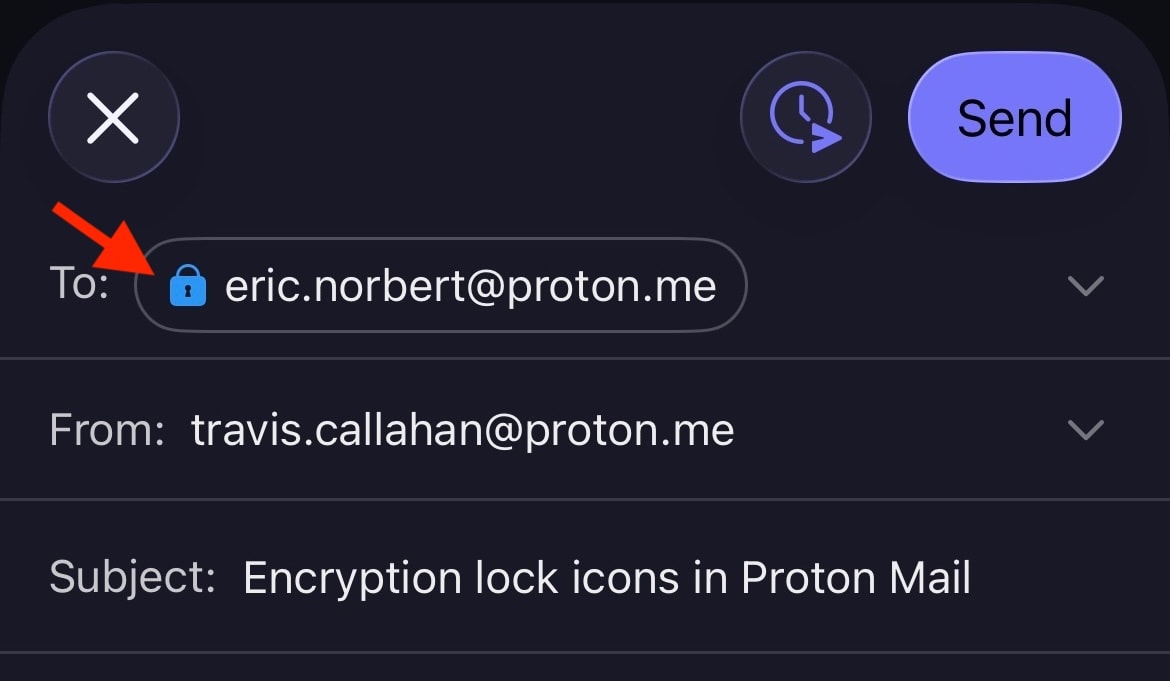
南京錠アイコンはメッセージ作成ウィンドウにも表示され、メールの送信方法によって変化する場合があります。たとえば、Proton以外の宛先に送信するメールをパスワード保護した場合、南京錠の色は黒(PGP署名が添付されている場合は緑(開いている状態))から青に変わります。

暗号化の南京錠アイコンは、AndroidおよびiOS用のProton Mailモバイルアプリでも表示されます。
南京錠アイコンの意味
メッセージの暗号化状態を示す主なインジケーターは、南京錠アイコンの色です。さらに詳細な情報は、南京錠の中にある小さなシンボルによって示されます。暗号化はメッセージ本文と添付ファイルにのみ適用されますのでご注意ください。メッセージヘッダーとメタデータは暗号化されません。これにより、Proton MailとPGPとの相互運用性が確保されます。
黒い南京錠
黒い南京錠は、メッセージがゼロアクセス暗号化で保管されていることを意味します。これは、メールボックス内のこのメールをお客様以外の誰も読むことができないことを意味します。Proton Mailであっても、このメッセージを復号化することはできません。ただし、このメールのコピーが送信者または受信者のメールサーバーに安全でない状態で保管されている可能性があります。
 (新しいウィンドウ) (新しいウィンドウ) | Standard — The email is safely stored on Proton Mail’s servers using zero-access encryption. We never have access to your message contents. |
青い南京錠
青い 南京錠は、Proton Mailのメールアドレス間で送信されるメールに表示されます。これらのメッセージはゼロアクセス暗号化で保管されますが、セキュリティを高めるために自動的な エンドツーエンド暗号化 (E2EE) も適用されます。
これは、メッセージが送信者のデバイス上で暗号化され、意図された受信者のデバイス上でのみ復号化できることを意味します。Proton Mailを含む第三者がE2EEメッセージにアクセスすることはできません。
 | Standard — End-to-end encrypted message |
 | Checkmark — End-to-end encrypted message with verified recipient/sender. This lock is used for the contacts for whom you enabled the optional Address Verification feature. Address verification and end-to-end encryption allow for a much higher level of security than just E2EE alone. |
 | Warning — This lock can appear if you enabled the optional Address Verification feature. It means the message could not be verified using the sender’s trusted key. Contact the sender to confirm the authenticity of the message. It can also mean that the contact’s key or signature is insecure. In this case, please ask them to update their key or software. |
警告が表示される原因となるいくつかの例を以下に示します:
- 安全でない鍵の使用(たとえば、RSA-1024鍵や、SHA1を使用して認証された鍵など)
- 送信者が鍵を変更し、お客様がまだ信頼していない新しい鍵でメールに署名した
- お客様がパスワードをリセットしたため、連絡先の署名(信頼された鍵を含む)を検証できなかった
緑色の南京錠(閉じている状態)
Proton MailはPGPと相互運用可能であるため、Proton Mailを使用していない相手ともE2EEメールを送受信できます。PGPを正しくセットアップしている相手へのメッセージはエンドツーエンドで暗号化され、閉じられた緑色 の南京錠が表示されます。これには、WKD鍵を使用しているユーザーも含まれます。
 | Standard – PGP end-to-end encrypted message |
 | Pencil — PGP end-to-end encrypted and signed message. A PGP signature guarantees that the sender is genuine and that the message hasn’t been tampered with. |
 | Checkmark — PGP end-to-end encrypted message with verified recipient/sender. This is the most secure way to email someone who doesn’t use Proton Mail. |
 |
Warning — PGP end-to-end encrypted message, but the sender’s email or key couldn’t be verified. If you see this warning, you may wish to contact the sender to confirm the authenticity of the message. It can also mean that the contact’s key or signature is insecure. In this case, please ask them to update their key or software. |
緑色の南京錠(開いている状態)
開いている緑色の南京錠は、メッセージがPGPを使用してエンドツーエンド暗号化されていないものの、PGP署名で電子署名されていることを示します。これらのメールは、すべてのメールと同様に、ゼロアクセス暗号化を使用して弊社のサーバーに保管されます。
 | Pencil — PGP-signed message. A PGP signature guarantees that the sender is genuine and that the message hasn’t been tampered with. |
 | Checkmark — PGP-signed message from a verified sender |
 | Warning — PGP-signed message, but the message could not be verified using the sender’s trusted key. If you see this warning, you may wish to contact the sender to confirm the authenticity of the message. It can also mean that the contact’s key or signature is insecure. In this case, please ask them to update their key or software. |