
如何使用鎖頭圖示檢查加密狀態
- 閱讀
- 2 分鐘
- 類別
- 接收與閱讀電子郵件
- 撰寫並傳送電郵
所有在 Proton Mail 中的訊息都標有鎖頭圖示,用以顯示其加密狀態。在本文中,我們將解釋這些圖示的含意。
收件匣和自訂資料夾中的每封電子郵件旁邊都會顯示鎖頭圖示。
已傳送和已接收電子郵件的加密狀態會顯示該訊息在傳送時是如何加密的,且無法變更。

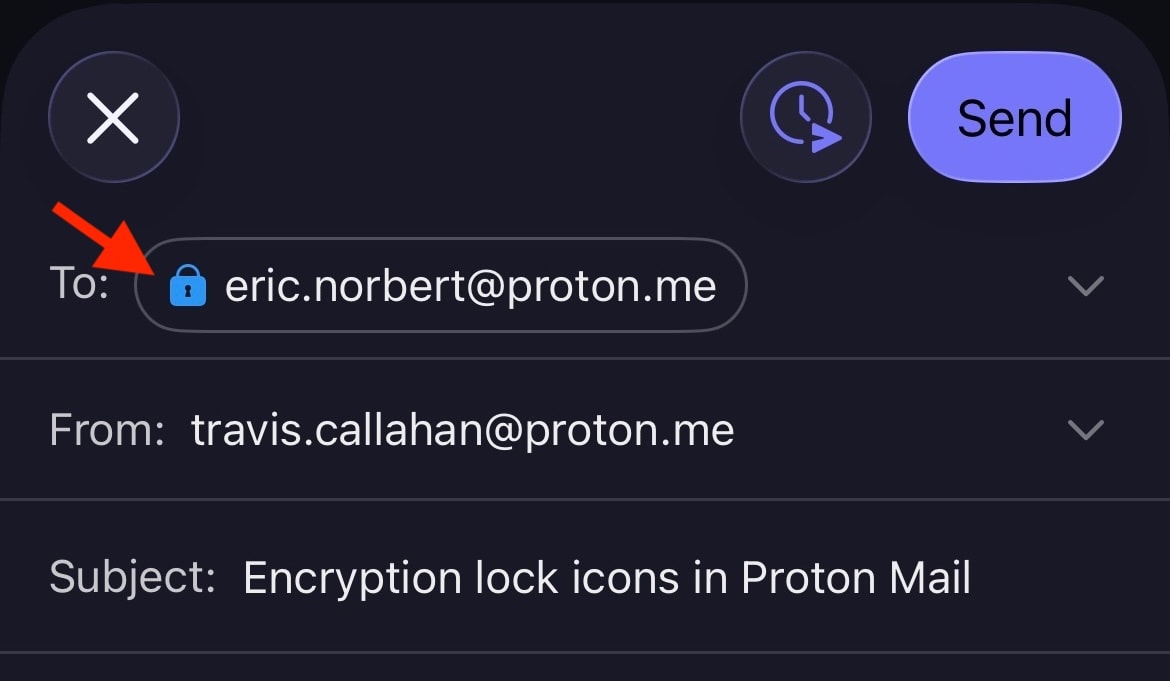
鎖頭圖示也會顯示在 [撰寫器] 視窗中,並可能根據電子郵件的傳送方式而有所變化。例如,如果您對傳送到 Proton 之外的電子郵件進行密碼保護,鎖頭將從 黑色(或在附有 PGP 簽名時顯示為 綠色(開啟))變更為 藍色。

加密鎖頭圖示也會顯示在 Android 和 iOS 的 Proton Mail 行動應用程式中。
鎖頭圖示的含意
訊息加密狀態的主要指標是鎖頭圖示的顏色。鎖頭內的小符號則提供額外資訊。請注意,加密僅套用於訊息內容和附件。訊息標頭和中繼資料不會加密,以便 Proton Mail 能與 PGP 互通。
黑色鎖頭
黑色鎖頭表示訊息是以零存取加密技術儲存。這代表除了您之外,沒有人可以閱讀您電子郵件信箱中的這封電子郵件。即使是 Proton Mail 也無法解密此訊息。然而,此電子郵件的副本可能會以不安全的方式儲存在寄件者或收件者的電子郵件伺服器上。
 (新視窗) (新視窗) | Standard — The email is safely stored on Proton Mail’s servers using zero-access encryption. We never have access to your message contents. |
藍色鎖頭
您會看到 藍色 鎖頭,出現在 Proton Mail 電子郵件地址之間傳送的電子郵件。這些訊息以零存取加密技術儲存,但同時也具備 自動 端對端加密 (E2EE) 功能,以提供額外的安全保障。
這表示訊息已由寄件者在他們的裝置上進行加密,且只能由指定的收件者在他們的裝置上進行解密。包括 Proton Mail 在內的任何其他人都無法存取 E2EE 訊息。
 | Standard — End-to-end encrypted message |
 | Checkmark — End-to-end encrypted message with verified recipient/sender. This lock is used for the contacts for whom you enabled the optional Address Verification feature. Address verification and end-to-end encryption allow for a much higher level of security than just E2EE alone. |
 | Warning — This lock can appear if you enabled the optional Address Verification feature. It means the message could not be verified using the sender’s trusted key. Contact the sender to confirm the authenticity of the message. It can also mean that the contact’s key or signature is insecure. In this case, please ask them to update their key or software. |
以下是可能導致顯示「注意」鎖頭的一些範例:
- 使用不安全的金鑰(例如 RSA-1024 金鑰或使用 SHA1 驗證的金鑰)
- 寄件者變更了其金鑰,並使用您尚未信任的新金鑰簽署了該電子郵件
- 您重設了密碼,且無法驗證聯絡人簽名(其中包含信任金鑰)
綠色鎖頭(關閉)
Proton Mail 可與 PGP 互通,允許您與不使用 Proton Mail 的人傳送和接收 E2EE 電子郵件。傳送給已正確設定 PGP 之用戶的訊息將會進行端對端加密,並顯示關閉的綠色鎖頭。這包括使用 WKD 金鑰的使用者。
 | Standard – PGP end-to-end encrypted message |
 | Pencil — PGP end-to-end encrypted and signed message. A PGP signature guarantees that the sender is genuine and that the message hasn’t been tampered with. |
 | Checkmark — PGP end-to-end encrypted message with verified recipient/sender. This is the most secure way to email someone who doesn’t use Proton Mail. |
 |
Warning — PGP end-to-end encrypted message, but the sender’s email or key couldn’t be verified. If you see this warning, you may wish to contact the sender to confirm the authenticity of the message. It can also mean that the contact’s key or signature is insecure. In this case, please ask them to update their key or software. |
綠色鎖頭(開啟)
開啟的綠色鎖頭顯示訊息並非使用 PGP 進行端對端加密,但已使用 PGP 簽名進行數位簽署。與所有電子郵件一樣,這些電子郵件皆是使用零存取加密儲存在我們的伺服器上。
 | Pencil — PGP-signed message. A PGP signature guarantees that the sender is genuine and that the message hasn’t been tampered with. |
 | Checkmark — PGP-signed message from a verified sender |
 | Warning — PGP-signed message, but the message could not be verified using the sender’s trusted key. If you see this warning, you may wish to contact the sender to confirm the authenticity of the message. It can also mean that the contact’s key or signature is insecure. In this case, please ask them to update their key or software. |