如何匯入與匯出電子郵件
- 閱讀
- 0 分鐘
- 類別
- 遷移指南
Proton 提供多種選項來匯入和匯出您的電子郵件。
Easy Switch
我們的 Easy Switch 工具可讓您輕鬆將電子郵件和通訊錄從舊的電子郵件服務遷移到 Proton Mail。每個擁有 Proton Mail 帳號的使用者都可以使用 Easy Switch。
Proton Mail Export Tool
我們為 Windows、macOS 和 Linux 提供命令列工具,可讓您將所有電子郵件匯出為 EML 檔案,並將其中繼資料匯出為 JSON 檔案。接著可以將 EML 訊息匯入任何電子郵件用戶端。例如 Thunderbird 或 Outlook。
瞭解如何使用 Proton Mail Export Tool
匯出單一電子郵件
每個擁有 Proton Mail 帳號的使用者都可以下載單一電子郵件。
1. 登入 mail.proton.me(新視窗) 並打開您要儲存的電子郵件。
2. 在寄件者詳細資訊下方,您會看到一排圖示。按一下三個點(更多)圖示,然後從選單中選取匯出。
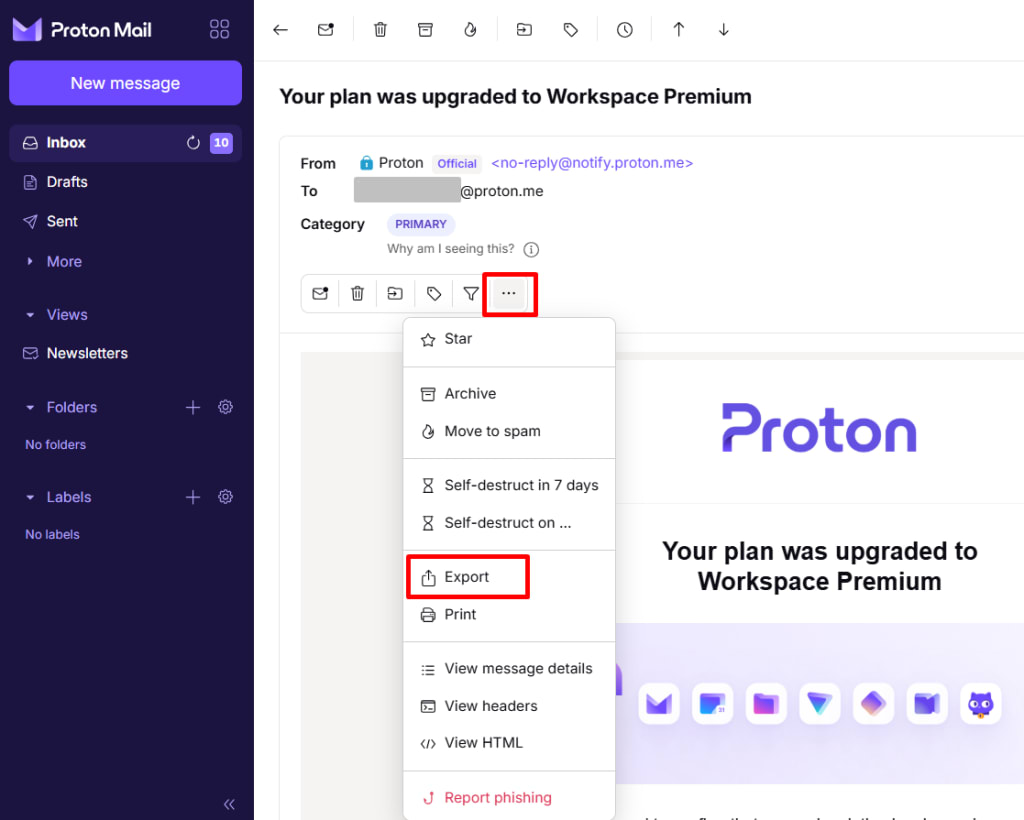
3. 選擇要在您裝置上儲存電子郵件的位置。
4. 按一下儲存。
Proton Mail Bridge
Proton Mail Bridge 是一款開源應用程式,可讓您將 Proton Mail 帳號與任何支援 IMAP 和 SMTP 的程式完全整合。這包括 Microsoft Outlook、Mozilla Thunderbird 和 Apple Mail。
任何使用 Proton Mail 付費方案的使用者皆可使用。
Proton Mail Bridge 會將您所有的電子郵件下載到您的電子郵件用戶端,並儲存在本地端。如果您願意,也可以使用電子郵件用戶端內建的「匯出」功能進一步匯出它們。以下提供相關的操作說明:
本篇支援文章也將向您說明如何使用 Proton Mail Bridge 和 Mozilla Thunderbird 匯入與匯出 MBOX / EML 檔案。