
Slå ihop två Proton Mail-konton
- Lästid
- 2 min
- Kategori
- Kombinera eller ta bort konto
Med en betald Proton Mail-prenumeration(nytt fönster) kan du skicka och ta emot meddelanden från flera e-postadresser. Så om du har flera Proton Mail-konton kan du slå ihop dem och hantera all din kommunikation i en och samma inkorg.
För att göra detta behöver du ta bort dina extra konton och sedan lägga till deras e-postadresser till ditt primära konto.
Så slår du ihop dina Proton Mail-konton
Innan du fortsätter med att slå ihop kontona måste du bekräfta att ditt primära konto har en betald Proton Mail-prenumeration.
Du kan endast slå ihop konton till ett primärt konto på ett betalt Mail-paket. Om ditt primära konto fortfarande har Free plan, uppgradera det (eller lägg till det i ett Familj-, Duo- eller Visionary-paket) innan du fortsätter.
Gör därefter följande steg:
- Exportera e-postmeddelanden och data från ditt sekundära konto
För att slå ihop två Proton Mail-konton måste det sekundära kontot tas bort permanent.
Om du vill behålla e-post, kontakter, kalendrar (Proton Calendar), filer (Proton Drive), lösenord (Proton Pass) eller annan data från kontot du tar bort, ska du ladda ner eller exportera det innan du börjar.
Så exporterar du e-post från Proton Mail
- Logga in på ditt sekundära konto (det du vill ta bort) och öppna dina konto- och lösenordsinställningar (⚙ Inställningar → Alla inställningar → Konto och lösenord).
- Rulla till Ta bort konto och klicka på Ta bort ditt konto.

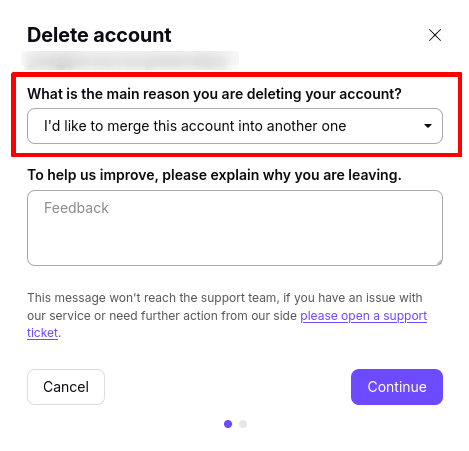
- I rullgardinsmenyn Vad är den huvudsakliga orsaken till att du tar bort ditt konto väljer du Jag skulle vilja slå ihop detta konto till ett annat. Klicka på Fortsätt och följ instruktionerna för att ta bort ditt konto.
Nu när du har tagit bort ditt sekundära konto kan du lägga till dess e-postadress i ditt primära konto. Det är viktigt att göra detta direkt. Så här gör du:
- Logga in på ditt primära konto och öppna dina kontoinställningar (⚙ Inställningar → Alla inställningar).
- Välj Identitet och adresser i sidofältet. Rulla till Mina adresser och klicka på Lägg till adress.

- Enter the email address from the account you just deleted. Add a display name, then click Save address.

Klart! Adressen från kontot du tog bort har lagts till i ditt primära konto. Du kan nu skicka och ta emot meddelanden med denna adress.