Secure password sharing is storing shared credentials in an end-to-end encrypted password manager and granting scoped access, rather than sending them through chat, email or spreadsheets. Access can then be limited, reviewed, logged, and removed the moment someone no longer needs it.
If you want to adopt secure password sharing within your business, the first step is accepting that credential access spreads over time. Your business needs to build a better strategy: we’ll explain how.
Why are passwords shared at work?
Even when having individual logins is the better option, daily operations often depend on accounts that several people need to use. Client portals, vendor dashboards, shared inboxes, and service accounts can all fall prey to the same access problem. The work is shared, but the credential that unlocks it was designed for one person to use.
When there’s no business-approved way to handle credential access, passwords are shared in the least secure ways. They move through chats, emails, browser storage, spreadsheets, shared documents, or personal notes. Sending a password feels harmless, but every new copy makes the credential harder to track, rotate, and remove.
Good credential management depends on memory, trust, and cleanup across channels that were not built to protect sensitive credentials. A better process gives every shared password a controlled place to live. Access can be granted to the right people, limited by role, reviewed by admins, and removed when the person no longer needs it.
What’s the solution to insecure sharing?
Password sharing is impossible to eliminate completely. Individual accounts make access easier to approve, monitor, and revoke. They also create clearer accountability when a system contains customer data, financial information, employee records, or admin settings. While the safest approach to access management is to give each employee their own login wherever a service supports it, this isn’t always possible.
Teams may inherit accounts created before formal IT processes existed, work with platforms that offer limited user management, or manage external portals controlled by clients, vendors, agencies, or partners. In small and growing companies, the person who first created an account may not be the person who manages it six months later.
A more realistic standard is to make sharing controlled, temporary when possible, and visible to the business. Unmanaged sharing is usually caused by a desire for convenience and speed. A password may be sent to solve an access request, then that same message becomes the place people return to whenever they need the account again.
Over time, the credential may be copied into a spreadsheet, saved in a browser profile, or passed to someone else without any clear record of where it went. What feels like a quick handoff becomes a loose access path, and ultimately the business loses confidence in who has the password, whether it was copied, and whether the account still needs to be shared at all.
Why it isn’t safe to store passwords in chat, email, and spreadsheets
Unsafe password sharing usually begins as a workaround for everyday access requests. Teams use the channels already open in front of them, such as chat, email, shared files, or browser storage, because those channels are fast and familiar.
The security risk appears later, when the password keeps circulating beyond the original request and the business no longer has a reliable way to review, rotate, or revoke access.
- Messaging platforms help teams move quickly, but they turn credentials into searchable text. A password shared in Slack, Teams, WhatsApp, or a project chat may sync to devices, appear in notifications, remain visible in message history, or become accessible to people added to the conversation later. Deleting the message can’t tell the business where the password went before it disappeared from view.
- Email creates a similar risk with a longer shelf life. Inboxes are archived, backed up, forwarded, and synced across devices. A plaintext password often travels with enough context to make it immediately useful, like the account name, customer ID, or system it unlocks.
- Spreadsheets can feel safe because credentials appear to be organized. Realistically, spreadsheets full of passwords become fragile access directories. Once a file is shared broadly, downloaded, duplicated, or kept by someone who leaves the company, the business lacks control over the passwords inside it.
These habits also damage accountability. If a sensitive account is misused or exposed, the business needs to know who had access, when that access changed, and which credentials need rotation. Chat histories, inbox searches, and old file permissions rarely provide a reliable answer.
What secure business password sharing looks like
Secure password sharing gives credentials a managed environment instead of letting them move through ordinary communication channels.
Shared vaults are the starting point for ongoing team access. Instead of keeping every credential in one broad collection, the business can organize vaults by department, client, function, system, or sensitivity, then assign access according to the work each person actually needs to do. This avoids exposing unrelated credentials just because someone needs one account, and gives the business a clearer way to separate everyday shared access from higher-risk admin or client credentials.
Permissions should reflect the work people actually need to do. One person may need to edit, rotate, and manage a credential, while another only needs access to complete a task. A secure sharing process should support those differences without forcing the business to choose between slowing people down and exposing too much.
Secure link sharing for business credentials
Single item sharing helps when a person needs one credential rather than a whole vault. It is especially useful for contractors, external partners, cross-functional requests, and temporary support. Secure links with expiration dates can support one-off access when the recipient should not keep long-term access.
The strongest version of this process keeps the credential inside the encrypted vault environment. Team members can receive access, use the credential, and lose access without the password being copied into chat, email, or a spreadsheet.
Unsafe v.s. secure password sharing at work
Here’s a clear delineation between insecure and secure password sharing.
| Unsafe sharing | Secure sharing |
| Chat, email, spreadsheets, browser storage, and personal notes create scattered copies of the same credential. The business may not know who saw the password, where it was saved, or whether access was removed. | Encrypted vaults, role-based access, single-item sharing, secure links with expiration dates, activity logs, and offboarding controls keep shared credentials inside a managed process. |
Give shared vaults clear ownership
A shared vault should not become a cleaner version of the old password spreadsheet. It needs structure, ownership, and rules for what belongs inside it.
A broad vault named “Company passwords” may work briefly, but it usually becomes harder to manage as the team grows. Credentials are easier to control when vaults match the teams or projects within a business: client accounts, finance systems, marketing services, operations, IT administration, or high-sensitivity systems.
Each vault needs an owner who can review access, remove people who no longer need entry, update old credentials, and check whether stored passwords remain strong and unique. Without ownership, old accounts accumulate and permissions expand beyond their original purpose.
The business should also define the boundary between password management and infrastructure secrets. SaaS logins, admin portals, recovery codes, secure notes, shared accounts, vendor credentials, and other human-managed access details fit naturally in a business password manager.
Runtime secrets used by production applications, CI/CD pipelines, and infrastructure usually belong in dedicated secrets management systems. That distinction keeps the password manager focused on team credential sharing without turning it into a replacement for production secrets management.
Make credential sharing auditable for compliance and incidents
Business password sharing needs visibility. When a shared credential protects customer data, employee records, financial systems, vendor portals, or admin settings, the company should be able to explain who had access and how that access was managed.
Credential sharing belongs in the access control conversation because shared passwords often unlock the systems where personal data is stored, changed, exported, or deleted.
The ICO’s guide to data security(नई विंडो) frames this as part of the technical and organizational measures businesses need to protect personal data, while the NCSC’s guidance on identity and access management(नई विंडो) reinforces that knowing who needs access, and under what conditions, matters as much as knowing who to keep out.
For password sharing at work, that means access should be limited, intentional, and reviewable, not passed through channels the business can’t properly audit.
Proton Pass for Business is a business password manager that helps organizations securely store, share, and manage passwords and sensitive credentials across teams. It gives admins a central place to manage shared credentials, check permissions, and see which people can reach sensitive accounts.
Chat and email can’t offer the same control, because once a password leaves the original message it keeps spreading, and it represents a risk to every system that credential unlocks.
Audit visibility also matters during incidents. If a shared account is exposed, admins need to know who had access, whether the credential was shared externally, and which passwords should be rotated first. The faster the business can answer those questions, the easier it is to contain the risk.
Create a password sharing policy
A password sharing policy needs to help employees understand where credentials belong and which channels are off limits for sharing them.
The policy should name the approved password manager and state that business passwords should not be shared through chat, email, SMS, WhatsApp, shared documents, spreadsheets, or personal notes. Every one of those channels can be phished, and a credential sitting in any of them is only as protected as the account it was sent from.
Rotation rules should be included too. Shared credentials should be updated after suspected exposure, employee departures, contractor offboarding, vendor incidents, and changes to high-risk roles. For sensitive accounts, the policy should define the owner and review cadence.
Our guide to creating a password policy offers a broader framework for password rules across a business. For team credential sharing, the most important details are operational: where passwords live, how access is granted, how access is reviewed, and how it is removed.
The approved process also has to be usable. If secure sharing is slow or confusing, people will return to the quickest channel. This is where interface quality stops being a matter of taste and becomes a security control: a password manager that employees find intuitive gets adopted, and one that creates additional steps gets worked around.
Secure password sharing checklist
Use this checklist to review how your business shares credentials today:
Setting up secure sharing
- Store shared credentials in an approved business password manager.
- Prohibit password sharing through chat, email, SMS, shared documents, spreadsheets, and personal notes.
- Organize shared vaults by team, function, client, system, or sensitivity.
- Assign an owner to each shared vault.
- Limit permissions by role or need.
Maintaining secure sharing
- Use single item sharing when someone needs one credential, not a full vault.
- Use secure links with expiration dates for one-off access.
- Protect shared accounts with multi-factor authentication (MFA) where available.
- Review access to sensitive credentials regularly.
- Remove contractors and agencies when the project ends.
- Rotate credentials after employee departures, suspected exposure, or vendor incidents.
- Document password sharing rules in the company password policy.
How Proton Pass supports secure password sharing for teams
Proton Pass for Business is a business password manager that helps teams store and share business credentials without sending passwords through uncontrolled channels. Logins, secure notes, recovery codes, and other sensitive credentials can be stored in end-to-end encrypted vaults and shared with the people who need access.
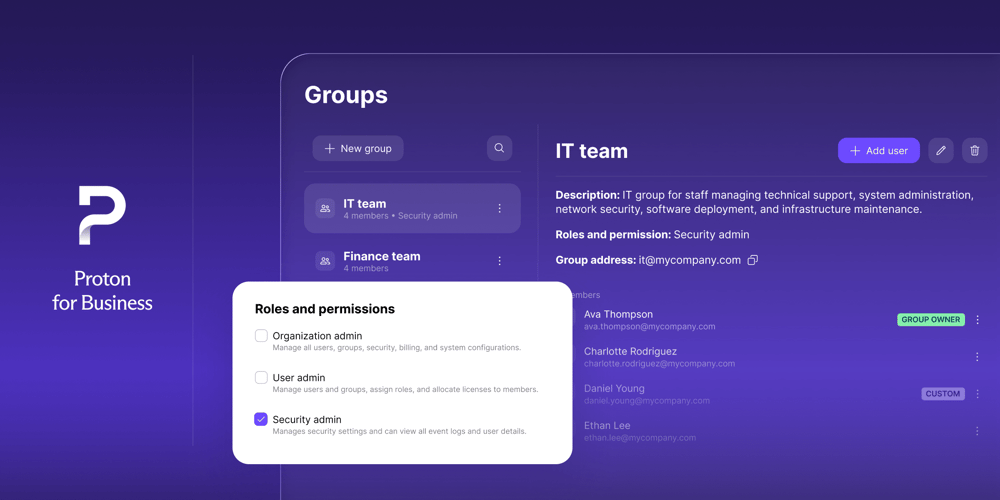
As a password manager for IT teams, Proton Pass for Business includes admin-focused features such as role-based access control, policies, activity logs, single sign-on, SCIM provisioning, and SIEM integration. These features help businesses manage who can access shared credentials and remove access more cleanly when someone leaves or changes roles.
Crucially, Proton Pass supports different sharing needs. Shared vaults help teams manage ongoing access. Single-item sharing lets someone receive one credential without seeing a wider collection. Secure links with expiration dates can support one-off access when permanent sharing would be too broad.
Because Proton Pass uses end-to-end encryption and a zero-access architecture, no one (including Proton) can read the passwords and secure notes stored in your vault. For businesses, this means credential sharing can be built around privacy and control instead of copying secrets into places never designed to protect them.
Share business credentials securely, with full control, using Proton Pass for Business.