
Account monitor
- Reading
- 2 mins
- Category
- Security and privacy
Account monitor is a free security setting available on all Proton Accounts. It lets you monitor sign-in attempts and other account management activity from your account settings.
If you suspect someone else has unauthorized access to your account, you can use this feature to check if they tried to sign in and if they were successful.
Account monitor is not enabled by default. To start monitoring events, you need to enable this feature in your account settings.
Plans
All free and paid plans
Services
All Proton services including Mail(new window), VPN(new window), Calendar(new window), Drive(new window), Pass(new window)
In this article
How to use account monitor
Enable account monitor
- Sign in to account.proton.me and open your settings.
- Select Security and privacy from the sidebar.
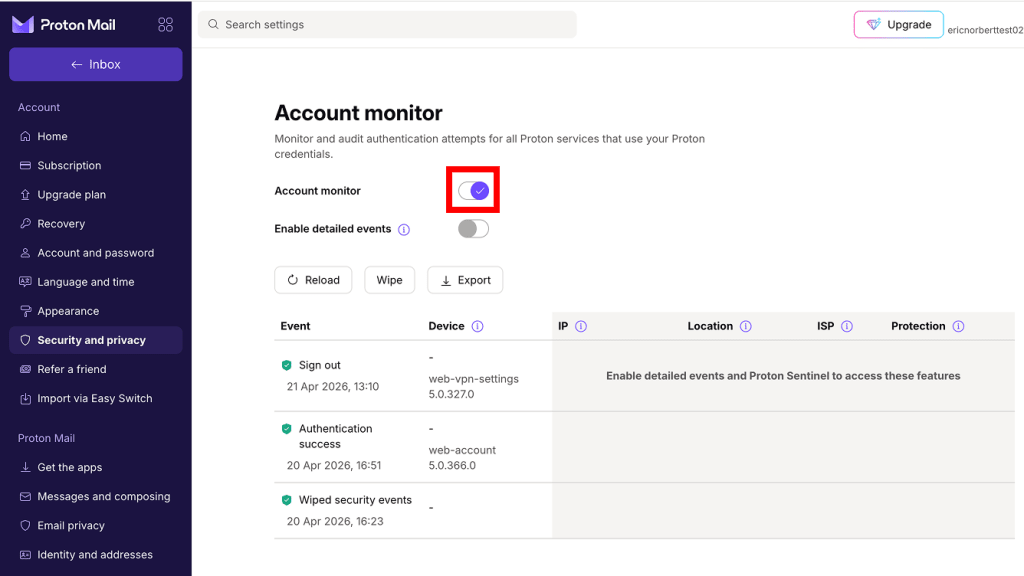
- Scroll to Account monitor and enable the Account monitor toggle.

Account monitor is enabled. Records of future sign-in events will appear here.
View events
- Sign in to account.proton.me and open your settings.
- Select Security and privacy from the sidebar.
- Scroll to Account monitor.

You’ll see a list of events. From here, you can:
- Reload: Refresh the table to view the latest events.
- Wipe: Delete all events from the table.
- Export: Download events as a CSV file.
Enable detailed events
For a closer inspection of your account activity, turn on the Enable detailed events toggle.

- This allows Proton to show the IP address(new window) for each event, and which Proton App was used.
- You can unlock Location, ISP(new window), and Device details by joining the Proton Sentinel high-security program.
Disable account monitor
Disabling account monitor will permanently delete all event records from our system.
- Sign in to account.proton.me and open your settings.
- Select Security and privacy from the sidebar.
- Scroll to Account monitor and disable the Account monitor toggle.
4. Read the warning. If you’re sure you want to continue, click Disable account monitor.

Account monitor is disabled. We’ll stop showing sign-in attempts for your account, and any existing event records will be permanently deleted.
Account monitor for Proton for Business
All members: Everyone in a Proton organization can monitor their own accounts using the steps in this article.
Administrators: In the Proton for Business admin panel, administrators can also view events for everyone in their organization. Learn how to access Proton’s business account monitor