Getting away from Big Tech is rarely as simple as closing an account. Over time, a single provider can become woven into your digital life: Your files are stored there, your inbox runs through it, your logins depend on it, and so does the AI assistant you turn to for everyday tasks.
That makes switching less about replacing one product and more about untangling a whole ecosystem. This autumn and winter, our roadmap targets exactly those sticking points: moving your data out, covering every device you use, sharing access without giving away your most valuable information, and bringing assistance into the tools you already work in.
If you missed what we committed to earlier this year, our product roadmap for the first half of 2026 covers everything that came before.
Here’s what’s coming over the next six months.
Proton Mail
When choosing our privacy-first ecosystem, many people start with Proton Mail. This season, we’re making it easier to bring your old inbox over and to keep your new one under control.
Content search on mobile
Content search is almost here for Proton Mail on Android and iOS, rolling out over the coming weeks. Search the full content of your messages, not just subjects and senders, while Proton still can’t read a word of your inbox. Look for the detail you remember, like a delivery address, a project name, a phrase from an old conversation, and Proton Mail surfaces the messages that contain it.
Easier migration and account linking
Until now, setting up your Gmail connection required leaving the Proton Mail app to complete the process in a browser, and then coming back. We’re fixing that. Soon you’ll be able to set up your Gmail connection entirely within the Proton Mail mobile app. You’ll be able to send and receive from your Gmail address, have your recent messages imported, and manage everything without ever being bounced out of the app.
And we’re improving how external accounts are handled. If you first signed up for Proton through VPN(new window), Drive, or Pass using a Gmail address, and later created a separate Proton Mail account, joining the two currently takes a manual process. We’re working to make this easier.
Free subdomains for business teams
Getting your team onto Proton Mail shouldn’t depend on owning a domain. We’re building free Proton subdomains for businesses, so your organization can claim an address of its own and start sending and receiving email right away. Every seat on your plan works from day one, with no registrar to deal with and no DNS records to configure. When you’re ready to connect your own domain, you can add it at any time, and your subdomain addresses will keep working.
Still in progress
We’re also putting the finishing touches on work from our last roadmap, including the next-generation Calendar, which we’re rebuilding from the ground up to give you a faster, smoother and more intuitive scheduling experience.
Proton Drive
A cloud drive earns trust through years of reliable service. For Proton Drive, our focus stays on the fundamentals: finding what you’ve stored, keeping every client fast and dependable, and making it practical to leave your old provider for good.
Search improvements on every client
We’re bringing improved search across all clients and more fields, now you will be able to search by more than just the file name on mobile and web. End-to-end encryption makes this a difficult technical problem, and we plan to roll out incremental improvements to search capabilities as they are developed — so think steady expansion rather than a single switch.
Continued performance and quality
Earlier this year, we rebuilt Drive around a single, shared engine that unifies all our cloud storage apps across platforms and powers all uploading, downloading, and encryption. We’re are now continuing to improve Drive so it’s faster and more reliable across clients.
For Docs and Sheets, the focus is also on stability and reliability, alongside some of the features people have asked for most: dark theme, editing Sheets on mobile, page breaks in Docs, ODT import and export in Docs, tables in Sheets, quick stats for selected cells in Sheets, and subscript and superscript in Docs. Check out the Docs and Sheets roadmap on Reddit(new window).
Easy Switch from Google Drive
Moving your data from another cloud storage provider currently means downloading everything to a device and then manually uploading it again, which is time-consuming and difficult. We’re making it easier to switch from Google Drive, so your data doesn’t have to make that round trip.
Linux beta and folder sync on macOS
We are working towards releasing a beta of the official Proton Drive app for Linux. The initial launch will likely consist of our headless daemon mode only, meaning you’ll have a sync engine running that keeps a configurable list of directories up to date the same way it does on Mac and Windows.
That’s the same sync engine behind a major change on macOS: You’ll be able to select any folder for syncing on Mac, similarly to how you select folders on Windows today, with the same functionality on both platforms. It’s by far the biggest missing feature of the Drive Mac client.
Proton Pass
Proton Pass already makes it easy to securely store, use, and share credentials. Next, we’re expanding those capabilities with safer ways to share access, more seamless sign-in across devices, and more flexible tools for managing teams and organizations.
Stronger credential security and safer sharing
We’re adding the ability to share a login without revealing the password; recipients can sign in but never see the credential, which makes sharing with family, contractors, and teammates considerably safer. We’re also adding expiration for shared items and vaults, so access can end automatically after a set period instead of lingering until someone removes it manually.
Pass Monitor v2 will take a more proactive approach to your security. It brings a revamped UI and proactive alerts, notifying you directly about weak, reused, and compromised passwords, as well as breached email addresses, so you catch risks before they become a real problem.
Convenience and ease of use
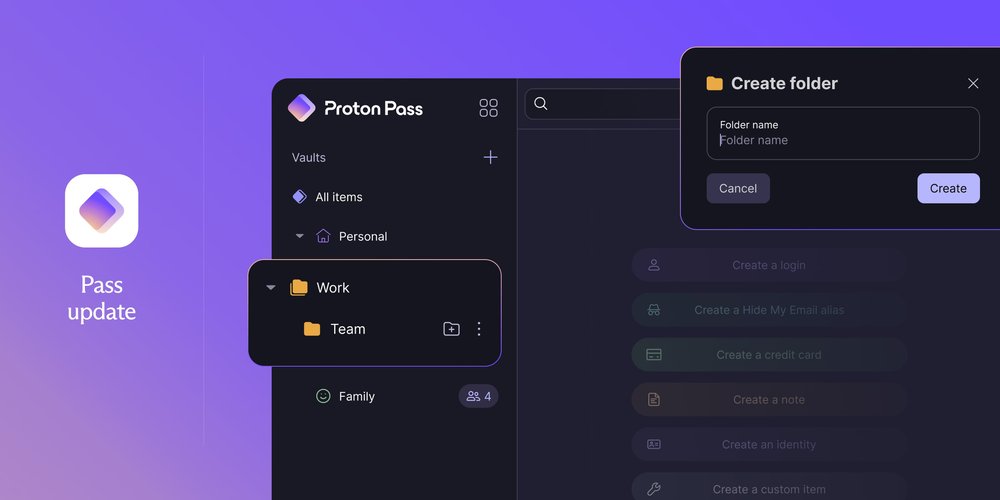
Folders are being rolled out, letting you organize logins by project, team, or year. Next, we’re adding the ability to share folders and subfolders, just like vaults and items today, giving you more flexibility and control over how you grant access.
On macOS and Android, we’re improving autofill: deeper macOS integration so Pass autofills at the system level, and more reliable autofill on Android. We’re also adding support for credential exchange protocol to make it easier to move passkeys and credentials between password managers. The goal is to make Pass work more consistently wherever you sign in.
Improved organization management
Following Admin Roles, role-based access control extends to policies for specific users and groups. Org policies currently apply to everyone; this adds the ability to include or exclude individual users or groups, so permissions can match how teams actually work.
We’re also adding vault transfer on off-boarding, letting admins automatically move a departing user’s vault content to someone else when deleting their account. And org management moves into a revamped admin console: user and access management, authentication, security, billing, alerts, and action items in one central dashboard.
Proton VPN
A VPN can’t protect you when it’s off. And the easier it is to use, the more likely you’ll just keep it on. This is why we’ll be rolling out our intuitive new app design across all supported platforms, allowing you to feel at home on whichever device you’re using. We’re also improving our kill switch and making it simple to pause Proton VPN when you need to.
Redesigned apps for Linux, iOS, macOS, and Android TV
Last year, we overhauled our Windows app. Now we’re bringing the same intuitive, consistent, and native experience to macOS, iOS and iPadOS, and Linux. Our Android TV app will also connect faster and make the features you actually use even easier to reach.
A smarter kill switch
If your VPN connection drops, the kill switch ensures your real IP address isn’t exposed. We’re improving it on Linux, macOS, iOS, and iPadOS, and adding an advanced kill switch(new window) on macOS.
Pause and resume
Some sites and apps won’t work while your VPN is on, so you may sometimes need to briefly turn it off. The tricky part is remembering to turn it back on. With pause and resume, you’ll choose how long to pause, and Proton VPN will reconnect automatically when that time is up. This feature will come to Windows and Android first, with other platforms to follow.
Lumo
Lumo 2.0 reshaped the core experience of our AI assistant this summer. Now we’re taking that experience to the places people already work: their own products, phones, and desktops.
Lumo API
We’re releasing the Lumo API, giving developers and businesses a way to bring Lumo directly into their own products and workflows, while getting the same zero-access encryption and no-logging protections as the Lumo app.
Improved mobile apps
We’re revamping the Lumo mobile apps to deliver a faster, smoother, and more reliable experience on iOS and Android. This will make Lumo feel more responsive and easier to use day to day, while giving us a stronger foundation to keep improving the mobile experience over time.
Lumo for desktop
We’ll launch a dedicated Lumo desktop app for faster, easier access throughout the day. It was originally planned for earlier this year, but we prioritized Lumo 2.0 first. With that now complete, we’re returning to the desktop app.
Moving beyond Big Tech with you, our community
Everything we’ve released this year, including the new features of our core services, has been possible with your support. As an independent, European alternative to Big Tech, we see building a private ecosystem of apps as a reclamation of our rights to privacy on the internet and proof that there’s a better way to build tech: for people, not profit.
Your trust and support are what helps us make better products. Feedback is invaluable to each of our teams, so let us know in our forums(new window) and on Discord(new window), X, Bluesky(new window), Facebook, LinkedIn, Threads(new window), Telegram, Reddit(new window), and UserVoice(new window), or leave us a review in the App Store or Play Store.
Thank you for helping us build a more private internet, and we’ll see you in the spring for our next roadmap updates.