Amazonin palveluista tulee helposti osa arkeasi, katsoitpa elokuvaa rentoutuaksesi, teit ostoksia tai seurasit lempisuoratoistajaasi Twitchissä. Sen selvittäminen, mitä jättämillesi tiedoille tapahtuu, tuntuu usein jäävän huomiseen.
Amazonin tekoälyn kouluttaminen ei luultavasti ollut syy, miksi rekisteröidyit. Mitä tietoja Amazon voi siis käyttää malliensa kouluttamiseen, kuka päättää, saako niitä käyttää, miten se vaikuttaa sinuun ja mitä vaihtoehtoja sinulla on, jos et halua olla mukana? Tutkimme joitakin Amazonin keskeisiä palveluita ja sen työpaikkoja selvittääksemme asiaa.
- Alexa: äänivuorovaikutus auttaa kouluttamaan Amazonin malleja
- Twitch: suoratoistostasi voi tulla Amazonin koulutusmateriaalia
- Ring-kamerat: FTC:n tapaus yksityisistä videoista ja algoritmien kouluttamisesta
- Fire TV: katselutiedoista tulee profilointiaineistoa
- Amazonin työpaikat: automaatio, koulutus ja valvonta
- Yksityisyytesi pitäisi olla osa palvelua
Alexa: äänivuorovaikutus auttaa kouluttamaan Amazonin malleja
Alexa on Amazonin ääniavustaja, joka on saatavilla Echo-kaiuttimien ja muiden laitteiden kautta. Voit pyytää sitä soittamaan musiikkia, asettamaan ajastimen tai vastaamaan kysymykseen, kun olet kiireinen muiden asioiden parissa.
Mitä Alexa-tietoja Amazon voi käyttää tekoälyn kouluttamiseen?
Amazonin Alexa-UKK:n(uusi ikkuna) mukaan seuraavia tietoja voidaan käyttää sen tekoälymallien kouluttamiseen:
| Sisältötyyppi | Mitä Amazon voi käyttää tekoälyn kouluttamiseen |
|---|---|
| Äänitallenteet | Puheesi, mukaan lukien aksentti, murre ja puhetavat |
| Litteroinnit | Tallennetun puheen kirjalliset versiot |
| Kirjoitetut pyynnöt | Alexalle kirjoittamasi kysymykset ja ohjeet |
Amazon Alexan yksityisyyskanteet
Amazon on kohdannut yksityisyyskanteita ja viranomaistoimia sen vuoksi, miten Alexa tallentaa, säilyttää ja käyttää ihmisten keskusteluja.
Vuonna 2023 Yhdysvaltain liittovaltion kauppakomissio (FTC) ja oikeusministeriö väittivät, että Amazon säilytti lasten äänitallenteita toistaiseksi(uusi ikkuna), elleivät vanhemmat pyytäneet niiden poistamista, ja käytti näin laittomasti säilytettyjä tietoja Alexan algoritmien parantamiseen. FTC:n mukaan lasten puhe tarjosi arvokasta koulutusaineistoa, koska se eroaa aikuisten puheesta.
Viranomainen väitti myös, että kun vanhemmat pyysivät poistamista, Amazon ei poistanut litterointeja kaikista tietokannoistaan. Yhtiö kiisti väärinkäytökset mutta suostui 25 miljoonan dollarin siviilioikeudelliseen sakkoon(uusi ikkuna), poistamaan käyttämättömät lapsitilit sekä tiettyjä ääni- ja sijaintitietoja ja lopettamaan näiden tietojen käytön tuotteidensa kehittämiseen tai parantamiseen.
Erillisessä kanteessa kolme kantajaa Washingtonissa, Floridassa ja Marylandissa syyttivät Amazonia heidän yksityisten keskustelujensa tallentamisesta Alexan kautta ilman suostumusta. Kukaan heistä ei ollut rekisteröinyt laitteita, mutta he asuivat perheenjäsenten kanssa, jotka olivat. Riita koskee “vääriä herätyksiä”, jolloin Alexa sekoittaa toisen sanan tai äänen herätyssanaansa ja aloittaa tallentamisen. Maaliskuussa 2026 liittovaltion tuomari hylkäsi osittain Amazonin vaatimuksen ratkaista asia ilman pääkäsittelyä(uusi ikkuna), mikä salli salakuuntelua koskevien kanteiden edetä väärien herätysten tallenteiden osalta, kun taas muut kanteet hylättiin.
Näin rajoitat sitä, miten Alexa käyttää äänitallenteitasi
Maaliskuusta 2025 lähtien jokainen Echo-laitteelle esitetty pyyntö lähetetään Amazonin pilveen. Et voi estää sitä, mutta jos et tunne oloasi mukavaksi ajatuksesta, että sinun ja perheesi ääntä käytetään Amazonin tekoälymallien rakentamiseen ja parantamiseen, voit tehdä näin:
- Avaa Amazon Alexa -sovelluksessa Lisää → Alexa-yksityisyys → Hallitse Alexa-tietojasi.
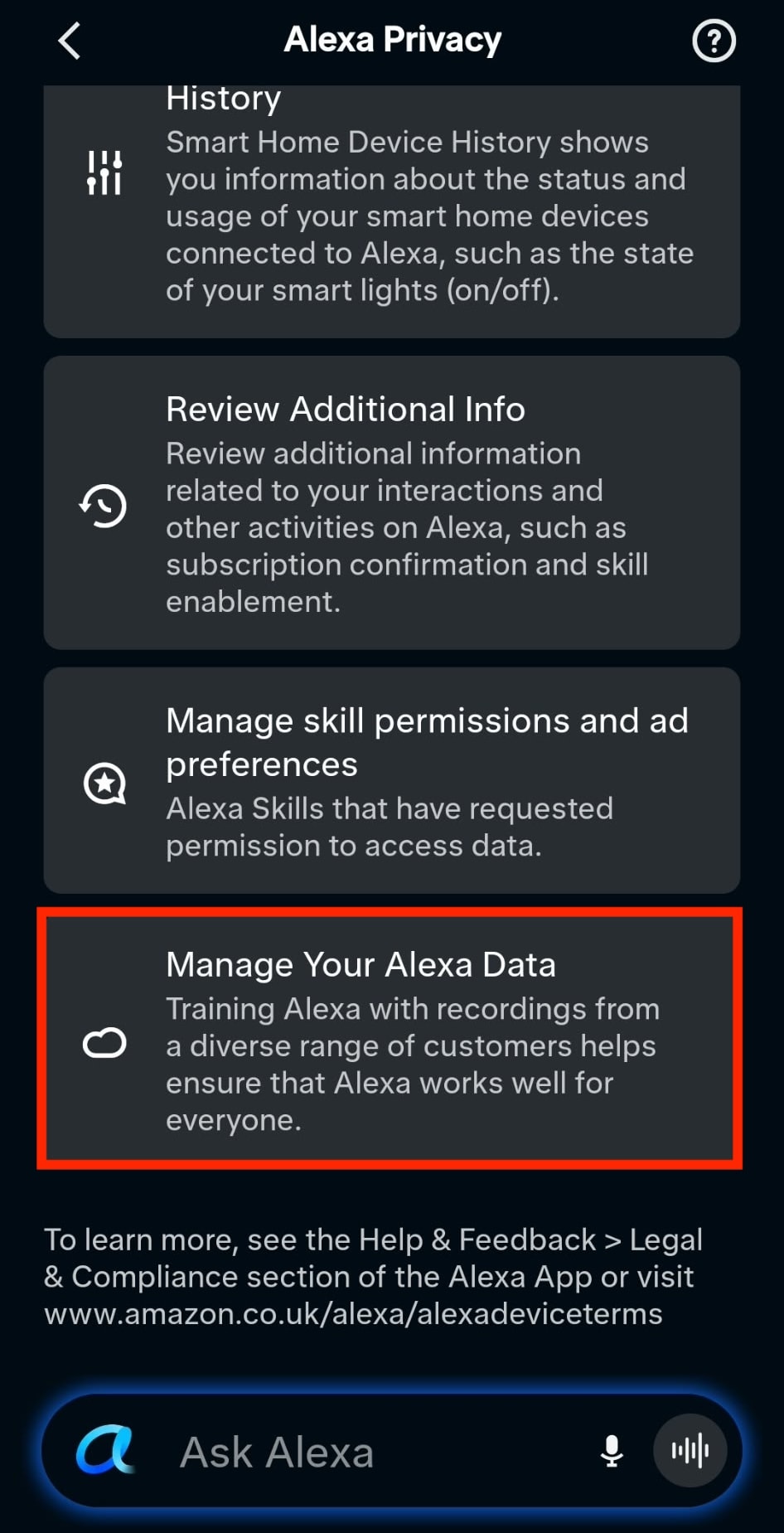
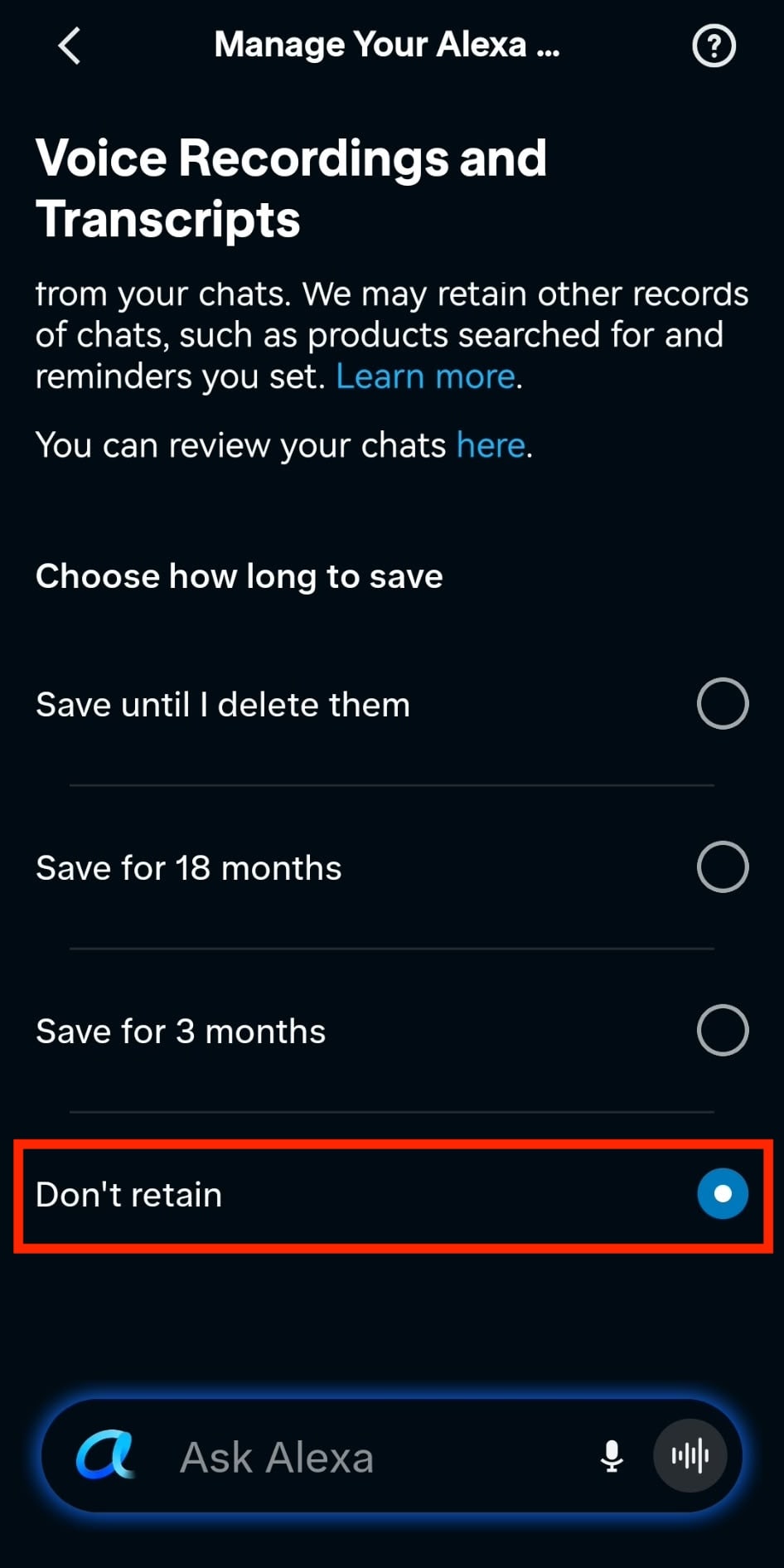
- Siirry kohtaan Äänitallenteet ja litteroinnit ja valitse kohdasta Valitse säilytyksen kesto vaihtoehto Älä säilytä.
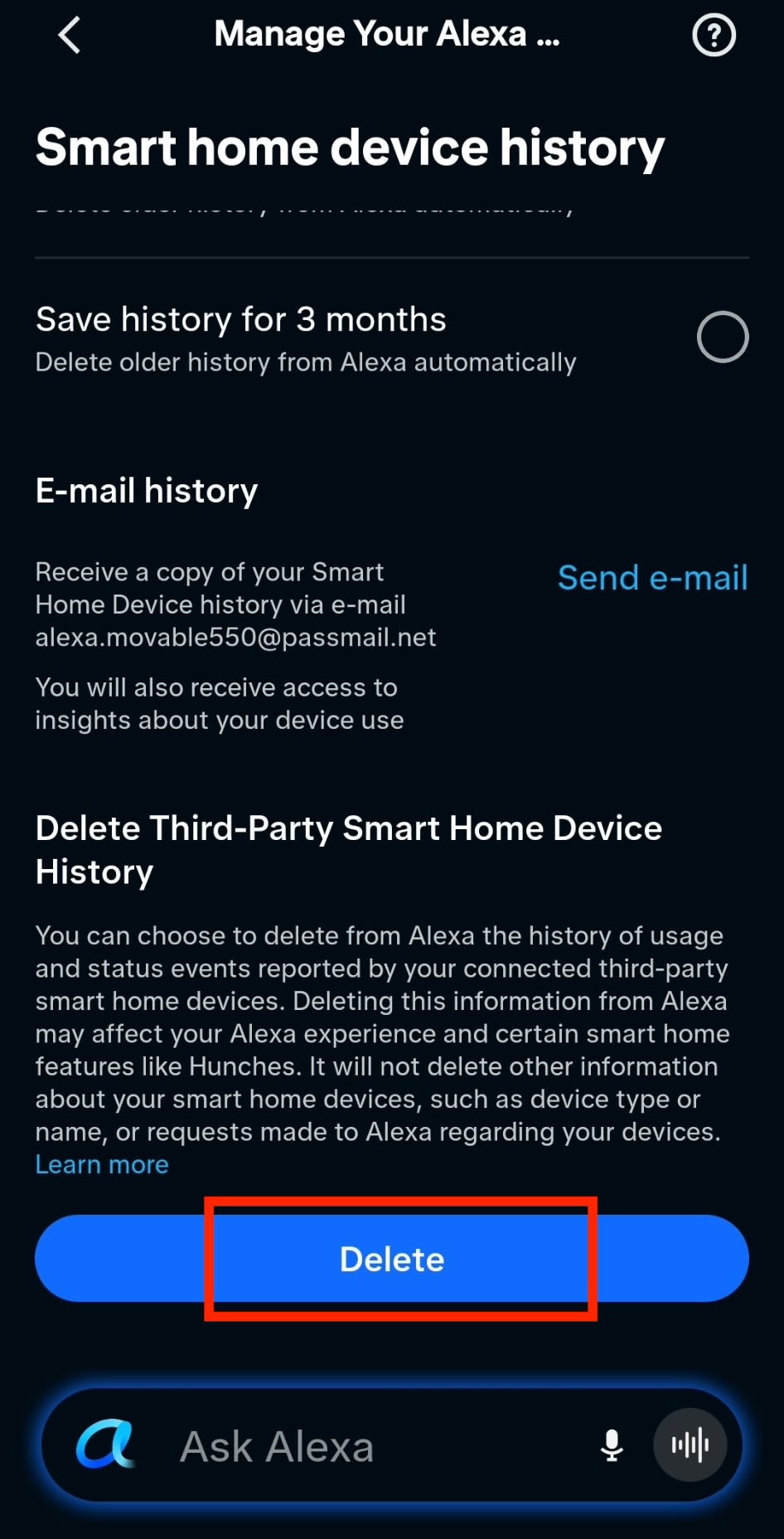
- Siirry kohtaan Älykodin laitehistoria ja napauta kohdassa Poista ulkopuolisten älykodin laitteiden historia painiketta Poista. Tämä on tehtävä usein. Valitse lisäksi kohdasta Valitse säilytyksen kesto lyhin ajanjakso (Tallenna historia 3 kuukauden ajalta).
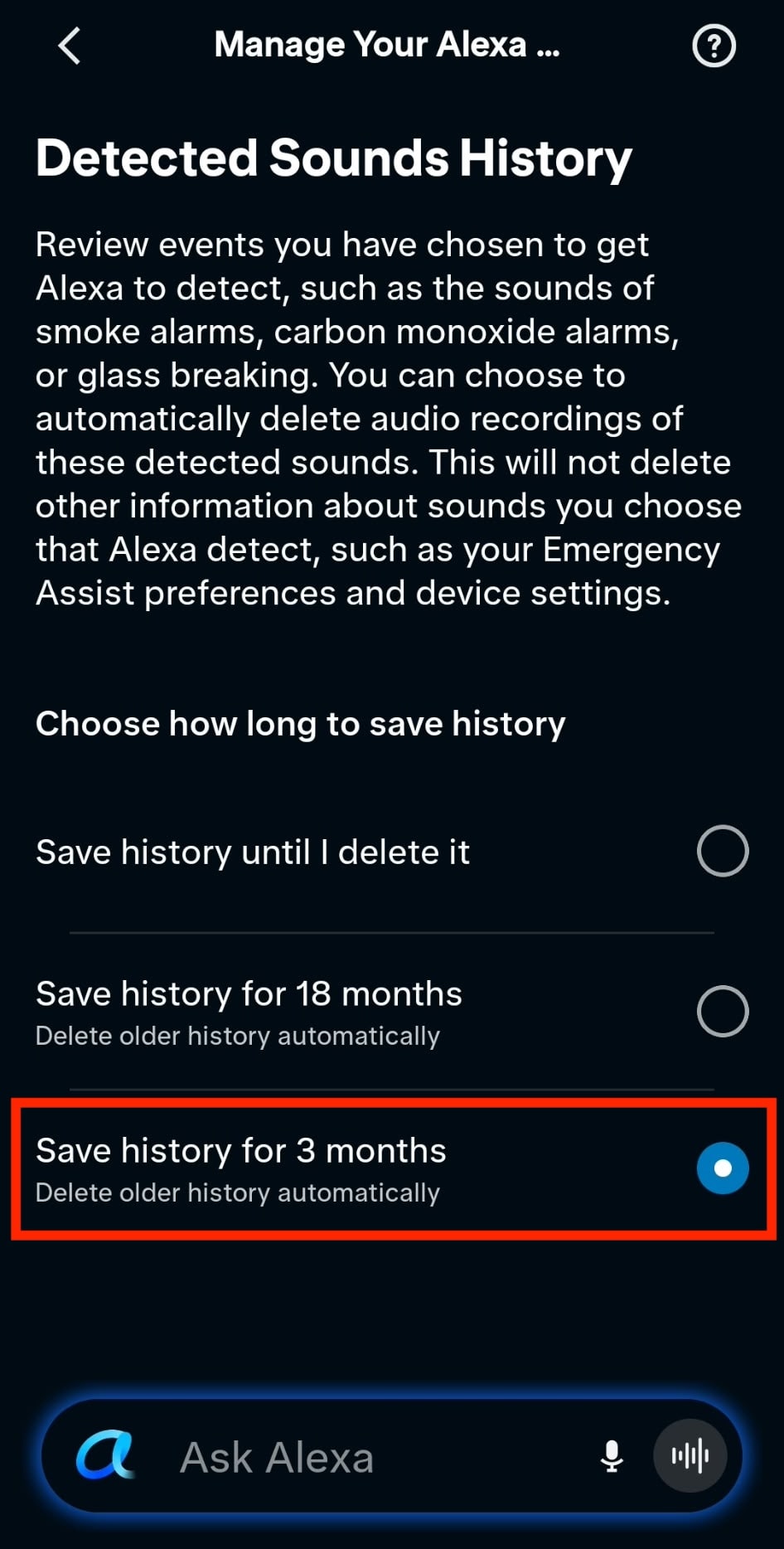
- Siirry kohtaan Havaittujen äänten historia ja valitse lyhin ajanjakso (Tallenna historia 3 kuukauden ajalta).
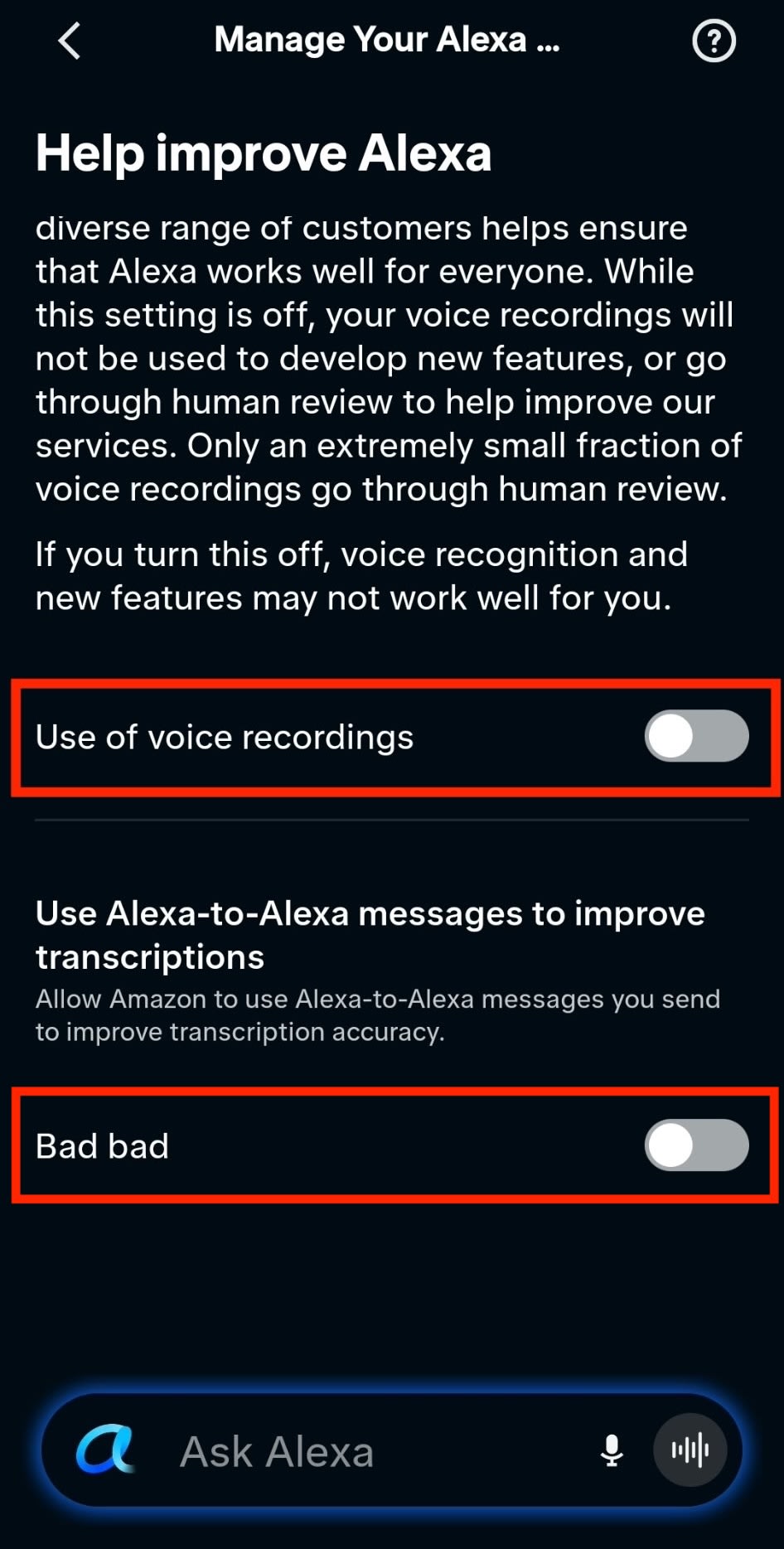
- Siirry kohtaan Auta parantamaan Alexaa ja poista käytöstä Äänitallenteiden käyttö ja Alexalta Alexalle -viestien käyttö litterointien parantamiseen.
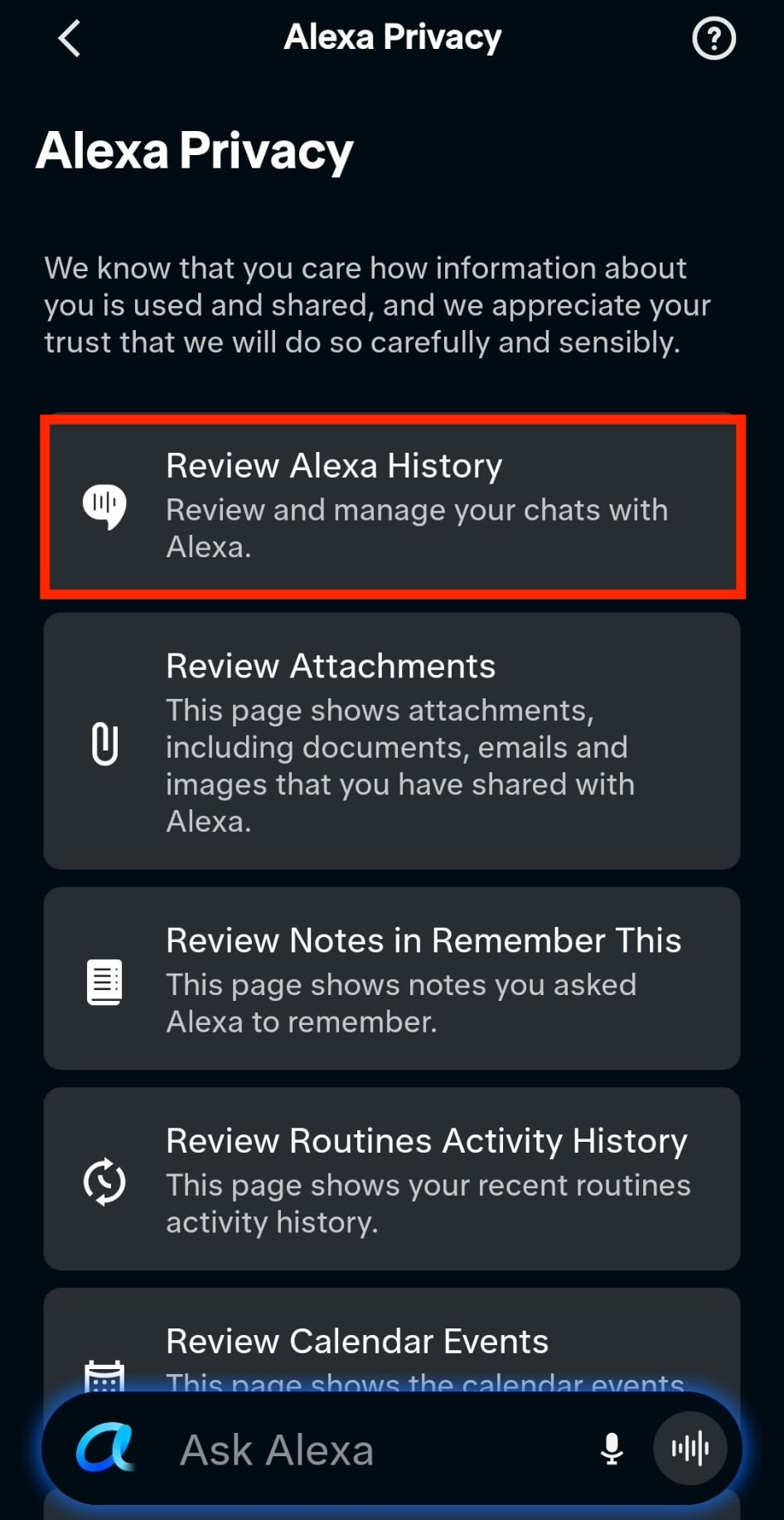
- Jos haluat tarkastella ja poistaa Alexan äänitallenteita, litterointeja ja kirjoitettuja pyyntöjä, avaa Lisää → Alexa-yksityisyys → Tarkista Alexa-historia.
Amazon muuttaa näitä valikoita usein, ja sanamuoto voi vaihdella alueen ja sovellusversion mukaan.
Jos haluat estää Echoa kuuntelemasta kokonaan, paina sen mikrofonin sammutuspainiketta. Valo muuttuu punaiseksi, kun mikrofonit ovat pois päältä.
Mitä muuta sinun on hyvä tietää Alexasta ja mallien kouluttamisesta
Kuunteleeko Alexa aina? Kyllä. Kun sen mikrofoni on päällä, Echo kuuntelee jatkuvasti herätyssanaansa. Tekoälyn koulutuksesta kieltäytyminen ei estä sitä tallentamasta ja lähettämästä ääntä Amazonille, kun se aktivoituu, myös vahingossa.
Amazon säilyttää kirjallisen version sanomastasi, vaikka valitsisit, ettei äänitallenteita säilytetä. Litteroinnit ja kirjoitetut pyynnöt säilyvät 30 päivää(uusi ikkuna) Alexa-keskustelun viimeisimmän pyyntösi jälkeen, ellet poista niitä sitä ennen.
Tietojesi poistaminen ei kumoa aiempaa koulutusta. Amazon voi jatkaa tietoihisi jo koulutettujen mallien käyttöä.
Voivatko Amazonin työntekijät kuulla tallenteitasi? Kyllä. Amazonin mukaan “vain erittäin pieni osa äänitallenteista päätyy ihmisen tarkistettavaksi”. Vuonna 2019 Bloomberg kuitenkin raportoi(uusi ikkuna), että kukin tarkistaja käsitteli noin 1 000 äänileikettä yhdeksän tunnin työvuoron aikana ja kuuli joskus nimiä ja pankkitietoja. Kun Äänitallenteiden käyttö -asetus (kohdassa Auta parantamaan Alexaa) poistetaan käytöstä, myös tallenteesi jäävät ihmistarkistuksen ulkopuolelle.
Twitch: suoratoistostasi voi tulla Amazonin koulutusmateriaalia
Twitch on Amazonin suoratoistoalusta, jolla sisällöntuottajat lähettävät suoraa lähetystä ja katsojat katsovat ja keskustelevat. Ihmiset tulevat jakamaan kiinnostuksen kohteitaan, seuraamaan lempisuoratoistajaansa tai viettämään aikaa yhteisön parissa.
Päätös saattaa käyttäjien sisältö Amazonin tekoälyn koulutuksen saataville on herättänyt vastareaktion suostumuksesta ja siitä, kuka saa päättää, miten sisältöä käytetään.
Mikä Twitch-sisältö kelpaa Amazonin tekoälyn koulutukseen?
Twitchin tekoälykoulutuksen UKK(uusi ikkuna) luettelee kanavasisällön, joka kelpaa Amazonin generatiivisen tekoälyn koulutukseen.
| Sisältötyyppi | Mitä Amazon voi käyttää tekoälyn kouluttamiseen |
|---|---|
| Video | Suorat lähetykset, tallennetut lähetykset, leikkeet ja kohokohdat |
| Ääni | Lähetysten ääni, mukaan lukien puhe |
| Keskustelu | Viestit, joita katsojat julkaisevat lähetyksen aikana |
| Kanavan sisältö | Kuvat ja teksti kanavalla |
Twitch ottaa sinut mukaan Amazonin tekoälykoulutukseen oletuksena
Elokuusta 2026 lähtien Twitchillä on ollut generatiivisen tekoälyn koulutus oletuksena päällä, joten sinun on itse löydettävä asetus ja kytkettävä se pois. Twitchin suorassa lähetyksessä tuotejohtaja Mike Minton totesi syyn suoraan: “Jos liittyminen olisi vapaaehtoista, kukaan ei liittyisi(uusi ikkuna).” Minton ei voinut vahvistaa, mitä sisältöä Amazon oli jo käyttänyt koulutukseen, eikä ollut selvää, milloin tietojen kerääminen alkoi.
Näin poistat tekoälykoulutuksen käytöstä Twitchissä
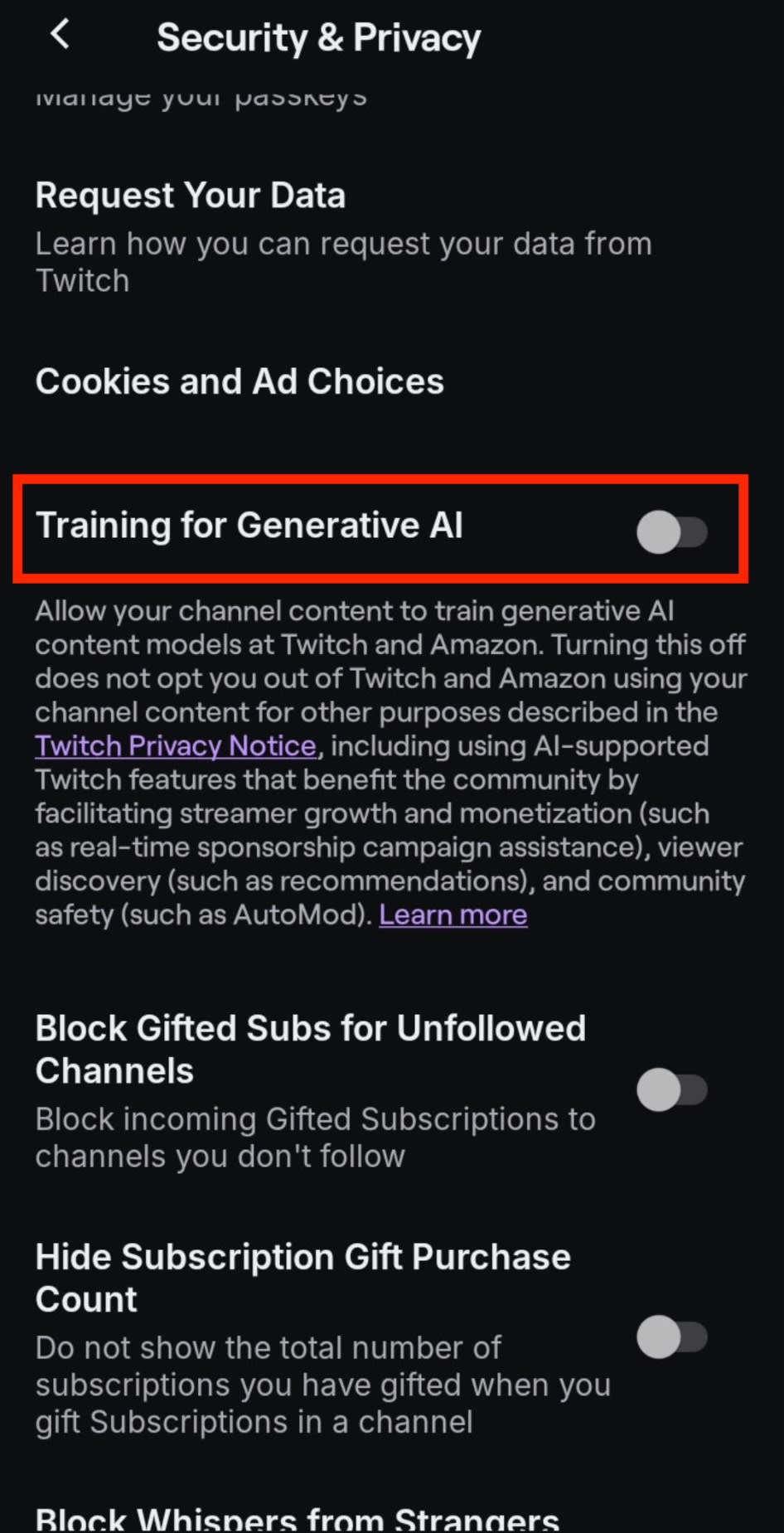
Avaa Asetukset → Turvallisuus ja yksityisyys ja poista Generatiivisen tekoälyn koulutus käytöstä.
Mitä muuta sinun kannattaa tietää Twitchistä ja mallien koulutuksesta
Kieltäytymisesi kattaa vain oman Twitch-kanavasi. Amazon voi edelleen käyttää viestejä, jotka julkaiset toisen striimaajan keskustelussa, jos tällä on tekoälykoulutus käytössä.
Kieltäytyminen ei poista Twitchin muita tekoälyominaisuuksia käytöstä. Twitch voi edelleen käyttää tietojasi(uusi ikkuna) keskustelun moderointiin, automaattisiin tekstityksiin ja sisältösuosituksiin.
Kieltäytyminen koskee vain tulevaa koulutusta. Se ei kumoa koulutusta, jonka Amazon on jo ehkä tehnyt sisältöäsi käyttäen.
Asetus ei välttämättä pysy pois päältä. Jotkut käyttäjät kertoivat, että Generatiivisen tekoälyn koulutus -kytkin kytkeytyi takaisin päälle, vaikka he olivat poistaneet sen aiemmin, joten asetus kannattaa tarkistaa ajoittain uudelleen.
Ring-kamerat: FTC:n tapaus yksityisistä videoista ja algoritmien koulutuksesta
Ring on Amazonin turvakameroiden ja videokellojen tuotemerkki. Ring-laitteet voivat tallentaa toimituksia ja vieraita kotisi ulkopuolella sekä perheen rutiineja ja yksityisiä hetkiä sisätiloissa.
FTC on ryhtynyt toimiin Ringin yksityisen kuvamateriaalin käytön vuoksi, ja kasvojentunnistus on herättänyt kysymyksiä vierailijoiden ja ohikulkijoiden yksityisyydestä.
Mitä Ring-tietoja käytetään Amazonin tekoälyn koulutukseen ja kasvojentunnistukseen?
Ring-kamerat tallentavat videota, ja niiden Familiar Faces -ominaisuus(uusi ikkuna) käyttää kasvotietoja vierailijoiden tunnistamiseen.
| Sisältötyyppi | Näin Ring käyttää niitä |
|---|---|
| Videotallenteet | Asiakkaiden kuvamateriaali, jota Ring FTC:n mukaan käytti algoritmien kouluttamiseen ilman suostumusta |
| Kasvokuvat ja -profiilit | Kuvat ja kasvotiedot, joita Familiar Faces käyttää vierailijoiden tunnistamiseen |
5,8 miljoonan dollarin sovinto yksityisistä videoista
Vuonna 2023 FTC syytti Ringiä(uusi ikkuna) siitä, että se käytti asiakkaiden yksityisiä videoita algoritmien kouluttamiseen ilman suostumusta. Työntekijöillä ja urakoitsijoilla oli laaja pääsy kuvamateriaaliin, eikä käyttäjille kerrottu selvästi, miten sitä käytettäisiin. Virasto sanoi, että Ring hautasi tuotekehitystä koskevat tiedot syvälle käyttöehtoihinsa ja tietosuojakäytäntöönsä.
FTC:n mukaan heikko tietoturva altisti asiakkaat myös ulkopuolisille, mikä mahdollisti hakkerien pääsyn noin 55 000 yhdysvaltalaisen asiakkaan tileille ja joidenkin kameroiden kaiuttimien käytön ihmisten häirintään. Ring suostui maksamaan 5,8 miljoonaa dollaria kuluttajien hyvityksiin mutta kiisti rikkoneensa lakia(uusi ikkuna). Seuranneessa tuomioistuimen määräyksessä(uusi ikkuna) Ring velvoitettiin poistamaan ennen maaliskuuta 2018 tallennetut videot, jotka työntekijät ja urakoitsijat olivat käyneet läpi tutkimusta varten, sekä ennen tuota päivämäärää kerätyt kasvotiedot.
Poistovaatimus koski myös kuvamateriaalista kehitettyjä malleja ja algoritmeja. Ring sai kuitenkin pitää ne, joiden poistamista se piti teknisesti mahdottomana, jos sen ylin johto antoi FTC:lle valaehtoisen selvityksen.
Ringin kasvojentunnistus vaikuttaa myös ihmisiin, jotka eivät ole koskaan ostaneet kameraa
Ringin Familiar Faces -ominaisuus(uusi ikkuna) antaa kameran omistajien lisätä nimiä kasvoprofiileihin, jotta ilmoitukset tunnistavat heidän tuntemansa ihmiset. Ominaisuus on oletuksena pois päältä, ja vain tilin omistaja voi ottaa sen käyttöön tai hallita profiileja. Se ei ole saatavilla joissakin paikoissa paikallisen biometrisiä tietoja koskevan lainsäädännön vuoksi.
Skannattavilla ihmisillä ei ole sananvaltaa. Senaattori Ed Markey sanoi Amazonin toimitusjohtajalle osoittamassaan helmikuun 2026 kirjeessä(uusi ikkuna), että ominaisuus jättää yleisön ilman “oikeutta suostua kasvojensa skannaukseen” ja että poistoa haluavan on pyydettävä sitä erikseen jokaiselta kameran omistajalta “jokaisessa kodissa, jossa he vierailevat”. Hän kehotti Amazonia “lopettamaan sen välittömästi”.
Näin poistat Ringin kasvojentunnistuksen käytöstä
- Avaa Ring-sovelluksessa Valikko ☰ → Pro-ominaisuudet.
- Napauta Familiar Faces -kohdassa Hallitse henkilöitä.
- Napauta kirjaston oikeassa yläkulmassa olevaa hammasrataskuvaketta ⚙.
- Poista Familiar Faces käytöstä jokaiselta kameralta.
Poista tallennetut profiilit avaamalla Pro-ominaisuudet → Familiar Faces → Hallitse henkilöitä. Valitse profiili ja napauta Poista-kuvaketta.
Huomautus: Ota vierailijat ja naapurit huomioon, kun sijoitat kameroita, ja tarkista paikalliset säännöt. Esimerkiksi Espanjan tietosuojaviranomaisen ohjeissa(uusi ikkuna) sanotaan, että kotikäyttöön tarkoitettujen turvakameroiden ei pidä kuvata julkisia katuja tai naapurikiinteistöjä.
Mitä muuta sinun kannattaa tietää Ring-kameroista ja mallien koulutuksesta
Kasvohälytysten poistaminen käytöstä ei poista kasvojentunnistusta käytöstä. Ring silti tunnistaa ihmisiä(uusi ikkuna) ja näyttää heidän nimensä tapahtumahistoriassa ja aikajanalla.
Ring-asetuksesi koskevat vain omia kameraitasi. Jos jonkun toisen kamera on luonut sinusta kasvoprofiilin, sinun on pyydettävä kyseisen tilin omistajaa poistamaan se.
Ringin pitäminen poissa kuvamateriaalistasi tarkoittaa ominaisuuksista luopumista. Voit ottaa käyttöön päästä päähän -salauksen, jotta Ring ei pääse käsiksi tallenteisiisi, mutta menetät Familiar Faces-, Video Search-, Smart Alerts- ja jaetun käyttäjän pääsyn näiden kameroiden videoihin. Ringin uudempi TAKE-salaus säilyttää nämä ominaisuudet antamalla Ringin järjestelmien purkaa salauksen ja käsitellä(uusi ikkuna) videosi väliaikaisesti ja poistamalla avaimet 24 tunnin kuluessa. Päästä päähän -salauksella mikään Ringin palvelu ei pääse niihin lainkaan.
Ei ole varmaa, voidaanko videomateriaalia käyttää tekoälyn koulutukseen. Amazon kertoi senaattori Markeylle(uusi ikkuna), ettei Ring käytä asiakkaiden biometrisiä tietoja malliensa kouluttamiseen, elleivät ihmiset nimenomaisesti suostu siihen, kuten beetatestaaajat. Kirjeessä ei kuitenkaan käsitellä videoita. Ringin Yhdysvaltojen generatiivisen tekoälyn tiedotteessa sanotaan, että sen koulutusdata voi sisältää “henkilötietoja tai koottua kuluttajatietoa” kertomatta, sisältyykö siihen asiakkaiden kameroista peräisin olevaa materiaalia.
Ei ole varmaa, aikooko Ring jäljittää ihmisiä. Ring lanseerasi Search Partyn vuonna 2025 etsiäkseen naapureiden kameramateriaalista kadonneita lemmikkejä. Henkilöstölle lähettämässään sähköpostissa, josta 404 Media uutisoi(uusi ikkuna), toimitusjohtaja Jamie Siminoff kutsui sitä “perustaksi”, joka on rakennettu “ensin koirien etsimiseen”, ja kirjoitti, että Ring voisi “nollata rikollisuuden naapurustoista”, mikä viittaa siihen, että Ring voi jonain päivänä kyetä etsimään ihmisiä. Ring kertoi 404 Medialle, että Search Party “ei käsittele ihmisten biometrisiä tietoja eikä jäljitä ihmisiä”, mutta ei sulkenut pois tällaista käyttöä tulevaisuudessa.
Fire TV: Katselutiedot muuttuvat profiloinnin materiaaliksi
Fire TV on Amazonin TV-alusta, joka on saatavilla suoratoistolaitteiden kautta ja sisäänrakennettuna joissakin televisioissa. Voit käyttää sitä elokuvan katsomiseen, sarjan seuraamiseen tai suoratoistosovellusten välillä vaihtamiseen.
Mitä tietoja Amazon kerää Fire TV:n kautta?
Amazonin Fire TV:n yksityisyys-UKK(uusi ikkuna) luettelee katselu- ja laitetiedot, jotka kuuluvat sen yksityisyyden hallinnan piiriin.
| Tietotyyppi | Sisältää |
|---|---|
| Laitteen käyttötiedot | Aloitusnäytöllä liikkuminen, laiteasetusten valitseminen |
| Sovellusten käyttötiedot | Mitä ulkopuolisten tahojen sovelluksia käytät ja kuinka kauan |
| Antennin kautta katselun tiedot | Mitä katsot antennin kautta, kun se on yhdistetty televisioon, jossa on Fire TV. |
| Kiinnostuksen kohteisiin perustuvat mainokset | Voivatko sovellukset käyttää mainostunnustasi mainosprofiilien luomiseen |
Miten automaattinen sisällöntunnistus (ACR) seuraa, mitä ruudulla on
Jos olet huolissasi siitä, että älytelevisiosi vakoilee sinua, ACR on usein sen taustalla oleva teknologia. ACR:n avulla älytelevisiot voivat seurata, mitä katsot. Teknologia ottaa näytteitä ruudulla näkyvästä sisällöstä ja vertaa niitä viitekirjastoon tunnistaakseen ohjelmat, elokuvat tai muun katsomasi materiaalin.
Tutkijat, jotka tutkivat Samsungin ja LG:n televisioita(uusi ikkuna) Yhdistyneessä kuningaskunnassa ja Yhdysvalloissa, havaitsivat, että ne jatkoivat ACR-tietojen keräämistä ja lähettämistä näyttäessään sisältöä HDMI:llä yhdistetyistä laitteista, kuten tietokoneesta tai pelikonsolista. Samsungin dokumentaation mukaan sen televisiot tallentavat ruutuja 500 millisekunnin välein; LG:n mukaan 10 millisekunnin välein. ACR:n poistaminen käytöstä television asetuksista pysäytti tietoliikenteen kokonaan.
Onko älytelevisioissa kameroita?
Joissakin älytelevisioissa on sisäänrakennettuja kameroita, mukaan lukien tietyt Samsung-mallit(uusi ikkuna). Tarkista televisiosi tekniset tiedot selvittääksesi, onko omassasi kamera ja miten se poistetaan käytöstä.
Huomioi kuitenkin, että ACR toimii ilman kameraa, joten linssin peittäminen ei estä televisiotasi seuraamasta sitä, mitä katsot.
Oikeusjuttu Fire TV:n katseluprofiileista
Kaksi Fire TV:n omistajaa syytti Amazonia katselutietojen keräämisestä ACR:n kautta ja koneoppimisen käyttämisestä niiden analysoimiseen kohdennettua mainontaa varten ilman tietoon perustuvaa suostumusta. Heidän toukokuussa 2026 ehdotettu joukkokanteensa(uusi ikkuna) kattaa Amazonin omat Fire TV:t ja muiden valmistajien mallit. Kanteessa väitetään, että ACR tallentaa myös sisältöä HDMI:llä liitetyistä laitteista, kuten kannettavista tietokoneista ja pelikonsoleista.
Omistajat väittävät, että Amazon yhdistää katselutiedot Amazon.comin ostotoimintaan rakentaakseen yksityiskohtaisia mainosprofiileja ja yhdistäen sen, mitä katsot, siihen, mitä ostat. He pyytävät tuomioistuinta vaatimaan selkeää tiedonantoa, muuttamaan ACR:n valinnaksi (opt-in) ja määräämään kerätyt tiedot poistettaviksi.
Miten rajoittaa Fire TV:n tietojen jakamista ja kohdennettua mainontaa
Avaa Asetukset → Asetukset → Yksityisyysasetukset ja poista käytöstä:
- Laitteen käyttötiedot
- Kerää sovellusten käyttötiedot
- Kiinnostuksen kohteisiin perustuvat mainokset
- Antennin kautta katselun tiedot (jos saatavilla)
Mitä muuta sinun tulisi tietää Fire TV:stä ja mallien koulutuksesta
Laitteen käyttötietojen poistaminen käytöstä ei pysäytä kaikkea keräämistä. Käytöstä poistaminen kattaa vain Amazonin laitetietojen käytön markkinointiin ja tuotekehitykseen. Amazon voi edelleen käyttää muita tietoja näyttääkseen sinulle kiinnostuksen kohteisiin perustuvia mainoksia.
Kiinnostuksen kohteisiin perustuvien mainosten poistaminen käytöstä rajoittaa kohdentamista, ei mainoksia. Asetus estää sovelluksia käyttämästä laitteesi mainostunnusta profilointiin ja kohdennettuun mainontaan, mutta näet edelleen mainoksia (ei kohdennettuja).
Laitteen käyttötiedot eivät kata Prime Videoa. Amazon kertoo, että kyseisen asetuksen poistaminen käytöstä ei vaikuta siihen, miten se käsittelee tietoja Amazon-palvelujen, kuten Prime Videon, käytöstäsi, ja ohjaa sinut sen sijaan kunkin palvelun omiin asetuksiin.
Muutoksesi koskevat vain sitä Fire TV -laitetta, jolla teet ne. Sinun on toistettava ne jokaisella muulla Fire TV -laitteella.
On epävarmaa, auttaako Fire TV:n käyttö kouluttamaan tekoälymalleja. Sen UKK:ssa sanotaan, että Fire TV:n käyttötiedot auttavat sitä “kehittämään ja parantamaan tuotteita ja ominaisuuksia kaikille asiakkaillemme” täsmentämättä, sisältyykö siihen tekoälymallien kouluttaminen.
Amazonin työpaikat: automaatio, koulutus ja valvonta
Amazonin työpaikkoihin kuuluu toimistoja, varastoja, jakeluajoneuvoja ja järjestelmiä, joita käytetään niiden valvontaan. Kamerat, skannerit ja ajoneuvojärjestelmät tallentavat rutiinityötä tuotteiden varastoinnista kuljetusten ajamiseen.
Työssä kerättyjä tietoja voidaan käyttää automaatiomallien kouluttamiseen, tuottavuuden seuraamiseen tai toimittajan koneoppimisjärjestelmien kehittämiseen.
Mitä tietoja työntekijät valmistelevat Amazonin tekoälyn koulutusta varten?
Amazonin työpaikkailmoitukset sen ML Data Operations -tiimille(uusi ikkuna) kuvailevat työntekijöitä, jotka merkitsevät videota, kuvia ja tekstiä Amazon Roboticsin ja Fulfillment Technologiesin käyttämiä malleja varten.
| Sisältötyyppi | Mitä työhön kuuluu |
|---|---|
| Video | Kohteiden tunnistaminen ja niiden liikkeen seuraaminen |
| Kuvat | Kohteiden merkitseminen ja niiden sijaintialueiden merkitseminen |
| Teksti | Kirjallisen materiaalin merkitseminen ja arviointi |
Ihmiset käyvät läpi satoja varastovideoita työvuoroa kohden
Amazonin GO-AI-työkuvaus(uusi ikkuna) kertoo, että henkilökunta katsoo useita satoja varastovideoita työvuoroa kohden ja käyttää niihin lähes seitsemän tuntia päivässä. Leikkeet kestävät tyypillisesti 15–20 sekuntia ja näyttävät, kuinka tuotteita asetetaan varastoon. Arvioijat varmistavat ja merkitsevät tuotteen sijainnin, ja Amazonin mukaan tarkastetut videot parantavat “automatisoidun prosessin tehokkuutta”.
Amazonille määrättiin sakko liiallisesta työntekijätietojen säilytyksestä
Amazon France Logistique säilytti yksityiskohtaisia skanneritietoja työntekijöiden tuottavuudesta ja työn laadusta 31 päivän ajan. Joulukuussa 2025 antamassaan päätöksessä(uusi ikkuna) Ranskan Conseil d’État vahvisti havainnon, jonka mukaan Amazon ei ollut perustellut niin suuren tietomäärän säilyttämistä niin kauan. Se vahvisti myös havainnot, joiden mukaan Amazon ei ollut tiedottanut työntekijöille tietojen keräämisestä eikä suojannut valvontakamerajärjestelmiään riittävästi.
Tuomioistuin alensi sakon 32 miljoonasta eurosta 15 miljoonaan euroon. Se myös päätti, että Amazon sai laillisesti seurata työntekijöitä kolmella kiistanalaisella mittarilla, mukaan lukien yksi, joka merkitsee jokaisen yli 10 minuuttia joutilaana olleen.
Ajoneuvomateriaalista voi tulla kameratoimittajan koulutusdataa
Amazonin Relay Safety Rewards -ohjelma(uusi ikkuna) maksaa itsenäisille kuljetusyrityksille, jotka kuljettavat Amazonin rahtia, kamerojen asentamisesta. Kamerat tulevat muun muassa Netradynelta, joka valmistaa tekoälypohjaisia kojelautakameroita kaupallisille kalustoille. Amazonin mukaan se saa tiedon vain silloin, kun kamera havaitsee törmäyksen.
Netradynen tietosuojakäytännön(uusi ikkuna) mukaan yhtiö voi kuitenkin säilyttää pienen osan tallennetusta videosta, omien sanojensa mukaan alle 0,1 %, omien koneoppimismalliensa kouluttamiseen. Materiaalia valitaan todennäköisemmin silloin, kun palaute tai tarkastus osoittaa laitteen tehneen virheen. Kuljettajat voivat pyytää Netradynea lopettamaan heistä kuvattujen kuvien käytön koulutuksessa sovellettavan lainsäädännön mukaisesti, mutta käytännössä ei kerrota, miten Amazoniin liittyvää materiaalia käsitellään.
Mitä Amazonin työntekijät voivat tarkistaa tietojen keräämisestä
Jos olet tässä tilanteessa, pyydä työnantajaltasi tai vuokratyöyritykseltäsi sen työpaikan tietosuojailmoitus ja kamerakäytäntö. Etsi vastauksia neljään kysymykseen:
- Mitä tietoja sinusta kerätään?
- Kuka ne vastaanottaa, mukaan lukien ulkopuoliset toimittajat?
- Voiko niitä käyttää uudelleen tekoälyn koulutukseen, ja kuinka kauan ne säilytetään?
- Mitä vaihtoehtoja sinulla on käyttää niitä, pyytää niiden poistamista tai vastustaa niiden käyttöä? Nämä oikeudet riippuvat siitä, missä asut.
Jos ajat ajoneuvoa, johon on asennettu Netradynen kameroita, sen käytännön mukaan voit pyytää yhtiötä lopettamaan malliensa kouluttamisen sinusta otetuilla kuvilla sovellettavan lainsäädännön mukaisesti. Ota yhteyttä osoitteeseen privacy@netradyne.com tai sen tietosuojavastaavaan osoitteessa dpo@netradyne.com.
Mitä muuta sinun tulisi tietää Amazonin työpaikoista ja mallien kouluttamisesta
Netradynen koulutuksesta kieltäytyminen koskee vain uutta tallennettua materiaalia. Koulutukseen jo valittuja kuvia voidaan käyttää edelleen.
Koulutuksesta kieltäytyminen ei sammuta työpaikan valvontaa. Kamerat voivat edelleen tallentaa materiaalia ja analysoida sitä turvallisuuden vuoksi.
Netradyne ei kerro, kuinka kauan se säilyttää koulutusdataa. Sen käytännössä ei anneta säilytysaikaa, vain että se säilyttää keskimäärin alle 0,1 % tallennetusta videosta.
Työnantajasi voi nähdä pyyntösi. Netradynen mukaan se voi välittää kuljettajien pyynnöt työnantajalle tai urakoitsijalle, joka käyttää sen kameroita.
Yksityisyytesi pitäisi olla osa palvelua
“Jos se olisi vapaaehtoista, kukaan ei suostuisi.” Twitchin selitys kohtelee odotettua kieltäytymistä ongelmana, joka pitää kiertää. Ihmisistä tulee ensin datapisteitä, ja vasta jälkeenpäin he saavat sanoa sanottavansa, jos vain löytävät asetukset.
Tässä käsitellyt tunkeilut raapaisevat vain pintaa siitä, miten Amazon kerää ja seuraa tietoja tuotteissaan ja palveluissaan. Amazonin välttäminen kokonaan on vaikeaa: aina kun sen pilvipalvelualustassa AWS:ssä on katkos, puolet internetistä kaatuu sen mukana.
On epärealistista odottaa, että kaikki lukisivat jokaisen käytännön ja tarkistaisivat säännöllisesti jokaisen asetuksen, varsinkin kun Amazon on vain yksi monista yrityksistä. Sama taakka seuraa ihmisiä Googlessa, sosiaalisissa alustoissa, sovelluksissa ja muissa palveluissa, joissa personointi, tietojen kerääminen ja tekoälyn koulutus on otettu oletusarvoisesti käyttöön ja yksityisyys riippuu siitä, että kieltäytyy.
Amazon ja muut suuret teknologiayritykset hyötyvät huomaamattomuudestamme, ja autamme niitä aina, kun asetamme mukavuuden etusijalle ja jätämme tekoälyn yksityisyyshuolet toiseen päivään. Voimme paheksua tunkeilua ja silti auttaa sitä jatkumaan.
Jos olet päättänyt, ettei Amazon ole kaupan arvoinen, voit poistaa Amazon-tilisi. Se on pysyvää: menetät pääsyn tilille sidottuihin ostoihin ja palveluihin, kuten Kindle-kirjoihin, Prime Videoon, Audibleen ja Alexaan, joten lataa ensin kaikki, mitä haluat säilyttää. Amazon säilyttää silti joitakin tietoja, kuten tilaushistoriasi, juridisista ja verotuksellisista syistä, eikä tilin poistaminen kumoa dataasi jo tehtyä koulutusta.
Amazonilla on edelleen vastuu selittää, mitä se aikoo tehdä ihmisten tiedoilla, ja kysyä lupaa ennen kuin käyttää niitä valitun palvelun ulkopuolella. Kun yritys odottaa ihmisten sanovan ei, sen tulisi kunnioittaa tätä vastausta sen sijaan, että päättäisi heidän puolestaan.
Lue lisää siitä, mikä on vaakalaudalla Protonin kattavassa oppaassa tekoälystä ja yksityisyydestä.
Yksityisyyden ei pitäisi riippua oikean kytkimen löytämisestä. Perustimme Protonin rakentaaksemme paremman internetin, jossa yksityisyys on oletusarvo, ja suunnittelimme palvelumme niin, ettei tietojasi ole alun perinkään mahdollista hyödyntää. Tämä koskee myös tekoälyä. Lumo, yksityinen tekoälyavustajamme, salaa keskustelut, jotta kukaan, ei edes me, voi käyttää tiedostojasi ja keskustelujasi tai käyttää niitä tekoälyn koulutukseen.