En morgen i august besvarede et medlem af vores team et opkald fra et californisk nummer.
Opkalderen, der virkede professionel og talte med en upåklagelig amerikansk accent, hævdede at komme fra Google. Der var ifølge opkalderen blevet gjort et forsøg på at ændre gendannelses-e-mail-adressen på medarbejderens Gmail-konto, og en e-mail om det lå lige i dette øjeblik i hans indbakke.
Ved nærmere undersøgelse opdagede vores teammedlem dog hurtigt, at tingene ikke var, som de udgav sig for at være.
Det var et phishing-svindelnummer og en mere avanceret form for social engineering. Det brugte en omhyggeligt scriptet samtale, der skulle opbygge præcis nok tillid til, at man tror, opkalderen faktisk er Google, og i sidste ende overtale en til at give en form for adgang.
Vores kollega lagde på, før det nåede så langt, så det præcise krav blev aldrig hørt. Men svindelnummerets struktur viser nøjagtigt, hvor det var på vej hen.
- Sådan fungerer svindelnummeret med gendannelse af Google-konto
- De afslørende tegn, kommenteret
- Hvorfor dette Gmail-svindelnummer er så overbevisende
- Sådan beskytter du dig mod forsøg på kontoovertagelse
- En sikrere indbakke starter med bedre e-mailsikkerhed
Sådan fungerer svindelnummeret med gendannelse af Google-konto
Opsætningen
Inden telefonen ringer, opretter svindleren en ny, anonym Gmail-adresse, som består af tilfældige bogstaver og tal. Via Googles legitime flow ”tilføj en gendannelses-e-mail” forsøger vedkommende at tilføje offerets adresse som gendannelses-e-mail på svindlerens egen engangskonto.
Den første rigtige e-mail
Googles system skal have offerets bekræftelse, så der kommer en ægte besked med en anmodning om at bekræfte gendannelses-e-mailen. Afsenderen, branding’en og koden er rigtige. (Figur 1 nedenfor)
Opkaldet
Svindleren ringer, udgiver sig for at være medlem af Googles sikkerhedsteam og beskriver et mistænkeligt forsøg på at få adgang til kontoen, som angiveligt blev blokeret, og påstår endda at have opsnappet offerets authenticator-kode. Ordet ”blokeret” gør opkalderen til helten. I virkeligheden er angrebet selve telefonopkaldet.
Den anden rigtige e-mail
Mens opkalderen stadig er på linjen, modtager offeret en ægte ”sikkerhedsadvarsel”, der oplyser, at en gendannelses-e-mail er blevet ændret på en tilknyttet Google-konto. Ved overfladisk blik ser det ud, som om kontoen er kompromitteret. Læses den omhyggeligt, afslører det lille tryk, at det er en kopi af en advarsel, der er sendt til svindlerens adresse. (Figur 2 nedenfor)
Forsvindingsnummeret
Den første e-mail tilbyder en legitim udvej: at fjerne din adresse fra fremmedes konto. Men i det øjeblik vores kollega lagde på, tilbagekaldte svindleren gendannelsesanmodningen, slettede sporene og gik sandsynligvis videre til det næste mål.
De afslørende tegn, kommenteret
Figur 1 viser den første Google-e-mail, som indeholder en sikkerhedskode, der skal bruges til at bekræfte din adresse som gendannelses-e-mail på svindlerens konto.
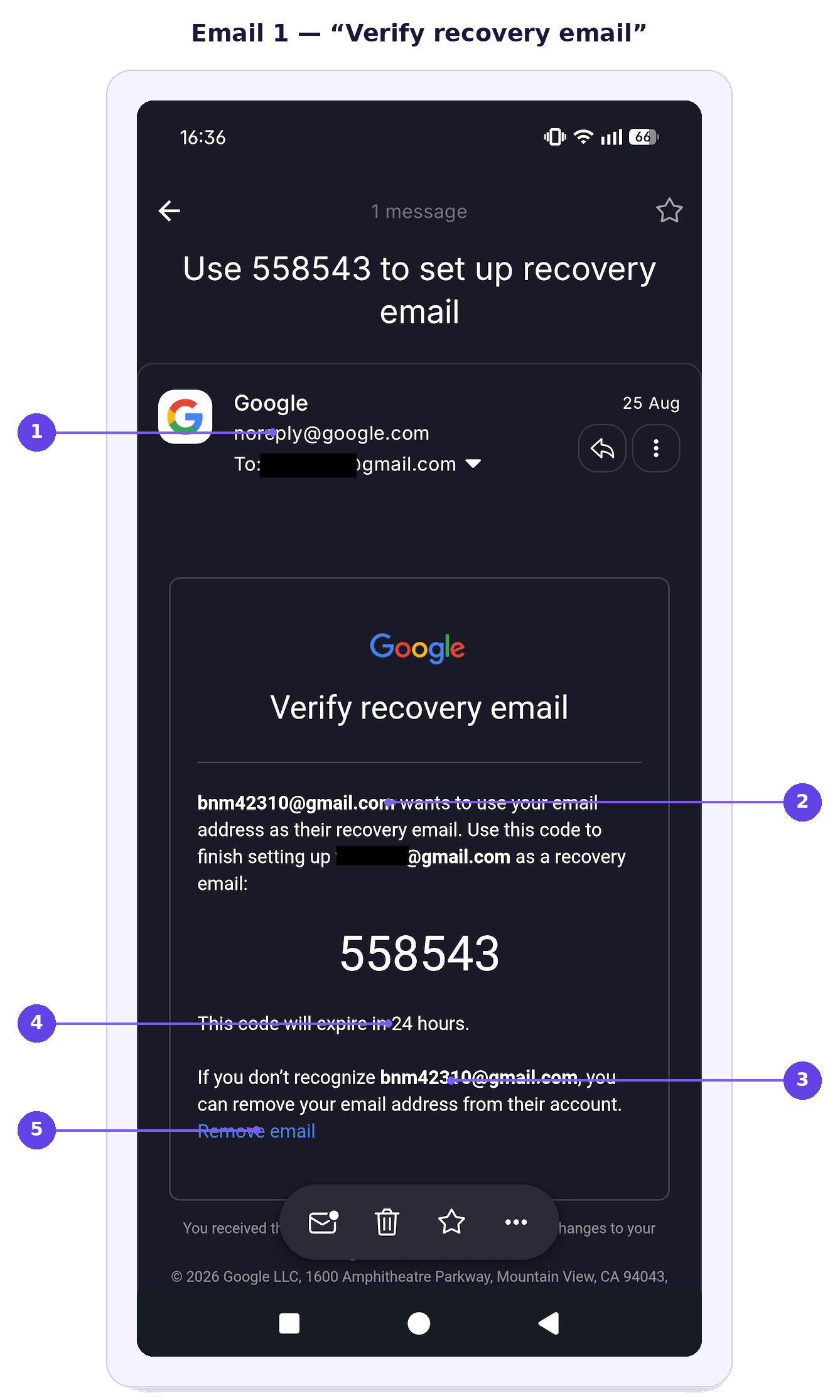
- Den ægte Google-afsender — rigtig, og det er præcis det, der gør den farlig.
- ”Vil bruge din e-mailadresse som sin gendannelses-e-mail” — den omvendte logik, da det her handler om en andens konto.
- Den anonyme engangsadresse — ingen mulighed for at verificere, hvem der står bag.
- Koden der udløber — fremstillet hastværk, der holder dig stresset og medgørlig.
- ”Fjern e-mail” — den ene handling, der stopper det, og præcis det, som svindleren annullerer, når du lægger på.
Figur 2 viser, hvordan en ægte Google-sikkerhedsadvarsel ved første øjekast kan virke alarmerende.
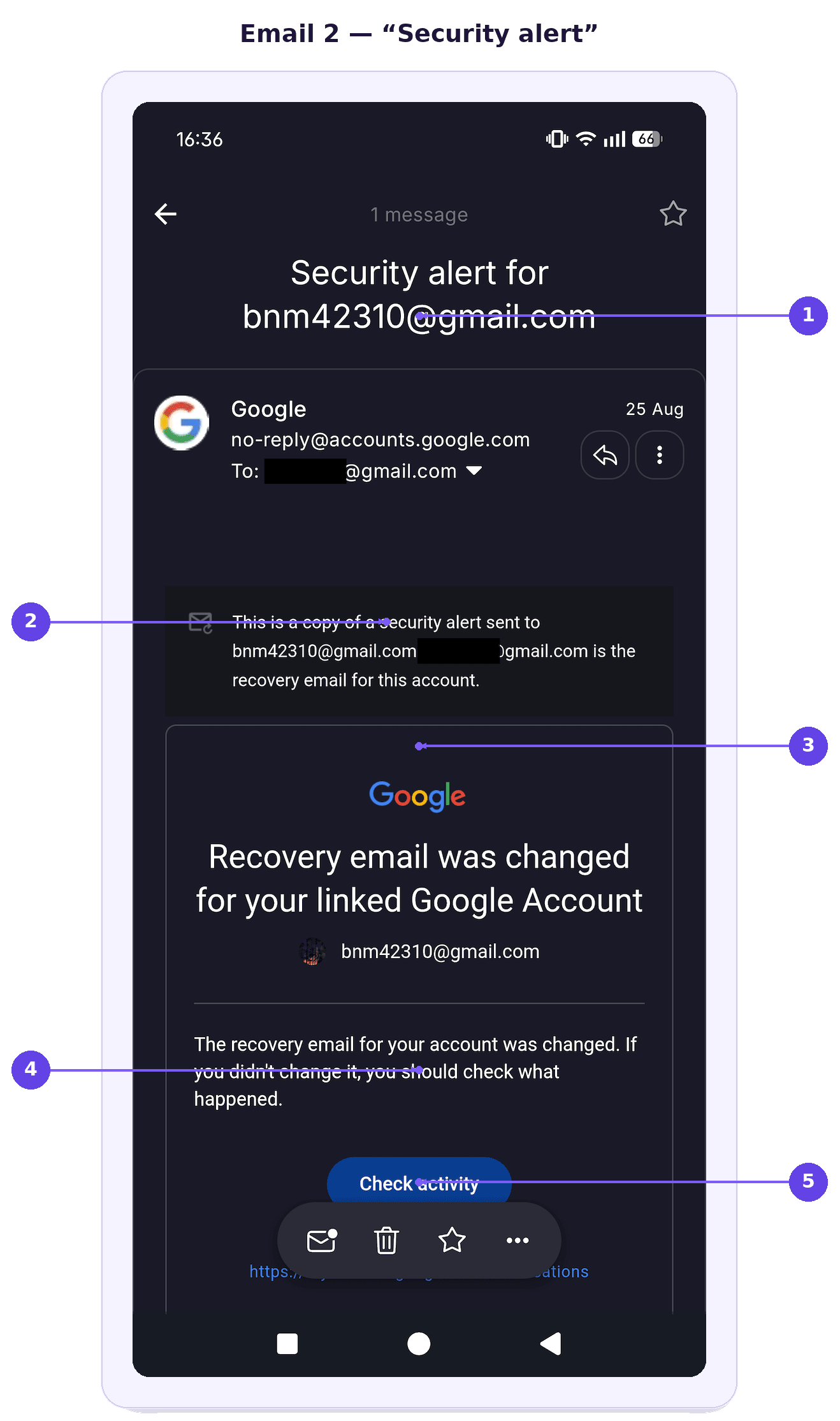
- Emnet er rettet mod svindlerens indbakke, ikke din — det første tegn på, at advarslen ikke handler om dig.
- ”En kopi af en sikkerhedsadvarsel, der er sendt til” engangsadressen — det største afslørende tegn og det nemmeste at overse ved overfladisk læsning.
- Den alarmerende overskrift — designet til at skræmme, før du læser det lille tryk.
- ”Hvis du ikke ændrede det, kan du tjekke, hvad der er sket” — sået tvivl, der gør dig parat til at stole på opkalderen.
- Knappen ”Tjek aktivitet” — en opfordring til at handle hurtigt i stedet for at læse grundigt.
Hvorfor dette Gmail-svindelnummer er så overbevisende
Begge phishing-e-mails kommer fra Googles rigtige servere, så alle konventionelle anti-phishing-kontroller går igennem.
Hvert element underbygger de andre: rigtige notifikationer samt en opkalder, der ved præcis, hvad der lige er landet i din indbakke. Samtidig kan samtalen afholde dig fra at klikke på ”Fjern e-mail” og holde din opmærksomhed på opkalderens instrukser.
Et Googledatabrud kan gøre svindelnumre som dette mere overbevisende, hvis blotlagte oplysninger giver angriberne detaljer, de kan bruge til at personalisere vishing eller phishing-angreb. Selv når adgangskoder ikke bliver lækket, kan navne, kontaktdetaljer eller kontooplysninger hjælpe svindlerne med at virke mere troværdige og opbygge tillid.
Sådan beskytter du dig mod forsøg på kontoovertagelse
Du kan beskytte dig ved at sætte farten ned og verificere, hvad der foregår, direkte hos Google:
Læg på og verificer selv. Hvis nogen ringer og hævder at komme fra Google, så afslut opkaldet, og tjek din konto direkte i stedet for at følge vedkommendes instrukser.
Læs Googles sikkerheds-e-mails omhyggeligt. Læg mærke til, hvilken konto advarslen faktisk handler om, især eventuelle linjer, der oplyser, at beskeden er en kopi af en advarsel, der er sendt til en anden adresse.
Del ikke bekræftelseskoder. Google behøver aldrig, at du oplæser en authenticator-kode, en gendannelseskode eller andre legitimationsoplysninger til logind over telefonen.
Brug ”Fjern e-mail”, hvis du ikke genkender kontoen. Hvis Google oplyser, at nogen vil bruge din adresse som sin gendannelses-e-mail, så fjern den fra den pågældende konto.
Lad ikke opkalderen presse dig. Svindlere er afhængige af hastværk for at holde dig handlende i stedet for at tjekke, hvad notifikationen faktisk siger.
Gennemgå din Google-kontos sikkerhed direkte. Åbn selv dine kontoindstillinger, og tjek seneste aktivitet, enheder, du er logget ind på, gendannelsesdetaljer og sikkerhedsadvarsler.
Rapportér mistænkelige opkald og beskeder. At rapportere forsøget kan hjælpe Google og din telefonudbyder med at identificere gentaget misbrug.
Gennemgå dine Google-privatlivsindstillinger. Privatlivsindstillingerne stopper ikke denne særlige form for svindel, men ved regelmæssigt at tjekke, hvilke data du deler, og hvilke apps og tjenester der har adgang til din Google-konto, kan du reducere din eksponering.
En sikrere indbakke starter med bedre e-mailsikkerhed
Svindel som denne er en påmindelse om, at selv legitime sikkerheds-e-mails kan blive omdannet til redskaber til social engineering. Ved at være skeptisk over for uventede opkald, tjekke din kontoaktivitet på egen hånd og læse advarsler omhyggeligt kan du undgå at falde for dem.
Leder du efter et bedre alternativ til Gmail? Proton Mail giver dig en sikker e-mailtjeneste, der er bygget op om at beskytte dine data og din kommunikation med end-to-end– og zero-access-kryptering.
Hvis nogen prøver et lignende svindelnummer, mens de udgiver sig for at være Proton, er der en simpel regel, du kan huske: Proton ringer aldrig til dig om et problem med kontosikkerheden. Du kan beskytte din konto mod overtagelse ved at aktivere to-faktor-godkendelse. På betalte abonnementer kombinerer Proton Sentinel automatiseret registrering med menneskelig sikkerhedsanalyse.
Proton Mail indeholder også beskyttelse mod mere konventionelle phishingforsøg, f.eks. e-mail-svindel med skylagerplads. PhishGuard blokerer og markerer mistænkelige phishing-e-mails, mens linkbekræftelse beder dig bekræfte, før du åbner eksterne links fra en e-mail.
Ingen e-mailtjeneste kan yde perfekt beskyttelse mod kontoovertagelse. Men hvis nogen alligevel klarer at bryde ind i din Proton-konto via e-mail- eller SMS-gendannelse, får de ikke automatisk adgang til dine e-mails og kontakter, takket være separate beskyttelser til datagendannelse.