

O CC (cópia carbono) e o BCC (cópia carbono oculta) são funcionalidades de e-mail padrão que controlam quem recebe uma mensagem e que informações pode ver.
Compreender a diferença entre Para, CC e BCC é crucial num contexto empresarial. Se colocar a pessoa errada em CC, o seu cliente vê uma nota interna que não devia ter visto. Se se esquecer de colocar um decisor em CC, este nunca verá um tópico de e-mail de que realmente precisava.
Continue a ler para descobrir que opção selecionar para comunicar de forma clara (com o destinatário ou destinatários corretos), evitar respostas desnecessárias, proteger os endereços de e-mail dos destinatários e salvaguardar informações sensíveis.
O que significa CC?
CC significa Carbon Copy, uma referência à época em que notas ou cartas manuscritas físicas eram reproduzidas com uma folha de papel carbono(nova janela).
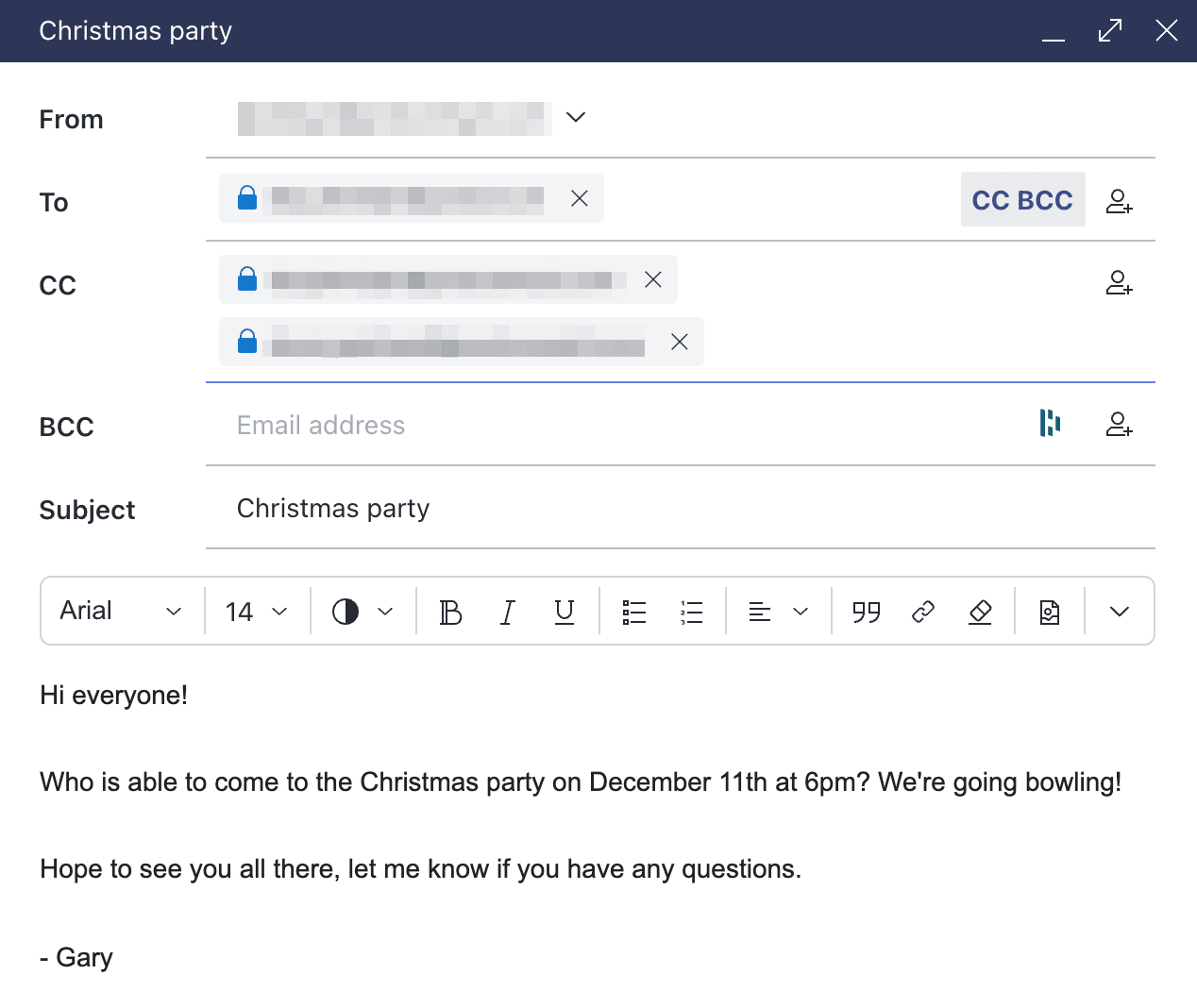
O CC permite enviar uma cópia de um e-mail a vários destinatários que não são o destinatário principal indicado no campo Para. O destinatário principal verá o endereço ou endereços de e-mail que introduziu no campo CC, bem como as respostas destes. Da mesma forma, a pessoa colocada em CC verá as respostas do destinatário (a menos que seja removida do campo CC ou que o destinatário clique em Responder em vez de Responder a todos).
Colocar destinatários em CC é especialmente útil ao enviar e-mails empresariais, porque pode adicionar a um e-mail tantos destinatários quantos quiser, todos os quais receberão uma cópia do mesmo e-mail e verão os endereços e as respostas uns dos outros. Isto mantém todos informados e cria um registo transparente da conversa sem exigir uma resposta.
 (nova janela)
Quando utilizar o CC num e-mail
O CC é uma função útil quando precisa de que alguém (ou várias pessoas) além do destinatário conheça e acompanhe um tópico de e-mail.
Por exemplo, quando quer envolver toda a equipa de projeto num assunto que afeta o trabalho de todos, como uma alteração ao âmbito ou ao prazo, basta colocá-los em CC.
Colocar em CC também pode ser útil quando quer que determinadas pessoas tenham visibilidade de um tópico de e-mail sem que a sua intervenção seja necessária. Ao enviar por e-mail uma proposta a um cliente, por exemplo, pode querer colocar em CC todas as pessoas diretamente envolvidas no projeto para que conheçam os seus comentários e a discussão que se seguiu. Se algo for escalado ou mencionado numa revisão mais tarde, estas pessoas estarão sempre informadas a tempo.
Quando não utilizar o CC num e-mail
Deve evitar-se colocar em CC quando o seu e-mail (ou o tópico de e-mail subsequente) contém informações sensíveis ou confidenciais. Quando envia a uma única pessoa informações sensíveis por e-mail, existe o risco de esta as encaminhar ou armazenar, mas colocá-las em CC aumenta esse risco ao acrescentar mais destinatários, frequentemente incluindo pessoas que não eram o público-alvo do conteúdo desde o início.
Também deve evitar utilizar o CC quando espera que alguém colocado em CC tome uma ação. As pessoas incluídas em CC frequentemente presumem que não precisam de responder, o que pode levar a tarefas esquecidas ou a atrasos. Este risco aumenta quando coloca em CC um grande número de destinatários desnecessariamente, o que também sobrecarrega as caixas de entrada com ruído irrelevante.
Colocar uma lista de distribuição inteira em CC numa atualização de estado de rotina cria ruído sem acrescentar responsabilidade. Enviar um e-mail a toda a equipa sobre uma alteração que não a afeta pode criar confusão.
Também deve ter cuidado ao colocar alguém em CC numa conversa existente sem o conhecimento ou acordo da outra parte — por exemplo, ao acrescentar uma nova parte interessada a um tópico com um cliente sem avisar primeiro o cliente. Mesmo que tenha um motivo legítimo, pode parecer que está a alargar o acesso a uma conversa potencialmente confidencial.
O que significa BCC?
O BCC significa Blind Carbon Copy. Funciona como o CC, mas sem visibilidade. A função BCC permite enviar cópias do mesmo e-mail a várias pessoas sem revelar que fazem parte de um envio em massa, nem revelar os endereços de e-mail dos outros destinatários ou as respostas ao seu e-mail original.
Outra diferença fundamental: se introduzir vários contactos no campo BCC, quando respondem, apenas você recebe o e-mail de resposta deles. Nenhum outro destinatário em BCC o recebe.
Quando utilizar o BCC num e-mail
O BCC deve ser utilizado sempre que precisar de enviar o mesmo e-mail a várias pessoas, mas não quiser que saibam que fazem parte de um envio em massa nem que possam ver os endereços de e-mail dos outros destinatários.
Colocar em BCC é útil para proteger a privacidade de pessoas que lhe deram o seu endereço de e-mail na expectativa de que não o partilhe sem a sua permissão. Por exemplo, ao enviar uma atualização sobre a sua empresa a uma lista de correio, deve utilizar a função BCC para garantir que os destinatários individuais não conseguem ver os endereços de todas as outras pessoas registadas nessa lista de correio.
Também pode colocar-se a si próprio em BCC ao enviar um e-mail a partir de uma caixa de entrada de equipa partilhada ou genérica, para manter um registo pessoal da correspondência enviada em nome da sua equipa.
Quando não utilizar o BCC num e-mail
Tal como acontece com o CC, tenha cuidado ao utilizar o BCC quando o seu e-mail contém informações sensíveis, ou quando suspeita que o tópico de e-mail resultante do seu e-mail irá conter informações sensíveis.
Evite utilizar o BCC em situações em que a transparência é importante. Acrescentar alguém secretamente à conversa pode prejudicar a confiança se vier à tona e ser considerado uma violação da etiqueta de e-mail. É melhor colocá-lo abertamente em CC ou enviar uma nota separada.
O BCC não deve ser utilizado em conversas em curso, como uma negociação ativa ou uma conversa com um cliente — em que espera que quem colocou em BCC consiga acompanhar toda a conversa. Como os destinatários em BCC ficam excluídos das respostas, isto significa excluí-los precisamente da conversa que queria que acompanhassem.
Qual é a diferença entre Para, CC e BCC?
| Funcionalidade | Para | CC | BCC |
| Cargo | O contacto principal pretendido do e-mail. | Para pessoas que precisam de estar a par. | Para incluir pessoas sem que as outras saibam. |
| Visibilidade | Visível para todos. | Visível para todos. | Oculto a todos os outros destinatários. |
| Perceção dos destinatários | Todos sabem que são o contacto principal. | Todos sabem quem mais está a ser mantido informado. | Apenas si e a pessoa colocada em BCC sabem que esta foi incluída. |
| Comportamento ao responder a todos | Recebe todas as respostas. | Recebe todas as respostas. | Excluído dos futuros tópicos de «Responder a todos». |
| Expectativa | É esperada uma resposta. | Apenas para conhecimento (FYI). | Não deve participar no tópico. |
| Melhor para | Pedidos diretos, tarefas e reuniões individuais. | Transparência e colaboração em equipa. | E-mails em massa, privacidade e supervisão discreta. |
O que acontece quando responde ou responde a todos?
O comportamento das respostas pode ser confuso, sobretudo quando estão envolvidos vários destinatários. O que acontece depende de escolher Responder ou Responder a todos.
Clicar em Responder a todos quando pretendia clicar em Responder pode provocar a fuga de comentários internos e de informações para clientes, ou o envio por engano de um e-mail a uma lista de distribuição inteira. Um único clique errado pode travar a produtividade da equipa e até ameaçar a reputação da empresa.
Se estiver no campo Para ou CC:
- Clicar em Responder envia a resposta apenas ao remetente.
- Clicar em Responder a todos envia a resposta a todos os que estão nos campos Para e CC.
Se estiver no campo BCC:
- Clicar em Responder envia a resposta apenas ao remetente.
- Clicar em Responder a todos envia a resposta a todos os que estão nos campos Para e CC, mas não a outros destinatários em BCC — embora revele a estes que foram incluídos em BCC
Uma forma melhor de enviar e-mails de grupo
Embora as funções CC e BCC sejam a principal forma de enviar um e-mail a várias pessoas, o nosso serviço de e-mail encriptado Proton Mail também o permite ao colocar vários destinatários num grupo de contactos.
Os grupos de contactos são úteis para enviar e-mails a várias pessoas que se conhecem entre si, sobretudo se lhes enviar e-mails regularmente como grupo. Por exemplo, uma equipa que envia atualizações semanais às partes interessadas pode poupar tempo ao usar um grupo de contactos em vez de adicionar destinatários manualmente todas as vezes.
Depois de criar um grupo de contactos na sua conta Proton Mail, pode enviar um e-mail a todos os membros desse grupo de uma só vez ao escrever o nome do grupo de contactos no campo Para e selecionar, no menu de preenchimento automático, o grupo de contactos ao qual pretende enviar o e-mail em massa. Assim, todos os endereços de e-mail dos contactos desse grupo são introduzidos no campo Para.


Quando envia um e-mail a pessoas que pertencem ao mesmo grupo de contactos, todas podem ver os endereços de e-mail uns dos outros, embora não saibam que as colocou num grupo de contactos, e o nome desse grupo não aparece nas respetivas caixas de entrada. Se não quiser que os contactos do seu grupo de contactos conheçam os endereços dos outros membros, pode introduzir o grupo de contactos no campo BCC.
Pontos-chave sobre a utilização de CC e BCC num contexto profissional
- Para: destina-se às pessoas que devem tomar medidas.
- CC (com cópia): destina-se a manter as pessoas informadas (para conhecimento).
- BCC (com cópia oculta): destina-se à privacidade (os destinatários ficam ocultos de todos os outros).
Como o Proton Mail protege as mensagens de e-mail Para, CC e BCC
Os grupos de contactos tornam a utilização de CC e BCC mais rápida, mas não os tornam mais seguros contra a interceptação por um terceiro. Esse é um problema diferente, e é um problema que a encriptação do Proton Mail pode ajudar a resolver.
O Proton Mail encripta as mensagens enviadas entre contas Proton com a encriptação ponto a ponto e protege tudo o que está armazenado na sua caixa de correio com a encriptação de acesso nulo, o que significa que nem a Proton a consegue ler — nem desencriptar, mesmo sob coação das autoridades. Também pode adicionar proteção por palavra-passe aos e-mails enviados para endereços não Proton, para que também fiquem encriptados.
Nada disto impede que um e-mail chegue à pessoa errada através de um CC ou BCC mal colocado, nem altera quem pode ver o endereço de quem num campo CC ou BCC. Isso continua a depender de utilizar os campos corretamente. O que a encriptação protege é o conteúdo de um e-mail comercial enviado em CC ou BCC em trânsito, para que uma proposta a um cliente ou um comentário interno não possa ser intercetado por um terceiro.
Se a sua empresa envia regularmente correspondência em CC e BCC com conteúdo sensível, como propostas de clientes e decisões internas, o serviço de e-mail empresarial da Proton aplica essa proteção automaticamente, sem que a equipa tenha de se preocupar com isso.
Perguntas frequentes
Quando se trata de proteger os endereços de e-mail dos seus contactos dos seus outros contactos, o BCC é mais seguro do que o CC. Com o BCC, não há forma de um destinatário saber que não é o único destinatário de um e-mail (desde que todos os outros destinatários estejam marcados como BCC), quanto mais descobrir os endereços de e-mail de outros destinatários. Por este motivo, deve usar o BCC quando não tem autorização para partilhar o endereço de e-mail de um contacto com mais alguém.
Importa notar que nem o CC nem o BCC são mais seguros quando se trata de proteger as suas mensagens contra a interceptação por um terceiro. Essa proteção só é garantida pela encriptação, não pela sua escolha de campo.
Depende de a quem envia: os mecanismos não protegem. O CC e o BCC controlam quem recebe uma cópia de um e-mail, não o que acontece a essa cópia depois. Qualquer pessoa incluída num campo CC ou BCC de uma mensagem pode encaminhá-la, tirar-lhe uma captura de ecrã ou armazená-la. Se está a enviar informações confidenciais, mantenha a lista de destinatários o mais pequena possível e considere encriptar a própria mensagem, para que o conteúdo fique protegido mesmo que acabe nalgum sítio onde não pretendia que estivesse.
Se quiser manter uma conversa com todos os destinatários originais do seu e-mail, é melhor usar a função CC, para que todos os contactos inicialmente incluídos no e-mail recebam todas as respostas. No entanto, se for importante que os endereços de e-mail dos seus contactos não fiquem expostos uns aos outros, e não se espere que continuem uma cadeia de e-mails inclusiva, deve usar o BCC para ocultar as informações de contacto dos seus destinatários.
Não. Os destinatários em CC não podem ver os nomes nem os endereços de quem quer que tenha sido incluído como BCC em qualquer mensagem original. As informações de contacto dos destinatários em BCC só ficam expostas se responderem ao e-mail usando «responder a todos».
O campo Para deve ser usado para os destinatários principais do seu e-mail, dos quais espera uma resposta ou algum tipo de ação após receberem o seu e-mail. Os destinatários principais serão normalmente aqueles a quem o e-mail é dirigido na saudação do seu e-mail.
Sim. As pessoas nos campos Para e CC podem ver-se mutuamente, enquanto os destinatários em BCC ficam ocultos de todos os outros. Os destinatários em BCC ainda podem ver quem está nos campos Para e CC, mas não recebem respostas desses destinatários.
A resposta é enviada ao remetente e a todos nos campos Para e CC. O endereço dessa pessoa continua a não ser mostrado como destinatário em BCC, mas a resposta pode revelar que foi incluída no e-mail original.
Normalmente, não. Os destinatários em BCC ficam ocultos dos outros destinatários. Se recebe um e-mail mas o seu endereço não aparece nos campos Para ou CC, provavelmente esteve em BCC.
Não diretamente. No entanto, enviar e-mails a um grande número de destinatários usando CC ou BCC pode ativar filtros de spam. Para grupos grandes, é melhor usar uma lista de correio ou um serviço de newsletter.





