

CC (copia de carbón) y CCO (copia de carbón oculta) son funciones estándar del correo electrónico que controlan quién recibe un mensaje y qué información puede ver.
Comprender la diferencia entre Para, CC y CCO es fundamental en un contexto empresarial. Si pones en CC a la persona equivocada, tu cliente verá un comentario interno que no debía ver. Si olvidas poner en CC a la persona que toma las decisiones, esta nunca verá un hilo de correo electrónico que realmente necesitaba leer.
Sigue leyendo para descubrir qué opción seleccionar para comunicarte con claridad (con los destinatarios adecuados), evitar respuestas innecesarias, proteger las direcciones de correo electrónico de los destinatarios y salvaguardar la información confidencial.
¿Qué significa CC?
CC significa copia de carbón, un término que remonta a la época en la que las notas o cartas manuscritas se replicaban utilizando una hoja de papel carbón(ventana nueva).
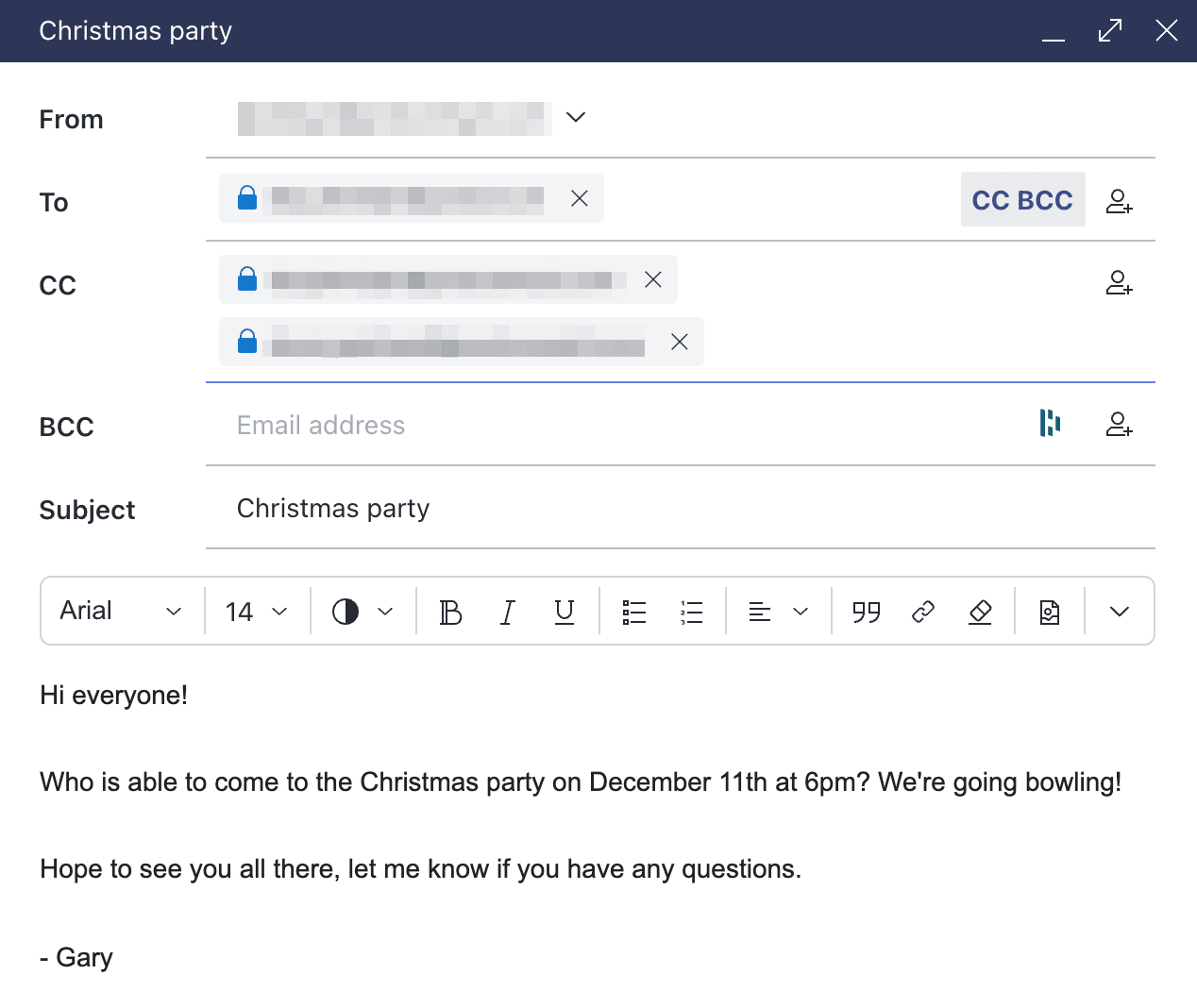
CC permite enviar una copia de un correo electrónico a varios destinatarios que no son el destinatario principal del campo Para. El destinatario principal verá las direcciones de correo electrónico que hayas ingresado en el campo CC, así como las respuestas de esas personas. Del mismo modo, la persona que hayas puesto en CC verá las respuestas del destinatario (a menos que se la elimine del campo CC, o que el destinatario haga clic en Responder en lugar de Responder a todos).
Poner en CC resulta especialmente útil al enviar correos electrónicos de empresa, porque puedes añadir a un correo electrónico tantos destinatarios como quieras, y todos ellos recibirán una copia del mismo correo y verán las direcciones y respuestas de los demás. Así, todos se mantienen informados y se crea un registro transparente de la conversación sin necesidad de responder.
 (ventana nueva)
Cuándo usar CC en un correo electrónico
CC es una función útil cuando necesitas que una persona (o varias) aparte del destinatario conozca y siga un hilo de correo electrónico.
Por ejemplo, cuando quieras poner en copia a todo un equipo de proyecto en algo que afecte al trabajo de todos, como un cambio de alcance o de fecha límite, basta con ponerlo en CC.
Poner en CC también puede ser útil cuando quieres que determinadas personas tengan visibilidad de un hilo de correo electrónico sin que sea necesaria su intervención. Por ejemplo, al enviar una propuesta a un cliente, puede que quieras poner en CC a todas las personas directamente implicadas en el proyecto para que conozcan sus comentarios y tu posterior debate. Si algo se escala o se menciona en una revisión más adelante, siempre estarán informados a tiempo.
Cuándo no usar CC en un correo electrónico
Conviene evitar el CC cuando tu correo electrónico (o el hilo de correo electrónico posterior) contiene información confidencial. Cuando envías información confidencial a una sola persona, existe el riesgo de que la reenvíe o la almacene, pero poner en CC aumenta ese riesgo al añadir más destinatarios, que a menudo incluyen personas a las que el contenido no iba dirigido en primer lugar.
También deberías evitar usar CC cuando esperas que alguien a quien pones en CC realice alguna acción. Las personas incluidas en CC suelen asumir que no necesitan responder, lo que puede provocar tareas omitidas o retrasos. Este riesgo aumenta cuando pones en CC a un gran número de destinatarios innecesariamente, lo que también llena las bandejas de entrada de ruido irrelevante.
Poner en CC a toda una lista de distribución en una actualización rutinaria del estado genera ruido sin añadir responsabilidad. Enviar por correo electrónico a todo tu equipo un cambio que no le afecta puede crear confusión.
También debes tener cuidado al poner en CC a alguien en una conversación existente sin el conocimiento o el acuerdo de la otra parte (por ejemplo, al añadir a una nueva parte interesada a un hilo con un cliente sin avisarle antes). Aunque tengas una razón legítima, puede parecer que estás ampliando el acceso a una conversación que puede ser confidencial.
¿Qué significa CCO?
CCO significa copia de carbón oculta. Funciona igual que el CC, pero sin visibilidad. La función CCO permite enviar copias del mismo correo electrónico a varias personas sin revelar que forman parte de un envío masivo, ni mostrar las direcciones de correo electrónico de los demás destinatarios ni sus respuestas a tu correo original.
Otra diferencia clave: si ingresas varios contactos en el campo CCO, cuando respondan, solo tú recibirás su correo electrónico de respuesta. Ningún otro destinatario de CCO lo recibirá.
Cuándo usar CCO en un correo electrónico
Se debe usar CCO siempre que necesites enviar el mismo correo electrónico a varias personas, pero no quieras que sepan que forman parte de un envío masivo ni que puedan ver las direcciones de correo electrónico de los demás destinatarios.
Poner en CCO es útil para proteger la privacidad de las personas que te han dado su dirección de correo electrónico con la expectativa de que no la compartas sin su permiso. Por ejemplo, al enviar una actualización sobre tu empresa a una lista de direcciones, debes usar la función CCO para garantizar que los destinatarios no puedan ver las direcciones de todas las demás personas que se han registrado en esa lista.
También puedes ponerte en CCO al enviar un correo electrónico desde una bandeja de entrada compartida o genérica del equipo, para conservar un registro personal de la correspondencia enviada en nombre de tu equipo.
Cuándo no usar CCO en un correo electrónico
Al igual que con el CC, ten cuidado al usar el CCO cuando tu correo electrónico contiene información confidencial, o cuando sospechas que el hilo de correo electrónico resultante contendrá información confidencial.
Evita usar CCO en situaciones donde la transparencia sea importante. Añadir a alguien a la conversación de forma encubierta puede dañar la confianza si se descubre y considerarse una vulneración de la etiqueta del correo electrónico. Es mejor poner a esa persona en CC de forma abierta o enviarle una nota aparte.
No se debe usar CCO en conversaciones continuas, como una negociación activa o una conversación con un cliente en la que esperas que quien hayas puesto en CCO pueda seguir toda la conversación. Como los destinatarios de CCO quedan excluidos de las respuestas, esto significa dejarlos fuera precisamente de la conversación que querías que siguieran.
¿Qué diferencia hay entre Para, CC y CCO?
| Función | To | CC | CCO |
| Rol | El contacto principal al que va dirigido el correo electrónico. | Para las personas que deben mantenerse informadas. | Para incluir a personas sin que los demás lo sepan. |
| Visibilidad | Visible para todos. | Visible para todos. | Oculto para todos los demás destinatarios. |
| Conocimiento de los destinatarios | Todos saben que son el contacto principal. | Todos saben quién más está informado. | Solo tú y la persona incluida en CCO saben que está ahí. |
| Comportamiento de Responder a todos | Recibe todas las respuestas. | Recibe todas las respuestas. | Excluido de los futuros hilos de «Responder a todos». |
| Expectativa | Se espera una respuesta. | Solo para tu información (FYI). | No debe participar en el hilo. |
| Mejor para | Solicitudes directas, tareas y reuniones uno a uno. | Transparencia y colaboración en equipo. | Correos electrónicos masivos, privacidad y supervisión discreta. |
¿Qué sucede cuando pulsas Responder o Responder a todos?
El comportamiento de Responder puede resultar confuso, sobre todo cuando hay varios destinatarios implicados. Lo que sucede depende de si eliges Responder o Responder a todos.
Pulsar Responder a todos cuando tenías intención de pulsar Responder puede provocar que comentarios internos e información acaben filtrándose a los clientes, o que se envíe por error un correo electrónico a toda una lista de distribución. Un clic equivocado puede mermar la productividad de tu equipo e incluso poner en riesgo la reputación de tu empresa.
Si estás en el campo Para o CC:
- Al pulsar Responder, la respuesta se envía solo al remitente.
- Al pulsar Responder a todos, la respuesta se envía a todos los que aparecen en los campos Para y CC.
Si estás en el campo CCO:
- Al pulsar Responder, la respuesta se envía solo al remitente.
- Al pulsar Responder a todos, la respuesta se envía a todos los que aparecen en los campos Para y CC, pero no a los demás destinatarios en CCO. No obstante, les revelarás que estabas en el campo CCO
Una mejor forma de enviar correos electrónicos a grupos
Aunque las funciones CC y CCO son la forma principal de enviar un correo electrónico a varias personas, nuestro servicio de correo electrónico cifrado Proton Mail también te permite hacerlo incluyendo varios destinatarios en un grupo de contactos.
Los grupos de contactos son útiles para enviar correos electrónicos a varias personas que se conocen entre sí, sobre todo si les escribes habitualmente en grupo. Por ejemplo, un equipo que envía actualizaciones semanales a las partes interesadas puede ahorrar tiempo usando un grupo de contactos en lugar de añadir los destinatarios manualmente cada vez.
Una vez que hayas creado un grupo de contactos en tu cuenta de Proton Mail, puedes enviar un correo electrónico a todos los miembros del grupo a la vez escribiendo el nombre del grupo de contactos en el campo Para y seleccionando, en el menú de relleno automático, el grupo de contactos al que quieras enviar el correo en masa. De esta manera, se introducirán todas las direcciones de correo electrónico de los contactos de ese grupo en el campo Para.


Cuando envías un correo electrónico a personas que forman parte de un mismo grupo de contactos, todos pueden ver las direcciones de correo electrónico de los demás, aunque no sabrán que los has incluido en un grupo de contactos y el nombre de ese grupo no aparecerá en sus bandejas de entrada. Si no quieres que los contactos de tu grupo de contactos conozcan las direcciones de los demás miembros, puedes introducir el grupo de contactos en el campo CCO en su lugar.
Ideas clave sobre el uso de CC y CCO en el ámbito profesional
- Para: es para las personas que se espera que actúen.
- CC (copia de carbón): es para mantener a las personas informadas (para su información).
- CCO (copia de carbón oculta): es para la privacidad (los destinatarios permanecen ocultos para todos los demás).
Cómo Proton Mail protege los mensajes de correo electrónico Para, CC y CCO
Los grupos de contactos hacen que CC y CCO se usen más rápidamente, pero no los hacen más seguros frente a la interceptación por parte de un tercero. Ese es un problema distinto, y en él puede ayudar el cifrado de Proton Mail.
Proton Mail cifra con cifrado de extremo a extremo los mensajes enviados entre cuentas de Proton, y protege con cifrado de acceso cero todo lo almacenado en tu buzón, lo que significa que ni siquiera Proton puede leerlo, ni descifrarlo bajo coacción de las autoridades. También puedes añadir protección con contraseña a los correos electrónicos enviados a direcciones ajenas a Proton, de modo que también estén cifrados.
Nada de esto evita que un correo electrónico llegue a la persona equivocada por un CC o CCO mal colocados, ni cambia quién puede ver la dirección de quién en un campo CC o CCO. Eso depende de que uses los campos correctamente. Lo que el cifrado sí protege es el contenido de un correo electrónico de negocios incluido en CC o CCO mientras está en tránsito, de modo que una propuesta a un cliente o un comentario interno no pueda ser interceptado por un tercero.
Si tu empresa envía habitualmente correspondencia en CC y CCO con contenido confidencial, como propuestas a clientes y decisiones internas, el servicio de correo electrónico para empresas de Proton aplica esa protección automáticamente, sin que tu equipo tenga que pensar en ello.
Preguntas frecuentes
En lo que respecta a proteger las direcciones de correo electrónico de tus contactos frente a tus otros contactos, CCO es más seguro que CC. Con CCO, no hay forma de que un destinatario sepa que no es el único destinatario de un correo electrónico (siempre que todos los demás destinatarios estén marcados como CCO), y mucho menos averiguar las direcciones de correo electrónico de otros destinatarios. Por este motivo, debes usar CCO cuando no tengas permiso para compartir la dirección de correo electrónico de un contacto con nadie más.
Es importante señalar que ni CC ni CCO son más seguros en lo que respecta a proteger tus mensajes contra la interceptación por parte de un tercero. Esa protección solo se consigue con el cifrado, no con la elección del campo.
Esto depende de a quién lo envíes: estos mecanismos no te protegen. CC y CCO controlan quién recibe una copia de un correo electrónico, no lo que ocurre con él después. Cualquiera incluido en un campo CC o CCO de un mensaje puede reenviarlo, tomarle una captura de pantalla o almacenarlo. Si envías información confidencial, mantén tu lista de destinatarios lo más reducida posible y considera la posibilidad de cifrar el propio mensaje para que el contenido siga protegido incluso si acaba en algún lugar que no tenías previsto.
Si quieres mantener una conversación con todos los destinatarios originales de tu correo electrónico, es mejor usar la función CC, de modo que todos los contactos incluidos inicialmente en el correo reciban todas las respuestas. Sin embargo, si es importante que las direcciones de correo electrónico de tus contactos no queden expuestas entre sí y no se espera que continúen una cadena de correo electrónico inclusiva, debes usar CCO para ocultar la información de contacto de tus destinatarios.
No. Los destinatarios en CC no pueden ver los nombres ni las direcciones de nadie que haya sido incluido como CCO en el mensaje original. La única vez que la información de contacto de los destinatarios en CCO quedará expuesta es si responden al correo electrónico usando «responder a todos».
El campo Para debe usarse para los destinatarios principales de tu correo electrónico, de quienes esperas que respondan o realicen algún tipo de acción tras recibirlo. Los destinatarios principales suelen ser aquellos a quienes se dirige el correo electrónico en el saludo.
Sí. Las personas de los campos Para y CC pueden verse entre sí, mientras que los destinatarios en CCO permanecen ocultos para todos los demás. Los destinatarios en CCO aún pueden ver quiénes están en los campos Para y CC, pero no reciben las respuestas de esos destinatarios.
Su respuesta se envía al remitente y a todos los que aparecen en los campos Para y CC. Su dirección sigue sin mostrarse como destinatario en CCO, pero la respuesta puede revelar que estaba incluido en el correo electrónico original.
Normalmente, no. Los destinatarios en CCO están ocultos para los demás destinatarios. Si recibes un correo electrónico pero tu dirección no aparece en los campos Para o CC, es probable que te hayan incluido en CCO.
No directamente. Sin embargo, enviar correos electrónicos a grandes cantidades de destinatarios usando CC o CCO puede activar los filtros de spam. Para grupos grandes, es mejor usar una lista de direcciones o un servicio de boletín informativo.





